How to Effectively Use the SmartCPM Tool on ExoClick
Last updated on August 13, 2026 6 min readYou are currently in the "Adult" - Learning paths

Adult Niche: The Gold Mine in Affiliate Marketing
6 min read
Top Adult Ad Networks (with Analysis and Pros & Cons)
22 min read
How to Create a Killer Mobile Campaign on ExoClick
9 min read
How to Effectively Use the SmartCPM Tool on ExoClick
6 min read

Whitelist Campaign Case Study in the Adult Vertical
8 min read
A Premium Campaign Case Study on ExoClick
7 min read

What is a Popunder Ad & How to Use It (Explained)
11 min read

Best Adult WordPress Themes for Tubes and Blogs
13 min read

You’re staring at your ExoClick dashboard, watching your campaign burn through budget, and you’re not sure if you’re paying too much or too little.
Sound familiar?
ExoClick is still one of the biggest adult ad networks out there, serving over 12 billion daily impressions.
That volume is exactly why you need a real strategy. With that much traffic and that many advertisers competing for it, guessing your bids is a fast way to lose money.
I’ve worked on ExoClick daily for years now, testing different bidding strategies to find what actually works.
Today, I’m sharing what I’ve learned about the SmartCPM tool.
What’s SmartCPM?
SmartCPM lets you set a maximum bid that you’ll almost never actually pay, unless another advertiser is bidding that high too.
Here’s the thing: what you actually pay depends on your next competitor’s bid, not your maximum.
For example, if you set a maximum bid of 0.50€ and your next competitor is bidding 0.40€, you’ll pay around 10% more than them. In this case, that’s roughly 0.44€.
This guarantees you the position at the lowest cost possible.
It’s a great tool if you want to save money without losing your spot.
But saving money isn’t all SmartCPM does for you.
Using SmartCPM, you can actually get a read on your competition: how much they’re bidding, what the first position costs, and whether they’re using day-parting or other tactics that shift the competition throughout the day.
It’s all about knowing how to read the data.
That’s why I want to walk you through a few practical ways to use it.
Beyond showing you what your competitor is bidding, SmartCPM also lets you spot the moment someone overtakes your position.
See below:
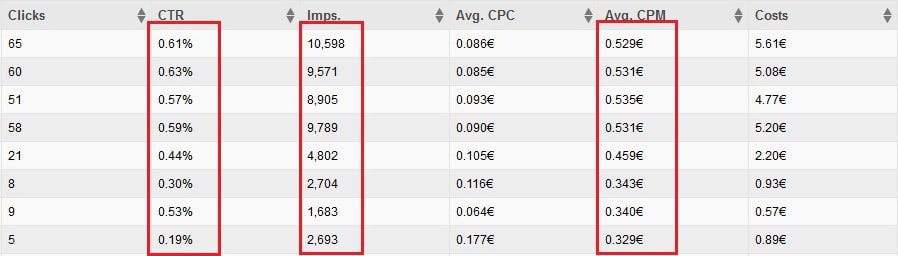
You can see I was paying an average of 0.53€ on the first four spots.
Then, I started paying 0.33€.
Cheaper traffic sounds great, right?
Except I lost traffic.
Why?
Someone was outbidding me quietly.
I knew because my impressions and my CTR both dropped.
That CTR drop is the real signal.
It means the quality of my traffic dropped too, not just the volume.
I’d slipped from the 2nd position to the 3rd.
Reading and Reacting to the Competition
Here’s what you need to know: advertisers are constantly adjusting their source targeting.
They’re excluding weak websites and paying more for strong ones, all the time. SmartCPM lets you see this shift and react to it.
Let’s say you’re running a RON (Run of Network) campaign.
On one website where you’re converting well, you’re also paying close to your maximum bid.
That’s a sign competition on that site is fierce.
It’s worth treating that website differently.
Consider pulling it into its own campaign where you can bid higher without dragging up your costs everywhere else.
I’ve seen this pattern often: the fourth website on a zone list performs the best (more conversions for the cost) but also costs the most.
That tells you something important.
Good performance attracts everyone.
You’re not the only one who noticed that site converts well, and now you’re all fighting over the same traffic.
Frequency Capping and Bid Strategy Work Together
One thing the original playbook missed: your frequency cap and your SmartCPM bid are two sides of the same decision.
If you want the top spots, ExoClick’s own guidance backs this up: set a low frequency cap (one to three impressions per user) paired with a high SmartCPM bid.
You’ll get more targeted, better-performing traffic, but competition for that inventory is tougher and prices climb.
If you’d rather work the middle or remnant inventory, set a higher frequency cap (four or unlimited) with an average or minimum bid.
Prices stay low and competition is lighter, but you’re trading quality for quantity.
You’ll need to put more work into optimization to make that volume convert.
Neither approach is right or wrong. It depends on what you’re optimizing for this month.
Finding Out What the Top Position Really Costs
Sometimes you want to know what it would take to own the first position, even if you can’t afford it yet.
That’s still useful information for later.
You can test this with a deliberately high bid (say, 20€) and check what you actually get charged.
Important: don’t leave that test running.
If your traffic doesn’t monetize at that price, you’ll burn budget fast.
Let’s say that test shows you’re paying 2€.
Now you know roughly what the current top bidder is paying, and you have a real number to plan around for when your budget allows it.
ExoClick’s dashboard also gives you a more direct route to this same information: the View Top CPM/CPC/CPV tool.
Pick your Category, Country, Device, OS, Mobile Carrier, and Browser, and it shows you the current top bid in that exact segment.
If your bid is lower, you can hit Match to meet it or Beat it to let the system outbid it automatically.
One thing to know: this tool isn’t available when you’re running the Smart Bid pricing model instead of SmartCPM.
If you’re already using Smart Bid, you won’t see this option, and that’s expected.
Duplicating Campaigns for Better Segments
Another smart move: duplicate a campaign to isolate your best-performing sites.
Take your winning sites out of the RON pool, put them into a new whitelist campaign, and give that whitelist campaign a higher bid.
This gets you a stronger position specifically where you’re already converting well.
Say your RON campaign bids 0.60€, and your new whitelist campaign bids 1.5€.
You might notice you’re only actually paying around 0.66€ on the whitelist campaign.
That’s because you’re competing against yourself. Your own RON campaign is still active on those same sites, so it’s setting the floor.
The fix: pull those sites off the RON campaign entirely, and give them a higher cap only on the whitelist campaign, since they’ve earned that extra “presence.”
Want to go deeper on this?
Check out our Ultimate Case Study on ExoClick whitelist campaigns.
Track Every Change You Make
Keep a log of every bid change you make, and note the date.
This sounds basic, but it’s the difference between guessing and knowing.
For example, say you bumped your bid from 0.5€ to 1€ on the 11th.
A day or two later, check the before and after.
If you were paying 0.4€ on the 10th and 0.8€ on the 12th, your change pushed your position up.
Good, now you know it worked.
Carriers Cost Differently, and That’s Normal
Mobile carrier targeting is still available on ExoClick today, sitting alongside device, OS, browser, and other targeting layers in the Step 3 targeting panel.
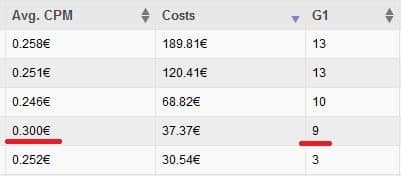
Carriers don’t cost the same, and that’s expected.
Traffic quality differs, each carrier has its own rules, and the offers available in that market shift the competition.
If you’re running a campaign that targets all carriers, you’ll see this cost difference clearly in your reports.
Say one carrier is costing you noticeably more than the rest, even inside a campaign that targets all of them.
That’s your cue to split it out. Give that carrier its own campaign, since lumping it in with cheaper carriers is hiding the real picture.
Most of the time, when the price is higher, there’s a reason, and usually a better opportunity hiding behind it.
That’s exactly why staying competitive means staying curious about your data.
These are the core moves I’d tell any affiliate to know before running SmartCPM campaigns on ExoClick.
If you’re serious about growing your revenue on one of the biggest ad networks in the game, put these into practice.
You’ve got what it takes to make SmartCPM work for you!