FAQ
Популярные вопросы
Аккаунт
- Что нужно, чтобы стать VIP?
- Какие преимущества у VIP аффилиатов?
- Я забыл пароль. Могу ли я получить новый?
- Для чего мне нужен секретный вопрос?
- Почему мои документы не прошли проверку?
- Какие документы мне понадобятся?
- Я забыл ответ на секретный вопрос. Как его изменить?
- Что такое постбек?
- Что такое API?
- Почему мой аккаунт заблокирован?
- Как я могу разблокировать мой аккаунт?
- Могу ли я изменить email аккаунта в Mobidea?
- Могу ли я войти в систему через аккаунт в Google или Facebook?
- Как я могу начать работать на Mobidea?
- Почему я не могу войти в Mobidea?
- Какую информацию я могу найти в личном кабинете?
- Почему следует выбрать Mobidea?
- Что такое пользовательский трекинг домен?
- Кошелек обновляется в реальном времени?
- Что такое IP диапазон, и как его установить?
- Кто обеспечивает хостинг лендингов?
- Где я могу установить секретный вопрос?
Предотвращение фрода
Оферы
- Какую вертикаль лучше выбрать?
- Могу ли я использовать свои материалы работая с Mobidea?
- С какими сегментами лучше всего работать?
- С какими странами/сегментами лучше работать в адалт?
- С какими сегментами лучше работать в Меинстрим?
- С какими оферами лучше работать в Адалт?
- Вы монетизируете десктоп траффик?
- С какими оферами лучше работать в Меинстрим?
- Что такое отдельный офер?
- Как долго нужно ждать апрув офера?
- Почему мой запрос на офер отклонен?
- Могу ли я направить одного юзера на несколько оферов?
- Тест офера показал страницу, отличную от скриншота
- Как взиматся плата с конечных пользователей?
- Вы платите за клики или за визиты?
Оплата
- Где я могу получить промокод?
- Какие методы оплаты доступны?
- Какая комиссия взимается при выводе средств?
- Могу ли я использовать разные способы вывода средств?
- Вы платите в любой валюте и на счет любого банка?
- Могу ли я использовать один способ вывода средств на разных аккаунтах Mobidea?
- Сколько вы платите?
- Как долго обрабатывается запрос на вывод средств?
- Когда деньги поступят на мой счет?
- Мой платеж не пришел. Что делать?
- Сколько времени займет возврат платежа?
- Могу ли я отправлять или получать деньги с другого аккаунта Mobidea?
- Как я могу запросить мой первый платеж?
- Каков размер минимального платежа?
- Как я могу отменить запрос платежа?
- Почему сумма минимального платежа - 50 долларов?
- Сколько платежей в день я могу неделю?
- Почему мне было отказано в платеже?
- Как внести детали платежа?
- Какие документы необходимы, чтобы разблокировать кошелек?
- Почему мои документы не прошли проверку?
- Где я могу проверить баланс своего аккаунта?
Результаты
- Какая разница между доступными доменами?
- Могу ли я купить трафик на Mobidea?
- Как я могу начать работать на Mobidea?
- Как создать свою первую кампанию?
- Я могу лить любой траффик на ваши оферы?
- Могу ли я использовать трафик из социальных сетей в Mobidea?
- Как я могу максимизировать свой доход?
- Как я могу анализировать результаты?
- Где лучше всего покупать трафик?
- Что такое EPC?
- Почему мой EPC такой низкий?
- Почему мои показатели нестабильны?
- Я шлю трафик. Почему нет подписок?
- В моем блоге не работает редирект. Почему?
- Могу ли я использовать двойной мета-рефреш?
- Могу ли я добавить несколько лендингов в один путь?
- Как я могу проверить свои результаты?
- Как создать кампанию?
- Как проверить топ сегменты Smartlink?
Трекер
- Как работает Трекер Mobidea?
- Что такое "Возможности"?
- Что такое "Кампании"?
- Что такое "Ротация"?
- Что такое "Лендинг"?
- Что такое "Источник Трафика"?
- Какие данные доступны для анализа?
- Какие оферы я могу поставить в ротацию?
- Чем полезна ротация?
- Что я могу найти в "Возможности"?
- В чем разница между видами редиректа?
- Какие возможности предоставляет трекер?
- Как можно работать с трекером?
- Как работают фильтры?
- Как настроить постбек?
- Статистика обновляется в реальном времени?
- Как работать с лендингами?
- Как удалить кампанию?
- Как удалить домен?
- Почему мой баланс отличается от статистики?
- В чем разница между кликами и визитами?
Smart Tools
Поддержка
What is a Custom Tracking Domain?
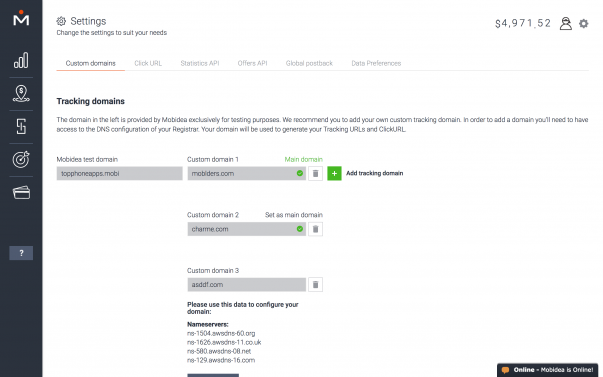
These are the domains used to generate your campaign URL. You can use a test domain from Mobidea to perform your tests. Even so, you'll need to add your custom tracking domain on your Mobidea account to use with your real traffic.
Mobidea won’t take any responsibility in case this domain gets flagged by a specific traffic source or antivirus software. This is why we recommend you use your own domain. You can add your own custom domains through the Settings menu.
You just need to add your domain URL and click “Save”. Please bear in mind that you should remove the “www” of your domain when you add it on Mobidea.
Mobidea will then show you all the information you'll need to configure your tracking domain so it can effectively work on your campaign.
Once you do it, click the checkbox "I've completed these steps", and Mobidea will verify if everything was configured properly on your side. It can take some time. Don’t panic if the domain isn't verified immediately.
In case you're setting a CNAME on an older domain, keep an eye out for the TTL (time to live) settings. This means that your subdomain and CNAME may take a little longer to propagate.
Once the domain is verified, it'll be automatically added into your list of domains and you'll be notified by email! In case your domain wasn't successfully verified, try checking if the information we provided was copied correctly.