
The world of affiliate marketing is both exciting and challenging, especially for those in the adult vertical.
It’s no secret that competition in this niche is fierce and that making a significant impact requires working with the top advertising networks.
One such ad network that stands out above the rest is TrafficStars.
As one of the biggest adult ad networks today, TrafficStars has enabled countless affiliate marketers to enjoy substantial earnings.
With a name like that, you know they mean business. But is its traffic really worthy of any stars?
We’ll help you figure that out in this TrafficStars review.
Key Takeaways
TrafficStars Review Key Takeaways | ||
Premium Adult Publisher Network TrafficStars gives advertisers direct access to some of the biggest adult sites in the world, including xHamster, PornHub, SpankBang, and YouPorn. | ||
Massive Scale The network delivers over 10 billion daily impressions across 200+ GEOs, giving you enough inventory to run and scale campaigns without hitting a ceiling. | ||
Wide Ad Format Support Banners, native ads, video pre-roll, popunders, in-page push, push notifications, interstitials, and IM slider ads are all available, covering almost every format used in adult campaign promotion. | ||
Strong Optimization Tools The rule-based Optimizer handles routine tasks like blacklisting poor spots and adjusting bids automatically, reducing the manual work needed to manage campaigns at scale. | ||
Multiple Pricing Models CPM, CPC, CPA, and CPMV are available depending on the format, giving advertisers flexibility in how they buy traffic. | ||
Fraud Protection with a Catch The 5x fraud refund guarantee is a strong safety net, but getting the refund approved requires solid proof—a third-party tracker is essential. | ||
Best for Adult, Dating, Gambling, and Nutra Verticals Performance is strongest in adult, dating, webcams, gambling, and nutra. Mainstream campaigns are unlikely to see strong results due to low advertiser demand outside the adult space. | ||
Publisher-Friendly Setup Onboarding is simple, payouts are automatic, and publishers can control ad compliance levels and aggression settings to protect their audience experience. | ||
New Advertisers May Not Get Full Access Immediately Premium placements like xHamster traffic are not always available to new accounts right away, so expect a testing period before unlocking the best inventory. | ||
What is TrafficStars?
TrafficStars is not your average online advertising company.
Founded in 2014 by a team of experts with more than 15 years of experience in the industry, TrafficStars has quickly grown to become one of the leading names in the game.
And with technology that constantly evolves alongside their growing team, it’s no wonder they serve up a whopping 10 billion ad impressions every day.
Its biggest traffic source is xHamster, which is an in-house developed adult website that belongs to the top 5 adult sites in the world.
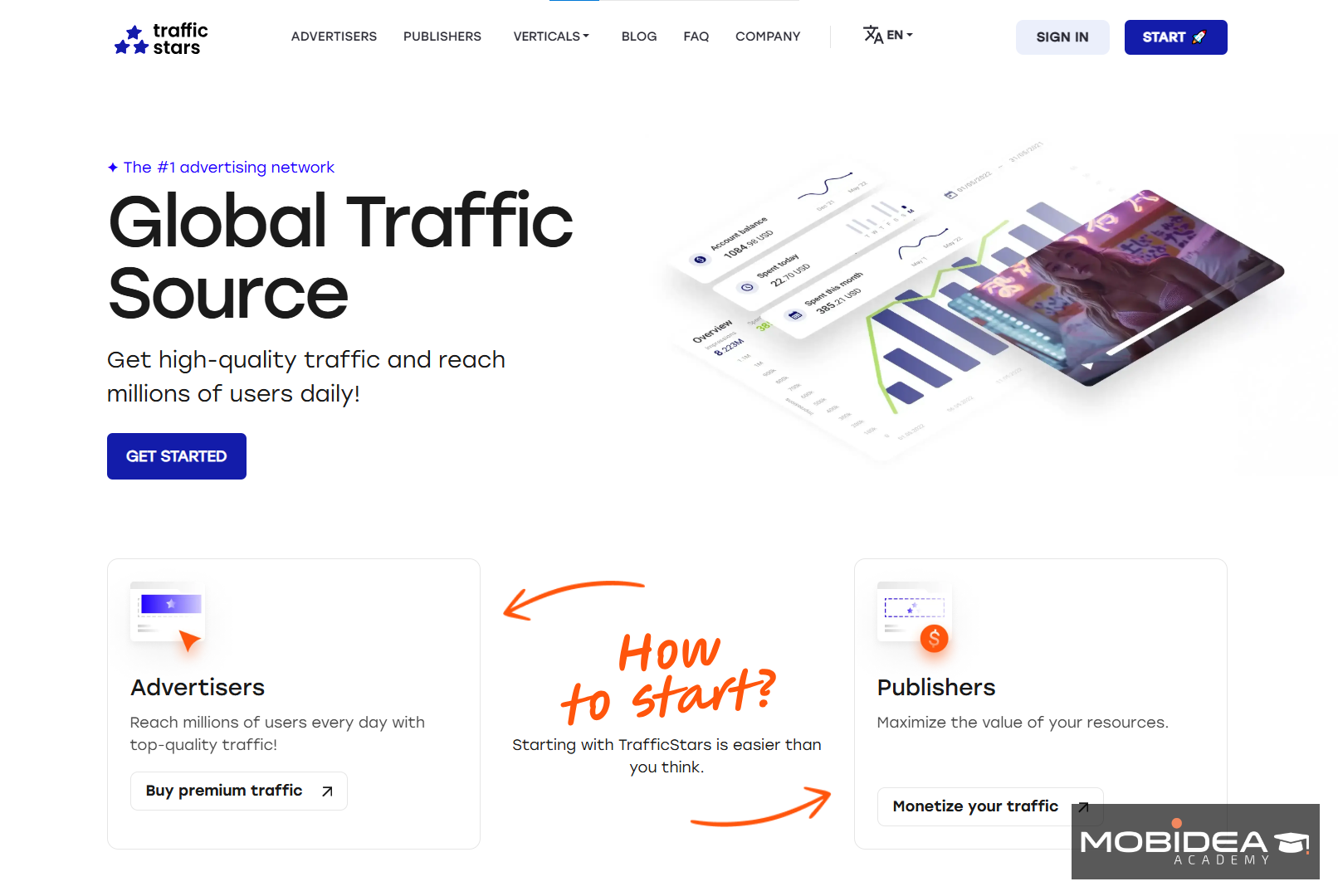
TrafficStars is a trusted self-serve ad network with a nice interface that is easy enough to understand and navigate.
TrafficStars Best Features
Just like when navigating through congested traffic, advertising can also be a daunting task.
But with the right features, you can cruise through with ease and reach your target audience.
Let’s explore the charm and allure of TrafficStars and find out if it is truly advertiser-friendly.
Well-Known Adult Brands as Publishers
Why settle for a trickle of traffic when you could have a flood?
With almost 10 billion daily impressions from top websites, including 6 of the top 20 adult websites in the world, finding the audience you need has never been easier.
Not only will you have enough traffic to scale, but with well-known adult brands as publishers, you can be sure that your ads will reach the right audience.
| We’ve mentioned above that they house xHamster, right?
Other well-known adult traffic websites under its wing are PornHub, SpankBang, and YouPorn. |
A portion of its traffic comes from some mainstream websites that fall under General Mainstream, Manga/Anime, Games, Streaming, and a bit of news media.
This network’s traffic does not only come from direct publishers but also from real-time bidding (RTB) partnerships with other ad networks and ad exchange platforms.
And when those partnerships involve some of the biggest names in the adult industry, you know you’re onto a winner.
Optimizer
Driving traffic to your website can feel like a game of whack-a-mole—you knock down one poorly performing source, and another pops up in its place.
That’s where TrafficStars’ feature, Optimizer, comes in.
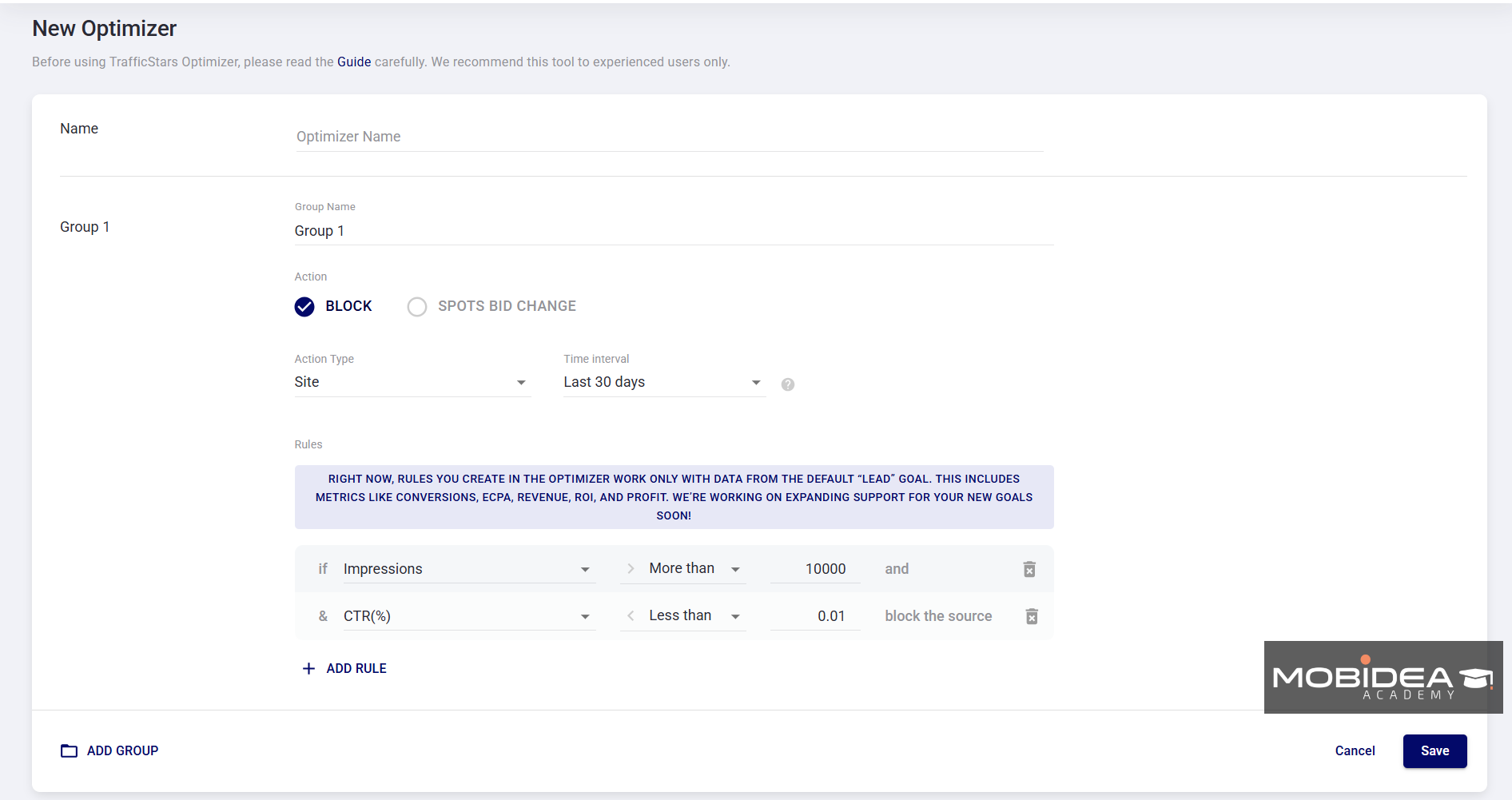
Optimizer is a rule-based optimization feature where you can target groups of campaigns, blacklist those pesky underperforming traffic sources and adjust bids with ease.
It’s like having your very own game-changer for online ads, one that doesn’t just knock down the problematic moles but boots them out of the game entirely.
Marketplace
The Marketplace showcases prime spots for your ads to reach your desired audience, complete with helpful descriptions to guide your decision-making.
This includes:
- Spot ID
- Domain
- Type
- Ad Spot Desription
- Ad Format
- Daily Impressions
- Action
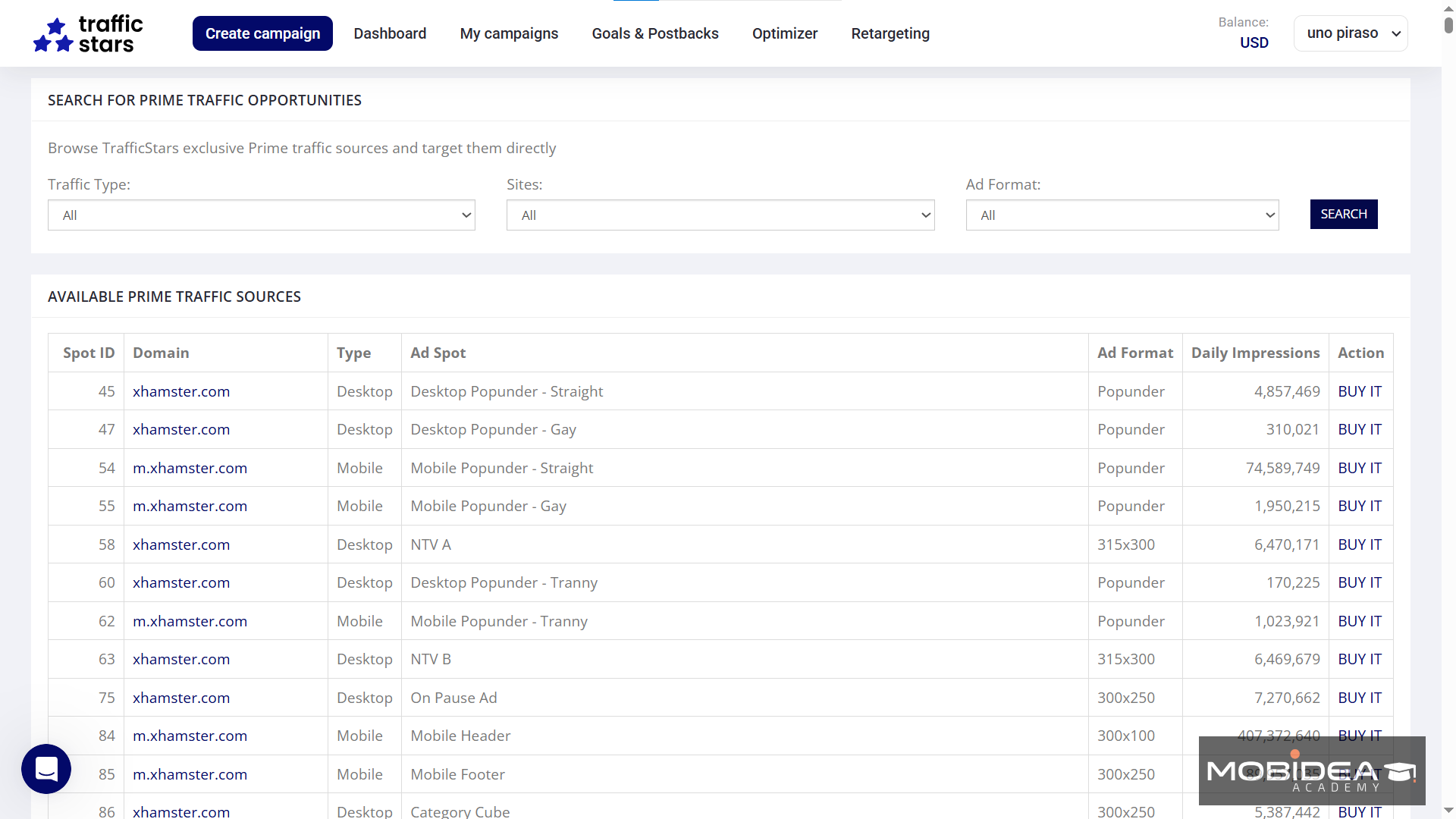
However, be aware that the BUY IT button may be a little misleading.
You can’t simply purchase all traffic from a particular ad spot.
You’d still have to create a campaign, manually select the spot, and place a bid.
The link is currently not available in the menu as it used to be as it’s currently being developed or improved (according to live chat support).
If you want to try it out, you can find it here.
Audience Targeting
TrafficStars offers three types of audiences.
You can choose to:
|
All three are available for Popunders, Banners, and Native ads, while Video ads can only run RON and Prime.
As for Push Ads, only RON is available.
Multiple Retargeting Options
Picture this: you walk into a store to browse, but you get distracted and leave without buying anything.
A few days later, you receive an advertisement from the same store showing you the products you were interested in.
This is exactly what retargeting does for online businesses.
TrafficStars offers this amazing feature that allows you to target visitors who have already expressed an interest in your product or service.
Retargeting is crucial to businesses that want more sales for less ad spend, and TrafficStars provides three solutions that can take your marketing efforts to the next level:
- Simple – based on clicks.
- Advanced retargeting based on collected data – based on data you gathered from the users on your landing pages. For example, when they answered a simple survey.
- Event-based Retargeting – based on the audience’s interaction with your website, such as viewing a page, adding to a cart, clicking on the checkout button, etc.

Lookalike Campaigns
With Lookalike Audience, you can say goodbye to the endless manual search for new audience reach and the struggle to increase your revenues.
The magic happens when an algorithm takes on the job of analyzing your campaign’s performance to identify top-performing ad spots.
From here, it works its magic by finding new spots with the same performance potential—like a matchmaker that just brings you the perfect prospects.
Considerable Targeting Choices
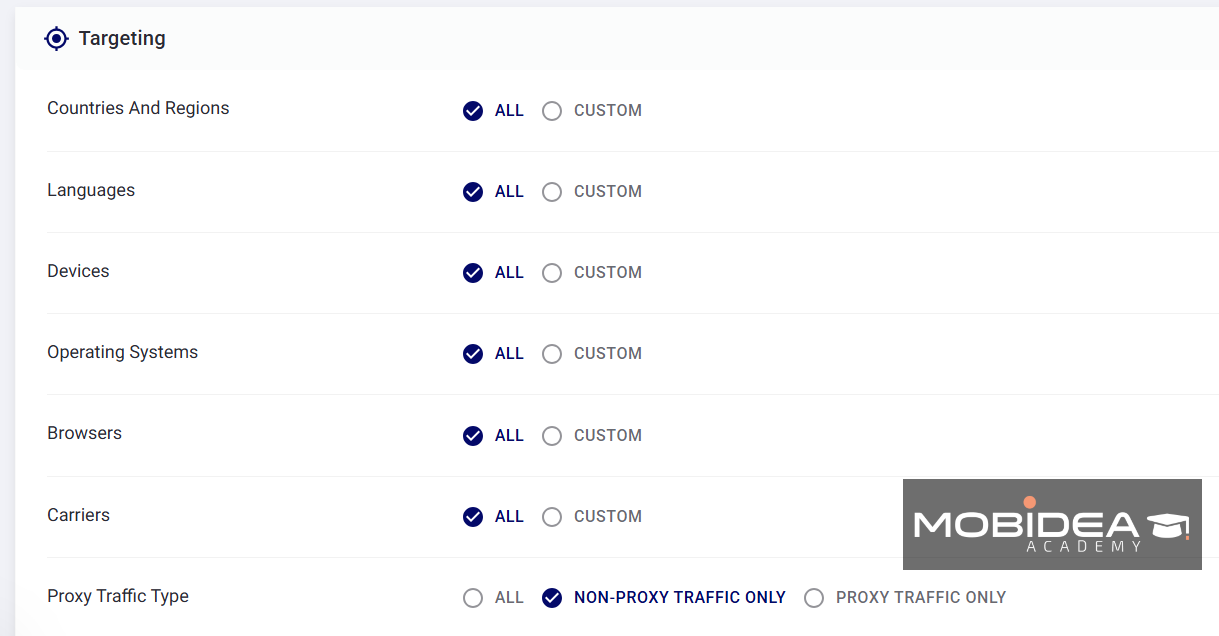
Like most ad networks, TrafficStars offers several targeting choices necessary to help you find the right audience easily:
- Countries, regions or states
- Language
- Device (Desktop, Mobile, Tablet)
- Operating System
- Browsers
- Carriers
- Proxy-traffic type (proxy and non-proxy)
Advanced filter options include the following:
- Device Brand
- Device Release Date
- Device Model price
- IP Range
- Keywords
- Retargeting
- Collect Users
- Categories
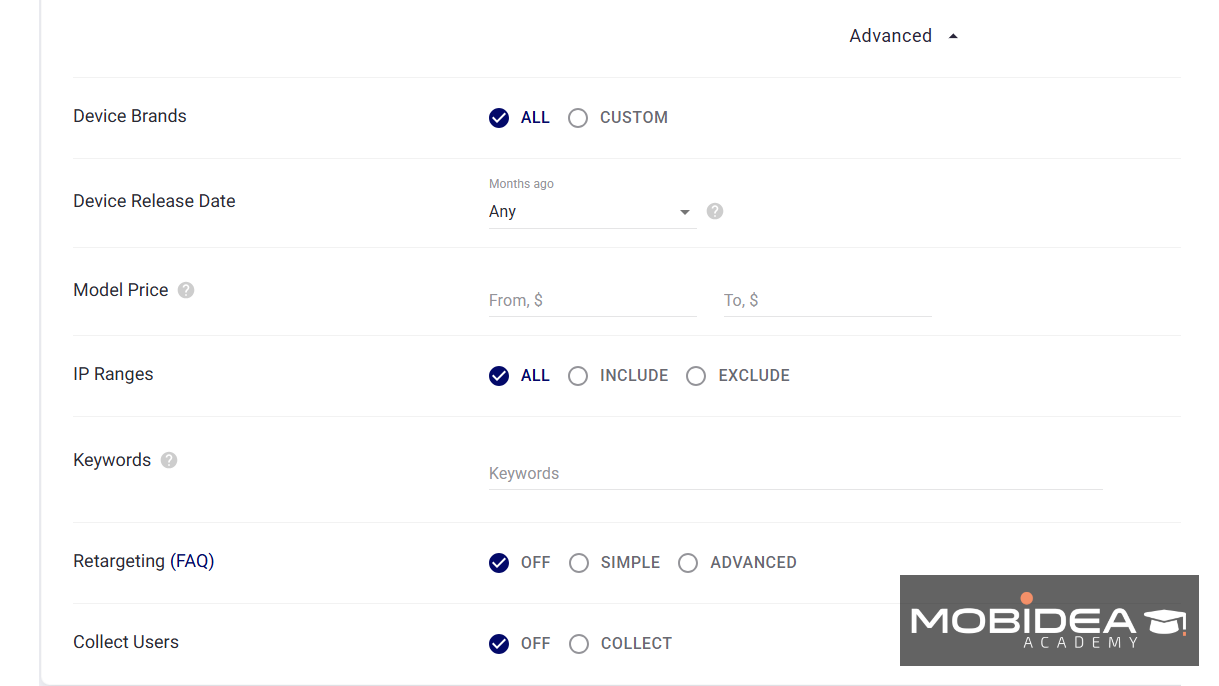
When it comes to categories, your options are:
- Whitelist or Blacklist
- Adult or Mainstream (you can choose both)
- Tags – There are 40 tags, 35 of which are adult and five are mainstream. These tags represent website categories.

In-House Anti-Fraud Solution
In online advertising, the constant threat of malware and fraudulent activity looms over every publisher and advertiser, more so for adult content.
Fortunately, TrafficStars provides an in-house solution to combat these pesky problems.
Their anti-fraud solution is designed to give both advertisers and publishers peace of mind, knowing that the traffic and ads are free from bots and fake clicks.
| The team at TrafficStars understands that the success of their advertising network depends on the trust of their clients, which is why they go above and beyond to offer a 5 times refund for any fraudulent traffic received by an advertiser. |
With this type of guarantee, you can bet that TrafficStars takes fraud prevention seriously and won’t let anything stand in the way of connecting their clients with high-quality traffic.

Account Managers
The personal manager selected by TrafficStars is based on your working hours (based on your timezone).
That means personalized assistance whenever you need it most.
Whether you’re looking to set up your first campaign or need expert guidance on optimizing your creatives, TrafficStars’ dedicated account managers will be there every step of the way.
You can also ask them for the top bids for some ad spots.
Plus, if you’re looking to target premium websites that have strict ad guidelines, the support team really shine.
Their knowledge of what flies (and what doesn’t) can help ensure your ads are not flagged.
Note: Flagged ads are not shown on websites that flag them and instead will be shown only to websites that accept them.
How to Start Advertising with TrafficStars
Today, we’re going to take a closer look at TrafficStars ad network and how to create a campaign.
We’ll dissect the platform’s performance, evaluate its efficiency, and see if it’s really worth your investment.
Getting Started
As always, you would need to create an account first, which is a simple process.

Next, you’ll be welcomed into the new user dashboard, where everything you possibly need to get started in using this ad network is shown.
This includes links to the Knowledgebase on how to create a campaign (this one has a video, too) or how to set up tracking.
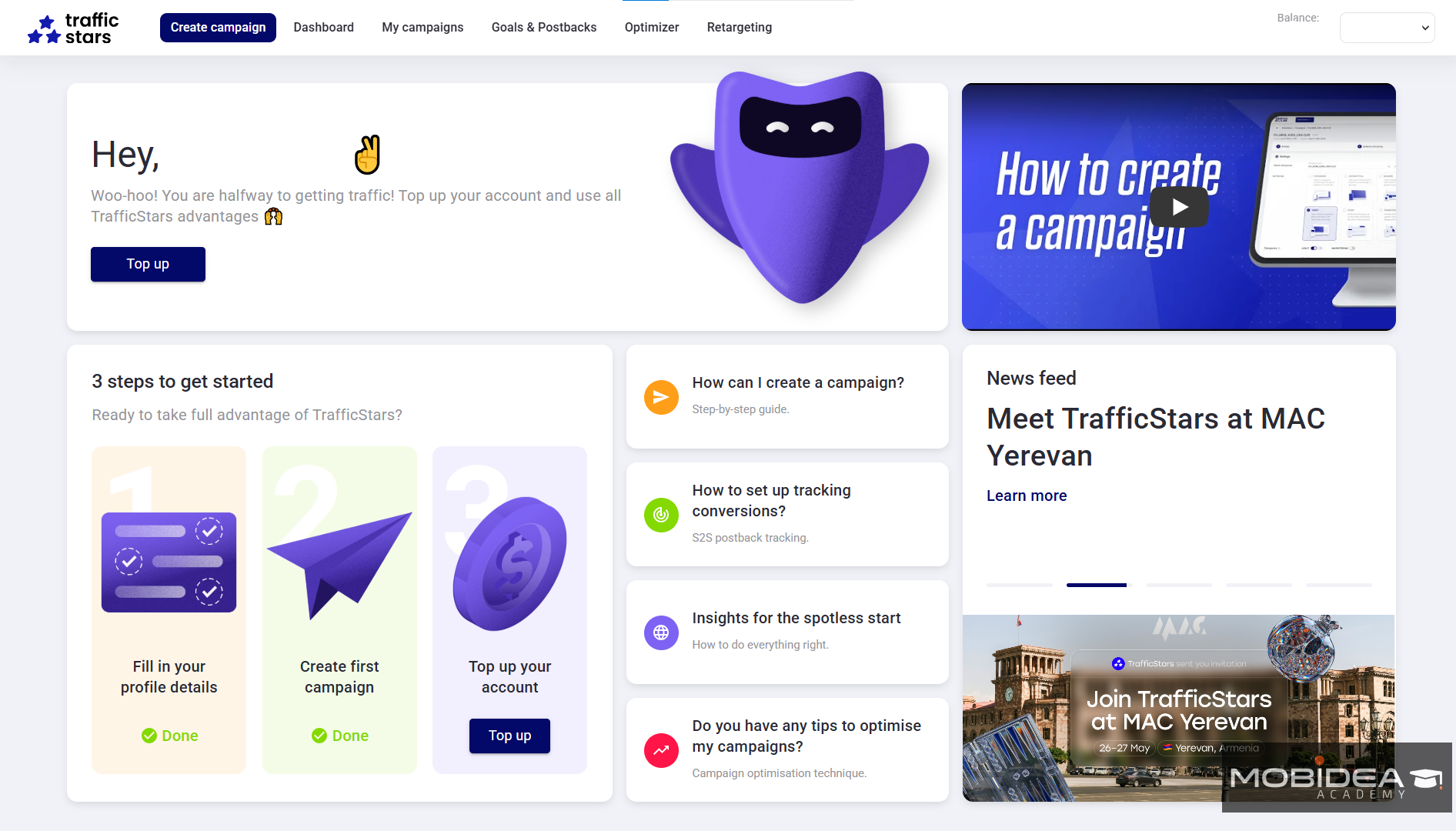
But first, I suggest completing your profile and then adding your first deposit.
There are six ways to top-up your account and these are through:
- debit or credit cards
- Paxum
- Capitalist
- Crypto
- bank transfer
All except bank transfer requires a minimum of $100 per top-up, while bank transfer requires $500.
Setting Up a Campaign
TrafficStars’ Help section has pretty good instructions on how to set up a campaign, but let’s have a quick run-through of how this is done, plus a few tips on how to create a good campaign at the onset.
First, click on the Create Campaign button right at the top.
There is only one campaign creation page for all ad formats, and it’s pretty straightforward.

If you choose Banner Ads, there are six sizes to choose from:
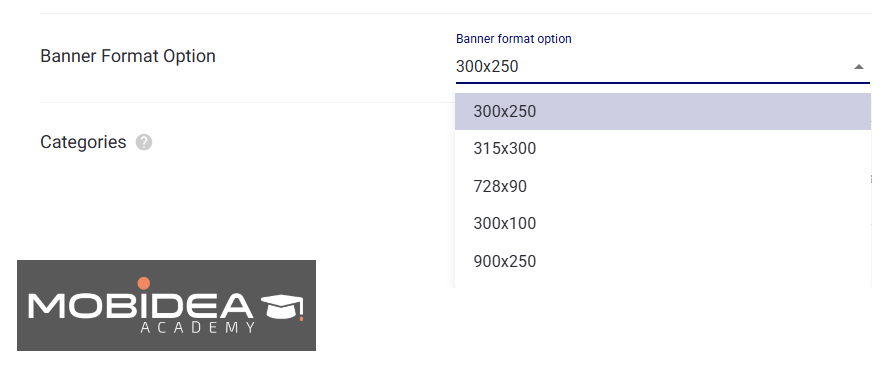
For Interstitial Ads, you can show either an image or a landing page. Both of these are full-page sizes.

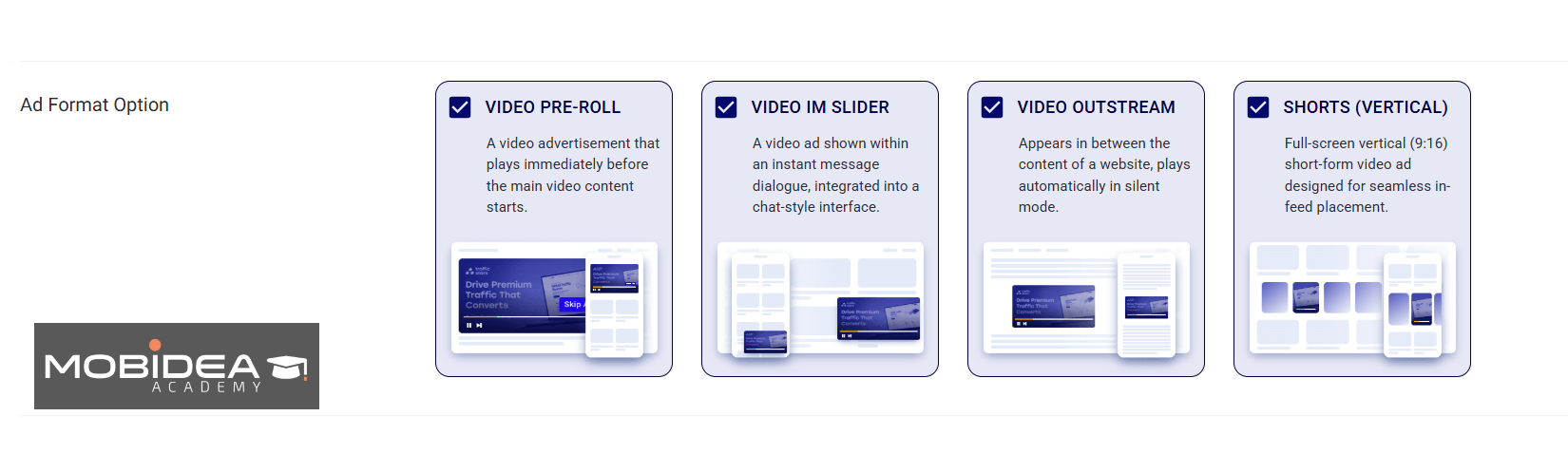
For Video Ads, you have four options:
- Video Pre-roll – shows up in the video player before the intended video content plays and can be skipped after a few seconds;
- Video IM Slider – an instant message that shows a video ad instead of a text-based message;
- Video Out Stream – shows up in the middle of the website content — whether the content is media or text.
- Vertical Video Shorts – these are in-feed, full-screen, short videos that are optimized for mobile
And finally, for push ads, you can choose between push notification ads and classic push ads.

As for popunder ads and native ads, there’s only one format for these ad types so there are not further choices.
Next is the categories section, where you can choose to either use Whitelist or Blacklist for this campaign.
If you choose to whitelist, you’ll have the opportunity to pause non-performing ad spots, helping you optimize easily.
You can choose to run an adult-only campaign or a mainstream-only campaign, or both.
If you are targeting specific niches, you can do so by selecting appropriate tags.

After this, you can set a schedule for your campaigns.
You may add dayparting and choose the appropriate time zone.

Next is the targeting section, which we already discussed above (under the features section).
There are a few notable sections here that would be of great use to you if you intend to hyper-target your audience (which I believe you should do, especially if you’re running an adult campaign).
Keywords Targeting
With the ability to match keywords on your ad campaign to the content of websites, your ad is always in the spotlight.
Keywords give you the edge when it comes to homing in on a niche audience, ensuring your message is seen by those who will take an interest.

Retargeting and User Collection
For retargeting to work, you must have a collection of users to retarget to.
This means you must have another campaign that you will use to build a collection.
Once the collection is built, you can then use it on other campaigns for whitelisting or blacklisting.
When you create a collection, make sure to copy the code provided during set up a Collection and place it on your landing page.
Allow at least 30 days of data collection for retargeting to work.
Once your Collection is ready, you can use it on a campaign and remarket to users who have already seen your ad before or have shown an interest based on their level of engagement.

This is best used by e-commerce websites.
If you have a funnel for an affiliate offer, this can work, too.
Full details on how to set up events-based or data-based retargeting can be found on TrafficStars’ FAQ pages.
The final section for this page is the Optimizer.
You can use rules to automatically optimize all your campaigns for tasks that you would normally do by hand.
You can simply select any of your pre-made optimization rules here, or you can create one from scratch right on this page.
We’ll discuss later how you can create one.
For now, let’s move to the next page by clicking on the Next button.
Audience and Pricing
This is where you can select the right audience for your campaign.
Your three options for traffic are RON, Prime, and Members Area.
Members Area is only available for:
- banner ads
- interstitial ads
- native ads
- video ads
If you choose RON, clicks are cheaper but are less targeted.
You can just whitelist or blacklist site IDs and spot IDs once you’ve gathered enough data (or you can let the Optimizer do that for you).
You can also choose between Direct Inventory and Partner Ad Networks.
The latter are third-party traffic sources.

If you choose Prime or Members Area in the Traffic Selection, you’ll be shown the list of ad spots available based on the ad format you chose.
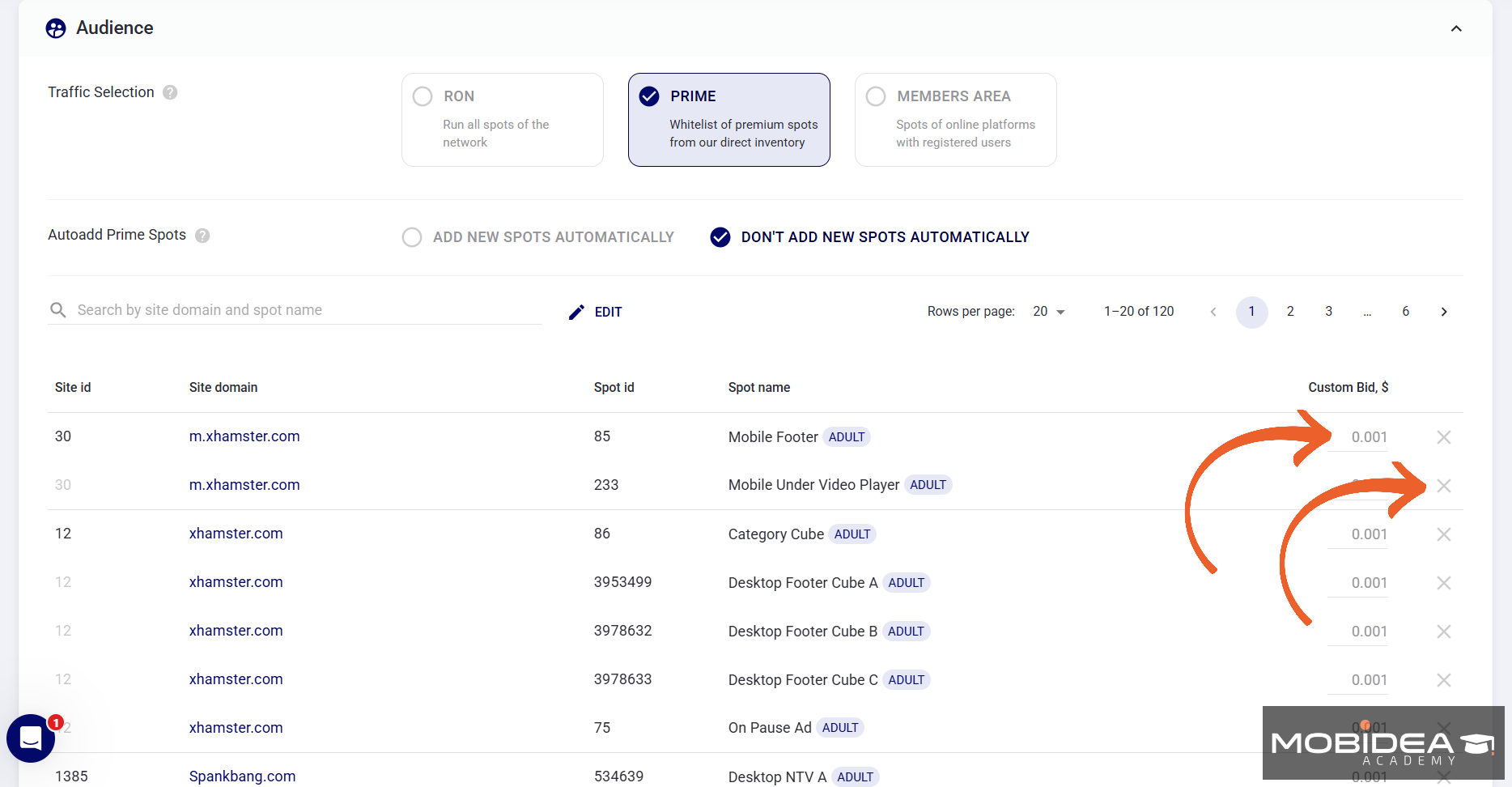
You can add a custom bid for every ad spot, and you can also remove some ad spots by clicking on the X icon across it.
Beneath this section is the Pricing, where you can choose the payment model and add your bid.
The payment model also depends on the ad format:
- For banner ads and video ads, CPC, CPM, and CPA are available.
- For popunders and interstitials, CPM and CPA are available.
- For native ads, it’s CPA, CPC, and CPMV (viewable CPM).
- For push ads, only CPC is open.

After adding your bid, the next step is to set your daily budget.
If your budget is unlimited, you can simply place zero (although I don’t recommend setting an unlimited daily budget, especially for RON!).
The minimum daily budget is $10 for all ad formats except push notifications, which require $25.
When done, click on Next to save your progress and head over to the Creatives page.
On the final page, upload your creatives and set the frequency for each creative.
And you’re done!
That wasn’t hard, was it?
Optimizer
We mentioned above that you can set rules for easy campaign optimization, right?
To do that, click on the Optimizer link on the menu.
Click on the New Optimizer button to create one.
Here’s the Optimizer page:
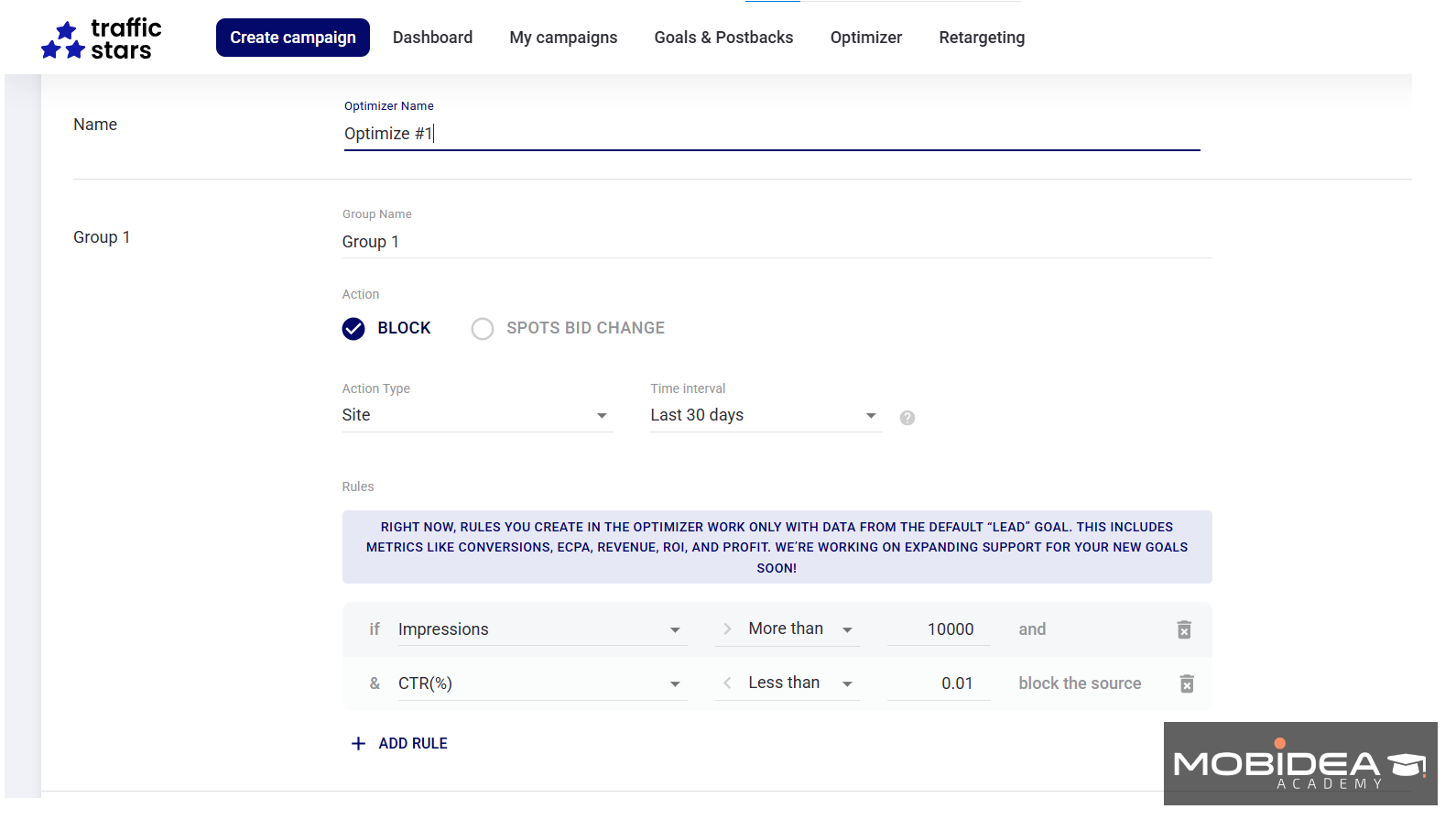
As you can see, there are two types of rules that you can make:
- Blocking
- Spots Bid Change
Blocking
So for blocking, the changes are made to the item you select on the Action Type:

Time interval is the period being evaluated:

The rules section allows you to establish the If statement that helps the system evaluate the results to find out whether or not to block the action item you chose.

You can have a simple “If Rule” for one statement or set “If-And Rules” for a combination of two statements to be followed before the optimization is carried out.
Bid Changing
Now if you want to automatically adjust bids based on the spot’s performance, choose Spots Bid Change.
As is obvious by the name, only bids for spots are adjusted here, not for sites, creatives, or any other item.

You can increase or decrease bids by dollar increments or by a percentage of your current bid.
As is with blocking, you have to establish the rule that the system must analyze and follow to perform the bid change.
Once you’ve created Optimizers, you can apply them to campaigns you’ve already created or will create in the future.
Clone Campaigns
Let’s say you want to promote a different offer using the same good-performing campaign, or maybe you want to expand your reach but would rather not touch the one you are already running—you can always clone a campaign.
To do this, head over to My Campaigns.
Scroll to the far right of the dashboard of your campaign list.
You’ll arrive at the kebab menu (the three dots); click the one corresponding the campaign you want to duplicate.
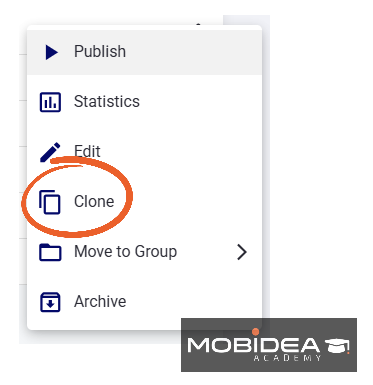
It’ll instantly create a clone.
Connecting Your Tracker
If you want to obtain better stats than what TrafficStars has to offer, we recommend integrating your tracking platform.
To do this, head over to the Goals & Postbacks menu selection, then choose the Postback tab.
The default goal selection is Lead, though the team is working on adding more in the future.
Select the Tool, either S2S tracking or pixel tracking.

Next is the postback type.
You can choose either Simple or Advanced.
If you go for advanced, you can track additional metrics.
Your options are:
- Track Earnings and ROI
- Report Conversion Cost
- Track Post-Conversion Events
- Allow duplicates
You can choose one or all, if you like.

Next is your tracking tool.
Different tracking tools have different macros associated with them, so make sure you choose the right one.
| ⚡ Haven’t chosen one yet? You can’t go wrong if you choose one from our Recommended Tracking Tools. |
TrafficStars has postback templates for some of the most popular affiliate tracking tools today, so just simply select whichever you are using, name it, then click on Generate to get your Postback URL.

Reports
TrafficStars provides standard reports, so you’ll have access to all the important metrics needed to analyze and optimize your campaigns.
Impressions, click-thru rates, ad spend, eCPM, leads, earnings, ROI; if it’s important to your ad campaign, TrafficStars has it covered.
It’s all pretty straightforward. For better stats, we suggest you utilize an affiliate tracker.
As you may notice from the results of the campaigns that Mobidea Media Buyers tried before, traffic from this ad network is pretty good once you find a good ad spot.

We also recommend that you set up bot filtering systems with your tracking platform in order to actively monitor and filter-out unwanted traffic.
This also helps when getting a refund for fake clicks you received since you can provide concrete proof, if it case it happens.
How to Earn Money as a Publisher with Traffic Stars
To complete our TrafficStars review, let’s discuss the side of publishers.
With Traffic Stars, you can start earning money as a publisher in no time.
Yes, you heard that right! As a publisher, all you need to do is sign up and verify your email.

You will then be asked to confirm whether you are an Advertiser or Publisher. Choose the latter.
Getting Started as Publisher
Here’s how the dashboard looks for publishers:

In order to get started, you must complete your profile, so do that first.
Your website and ad spots will not be reviewed until your profile is completed.
Adding Sites
Of course, the most important task here is adding your website and ad spots.
Head over to Manage Ad Spots or click on the Create New button on the menu.
Now you have three main sections here:
- Sites List
- Ad Spot List – for manually creating ad spots with specific ad sizes
- Master Spot List – for letting Traffic Stars choose the best ad format for the space provided based on the highest bid.
You must add your website before creating either an Ad Spot or a Master Spot.
Select Sites List, then click on Create Site.

Complete the details and submit it.
It will then be placed on Pending and will be reviewed by the TrafficStars compliance team, which can take up to one business day.
While it is still in review, you can proceed with creating ad spots.
For manually creating ad spots, go to Ad Spots List, then click on Create Ad Spots.

Choose the ad format, then complete the necessary details.
The information required from you varies from format to format.
For instance, here’s what it looks like if you choose Native:

If you don’t want to do this manually for all available ad spaces on your website, create a Master Spot instead and let TrafficStars choose the best format for you.
This way, you can increase fill-up rates and maximize your earnings.

One thing commendable about TrafficStars is that they allow its publishers to set rules on the kind of ads they allow to show on their sites.

So if, for instance, you want to make sure the ads that show up on your website will not cause you to lose your Google ranking, then you can click on “Leave Google Compliant Creatives only.”
You can also choose the ad categories and their level of aggression.
This way, you can keep running ads without the risk of turning your audience away from your website.
Although, bear in mind that the stricter your rules, the fewer ads it will show.
Getting Paid
Once your website has been approved and earnings start rolling in, you can withdraw your earnings weekly or monthly.
To successfully cash out, you need to reach the threshold you set on your account.
The threshold you can set is $10, $100, $200, and so on.
It’s also important to note that minimum payouts depend on your chosen payment method.
For example, if you choose to get paid via USDT, you can withdraw at least $10. If you choose Paxum, the minimum shall be $100.
Payment options are as follows:
- Paxum
- Cosmopay
- ePayService
- Capitalist
- European SEPA Transfer
- International WIRE Transfer
- Crypto: BTC or USDT (TRC20)
TrafficStars Pros and Cons for Publishers
If you’re a publisher looking for a new ad network to partner with, TrafficStars may have caught your eye.
And why wouldn’t it? This platform claims to deliver high-quality traffic that’s catered to publishers.
But before you hop on board, weighing its strengths and weaknesses is important.
Pros
Cons
| |
TrafficStars Verdict
With its impressive reach, multiple ad formats, and dedicated support team, this ad network has everything you need to take your affiliate marketing strategy to new heights.
| ⚡ To conclude this TrafficStars review, here’s our verdict: we recommend running ads here! |
As expected, it delivers high quality traffic sources for the adult space. Why settle for less when you can partner with the best?
Start your journey with TrafficStars and watch your profits soar to the stars.
And don’t forget to get your coupon code MOBIDEA10 for a 10% top-up bonus!
TrafficStars FAQ
Is TrafficStars only for adult traffic?
No, but adult is its primary strength.
It has some mainstream inventory in categories like gaming and streaming, but most of its traffic and advertiser demand is in adult-related niches like Dating, Cams, Gambling, and Nutra.
What is the minimum deposit for advertisers?
$100 for e-wallets and credit cards, and $500 for wire transfers.
What pricing models does TrafficStars support?
CPM, CPC, CPA, and CPMV, depending on the ad format. Push ads are limited to CPC only. CPMV is exclusive to native ads.
How does TrafficStars’ 5x fraud refund guarantee work?
If you can prove that traffic you received was fraudulent, TrafficStars will refund up to five times the amount spent on it.
In practice, proving this to the platform’s satisfaction can be difficult, so always use a third-party tracker to collect evidence.
How fast does campaign moderation take in TrafficStars?
Usually within 10 minutes on business days.
Can I access xHamster traffic as a new advertiser?
Not always. Access to top-tier placements like xHamster is not guaranteed for new accounts.
Talk to your account manager about when and how this becomes available.
What ad formats are available in TrafficStars?
Banners, native ads, video pre-roll, popunders, in-page push, classic push notifications, interstitials, and IM slider ads.
What are TrafficStars’ publisher payment options and minimums?
Paxum, Cosmopay, USDT, Bitcoin, Capitalist, SEPA, and wire transfer.
Minimum payout starts at $10 for USDT and $100 for most e-wallets. Payments can be scheduled weekly, monthly, or quarterly.
What tracking integrations does TrafficStars support?
It connects directly with 15+ trackers including Voluum and RedTrack via postback URLs.
Other trackers can be set up manually using available macros.
Does TrafficStars have a referral program?
Yes, for publishers only. You earn 5% of the revenue generated by any publisher you refer.
Is there any TrafficStars promo code?
Yes! Use the coupon code MOBIDEA10 when funding your account for the first time to get a 10% bonus.


Check our Adcash review and understand how you can increase affiliate marketing profits by exploring this awesome ad network to the max!

A Zeropark review that's perfect for media buyers and affiliate marketers to learn how to launch a great campaign on Zeropark!
With its ultra-low minimum deposit of $5, Popcash is competing head-to-head with other popular traffic sources. Read this Popcash review and see if this ad network is worth testing.