
Push.House At A Glance
Push.House: Offers & Verticals
Ad types: In-Page Push Ads, Classic Push Notification Ads, OnClick (Popunder) Ads
Verticals: Casino, Gambling, Dating, Utilities, Sweepstakes, Mobile Subscriptions, Finance, Nutra
Push.House: Payment & Investment
Cost Model: CPC, CPA Goal
Minimum Deposit: $50
Payment Methods: Credit cards, Capitalist, USDT, Bitcoin, Pay2House, Payoneer
Push.House: Support
Personal Account Manager: No
Knowledgebase: It has an FAQ section within the dashboard.
Support Response Speed: Good
Support Rating: Good
Contact Methods: Live chat, ticketing on dashboard, and Telegram chat
Ah, advertising, the backbone of capitalism. In the world of online marketing, traffic is king.
And not just any traffic—direct traffic!
Why, you ask? Well, not only do these channels have a specific and engaged audience, but they also offer a more direct and cost-effective approach to advertising.
And if you’re looking for a specialized network that knows how to reach users through various means, look no further than Push House.
It’s an ad network that used to specialize in push ads, but has now expanded to additional ad formats.
But is this traffic source everything that it is cut out to be? This Push House review will help you determine that, so let’s get started!
Key Takeaways
👉Three Ad Formats Available: Push.House offers Classic Push, In-Page Push, and OnClick (popunder) ads, giving advertisers multiple options for reaching audiences based on campaign goals.
👉Large Traffic Volume with Quality Direct Sources: The network delivers 14 billion daily impressions across 180+ countries, with particularly strong performance from in-house publisher traffic compared to external feeds.
👉Low Entry Barrier: Minimum deposit of just $50 makes Push.House accessible for testing, one of the lowest thresholds in the push advertising industry.
👉Advanced Automation Features: Tools like Auto Rules, Multi-format campaigns, Ad Templates, and CPAGoal payment model reduce manual optimization work and speed up campaign management.
👉Partner Level System: Spending more unlocks better rates, credit lines, whitelists, and priority support, making the platform increasingly profitable as campaigns scale.
👉Adult Content Accepted: All three formats now support 18+ creatives, opening opportunities for dating, adult, and other sensitive verticals that face restrictions elsewhere.
👉Feed Traffic Requires Testing: While direct Push.House traffic performs well, external feed sources vary in quality and require careful monitoring, making it best to start with in-house traffic before scaling to feeds.
What is Push House?
Push.House is an innovative Ukraine-based push ad notification portal that has been giving advertisers their daily dose of push ads since 2018.
How do they do it? Through their unique publishing arm, Partners.House, which accepts websites and direct publishers for subscriber collection and sells their push subscription ads in Push.House.
This company was one of the first ones to jump on the opportunity when push notification ads was launched. As such, it was able to build not just its collection of subscribers, but also its reputation.
Now it has expanded to deliver two other ad formats: in-page push ads and pop ads.

The network connects with its advertisers, publishers, and other potential partners through the following:
Social Media
- Instagram: https://www.instagram.com/pushhouse_/
- Facebook: https://www.facebook.com/pushhousenetwork
- Telegram Chat: https://t.me/publisher_push_house
- Telegram Channel: https://t.me/push_house_eng
- LinkedIn: https://www.linkedin.com/company/pushhouse/
- YouTube: https://www.youtube.com/@PushHouse_En
Collaborations & Partnerships: m.pavlychenko@holding.house
Push.House Best Features
Learning what a network has to offer is a great way to evaluate whether it’s for you or not, so let’s discuss what Push House has to give you.
Self-Service Platform
For advertisers who like to have control and love to be hands-on with their campaigns, a self-service platform is the perfect solution.
Push House offers you the opportunity to make decisions and be in charge of your campaigns.
Even if you’re not a tech genius, you can easily navigate the user-friendly dashboard.
As a result, setting up your campaigns is a seamless process that can be done quickly.
You don’t have to rely on a third-party manager or wait for long periods of time to make changes to your ad campaign.
3 Ad Formats with Good Traffic Volume
As we’ve mentioned above, Push House offers three formats right now:
- Web push ads
- In-page push ads
- Onclick (popunder) ads
This advertising network delivers immense volume coming from both direct publishers and external partner sources (which they call Feed).
With more than 525 million active push ads subscribers, there are enough audiences to promote to.
When combining direct publishers and feeds, Push House averages more than 415 million clicks on Mobile and 9 million clicks on Desktop on a daily basis.
This covers all ad types, coming from an estimated 14 billion impressions.
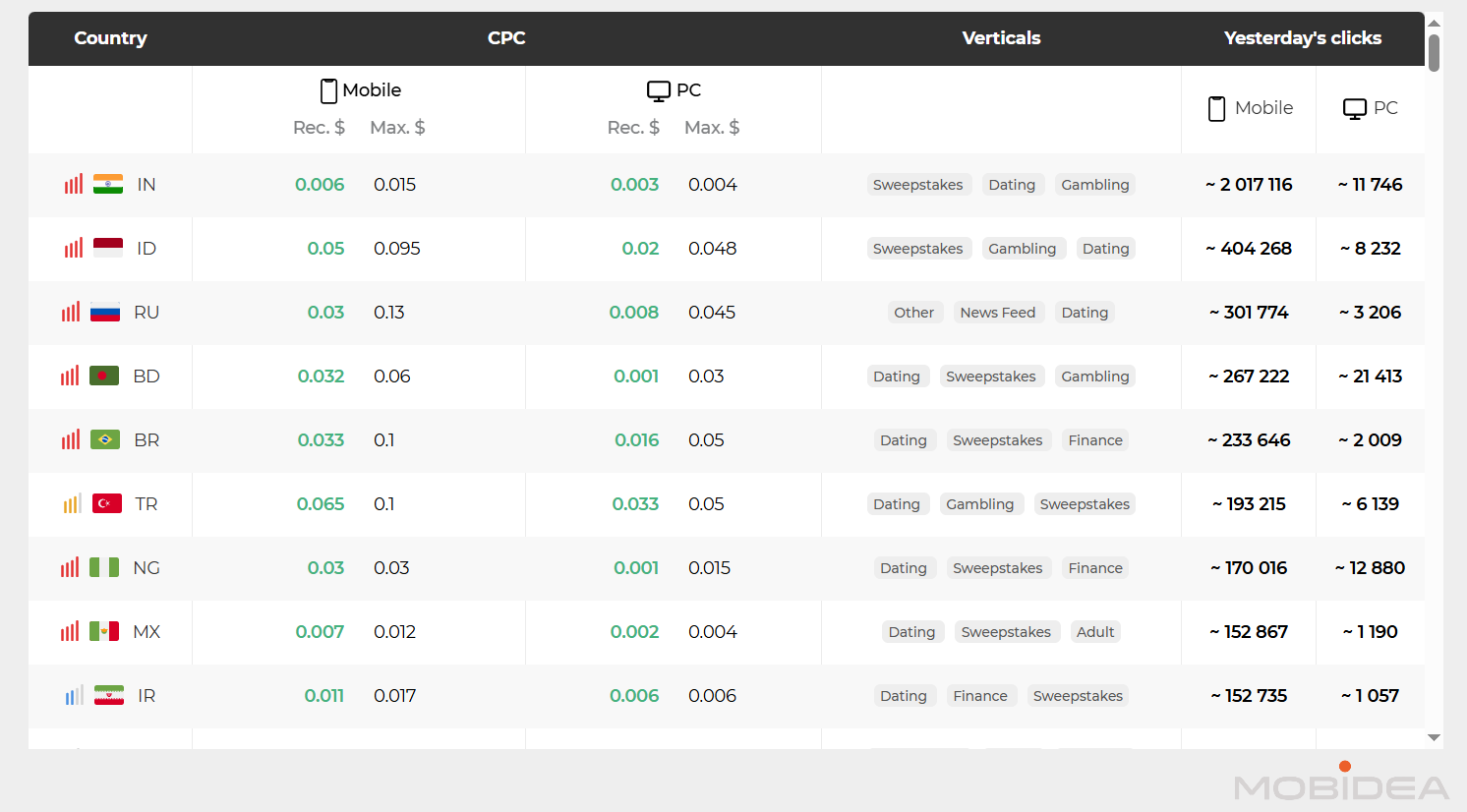
You can show ads to 180 countries worldwide. When it comes to traffic performance, Push House is known for providing high-quality traffic from its direct publishers.
Multi-format Campaigns
Testing the same offer across different ad formats used to mean creating separate campaigns for each format—a time-consuming process that many advertisers skip.
Push.House’s multi-format campaign feature eliminates this hassle by automatically generating campaign copies across all available formats with a single setup.
Auto Rules
Auto Rules automates campaign optimization by executing actions when specific performance conditions are met.
Advertisers can:
- set rules that pause underperforming elements,
- adjust bids, or
- trigger other actions without manual intervention.
The feature continuously monitors campaign metrics in the background.
When conditions are met (such as spending reaching a set amount without conversions, or a platform achieving a target CTR), the system immediately executes the predefined action.

Audience Creation
Imagine you’re creating a new ad campaign, you have your coffee ready and you’re ready to work, but as soon as you start, you realize that you have to copy and paste the same whitelisted sources that you’ve used before.
This feeling is all too familiar for anyone who’s spent any time creating campaigns while using a predetermined source list.
Luckily, Push House has a solution to this problem.
With their audience creation feature, you can create a whitelist or a blacklist and use them in any campaign. You can also easily combine those lists with just a single click.
No more copy-pasting—just simple audience list creation that can be re-used and edited anytime.
Retargeting
For those of us who use funnels to convert audiences for our affiliate offers, retargeting allows us to keep our offer in front of potential customers who have previously shown interest.
This ultimately increases our chances of making a sale or conversion.
Push House offers easy retargeting of audiences for less ad spend and better ROI. The steps to using this feature are simple and can be done through the Audiences page.
However, this feature is not available for all advertisers. It depends on your level.
Templates in Campaign Groups
This feature allows you to create reusable campaign configurations with preset parameters. No more repetitive setups!
Instead of manually configuring targeting, bids, and other settings for each new campaign, templates let you save these configurations and apply them to multiple campaigns with a single click.
This feature proves particularly useful when running multiple campaigns for the same vertical or when testing different creatives with identical targeting settings.
Templates can also be combined with audience lists, so you can make your campaign setup more efficient.
Partner Level System
The Partner Level System rewards advertisers based on how much they spend on traffic.
Push.House looks at spending from the last two months to decide partner levels.
The system has several levels (Junior, Middle, Senior, Expert, and Elite). Each level gives access to different benefits that help make campaigns run better and earn more.
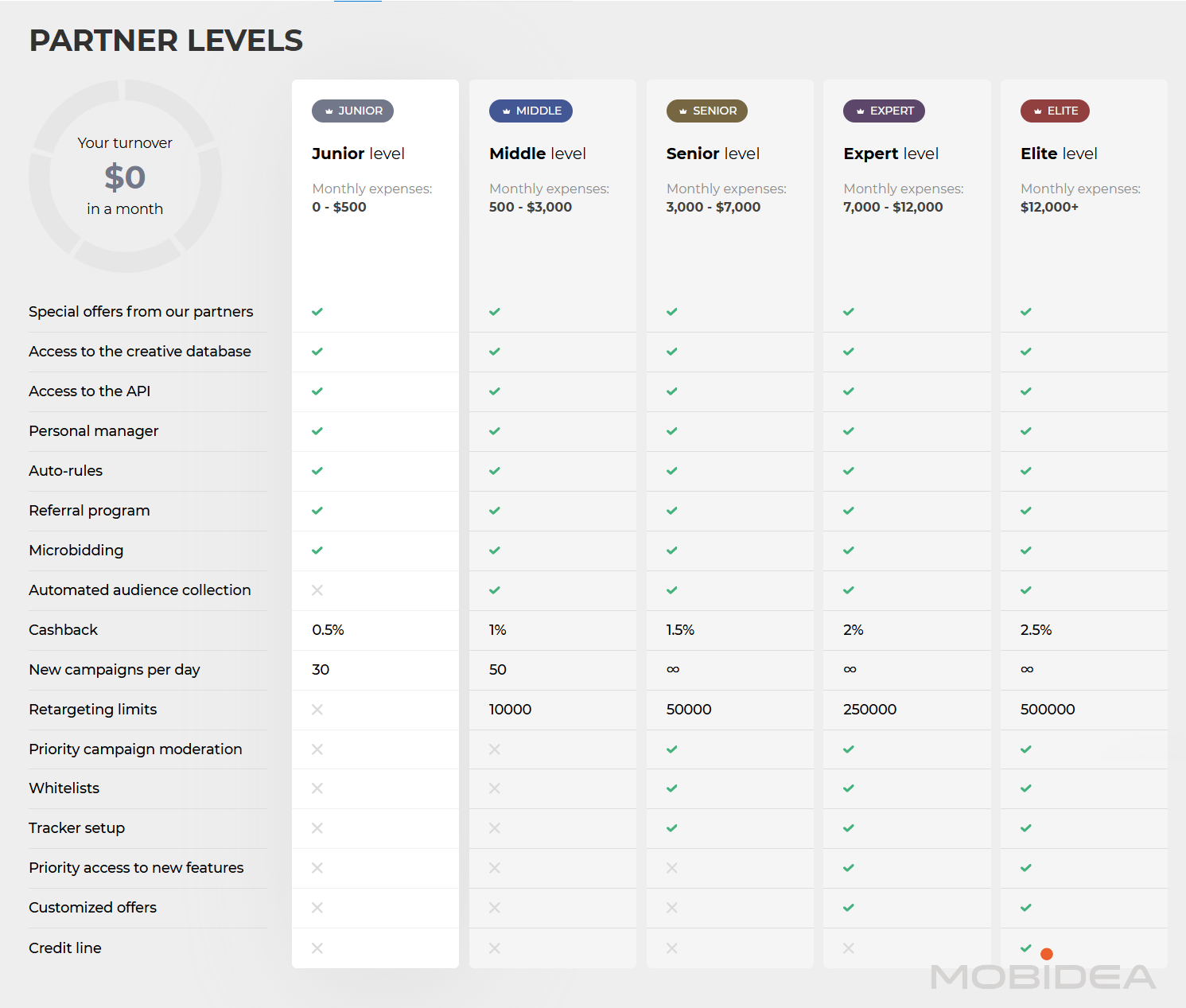
What you get at higher levels:
- Whitelists: Get access to tested traffic sources that perform well
- Special deals: Work out custom payment terms based on how much you spend
- Credit options: Run campaigns first and pay later instead of paying upfront
- Tracker help: Get support setting up tracking tools correctly
- Better support: Faster replies and more help from the support team
- Higher cashback: Earn more cashback on conversions when using postback tracking
The system rewards advertisers who keep running campaigns and spending consistently.
Since levels are based on the last two months, they can go up or down depending on recent activity.
For those planning to scale campaigns, knowing the level requirements helps with budget planning.
Reaching higher levels can make campaigns more profitable through better prices, payment terms, and access to better traffic.
You may even be granted a credit line once you reach the highest level! Not a lot of traffic platforms provide that.
How to Start Advertising with Push.House
With Push House, it’s easy to get started and there are no fancy requirements to fulfill. Your first job is to get signed up and you’ll be approved in no time.
Click here to sign up to Push House. Give yourself a minute to fill out the registration form with your essential details.
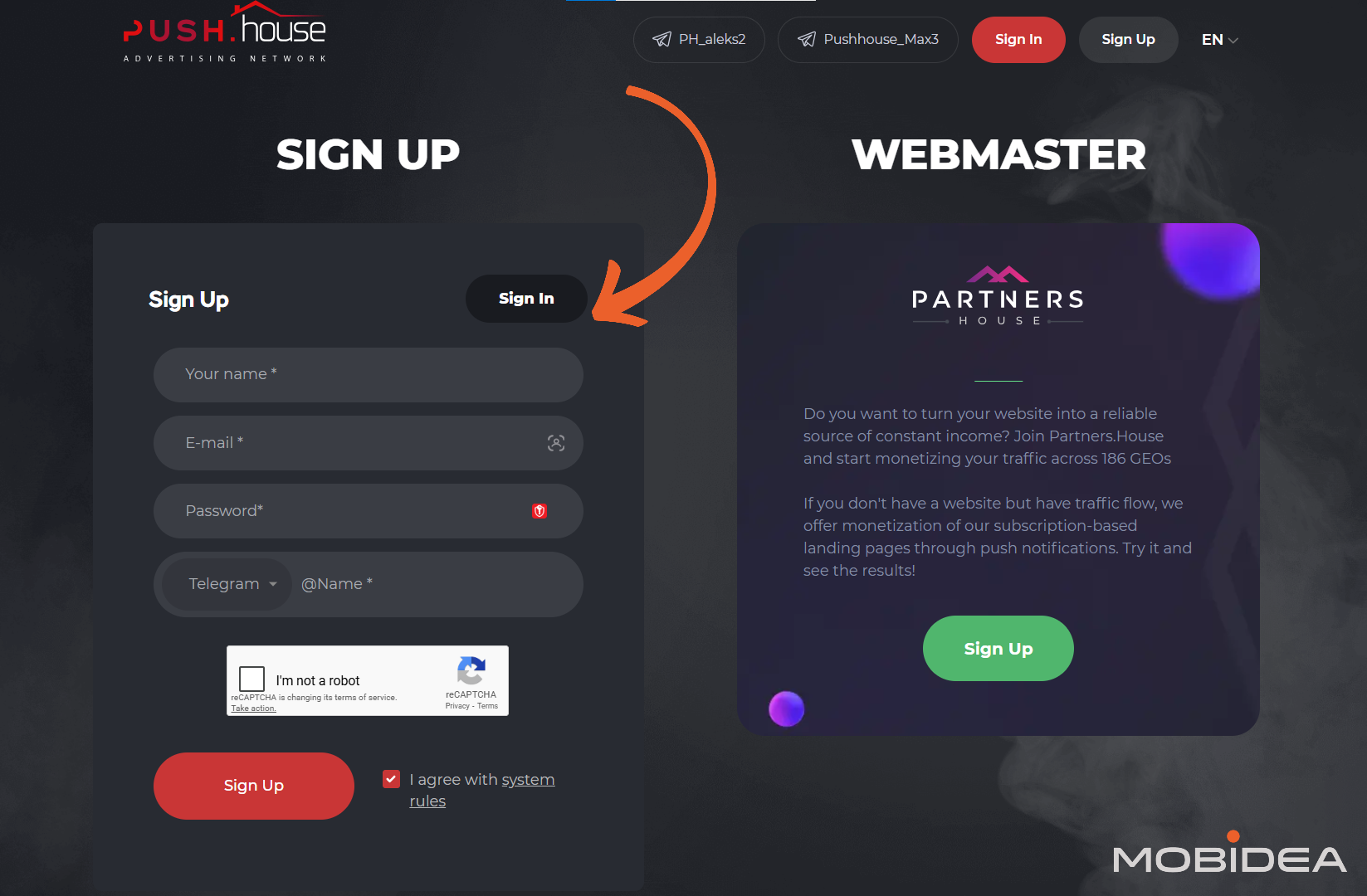
Verification is an essential step in the Push House registration process, so check your inbox for the verification email. Click the link inside to finish setting up your account.
Getting to Know the Dashboard
Now that you have an account, let’s have a quick rundown on Push House’s dashboard.
Upon logging in, you’ll find yourself seeing a quick summary of your advertising campaigns’ performance in terms of:
- Shows
- Clicks
- CTR
- Spent
You’ll also see a chart of its performance over time, depending on the ad format.
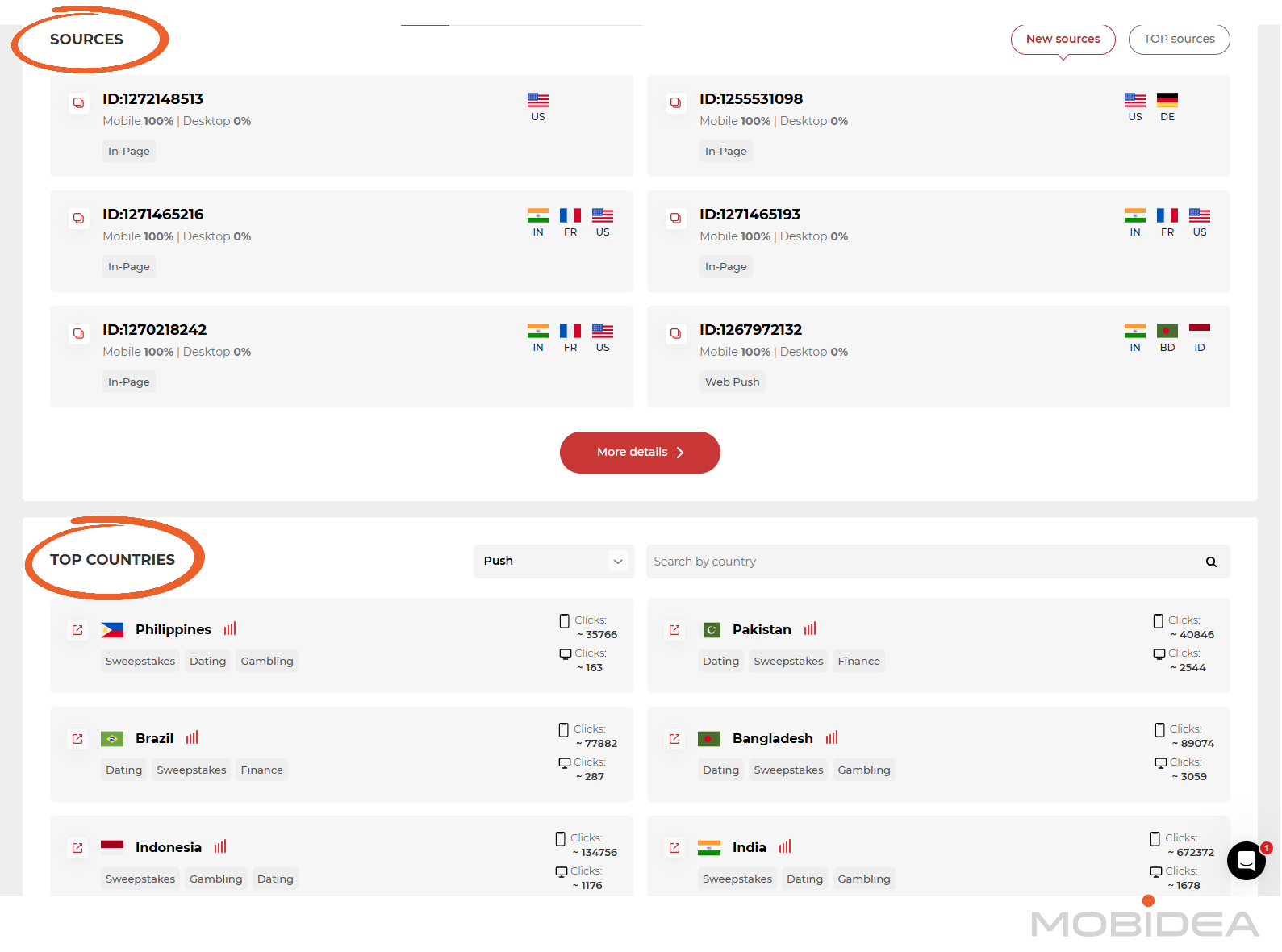
Scroll down and you’ll see the current Top Sources and Top Countries in Push House based on clicks from the previous day.
Everything you need to visit can be seen on the menu on the left pane.
Let’s visit some of them.
Network Volume
The next page to visit is the Network Volume, which details how many clicks the push notification advertising network has received the previous day.
You can filter the data based on:
- Ad format
- Traffic type (mainstream or adult)
- Country
- Connection Type
- Device
- Browser
- OS
- Verticals
- Level of Geo Competitiveness (low, medium, high)
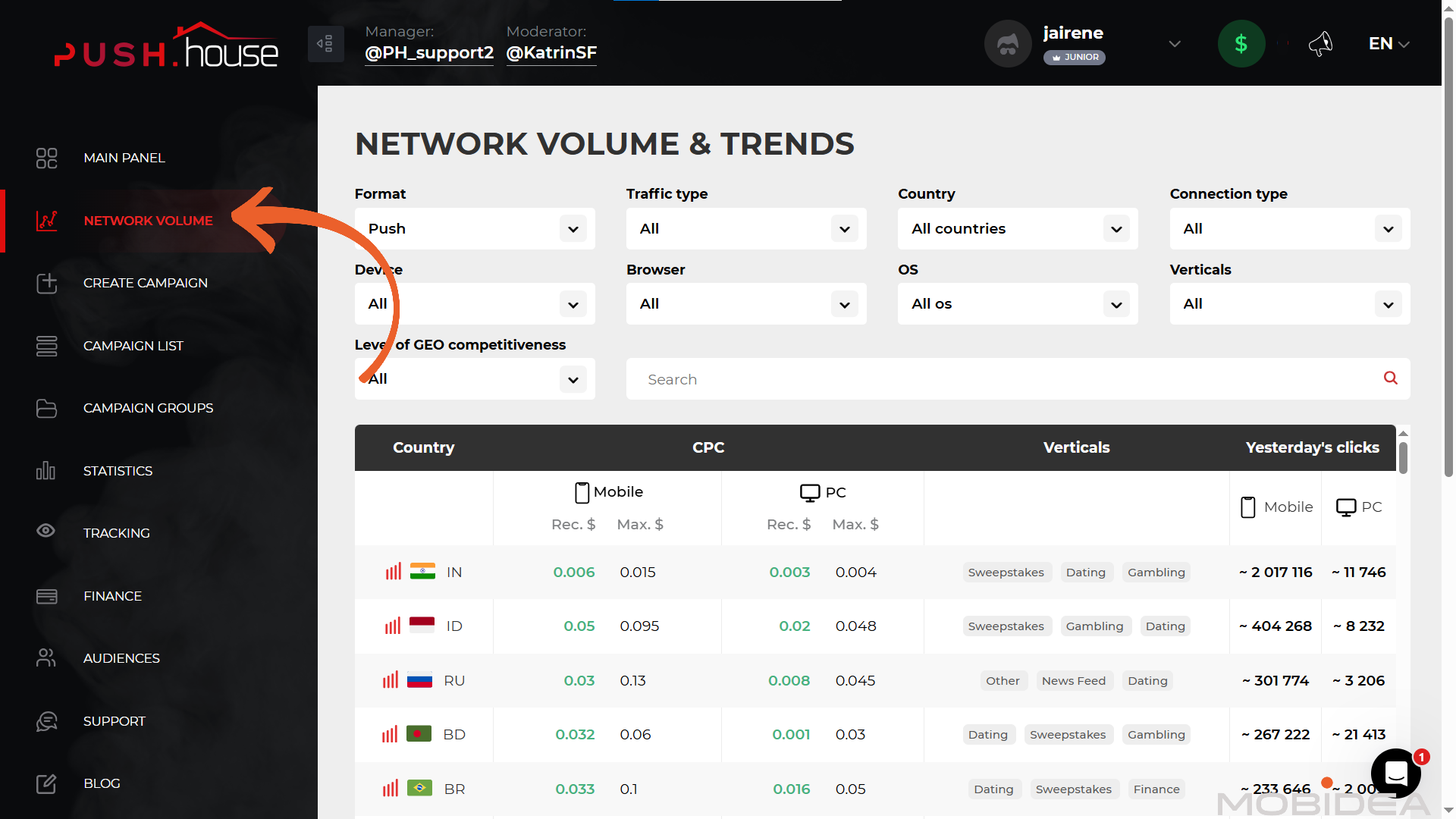
The amount of traffic shown here includes both in-house traffic and feeds combined. Not only that, but it also shows the recommended and highest bids per country per device.
This is a great starting point for when you are about to create a campaign in Push House.
Campaign List and Campaign Groups
This is where you’ll find a list of campaigns you’ve created.
It will also display stats columns which you can edit.
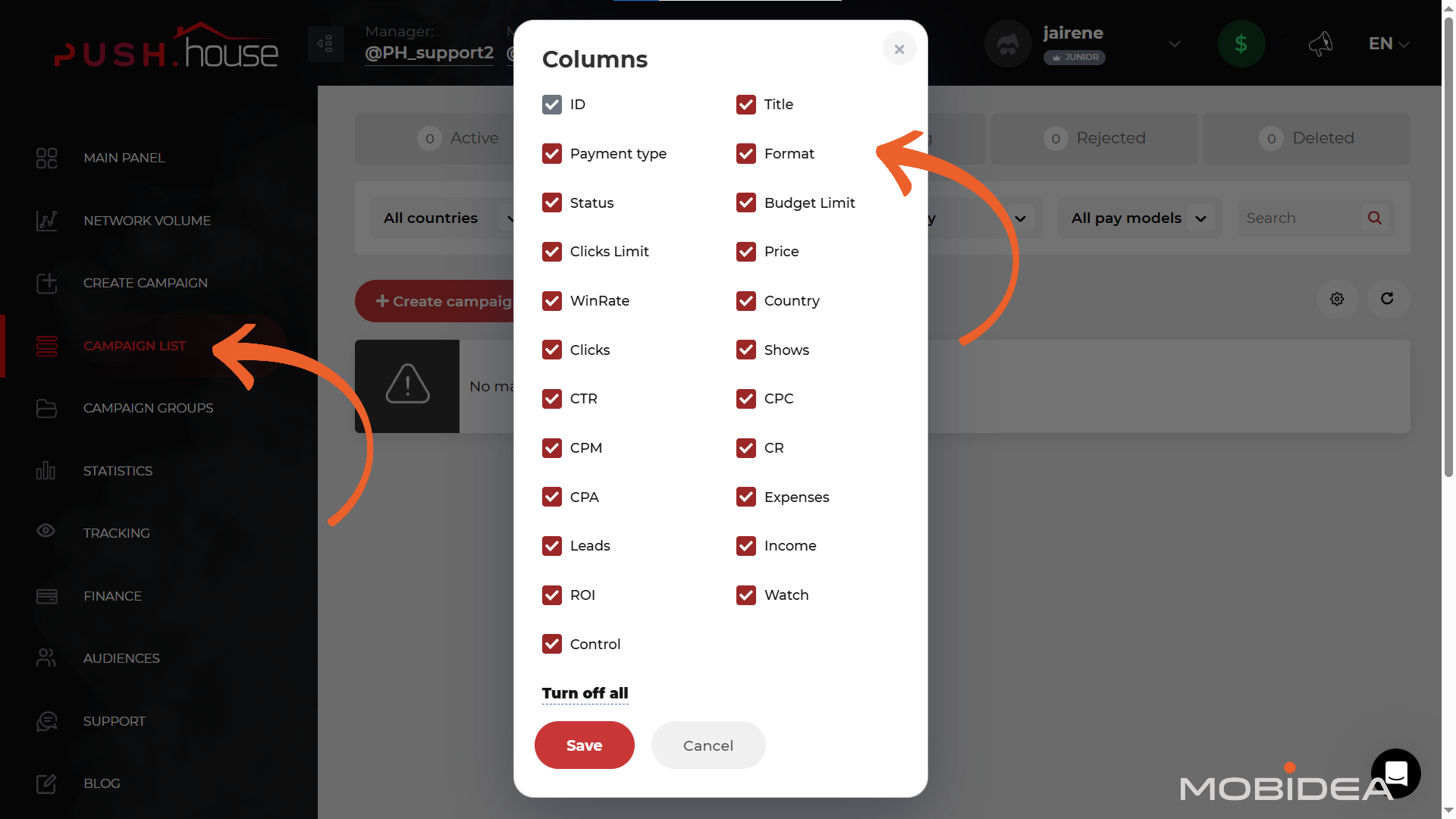
The Campaign Groups, on the other hand, is where you can create categories or folders for your campaigns for easy reference and monitoring.
Statistics
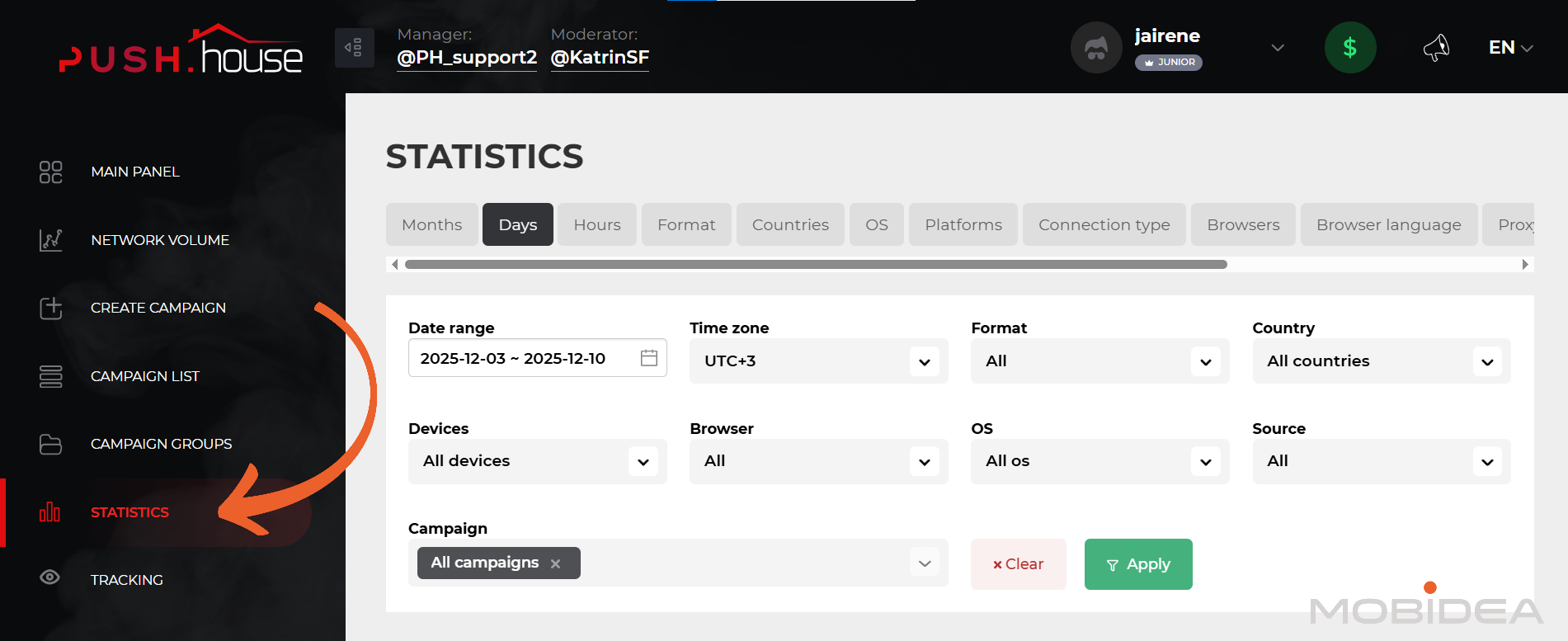
This is the reports page where you can view the performance of your Push House campaigns.
At the top is the sorting element. It’s anything you choose to sort the reports by: Months, Days, Hours, Format, Countries, OS, Platforms, Connection Type, Browsers, Browser Language, Proxy, Campaigns, SID, Feeds, or Devices.
You can also filter reports based on:
- date range
- format
- country
- operating system
- devices
- browser
- campaign
- source (push house direct or feeds)
Tracking
Push House can easily integrate with any of the top tracking systems out there through S2S tracking.
Just select the tracker you are using, copy the postback link, and add it to your tracker. Of course, a custom option is also available.

If you want to test if conversions are really monitored by your tracker and fired to Push House, you can use this page to test conversions.
Finance
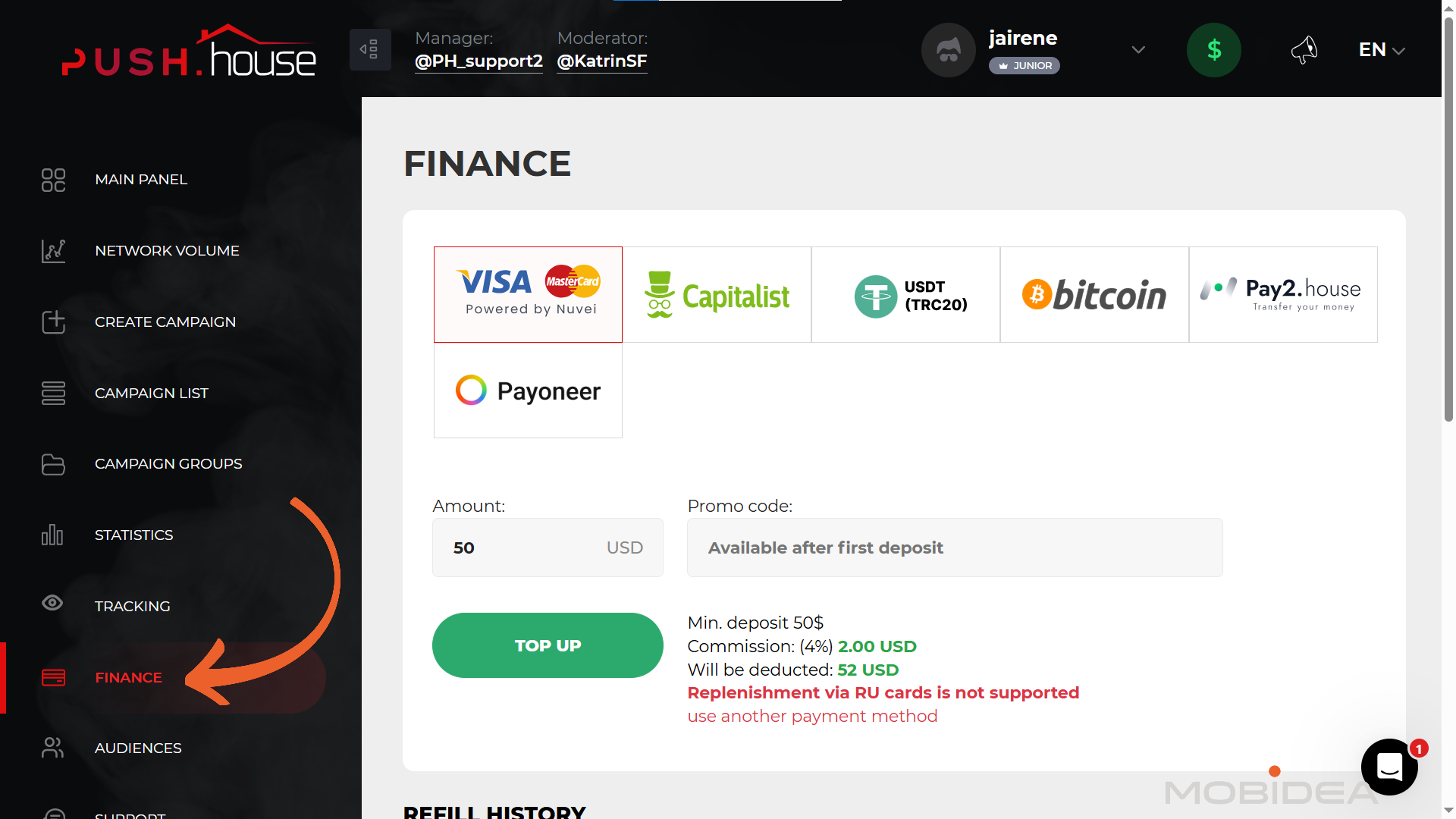
Adding funds is easy-peasy-lemon-squeezy.
Just head over to the finance tab in the menu, and choose from any of the following options:
- credit cards
- Capitalist
- USDT
- Bitcoin
- Pay2House
- Payoneer
Push House has one of the lowest minimum deposits in the industry, which is $50.
Don’t forget to use Mobidea’s unique promo code MOBIDEA15 to get a 15% bonus on your first deposit.
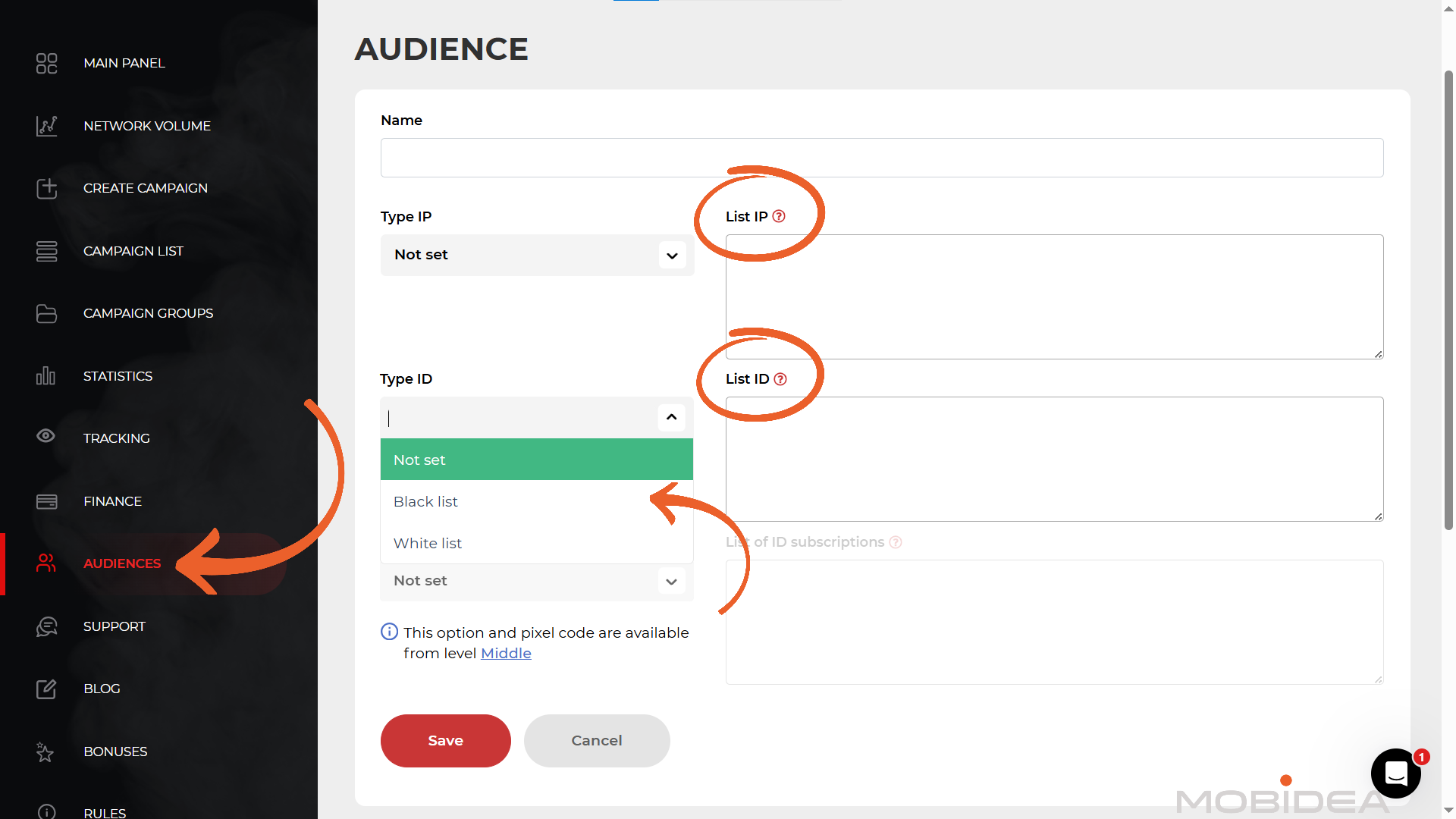
Audience
This section is where you can create whitelists or blacklists for repeat use in your campaigns.
To be able to create this, you would need either the IP range or the subscription ID.
With the former, you just need IP data; for the latter, you would first need to run a campaign in Push House to identify subscription IDs you want to add to the list.
Other Subsections
The other sections in the dashboard of this push ad network are Support, Blog, Bonuses, Rules, and FAQ.
For assistance, you can reach out to your manager, whose Telegram chat link is shown right at the top of your dashboard.
If you don’t have an account manager by default yet, you can always chat with the support team through the live chat.
What I like is that the live chat is not a chatbot (which a lot of advertising networks use nowadays), so you can actually speak to a live person.
To top it off, they respond within minutes! Based on my experience, someone replied to my question within half an hour.
If you need guidance on setting up a campaign and other account-related stuff, you can talk to the support team or check out the FAQ section.
The Bonuses section shows a list of other tools necessary to help you succeed with affiliate marketing, including trackers and spy tools, complete with promo codes.
Creating a Campaign
Now that we’re familiar with navigating other parts of Push House’s dashboard, let’s get down to creating a campaign.
Click on Create Campaign in the menu. The process is quite straightforward.
Add a recognizable name and choose the traffic type (Mainstream or Adult).
Select the Category (required). Your choices for the category include:
- Dating
- Finance
- Nutra
- Antivirus
- Sweepstakes
- Betting
- Gambling
- Crypto
- Apps
- Newsfeed
- Mobile Subscription
- Push Subscription
- E-commerce
- Adult
- Other
Next, choose the ad format. The ad formats available are Push Notification, In-Page Push Notification, and Onclick.
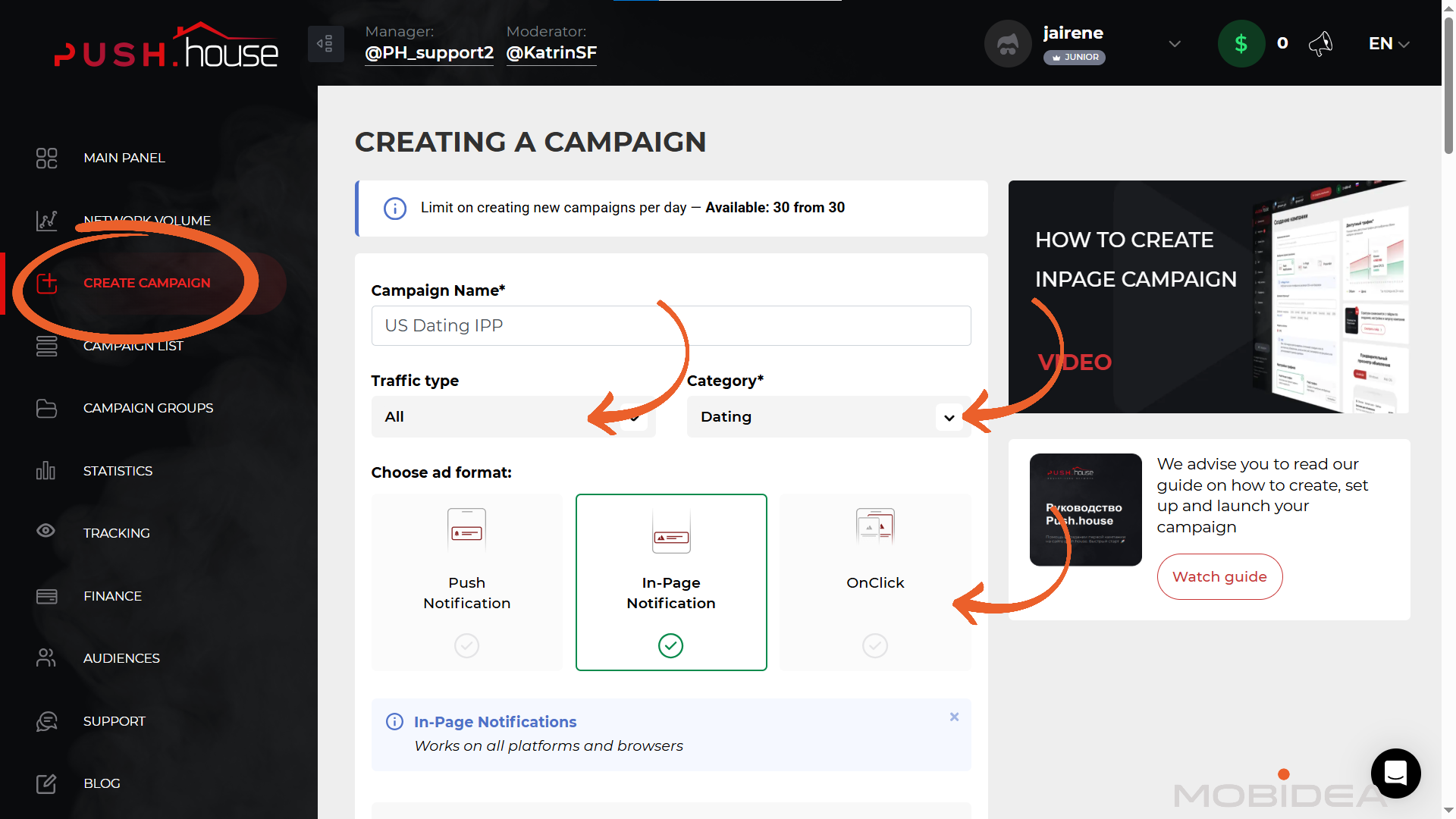
Underneath is the option to turn on Multiformat campaign.
Next is the target URL field, which is what opens up when a user clicks on your ad.
When adding your target page (target URL), you can use any of the indicated macros to track your campaign properly.
Though if you’re using a tracker with Push House ad network template, then you won’t have to change anything, maybe just double check.
No tracker yet? Choose from any of our recommended trackers.
Choose your pay model next, whether CPC or CPA Goal.
The CPA Goal is where the platform’s algorithm takes care of the bids, adjusting them in real time based on performance.
Note: The CPA Goal is still in Beta, which means it’s not yet perfect. Make sure to check your CPA Goal campaign from time to time. Also, it’s not available for Onclick ads.
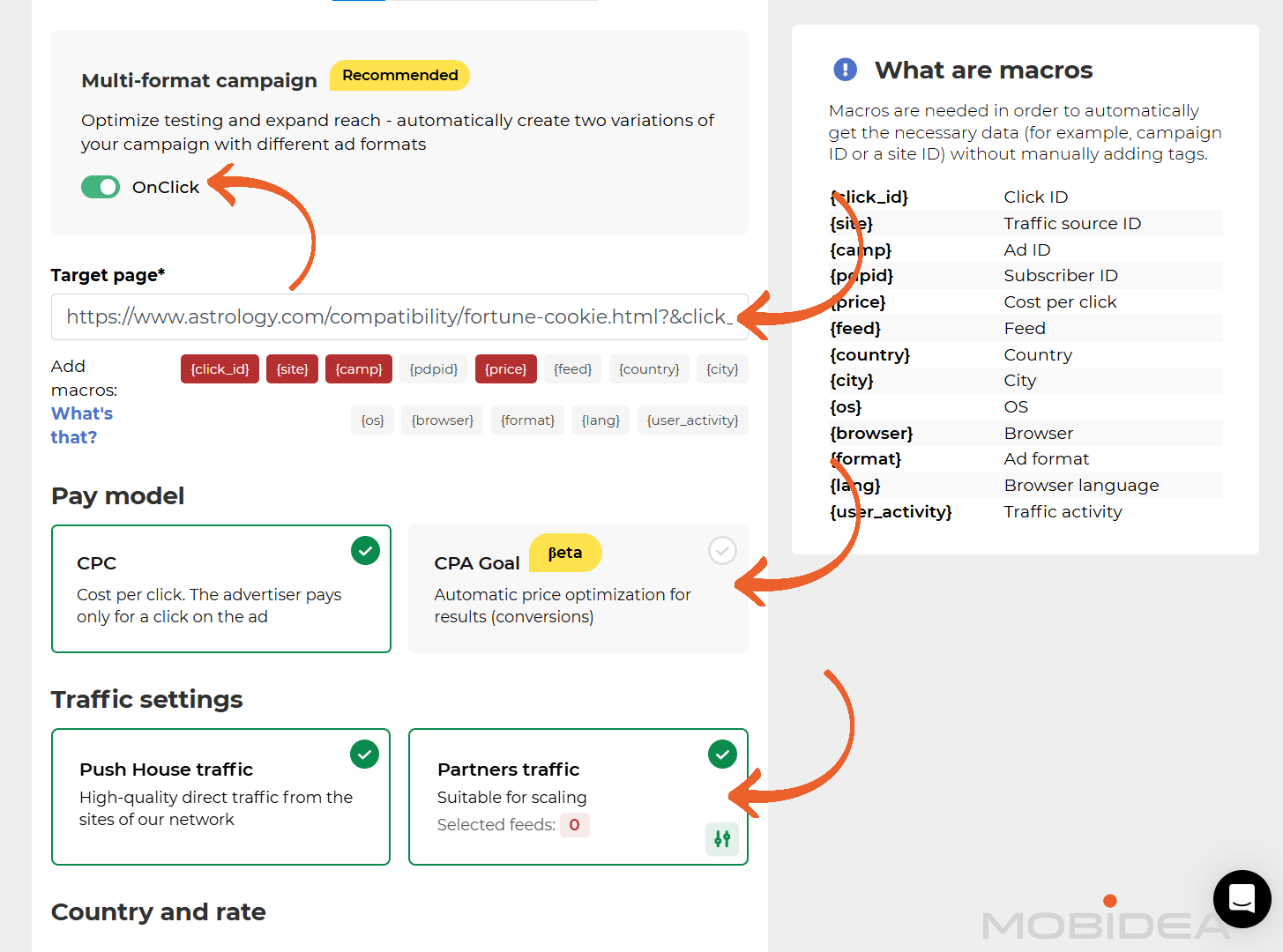
Don’t forget the Traffic Settings. You can choose traffic purely from Push House, or traffic from external sources (Partners Traffic).
If you choose the latter, you’ll have the option to select specific feeds and assign individual CPC rates for each. If you’re running feeds traffic for the first time, best to unify the CPC and adjust (or turn off) based on performance.
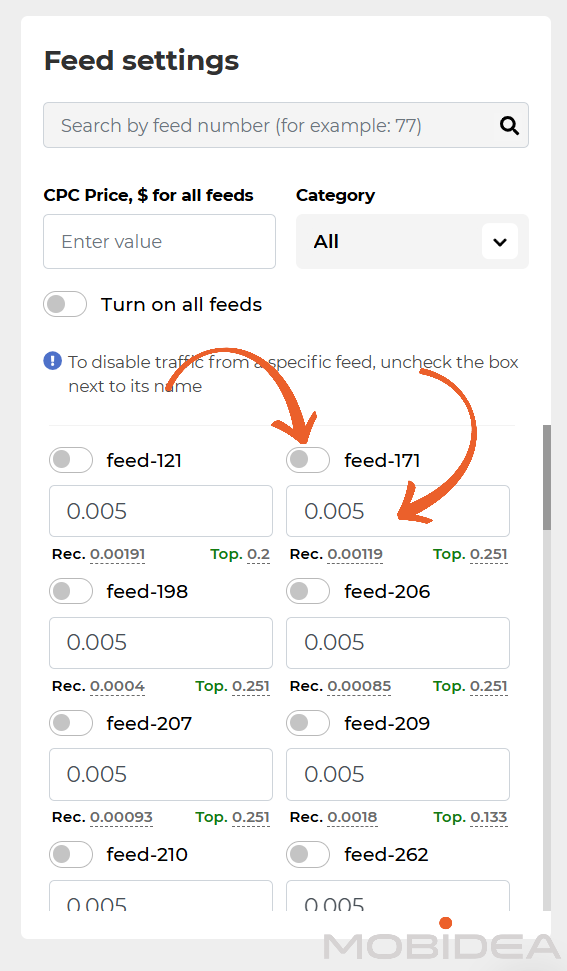
If you want just high-quality traffic, we suggest working with Push House’s traffic alone and then scaling with Feeds later on.
The next step is to add the target country. Once you’ve chosen this, you can input your bid.
Underneath the CPC bidding field are the recommended bid and the highest bid of your competitors for your selected location.
Based on your chosen country, a graph of available traffic as well as an estimate of the traffic you will get based on the bid will be shown to you.
You can use this to think about the bid you want to place.
Narrow down to specific, if you like, though I only recommend doing this if you have enough data or the offer your are promoting requires it.
There’s also the Zone Test Limit that allows you to place a maximum cost per zone. This helps avoid overspending per zone while you still have not seen the performance of the campaign.
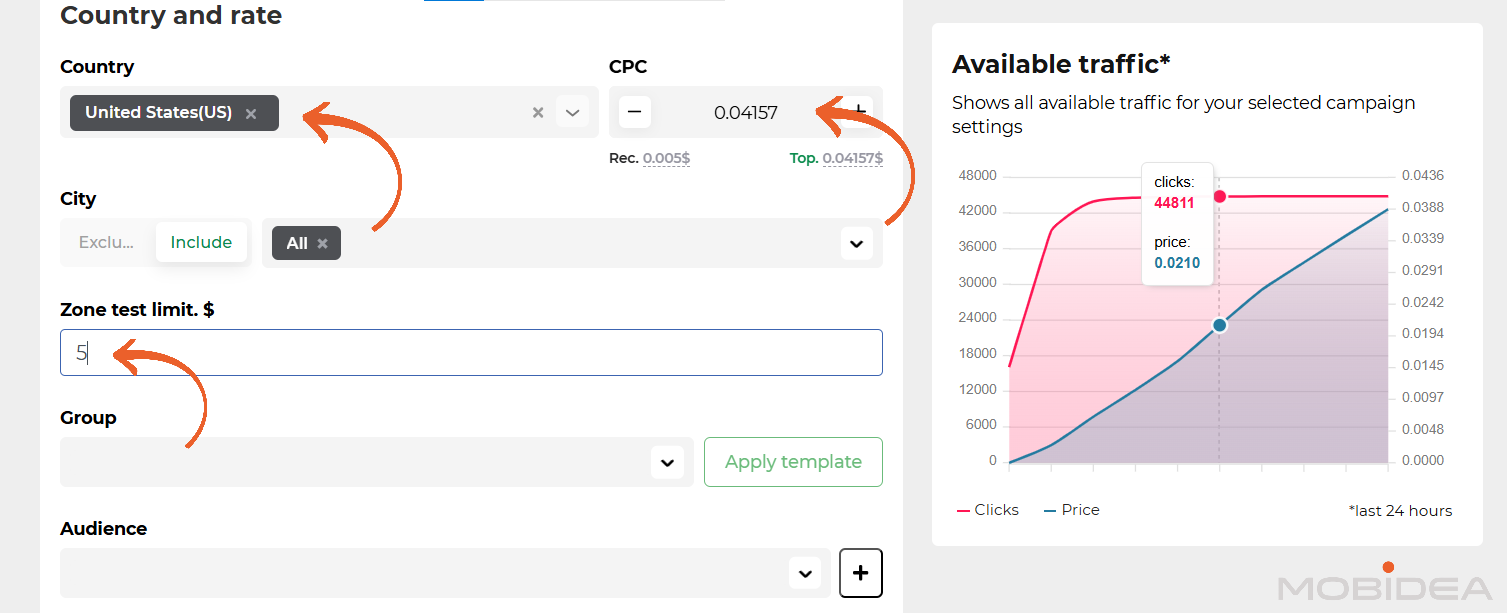
There’s also some optional settings such as Group, Group template, and Audience.
Next is the targeting settings.
You can go ahead and complete your settings for the following:
- Device (desktop or mobile)
- Subscription age (how long since users subscribed; only available for Push Notification Ads)
- OS
- Browser
- Browser language
- Proxy (All, No Proxy, Proxy)
- Connection Type (All, 3G/LTE, WI-FI/Broadband)
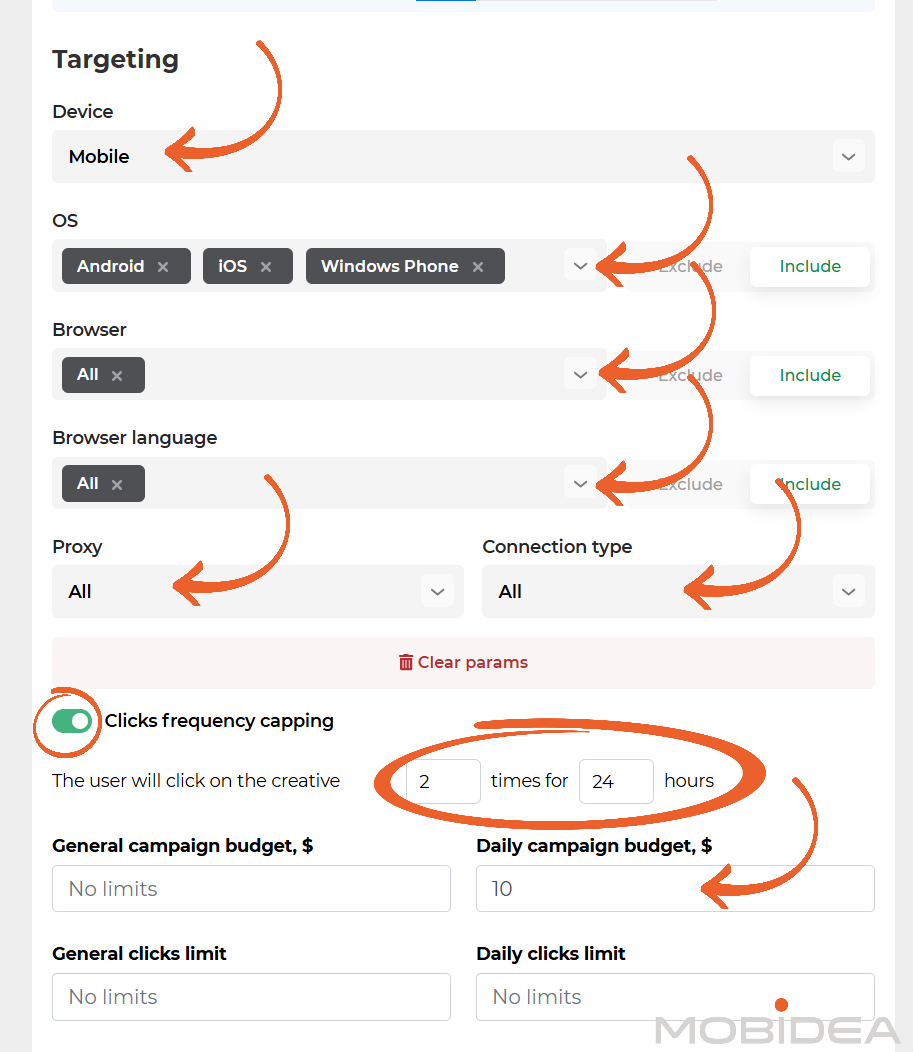
There’s also the option to limit click frequency. I recommend turning it on.
My usual settings for click frequency capping is 2 to 3 clicks per 24 hours, but it’s up to you to set it up how you want it.
Next is the finance part, where you indicate the total campaign budget (if any) or daily budget (of at least $10). If you want to limit the clicks, you can also do that.
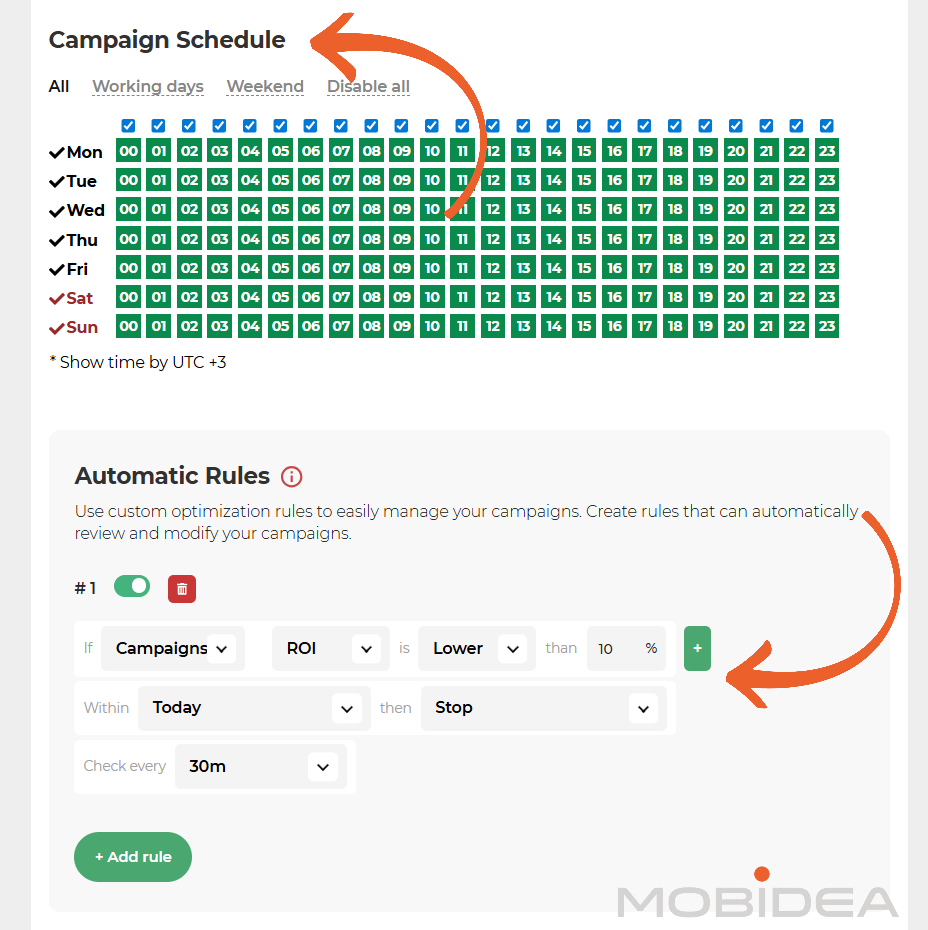
Then there’s dayparting, which can be done on this page, too.
My favorite part is the Automatic Rules, which helps you manage your campaign without having to monitor it every minute or every day.
It works by evaluating the status of the campaign, source, or feed based on its ROI, leads, income, conversion rate, and so on.
Now once this is done, you can start creating your ad. This is one of the best things about Push House, as you have more options for how your ad looks.
We’re setting up an in-page push campaign right now, and I’m quite happy with their in-page push templates.
These templates let advertisers style their in-page ads to look like messages from popular operating systems, social networks, and messaging apps.
This feature helps ads blend in naturally with platforms users already trust, which can increase engagement and click-through rates.
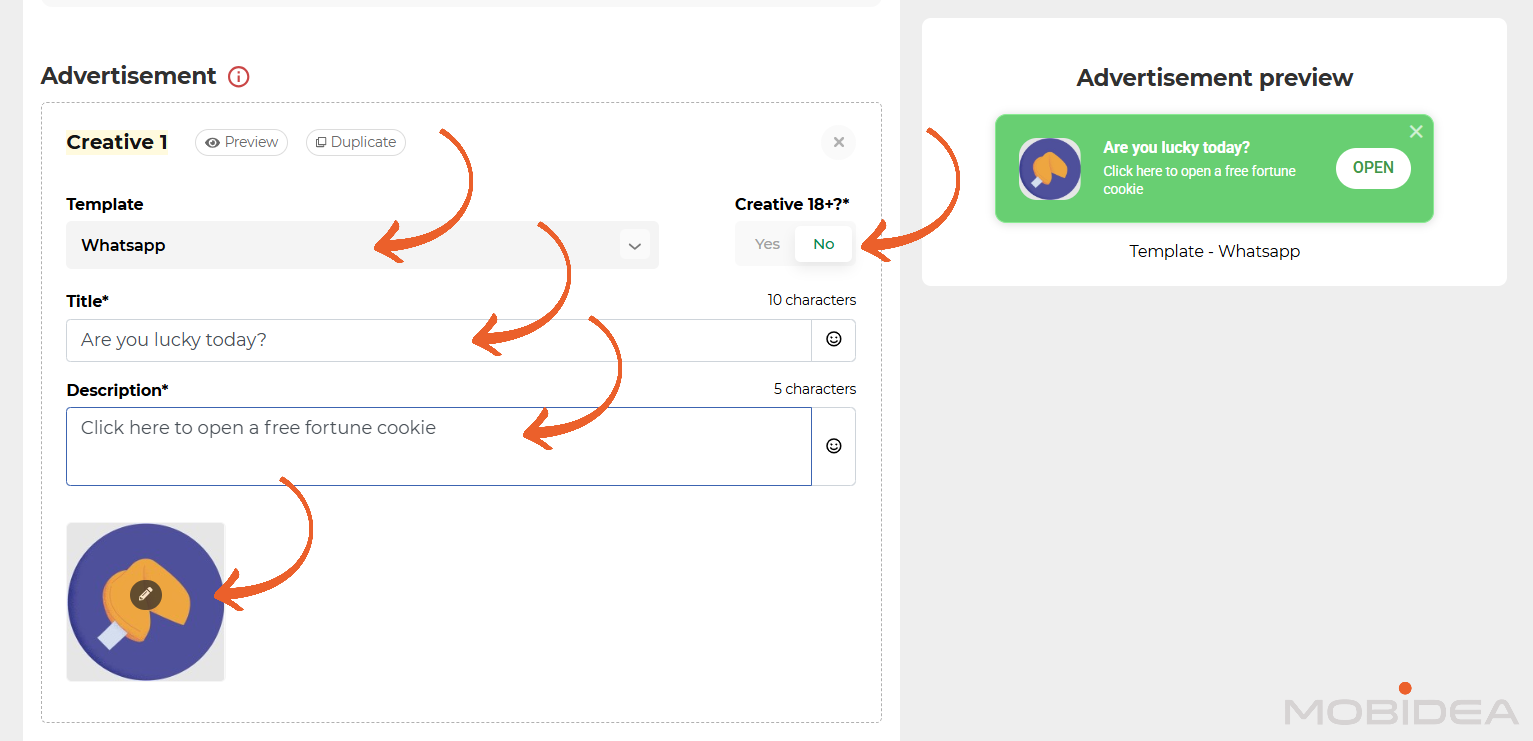
Here’s one example, using Whatsapp template:
Templates come in various forms, including:
- OS (Mac, Windows, Android, etc.)
- Custom (black, white, pink, etc.)
- Social (Facebook, Instagram, Whatsapp, etc.)
- Classic (Small, dialogue, etc.)
- Alert icons (basic bubble, text pulse, dynamic message, etc.)
- Custom widgets (flat style, retro, etc.)
Here’s another example, utilizing Alert Icons >> Text Pulse >> Spin Animation.
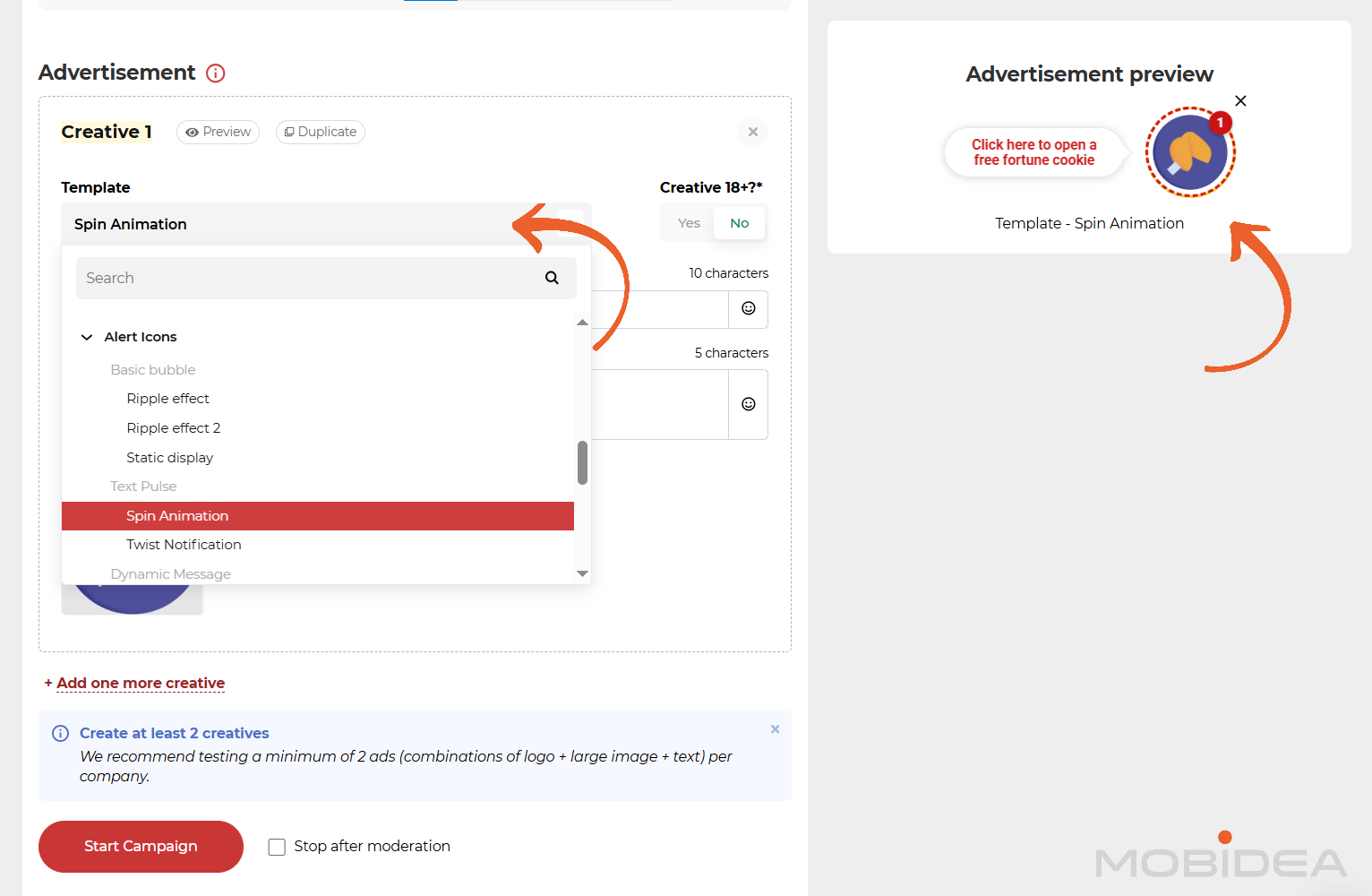
Another unique feature is being able to identify whether the ad is meant for audiences 18+ or not. This not only filters out unnecessary audiences but also makes sure your ad remains compliant.
Push notification advertisements have unique features as well.
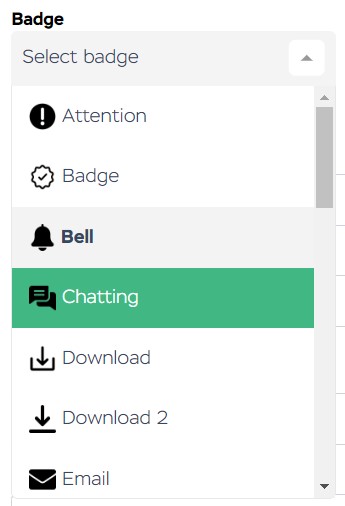
First among the unique features is the badge, which is an icon that appears at the very top of the notification (together with the browser name and the publisher site’s domain name).

Your options for badges include Attention, Bell, Badge, Chatting, and more.
Next is the option to add text to your buttons. If you enable this, you must add labels to two buttons, each with a maximum of 10 characters.

For both classic push and in-page push, don’t forget to add the title, description, and the standard two types of images.
And you’re done!
You can upload multiple creatives at a time—up to 10, in fact.
You can now submit the campaign and wait for moderation, which typically takes about 20 to 50 minutes, though it can take up to a whole day.
Push.House Pros and Cons for Advertisers
Before committing budget to any traffic source, understanding both strengths and limitations helps make informed decisions.
Here’s an honest assessment of what Push.House offers advertisers based on platform features and real user experiences.
Pros
- High-Quality In-House Traffic: Direct publisher traffic performs consistently well with genuine user engagement, not inflated by bots or low-quality sources.
- Large Traffic Volume: Over 14 billion daily impressions across 180+ countries, combining both direct publishers and feed sources for extensive reach.
- Three Ad Formats Available: Classic Push, In-Page Push, and OnClick formats provide options for different campaign goals and user engagement styles.
- Advanced Automation Tools: Auto Rules, Templates, and Multi-format campaigns reduce manual work and speed up testing and optimization processes.
- CPAGoal Payment Model: Set target cost per action and let the algorithm automatically optimize for conversions on Push and In-Page formats.
- Low Entry Barrier: Minimum deposit of just $50 makes testing affordable for advertisers at any budget level.
- Partner Level Rewards: Higher spending unlocks whitelists, credit terms, better rates, and priority support as campaigns scale.
- Adult Content Accepted: All three formats now allow 18+ creatives, opening opportunities for dating, adult, and related verticals.
Cons
- Manual Blacklisting Required: Sources cannot be paused directly from the statistics page, IDs must be copied and manually added to blacklists for exclusion.
- Network Volume Display Limitations: The page shows previous day’s clicks rather than total available impressions, making traffic estimation less straightforward for countries with fewer active campaigns.
- Feed Traffic Minimums: Accessing feed sources requires at least $70 account balance, or $200 for India traffic specifically.
- Potential Bot Traffic: While the network has anti-fraud measures, some bot traffic can still pass through, making it essential to use separate tracking tools and monitor for unusual patterns or low-quality sources that need blocking.
- Feed Traffic Quality Varies: Traffic from external feed sources may not match the quality of Push.House’s direct publishers, so starting with in-house traffic and gradually testing feeds is the safer approach.
How to Earn Money as a Publisher with Push.House
While Push House does not accept publishers, you can still sell them your traffic (or more appropriately, user subscriptions to your website), by signing up with Partners House, Push House’s publishing arm.
We will not be discussing how to use this platform in this Push House review though.
Push.House Verdict
Should you work with Push.House? You definitely should.
Push House is one of the first push ad networks out there, and with their knowledge of this ad format comes better features, better quality, and more push traffic volume.
And don’t forget—Mobidea’s unique promo code MOBIDEA15 gets you a 15% bonus on your first deposit, so sign up today!


It's finally time for you to read, analyze, explore and dive into this updated Clickadu Review in order to become a dope affiliate master!

This PopCash Review will allow you to learn how to setup a campaign on PopCash like a true media buying master professional!

Read our in-depth SpyOver review, one of the great native spy tools in the market.