
OnClickA At A Glance
OnClickA combines global reach and high-tech solutions to power a strong ad network for advertisers and publishers. The platform covers 240 GEOs and offers high-quality traffic sources, advanced targeting, and smart tools for effective campaign management. The platform stands out for its strong performance in iGaming while supporting a wide range of other niches.
From precise targeting and automation features like Smart Audience Retargeting and Dual Postbacks to innovative formats such as Telegram Mini App Ads, OnClickA provides all the tools and technologies modern advertisers need to keep up with the industry, meet their goals, and test new ideas.
Advertisers have a variety of ad formats to choose from, such as Popunder, In-Page, and Video Ads, among many others. For publishers, OnClickA opens access to global demand and diverse monetization options, ensuring steady revenue and transparent analytics. In short, it’s an all-in-one ecosystem that provides advertisers and publishers with everything needed for efficient campaign management and steady growth.
OnClickA: Offers & Verticals
OnClickA brings together a wide range of verticals and ad formats, giving advertisers and publishers the freedom to test, grow, and optimize campaigns.
The platform has a particularly strong presence in iGaming, supported by specialized traffic sources and ad formats that meet the needs of this industry. At the same time, OnClickA performs effectively across dating, utilities, sweepstakes, finance, and other verticals, making it a modern, technology-driven choice for advertisers who value reach, control, and consistent performance across markets.
OnClickA: Payment & Investment
Cost Model: CPC, CPC Goal, CPM
Minimum Deposit: $45*
Payment Methods:
- Credit / Debit Cards (Visa, Mastercard, GPay, Apple Pay, Giropay, Alipay, Bancontact, iDeal, Przelewy24) — funds appear within about 5 minutes.
- Capitalist — funds arrive within 15 minutes.
- Cryptomus — supports crypto payments (TON, USDT, ETH), funds appear immediately after confirmation.
- Coinbase — accepts USDT, ETH, USDC, BTC, LTC, DAI, DOGE, SHIB; balance updates within about 1 hour.
- Bank Transfer — takes up to 3 business days to process.
- UPI (PhonePe, Paytm) — funds appear within about 5 minutes.
*While the minimum deposit is $45, starting with around $300 is generally recommended to ensure enough data for testing, optimization, and scaling campaigns effectively.
OnClickA Best Features
OnClickA gives advertisers the freedom to shape their campaigns exactly the way they want.
Advertisers can fine-tune their targeting using a wide range of parameters — languages, browsers, operating systems, IP types, carriers, and connection types — which allows for precise audience segmentation across any GEO. The platform also supports whitelist and blacklist management, giving users full control over where their ads appear.
OnClickA constantly expands its toolkit, adding new solutions to help advertisers run smarter and more efficient campaigns. Among its standout features are several tools that simplify optimization and boost performance across different verticals. Some of these include:
- Smart Retargeting helps re-engage users who have already converted or interacted with your ads, turning existing audiences into long-term value.
- Dual Postbacks tracks multiple events within a conversion funnel, giving deeper insights and allowing more precise optimization for better ROI.
- Advanced Anti-Fraud system provides layered, adaptive protection that automatically adjusts to different verticals and campaign types, maintaining consistent traffic quality.
- Real-Time Detailed Statistics give advertisers full visibility into performance data as it happens. You can instantly see which sources, creatives, or GEOs bring the best results, compare metrics in detail, and make timely decisions that keep campaigns performing at their peak.
- Microbidding gives you the flexibility to control bids per site, helping you spend smarter and get the most value from every impression.
- Automation tools take over routine tasks, from bid adjustments to budget distribution, letting advertisers focus on strategy instead of micromanagement. With flexible automation settings, campaigns stay optimized and efficient around the clock.
Diverse Ad Formats
OnClickA offers a wide variety of ad formats to cater to different needs and campaign goals. Here’s an overview of the available ad formats:
1. Popunder Ads
Impressions: over 10M daily
Popunders remain one of the strongest conversion formats. They open a full landing page behind the active browser window, generating lots of traffic and visibility. Ideal for campaigns that need reach and fast user reactions.
2. In-Page Ads
Impressions: over 2B daily
In-Page looks like a classic notification but appears directly on a webpage, working across all browsers and devices without subscriptions. The format attracts strong user attention and delivers consistent volumes, making it a solid choice for performance-oriented campaigns.
3. Video Ads
Impressions: over 50M daily
Video ads deliver strong engagement and storytelling potential. Available as In-Stream, Out-Stream, and Slider, they help brands capture attention and convert through visuals — especially effective in entertainment, iGaming, and mobile offers.
4. Telegram Mini App Ads (TMA)
TMA is a fairly new and fast-growing format inside the Telegram ecosystem. It allows advertisers to reach users directly within Telegram Mini Apps, combining visibility with interactive engagement.
The format supports different ad types, including rewarded posts — short, engaging interactions that reward users for participation and deliver exceptionally high attention rates. This makes TMA ideal for gamified, crypto-friendly, and mobile-first campaigns, where engagement and retention are key.
The format supports several ad types, including:
- Rewarded Ads – users interact with ads or complete simple actions to receive in-app rewards, helping brands achieve higher engagement and attention rates
- Banner Ads – non-intrusive placements that blend seamlessly into Mini App interfaces and deliver consistent visibility
- Interstitial Ads – ads that appear between user actions or content views, effective for boosting engagement and conversions.
Other available OnClickA formats include:
- Push Notifications — classic opt-in pushes sent directly to users’ devices, great for re-engagement and time-sensitive offers.
- Banner Ads — visual placements of various sizes across desktop and mobile, ideal for awareness and retargeting.
- Native Teaser Ads — integrated seamlessly into site content for smoother user experience and higher trust.
- Direct Link — a simple, flexible format that sends users straight to a landing page without additional creatives.
Together, these formats give advertisers flexibility to choose the right combination for any campaign objective, from reach and awareness to conversion and retention. As for publishers, OnClickA supports monetization across multiple formats, including TMA, allowing them to choose what best fits their traffic and audience.
Extra Platform Capabilities Worth Highlighting
Auto-Adjust Price
OnClickA includes an automated bid adjustment feature that helps maintain competitive pricing without constant manual updates. When enabled, the system automatically recalculates bids every 24 hours to match recommended rates.
Campaign bids can also be adjusted manually for advertisers who prefer direct control. Increasing the bid above the recommended rate gives you an advantage, helps secure more placements, and ensures broader reach early in the campaign.
In-House Anti-Fraud System
OnClickA uses its own in-house anti-fraud system that constantly evolves to keep traffic quality high. The system adapts to new traffic patterns and automatically fine-tunes protection settings to ensure campaigns run smoothly across all verticals.
It was recently updated with additional layers of behavioral analysis and adaptive algorithms that help improve performance and consistency even more. Alongside internal monitoring, OnClickA also runs external traffic quality assessments.
Straightforward and Multilingual Interface
OnClickA prides itself on offering an intuitive and straightforward interface, ensuring that users can navigate and manage their campaigns with ease. Even those new to affiliate marketing can quickly understand and work with the platform’s features thanks to its user-friendly design.
OnClickA’s interface supports multiple languages, including English, Japanese, Spanish, and German, enhancing accessibility for global media buyers.
Ad Spot Blacklisting
Ad spot blacklisting and whitelisting let you decide exactly where your budget goes, helping your OnClickA campaigns become more focused and profitable. This feature gives you precise control over ad placements, maximizing the efficiency of your advertising spend.
API Availability
OnClickA‘s API offers significant benefits for large-scale media buyers. It makes managing campaigns and automation easy. Here’s why:
- Streamlined Campaign Management: Easily manage campaigns, ad groups, and keywords. Set up billing systems.
- Enhanced Customer Insights: Get deep insights into customer behavior. Make your campaigns more personal and data-driven.
- Real-Time Monitoring: Monitor and report with real-time data, enabling quick campaign adjustments.
VAST Link Support
OnClickA also supports VAST links, allowing advertisers to run video ads directly through their own ad servers or trackers. With a VAST link, OnClickA’s system can automatically load and display video creatives to users, ensuring smooth and consistent delivery across different placements.
This feature is especially convenient for advertisers who already use third-party tracking tools or want to streamline video ad management without manual setup. It’s a simple and efficient way to expand your campaigns with engaging video formats.
Referral Program
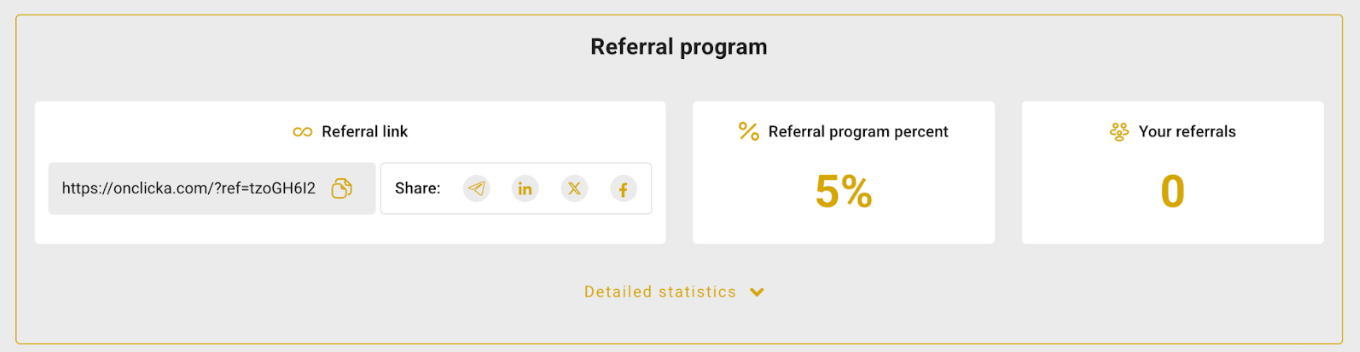
OnClickA’s referral program is simple to join and offers a generous 5% commission on the revenue generated by the advertisers you refer. You also receive referral reports for transparency.
How to Start Advertising with OnClickA
Signing up with OnClickA is straightforward and hassle-free, designed to get you started as quickly as possible. There are minimal requirements to join the platform.
All you need to provide are basic information and your contact details. Once you’ve filled in the necessary fields, confirm your email address, and you are all set to start your advertising journey.
Getting Familiar with the Dashboard
After logging in, the platform provides a quick overview of the main steps to get started. The dashboard is clean and intuitive, with clearly labeled sections that make it easy to find and access all key features and tools.
Setting up tracking
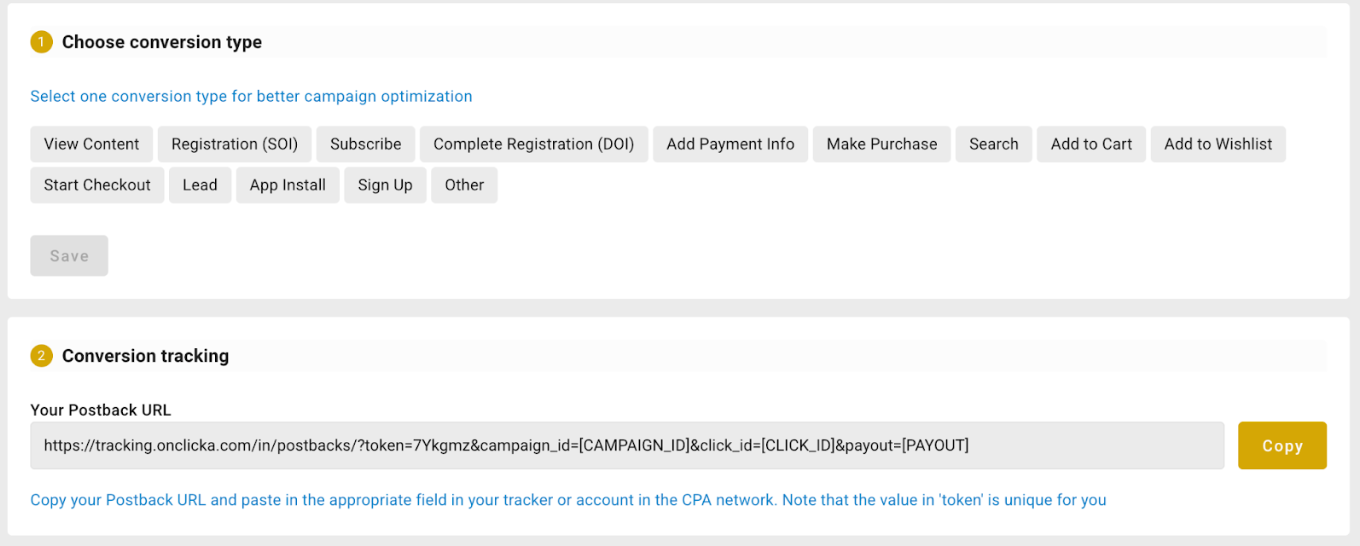
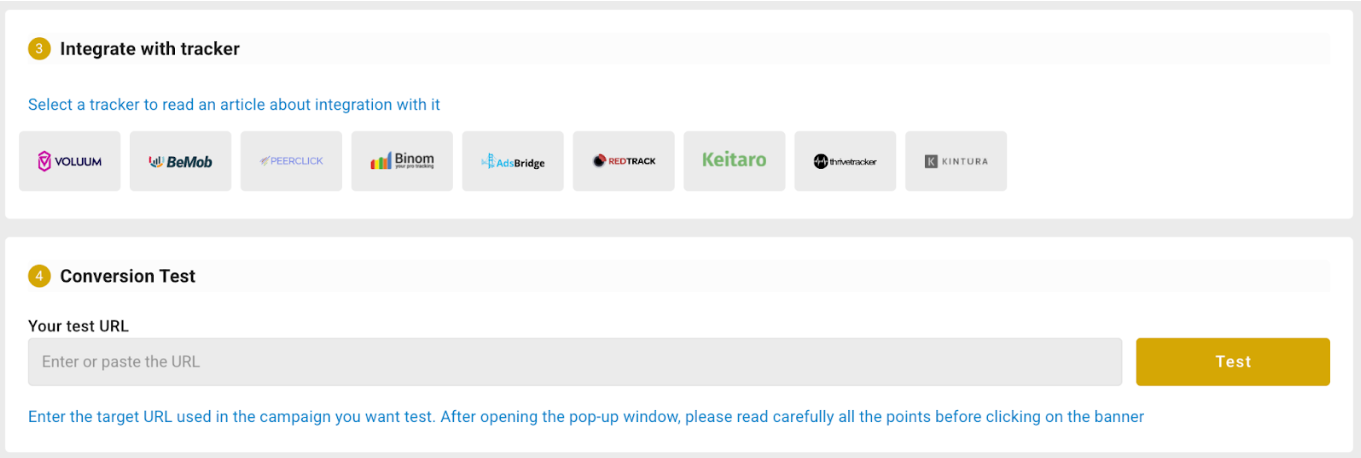
Accurate tracking is essential for understanding campaign performance, and OnClickA makes it easy to set up. To send conversions back to the platform, simply go to the Tracking page and copy your Postback URL — it works with both third-party trackers and affiliate networks.
OnClickA also supports Dual Postbacks, allowing you to track multiple conversion events within the same funnel for more precise optimization and performance insights. The platform recognizes the importance of data accuracy and even rewards advertisers with a 5% cashback on campaign spend when postbacks are connected.
Creating a Campaign
After exploring the interface and becoming acquainted with the main sections, you can begin creating your first campaign.
1. Adding Funds
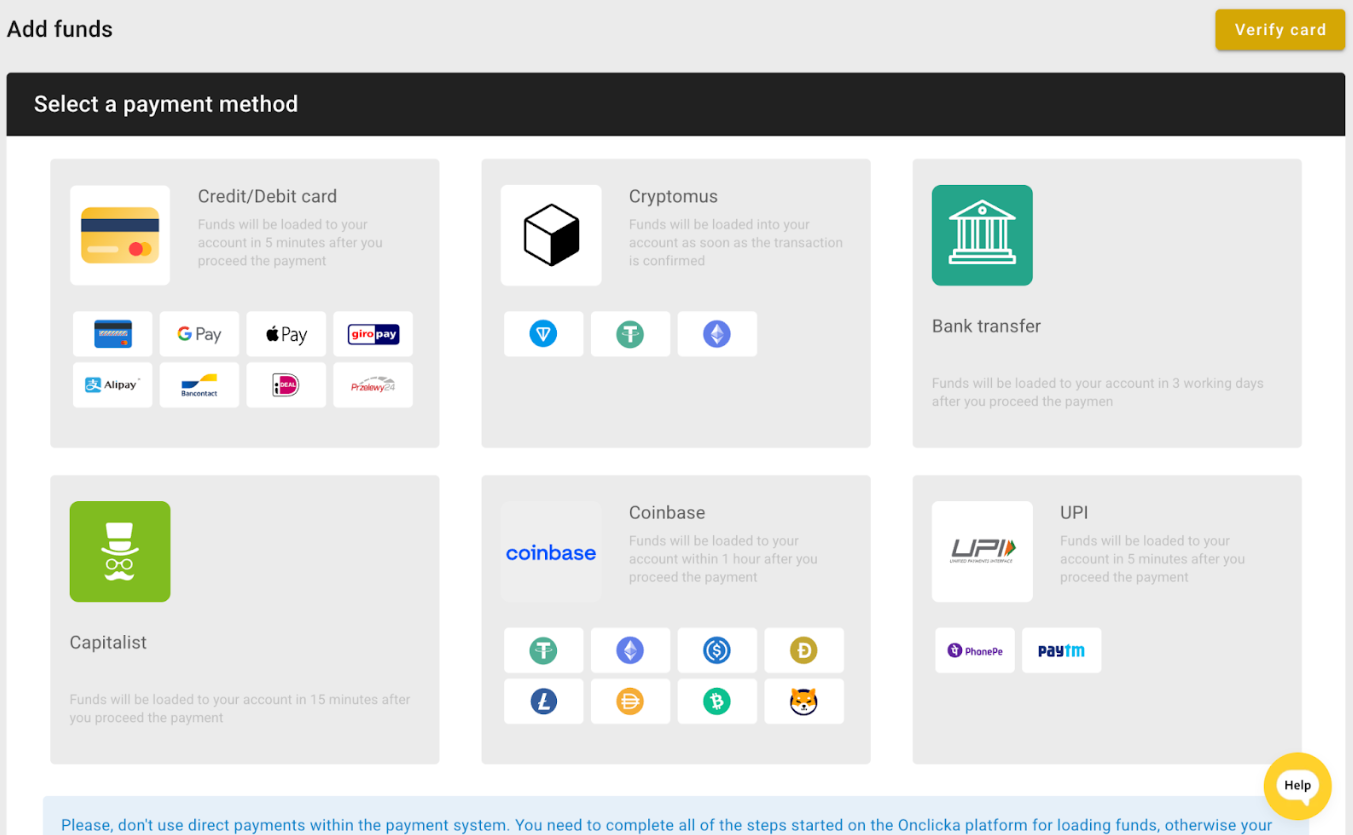
Before creating your campaign, go to the Add Funds section. Choose your preferred payment method and follow the prompts to top up your balance.
Note: We recommend starting with a deposit of $300 or more. This amount gives your campaigns enough data to optimize effectively, while smaller budgets may not offer enough to generate significant data.
For those trying OnClickA out for the first time, we have an exclusive promo code! Use the promo code MOBIDEAREV2025 to receive an additional $50 bonus on your first-time deposit of $75 or more. This is a fantastic opportunity to maximize your initial investment and see what OnClickA can do for your campaign.
2. Create a Campaign
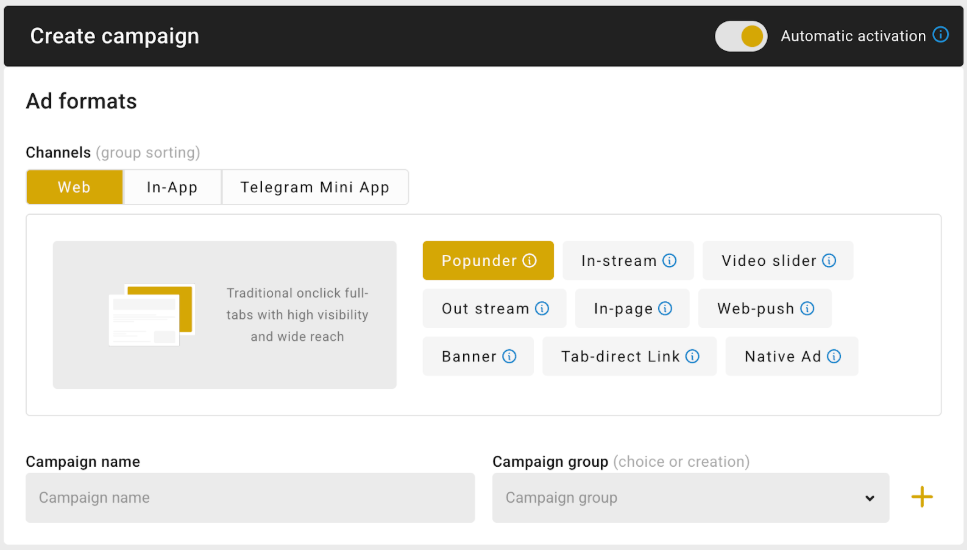
Click Create Campaign in the top panel to start.
You can enable Automatic activation at the top of the page if you want your campaign to launch automatically after approval.
The next step is to select where your campaign will run: choose between Web, TMA (Telegram Mini App), or In-App traffic. This determines which formats and targeting options will be available next.
After that, you can pick the specific ad format that fits your goal. OnClickA offers a wide selection, including Popunder, In-Stream Video, Video Slider, Out-Stream Video, and more. The choice will depend on your advertising goals and target audience.
As you set up your campaign, you’ll see an estimate of how many clicks you can expect based on your bid and selected filters. This changes based on the varying filters you choose as you go through the campaign creation process. For some new formats or Regarding traffic sources, please note that this data may be approximate; however, you can always reach out to your manager for more details.
Next, input the basic campaign details and assign it a name that will help you easily identify it later. Add it to a Campaign Group for easier search.
Pricing
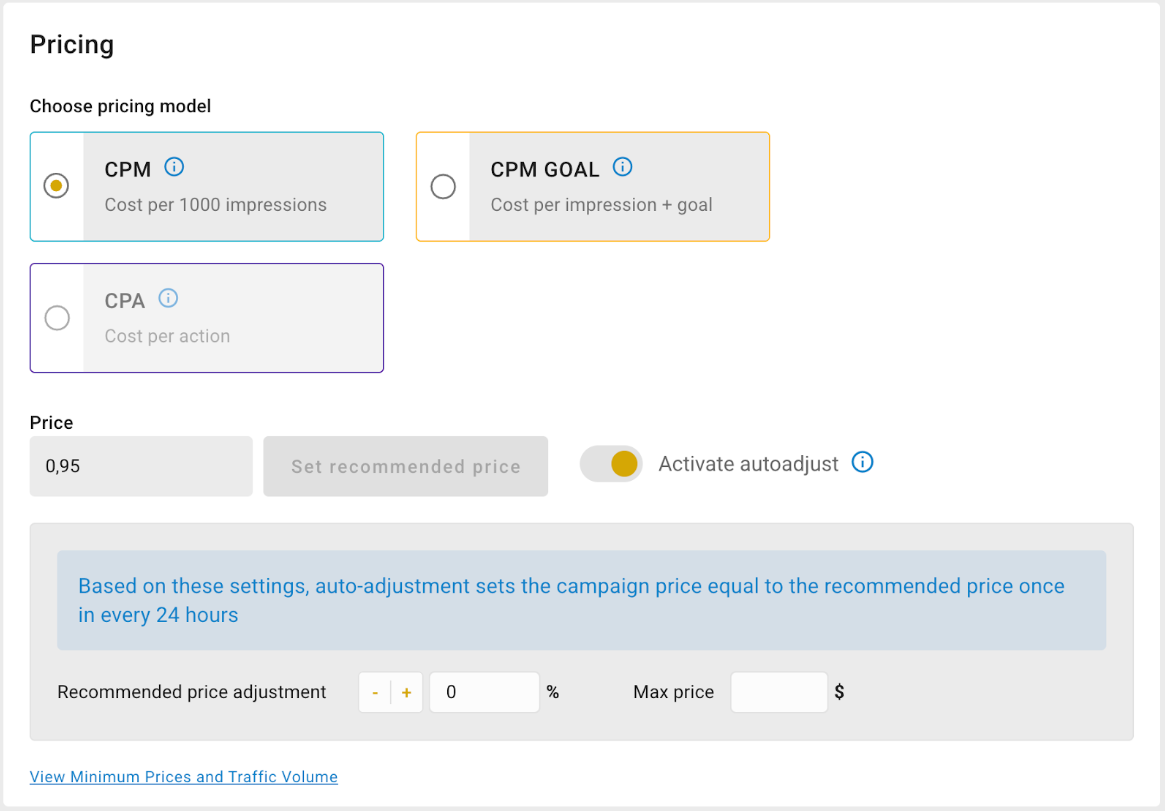
After this, you’ll move on to the Pricing section, where you can choose the pricing model.
You can enter your bid manually or use the recommended one. Increasing your bid slightly above the suggested rate will give you an advantage and help your campaign gain impressions faster.
If you enable auto-adjustment, the bid can automatically update once a day to stay close to the recommended price.
Ad Selection

If you’ve already created an ad, select it from the list. Otherwise, click Create new one to make it directly within the setup process.
Ad Category

Select your campaign category: Mainstream or Dating. You can leave it disabled if you want to receive traffic from all available sources. Keep in mind that OnClickA has especially strong volumes in iGaming and Dating, but the platform also performs well across other verticals.
Traffic Type
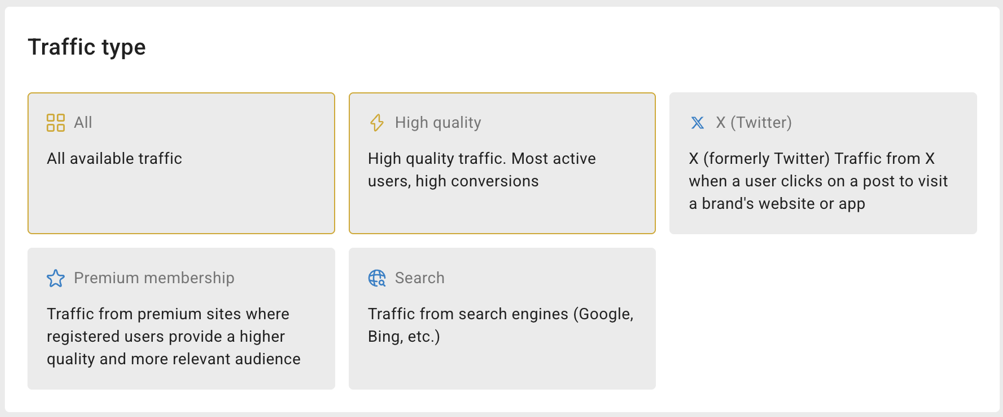
Choose the type of traffic you want:
- All (default)
- High Quality (active users, verified traffic)
- Premium membership (registered, high-quality traffic)
- Search (traffic from search engines)
Sources
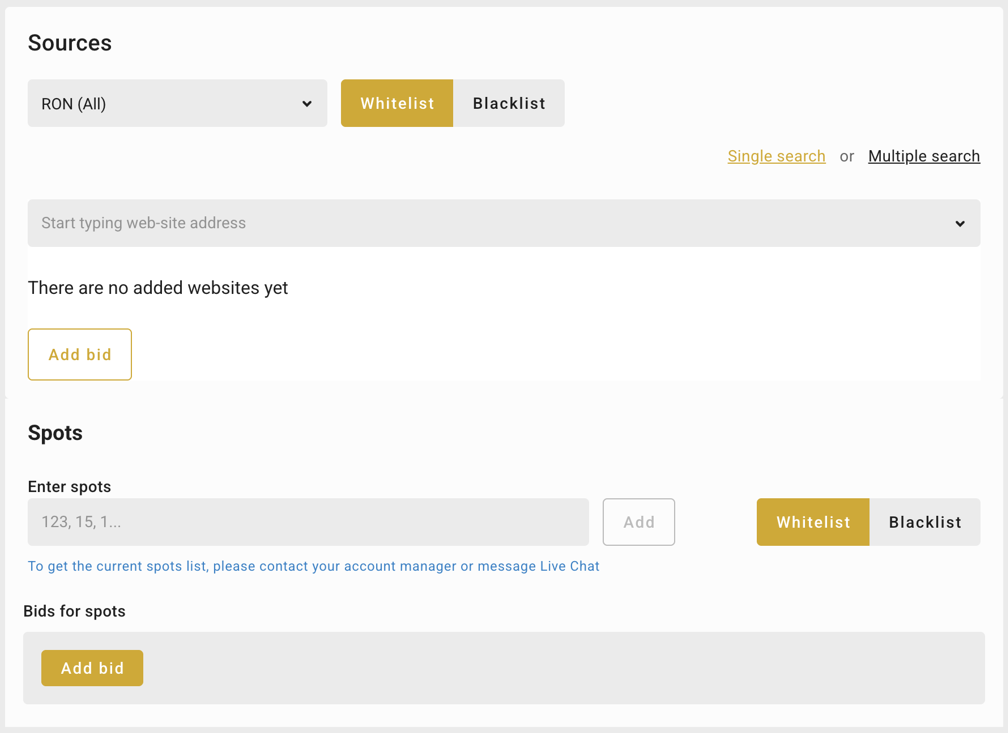
Next are your sources. Selecting RON (Run of Network) provides access to the full range of available traffic across the network. You can also select Premium only. Use Whitelist and Blacklist to manage traffic sources once you collect enough performance data. You can also apply manual website selection or add specific spot IDs.
Targeting Parameters
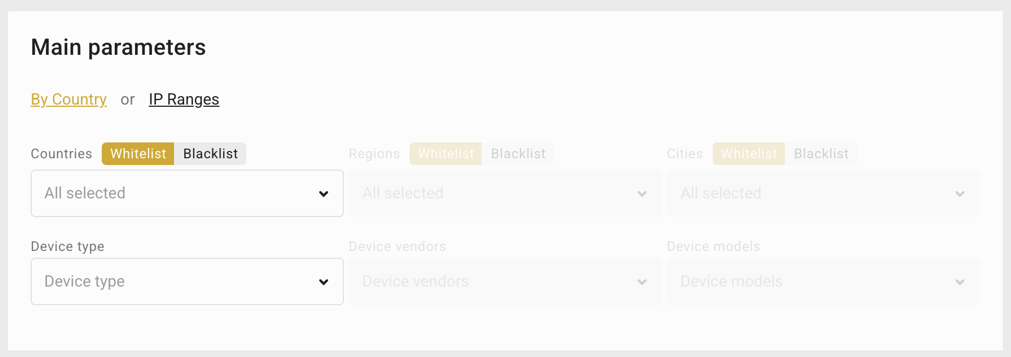
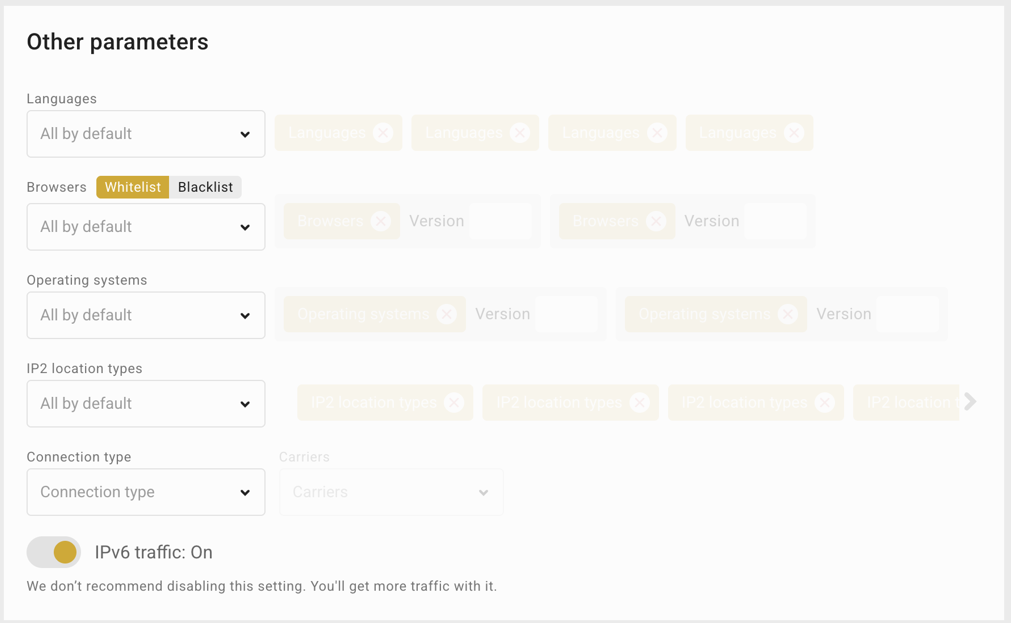
Refine your targeting in Main and Other parameters sections. Options include:
- Country selection (with whitelist/blacklist)
- Device type
- Language
- Browser
- Operating system
- IP type
- Carrier
- Connection type
These settings help you build accurate audience segments and control campaign delivery.
Limits and Scheduling
The Limits section defines campaign restrictions based on budget or impression count. OnClickA provides flexible budgeting options suited to various needs. Hourly, daily, or total limits can be set to maintain control over campaign spend.
Frequency caps can also be configured, limiting the number of times a unique visitor views the same creative within a defined time period.
Scheduling options make it possible to determine when the campaign remains active. Dayparting settings allow inclusion of weekdays, weekends, or specific hours.
After all parameters are configured, campaigns can be launched by selecting the “Create Campaign” button. Approval typically takes from a few hours to a day.
Once approved, campaigns automatically begin running if automatic activation is enabled and sufficient funds are available in the account.
Viewing Stats
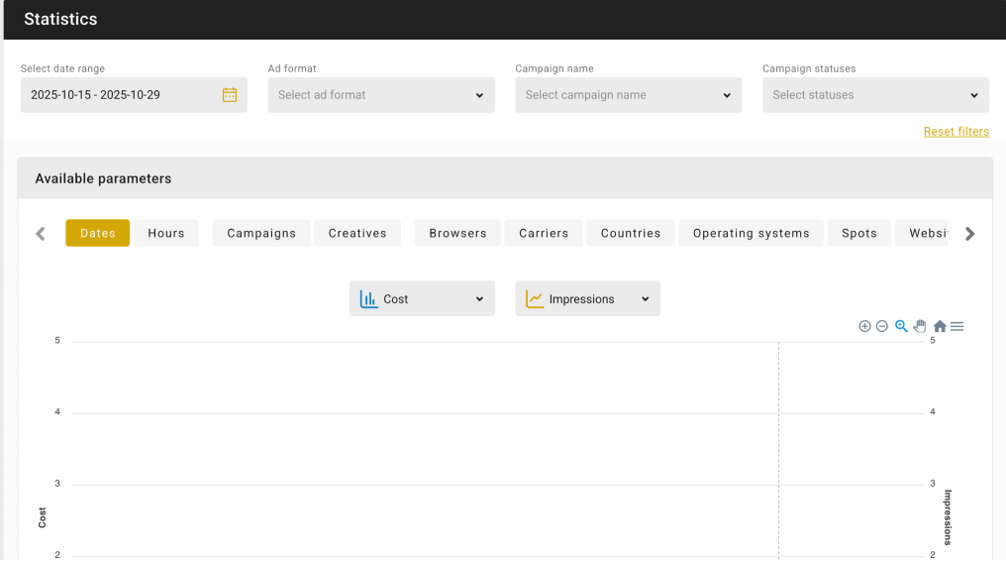
You can view the statistics of all your campaigns on the Stats page. This page features a customizable chart that allows you to adjust parameters, such as dates, hours, campaigns, creatives, spots, and more, offering a comparison of costs against impressions.
Beneath the chart, you’ll find a summary table that provides detailed data on impressions, clicks, video views, CTR, conversions, and payouts, all based on your selected parameters. This comprehensive table makes it easy to analyze the performance metrics that matter most to your campaigns.
The individual campaign’s stats page offers a thorough overview of the campaign’s performance, including key metrics and settings. This detailed view helps you understand how each campaign is performing, enabling you to make informed decisions and optimize your strategy for more conversions and results.
You can also make adjustments to the campaign bid here, so you won’t have to edit the campaign itself and submit it once again for approval.
Campaign Optimization
When it comes to campaign optimization on OnClickA, the platform offers:
- Campaign Bid Auto Adjustment
You can mainly adjust your campaign bids, which allows you to fine-tune the amount you’re willing to pay for impressions or clicks. By automatically adjusting to the Recommended Bid, you can receive more traffic from competitive spots.
- Whitelist/Blacklist
You can use the spot whitelist/blacklist feature to include or exclude certain spots based on performance data. This allows you to focus on sources that yield better results and filter out less effective ones. You can also create blacklists directly from the statistics interface, which is very convenient.
You can even assign a specific bid per site or spot. However, this can only be done from within the campaign, which means you need to edit the campaign to do this (and submit it for approval again).
OnClickA Pros and Cons for Advertisers
Now that we’ve gone through the basics of using OnClickA, let’s summarize its pros and cons for advertisers.
Pros
- Own traffic sources: OnClickA operates with its own global traffic sources across 240+ GEOs, ensuring stable volumes and consistent quality.
- Diverse ad formats: From Popunder and In-Page to Video Ads and innovative options like Telegram Mini App Ads, OnClickA offers multiple formats designed for engagement. Many are interactive, rewarded, or gamified — perfect for iGaming, betting, and other dynamic verticals.
- Constant innovation: The platform regularly introduces new tools, ad formats, and optimization features, giving advertisers room to test, experiment, and find the best-performing combinations.
- High traffic volumes: With billions of impressions monthly, OnClickA provides the scale needed to reach and engage audiences worldwide.
- Smart targeting and control: Advertisers can fine-tune campaigns with features like whitelisting, blacklisting, site-level controls, and advanced targeting options.
- Flexible budgeting: Set hourly, daily, or total budgets, use microbidding, and keep full control of your spend.
- User-friendly interface: The dashboard is intuitive, with a customizable stats page and clear charts that make campaign analysis quick and simple.
- Referral program: Earn 5% of the revenue generated from referred advertisers — a solid bonus for active users.
Cons
- Delayed support response: While support is consistently available, replies might take longer than usual during busy times.
- Minimal traffic data for manual selection: If you choose the Manual selection option for premium sites, you may find limited sites and little to no traffic data. Traffic is available, though, just make sure to ask your account manager for info.
How to Earn Money as a Publisher with OnClickA
OnClickA also offers an opportunity for publishers to make money through their website traffic. Here’s how it works:
Sign Up as a Publisher on OnClickA
First, you need to register as a publisher on the OnClickA platform.
The sign-up process is straightforward and requires you to provide your contact details. Once done, you will immediately gain access to the dashboard. Make sure to confirm your email address, though.
Get Your Unique Ad Code
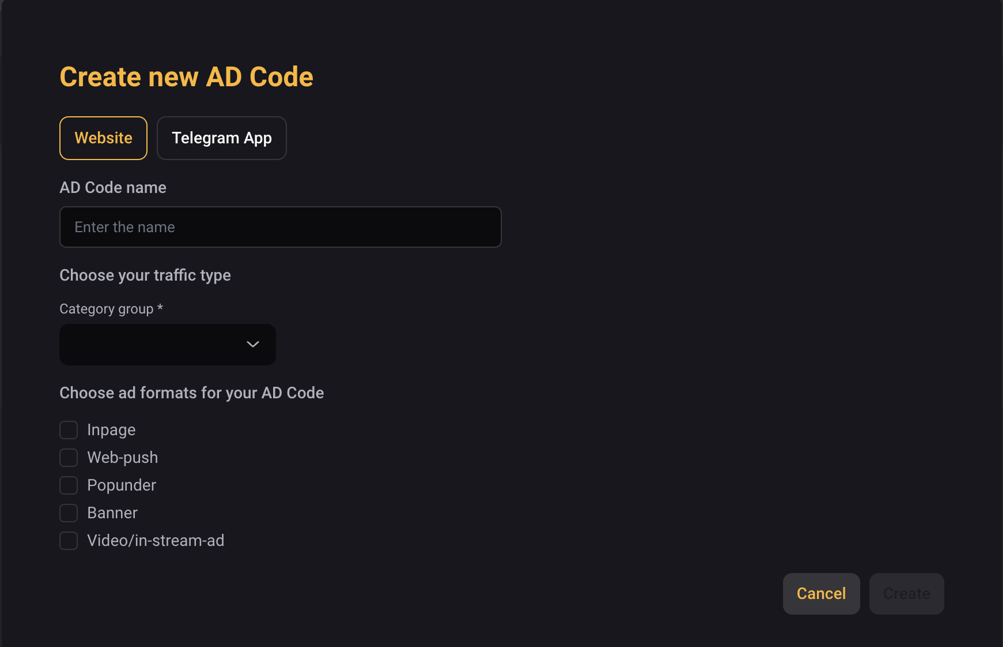
Go to the Ad Code page and select the “Add New AD Code” button. A pop-up window will appear; fill in the details.
Heads up: you can create various AD formats with one AD Code. You can either set up one AD Code for all your sites or create a unique one for each site.
Place the Ad Code on Your Website
With your unique ad code ready, the next step is to embed it into your website’s source code.
You can place the code in either the head or body section, depending on the ad format. After successfully implementing the ad code on your website, you can begin earning revenue from ad views and clicks.
Flat Deals Available
OnClickA offers publishers a flat deal option, allowing them to sell all the traffic from their websites in one go. This simplifies the monetization process and ensures a steady income stream.
The platform provides hands-on assistance by helping to set up ad spots on a publisher’s website and consulting on the best ad formats tailored to the site’s specific audience and layout.
Referral program for publishers
OnClickA’s referral program provides an additional way to earn from the platform. Participants receive 7% of the earnings from referred publishers and 5% from referred advertisers.
The program includes real-time statistics and flexible withdrawal options, allowing partners to track performance transparently and access their earnings conveniently.
Withdraw Your Earnings
OnClickA offers several convenient ways to withdraw your earnings, with fast and reliable processing. They process and send funds within 4-7 business days after you submit a request, with payment releases occurring on Mondays, Wednesdays, and Fridays. Take note that the minimum withdrawal amount is $50.
The withdrawal options are:
- Bitcoin
- Capitalist
- Webmoney
- Wire Transfer
- USDC ERC-20
- USDT TRC-20
The minimum payout is $50 for Bitcoin, Capitalist, WebMoney, and USDT (TRC-20). For USDC (ERC-20), the minimum is $250, and for Wire Transfer — $500.
All payments are processed automatically after approval, allowing publishers to receive funds regularly and maintain steady cash flow.
OnClickA Pros and Cons for Publishers
Pros
- Accepts all kinds of websites (dating or mainstream)
- Weekly payments and diverse payment methods, including cryptocurrency.
- Wide variety of ad formats to choose from
- High-paying referral program
- Straightforward setup
- Option for flat deals
Cons
- Some ad formats may perform differently depending on the website niche
- Ad quality control needs to be improved; you can’t block specific types of ads from showing up on your website
OnClickA Support & Account Management
Every client gains access to a personal account manager. These managers don’t just handle support tickets: they help with campaign audits, optimization tips, and strategy setup to make sure advertisers get the best possible performance. The support team is available 24/7 through the Telegram bot, live chat, and email at support@OnClickA.com.
OnClickA Verdict
With thousands of advertisers and publishers already using the platform, OnClickA has earned its place among today’s popular ad networks. It combines wide reach, reliable traffic, and powerful tools that make it easier to launch, test, and scale campaigns of any size.
With tools like Microbidding, Smart Retargeting, Dual Postbacks, and Ad Spot Blacklisting, advertisers can fine-tune their strategy and focus on what works for their goals. Features such as custom detailed statistics and transparent traffic insights make campaign management even smoother.
For those trying OnClickA for the first time, there’s an exclusive promo code waiting for you! Use MOBIDEAREV to get a $50 bonus on your first deposit of $75 or more.
It’s a simple way to start exploring the platform, test its features, and see how OnClickA can help you grow your campaigns — just register and give it a try.


It's finally time for you to read, analyze, explore and dive into this updated Clickadu Review in order to become a dope affiliate master!

This PopCash Review will allow you to learn how to setup a campaign on PopCash like a true media buying master professional!

Read our in-depth SpyOver review, one of the great native spy tools in the market.