
What are In-Page Push Ads?
In-Page Push Ads are an ad format that extends far beyond the limits of classic push ads.
But what sets them apart from the classic push ads, and how can you use in-page push traffic to maximize your revenue?
In-Page Push traffic refers to traffic from In-Page Push Ads. These ads are displayed as widgets that appear on top of website pages or when a user scrolls down the page.
They are less intrusive than web push ads and offer a unique way to reach your target audience with relevant messages.
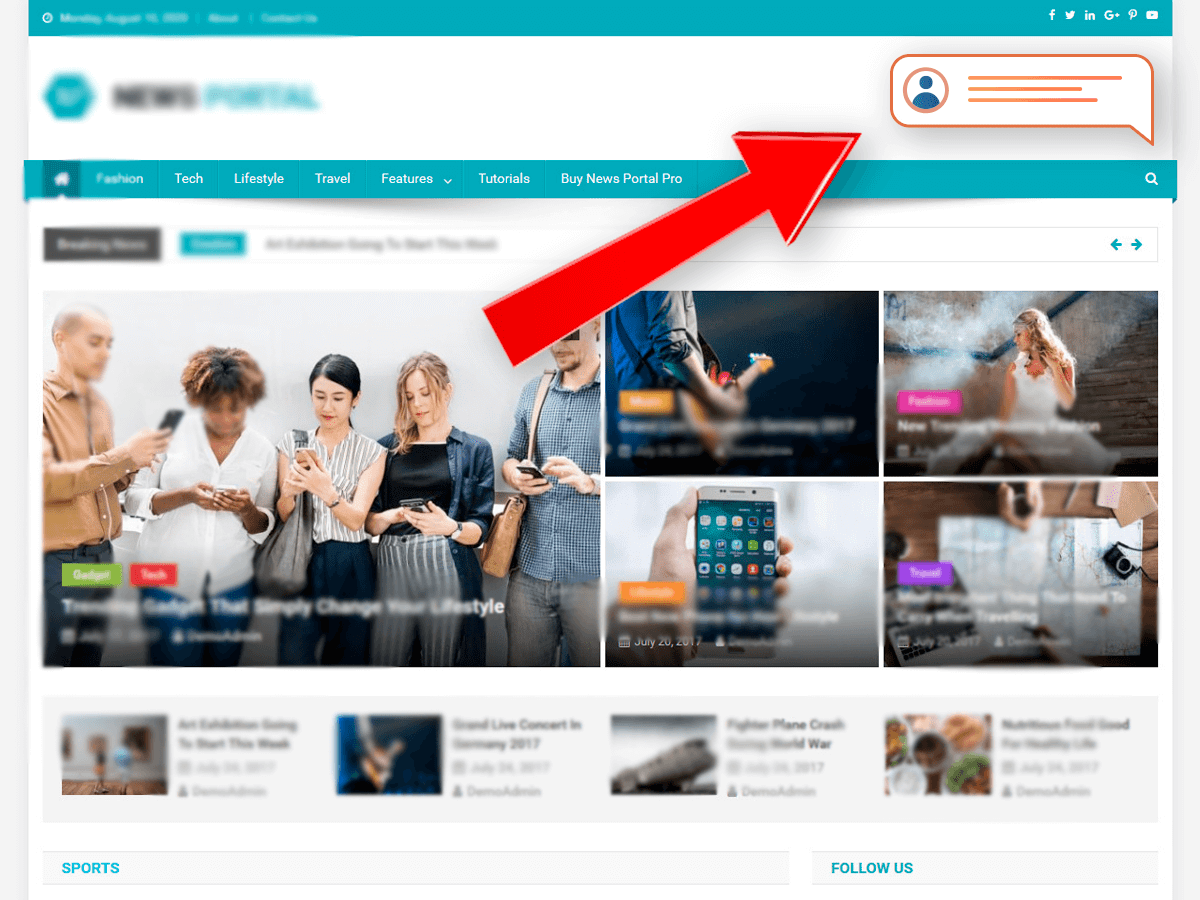
In-page push ads look a lot like web push ads but they are actually quite different. These ads simply imitate the look of classic push notification ads with an icon, title, and description.
In reality, in-page push ads are banner ads that appear on publisher websites. They show at the top or bottom of a website when using mobile, and at the corners of a webpage when using desktop. This makes it look like a small pop-up notification to the user.
One big difference is that there’s no need for a user to subscribe to receive in-page push notifications.
As long as a user visits the publisher’s website, ads can be delivered without disturbing the browsing experience.
Benefits of In-Page Push Ads
In-page push traffic cancels out the limitations of both push notification ads and banner ads.
Here are some of the benefits of using it!
Wider Reach
In-Page push traffic can reach users of iOS devices that have eluded the advertising market for some time. These ads bypass device restrictions and increase audience reach. In essence, this ad format can penetrate ALL devices.
Real-Time Ad Display
Once an active user visits the publisher’s website, real-time bidding takes place and the winning ad is displayed immediately.
In-Page Push Ads Reduces Banner Ad Blindness
In-page push is basically a banner ad masquerading as a push ad, which means users are not “immune” to them yet. They’re also non disruptive to the user experience. As a result, in-page push ads typically get a higher CTR than typical banner ads.
Pay-Per-Click Instead of Cost-Per-Mille
Although these are essentially display ads, with most ad networks you won’t have to pay for every thousand impressions (which is typical for this ad type). With in-page push ads, you only pay when a user clicks your ads, which means more qualified users.
Ability to Target Different Quality Levels
Some networks allow advertisers to choose in-page push placements based on the quality of traffic. The higher the quality, the greater the chances of converting.
Higher Average CTR than Classic Push Ads
Since the user is actively engaging with the webpage they are browsing, in-page push ad notifications receive more clicks than classic web push. So if you want higher engagement, try switching to in-page push ads.
Disadvantages of In-page Push Traffic
As great as in-page push ads are, they still have their downsides. Here are some of the disadvantages of in-page push ads.
Less Volume
The volume of in-page push traffic is still a work in progress. Because it was only introduced recently, it will take some time to achieve the volume of inventory found with normal push ads.
If you want a huge number of impressions per day, try starting with regular push ads, and then use in-page push to move your campaigns to a wider audience.
Multiple In-Page Push Ads in One Page
While some publishers minimize the number of in-page push ads that appear on a page to prevent disrupting the user experience, others allow several in-page ads to appear at any one time. To avoid bidding on these ad spots, you can ask the ad network about the limits they set for in-page ads per ad call.
Top GEOs (by Traffic Volume)
As the in-page push ad format is still pretty new, not all countries and regions have a huge inventory. Before starting your campaign, it’s best to check if the location you intend to buy from can deliver the traffic volume you need.
Here’s a list of the top geographic regions for in-page push ads based on traffic volume:
- Indonesia
- Vietnam
- Thailand
- India
- USA
- Poland
- Egypt
- Pakistan
- Japan
Top Performing Verticals
Every ad type has different verticals that generate the most profit and in-page push traffic is no different. It’s not only similar to web push, but also possesses comparable top-performing verticals.
The best performing verticals for in-page push include:
- Sweepstakes
- Push Subscriptions
- Carrier Billing
- Mobile Content
- Nutra & Diet
- E-Commerce
- Dating
- Antivirus
- Sports Betting
- Lead Generation
- Finance
- Video Streaming
Are you looking for converting offers?
Sign up on Mobidea and check the offers directory.
Launching Your First In-Page Push Campaign
In-page push ads are easy to set up, but things can quickly go sideways if you don’t do it right.
Before we dive in on how to launch your first campaign, we recommend you first check out our best picks for in-page push ad networks:
Ultimate List of the Best In-Page Push Ads Networks
This list is regularly updated to make sure we include only the best traffic sources for in-page push.
Now, back to the matter at hand.
We recommend you shorten the testing phase by following the following best practices for running in-page push ads campaigns.
Target the Latest OS versions
Android and iOS are the two biggest OS types in the market. You’ll find several versions of these, so opt for the latest ones. Also, keep in mind that users of iOS devices are not yet familiar with push notification ads, so they will be less wary of in-page push ads as well.
Test Images on Push Ads First
See how your images work on regular push notifications first before using them on your in-page push ad. Choose the ones that perform best to minimize testing with in-page push.
Set Up Postback Tracking
Accurate tracking is the key to proper optimizations, so make sure you set up postback tracking to efficiently monitor your conversions and ROI.
For more info on how to set up postback tracking for your campaigns, check the instructions provided by your traffic source.
Choose Suitable Creatives to Attract the Right Audience
While in-page push ads allow you to target locations, devices, publisher lists and more, it cannot target users based on viewer demographics such as age or gender. So to capture the right audience, be creative with your ads.
For example, when targeting senior women for a dating campaign, you can do this:
Test Ads with Emojis
To set your ad apart from your competitors (since sometimes more than one in-page push traffic appears on one page), you can use emojis to capture the user’s attention.
Don’t overdo it though; a maximum of two emojis is enough per ad.
Run Broad Campaigns First
Starting with a wide campaign setup, with little or no targeting, will help you identify sources and targeting that drive you the most traffic.
Remember that in-page push traffic is pretty limited at the moment and there are a lot of advertisers competing over a small space.
If you narrow down too fast, you might not receive enough traffic to evaluate the data or generate conversions!
Final Thoughts on In-Page Push Ads
In-page push ads are among the freshest ad formats on offer today.
And, as we all know, the fresher the better when it comes to reaching customers, right?
Not many people have heard of this ad type yet so, if you’re looking for more ways to boost revenue without spending too much time or money, get ahead of the game and start running in-page push notification ads now.


There are many correlated aspects that affect a campaign's performance. Understand their impact in this Mobidea Academy post!

Find out what is header bidding and get to understand how to maximize affiliate marketing profits like a remarkably cool professional!

Join the celebration as RollerAds, the push-oriented ad network, marks its 4th birthday with incredible gifts for you.