
Finding a reliable popunder traffic source that doesn’t drain your budget can feel impossible.
Many ad networks demand high minimum deposits, making it difficult for new affiliates or those testing new offers to get started.
PopCash positions itself as an accessible entry point into the popunder advertising space with its $5 minimum deposit and straightforward interface.
But does this low barrier to entry translate into profitable campaigns, or does it come with trade-offs that make success harder to achieve?
In this PopCash review, we’ll examine what this popunder network offers advertisers and publishers, helping you determine whether it deserves a place in your traffic acquisition strategy.
What is PopCash?
PopCash emerged from the vision of founders in early 2012.
By the end of that year, they launched the platform and quickly established it as a prominent player in the popunder advertising space.
The network built its reputation on providing accessible popunder traffic with rapid momentum.
As the market grew, PopCash expanded both its workspace and workforce to serve an increasing number of advertisers and publishers.
The company has focused on combining low entry barriers with the expertise needed to produce measurable results.
Throughout its operation, PopCash has maintained its position as a self-serve platform where advertisers control their campaigns directly.
The network connects advertisers seeking popunder traffic with publishers monetizing their websites through popunder placements.
In 2019, PopCash’s founders expanded their advertising network portfolio by launching Mondiad, a second, performance-driven ad network built to complement PopCash’s popunder focus.
While PopCash remains dedicated to self-serve popunder traffic, Mondiad broadened the offering with 8+ formats.
Together, the two networks give advertisers and publishers a wider range of formats to work with while sharing the same self-serve, low-barrier philosophy PopCash was built on.
We’ll be reviewing Mondiad too soon, so be on the lookout for it!
PopCash Best Features for Advertisers
Selecting the right popunder network requires understanding what tools and capabilities will support your campaign goals.
PopCash offers several features designed to help advertisers launch and optimize campaigns efficiently.
Let’s examine each feature to see how it can benefit your advertising efforts.
Low Entry Barrier
One of PopCash’s most distinctive features is its $5 minimum deposit, making it one of the most accessible popunder networks available.
This low threshold removes the financial risk typically associated with testing new traffic sources in affiliate marketing.
For affiliates testing new offers or exploring the popunder format for the first time, this minimal investment allows experimentation without significant capital commitment.
You can evaluate traffic quality, test landing pages, and determine whether PopCash fits your campaign needs before scaling up spending.
The platform accepts multiple payment methods including PayPal, Paxum, Skrill, and wire transfer, providing flexibility in how you fund your account.
Deposits process quickly, typically reflecting in your account within minutes for payment processors like PayPal and Paxum.
Traffic Volume and Reach
PopCash delivers consistent popunder traffic across global markets.
The network works with thousands of publisher websites spanning various categories including streaming sites, download portals, entertainment platforms, and content websites.
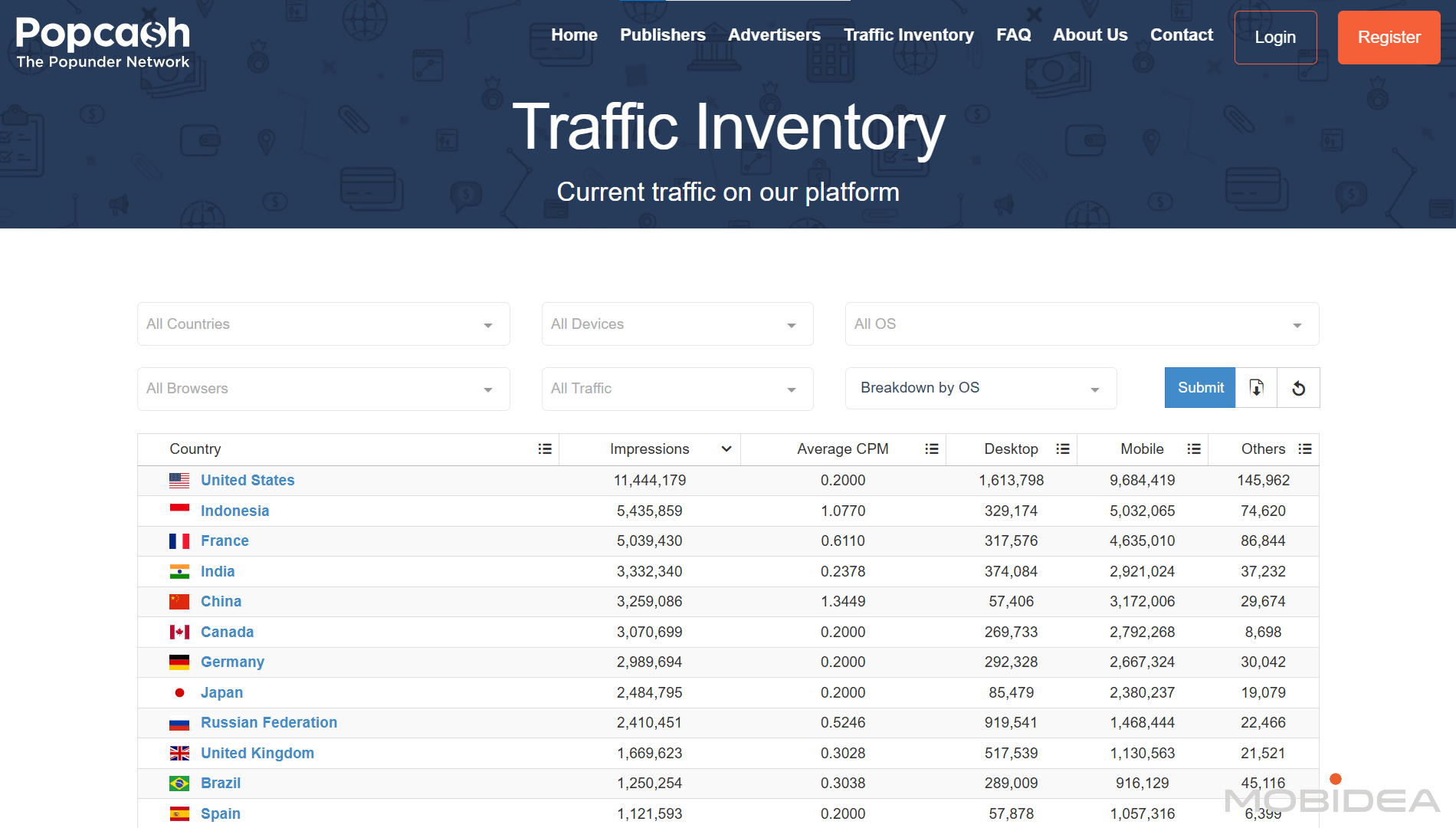
It currently delivers over 60 million impressions across countries and devices on a daily basis.
Its top countries include:
- United States
- Indonesia
- France
- India
- China
- Canada
They have both adult and mainstream traffic.
Traffic distribution by category includes:
- Streaming and entertainment sites
- Download and file sharing platforms
- News and content portals
- Gaming and hobby websites
- Various niche content sites
Geographic reach extends worldwide, with campaigns able to target specific countries or run globally.
Targeting Options
PopCash provides fundamental targeting capabilities to help advertisers reach relevant audiences.
Available targeting includes:
- Geographic Targeting: Select specific countries where your campaigns should run.
You can choose single countries or multiple markets, but city or state level targeting is not available.
- Carrier Targeting: For mobile traffic, target specific mobile carriers by name, helpful for carrier billing offers or region-specific mobile promotions.
You can also target by connections (WiFi, carrier, etc.)
- Category Targeting: Filter traffic by website category such as movies, streaming, downloads, and other content types.
This helps align your offers with contextually relevant environments.
- Device Targeting: Choose among desktop, mobile phone, eReaders, tablet, and more.
This allows you to focus campaigns on specific device types based on where your offers perform best.
For example, you can run desktop-only campaigns for software downloads or mobile-only campaigns for app installs.
- Operating System Targeting: Target users based on their operating system including Windows, macOS, Linux, Android, and iOS.
This proves useful for offers requiring specific platforms.
- Browser Targeting: Reach users on specific browsers like Chrome, Firefox, Safari, or Edge.
Helpful when promoting browser extensions or testing compatibility.
- Language Targeting: Filter traffic based on browser language settings.
This helps ensure your landing pages match visitor language preferences, particularly important for offers requiring specific language comprehension or when running campaigns in multilingual regions.
Campaign Optimization Tools
PopCash gives advertisers direct control over traffic quality through publisher-level optimization.
This capability separates profitable traffic sources from underperforming ones, essential for maintaining positive ROI.
The platform uses a whitelist and blacklist system:
- Publisher Blacklisting: Block specific publisher site IDs that generate clicks without conversions.
Once blacklisted, your campaigns will no longer receive traffic from these sources, protecting your budget from poor performers.
- Publisher Whitelisting: Create campaigns that run exclusively on site IDs you’ve identified as profitable.
This approach works well once you’ve gathered enough data to know which publishers drive results.
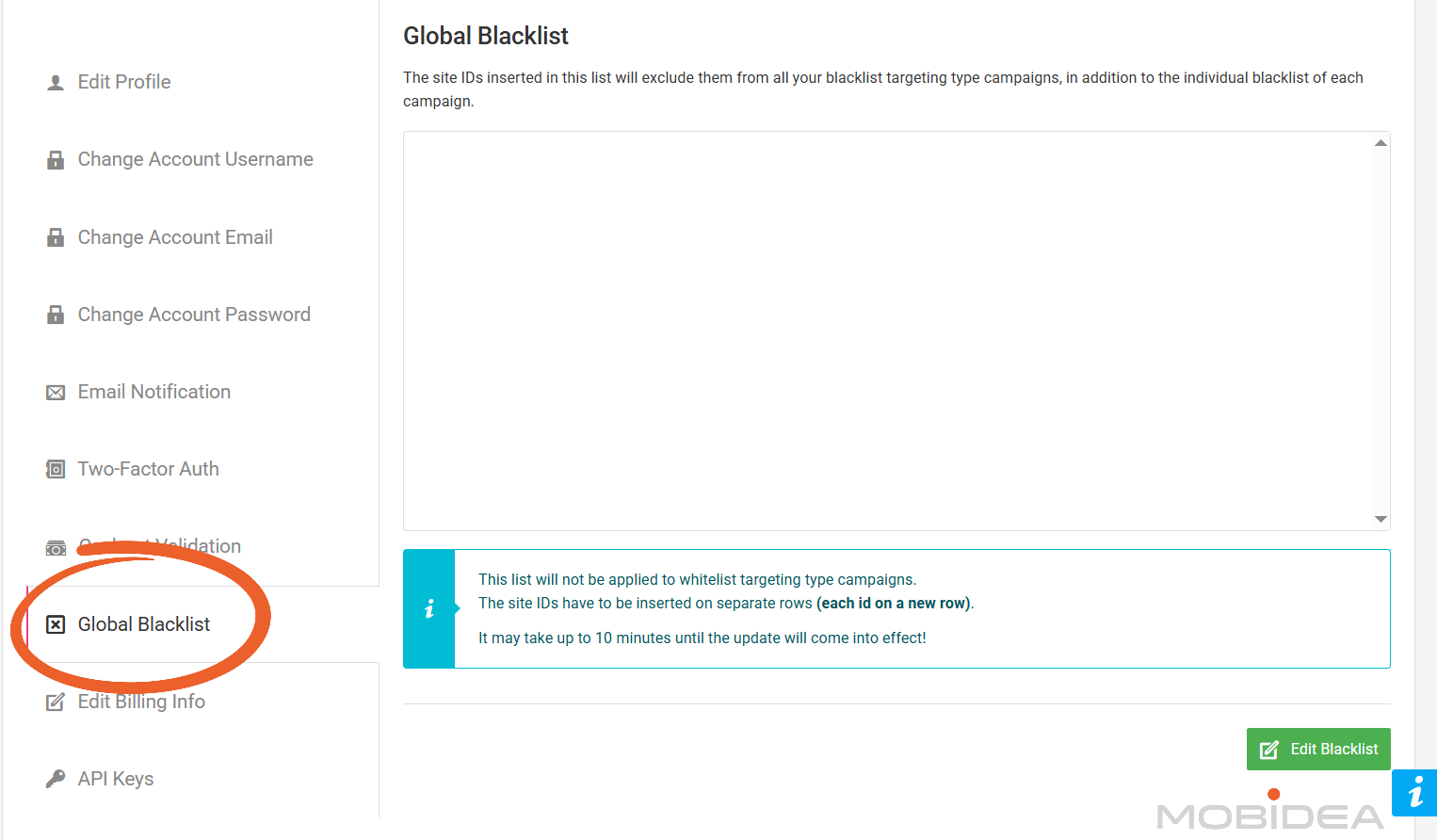
- Global Blacklist: This account-level blocking saves time when you’ve identified consistently poor-performing publishers that should never receive traffic from any of your campaigns.
Fast Campaign Approvals
Campaign moderation happens quickly at PopCash, with most campaigns approved within one hour of submission.
This rapid turnaround lets you launch campaigns and start gathering data without lengthy waits.
During peak weekends when submission volume increases, approval times may extend to approximately 12 hours.
This is still a pretty good turnaround time compared to other platforms.
The moderation team reviews campaigns to ensure compliance with platform policies and advertiser terms before activation.
Responsive Support Team
PopCash stands out because of its very fast customer support.
When you use the live chat, a real person answers you within seconds, not minutes or hours.
This is not a chatbot, but an actual support staff member who can help you right away.
The best part is that this fast support works even on weekends.
Most ad networks have slow support on Saturday and Sunday, or they only use email.
PopCash gives you the same quick help every day of the week.
The support team can help you with many things:
- Setting up your campaigns correctly
- Fixing targeting problems
- Connecting your tracking tools
- Questions about payments
- Explaining how features work
- Solving problems with your campaigns
The support staff know the platform well. They give you specific answers for your situation, not just general replies.
When you have a problem that is hard to fix, they work with their technical team and come back to you with solutions.
How to Start Advertising with PopCash
Getting started with PopCash requires completing a few simple steps before your first campaign goes live.
This section walks through the entire process from account creation to campaign optimization.
Account Registration
The registration process requires just basic information.
After submitting the form, check your email for a verification message.
Click the verification link to activate your account and gain access to the dashboard.
No additional verification documents or approval processes are required.
Once you verify your email, you can immediately access the platform and begin setting up campaigns.
Dashboard Overview
Upon logging in, the PopCash advertiser dashboard displays your account overview.
The interface uses a straightforward layout with main sections accessible through the left navigation menu.
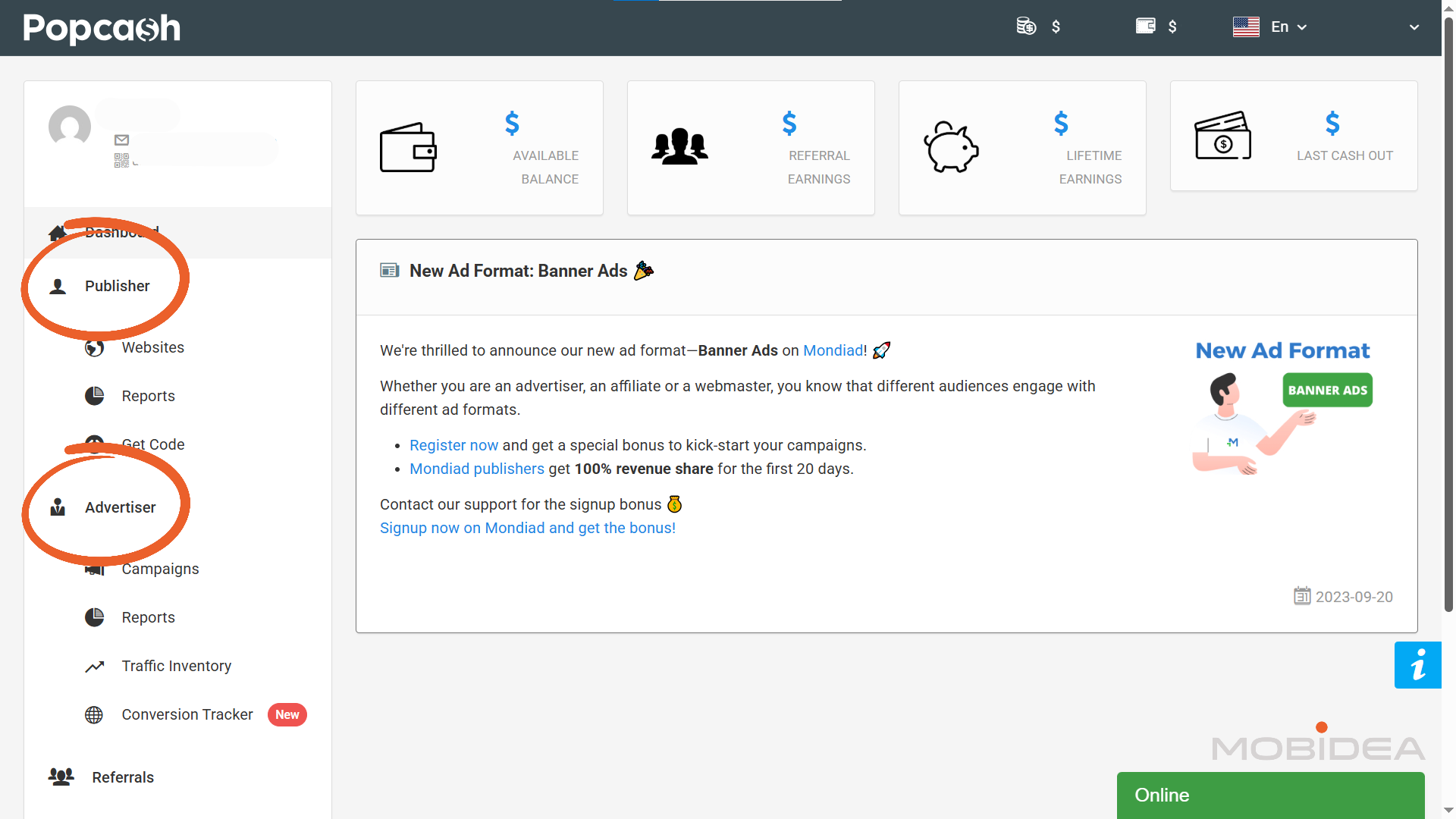
As you can see, you have the Publisher and the Advertiser features in one dashboard.
So if you have online properties that can earn from selling traffic, you can use the same account.
For now, let’s talk about the Advertiser section.
Funding Your Account
Before creating campaigns, you need to add funds to your account.
Navigate to the Billing section and select Deposit.
You’ll be taken to the deposit page which offers multiple ways to fund your account.
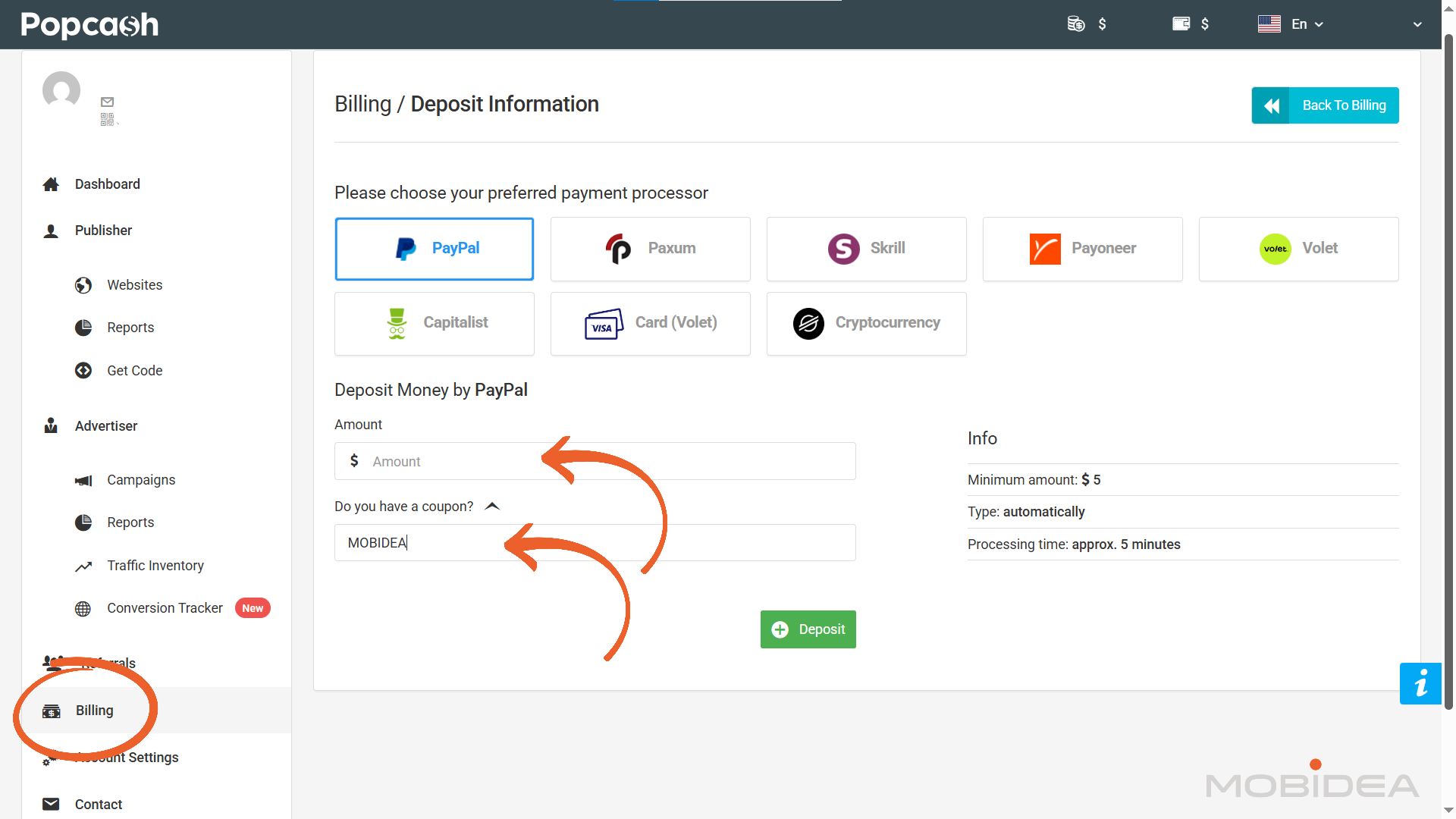
Enter your desired deposit amount, keeping in mind the $5 minimum requirement.
The platform doesn’t charge deposit fees beyond what your chosen payment method may have.
Checking Bid Competition
I recommend you check out the traffic inventory first before creating your first campaign.
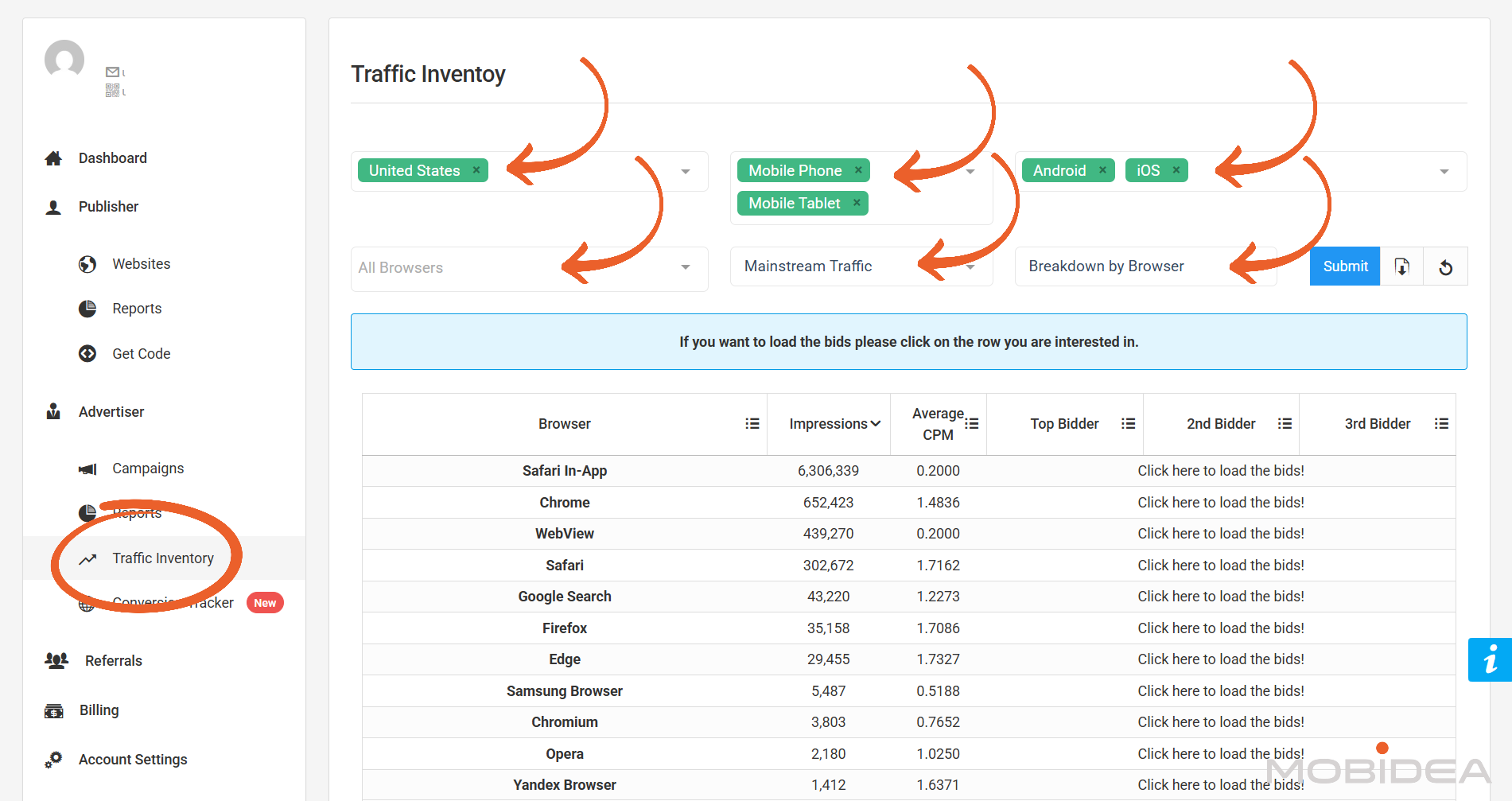
This way, you’ll have a good grasp of the potential traffic, as well as the average bids based on country, device, OS, browser, and traffic type.
Head over to Traffic Inventory under the Advertiser menu.
Here, you’ll have the option to filter traffic volumes based on:
- Country
- Device
- OS
- Browser
- Traffic Type (Adult/Mainstream)
Multiple items per filter can be selected.
You can also show the breakdown by OS, Carrier, Browser, and Country.
Downloading traffic data is also possible.
With this data, you can evaluate how much potential traffic a specific targeting combination may have.
You’ll even find the average bids for each targeting segment.
They also provide the option to show the Top bidder, 2nd bidder, and 3rd bidder by clicking on the link in the bidders column.
However, I’m not sure if this is accurate since I checked all bids for various segments and filters and they are mostly the same.
Still, I think the average CPM is enough to help you judge how much you should bid.
Setting Up Tracking
Third-party tracking tools help you gather traffic data from your campaigns, while at the same time monitoring conversions coming from these ads.
To integrate conversion tracking with Popcash, use a postback URL.
Head over to the Conversion Tracker page to get yours.

PopCash provides postback URL templates for popular tracking platforms including AdsBridge, FunnelFlux, RedTrack, CPV Lab Pro, Skro, Binom, BeMob, Voluum, Peerclick, ClickFlare, Keitaro, and MaxConv.
Popcash allows you to track not just one, but two conversions from the same click.
So if you have an offer that converts twice, like for example, for a lead submission and a credit card payment, you can monitor both with ease.
Use the Second Postback URL for such cases.
You can also use custom postback URLs for other trackers.
Creating Your First Campaign
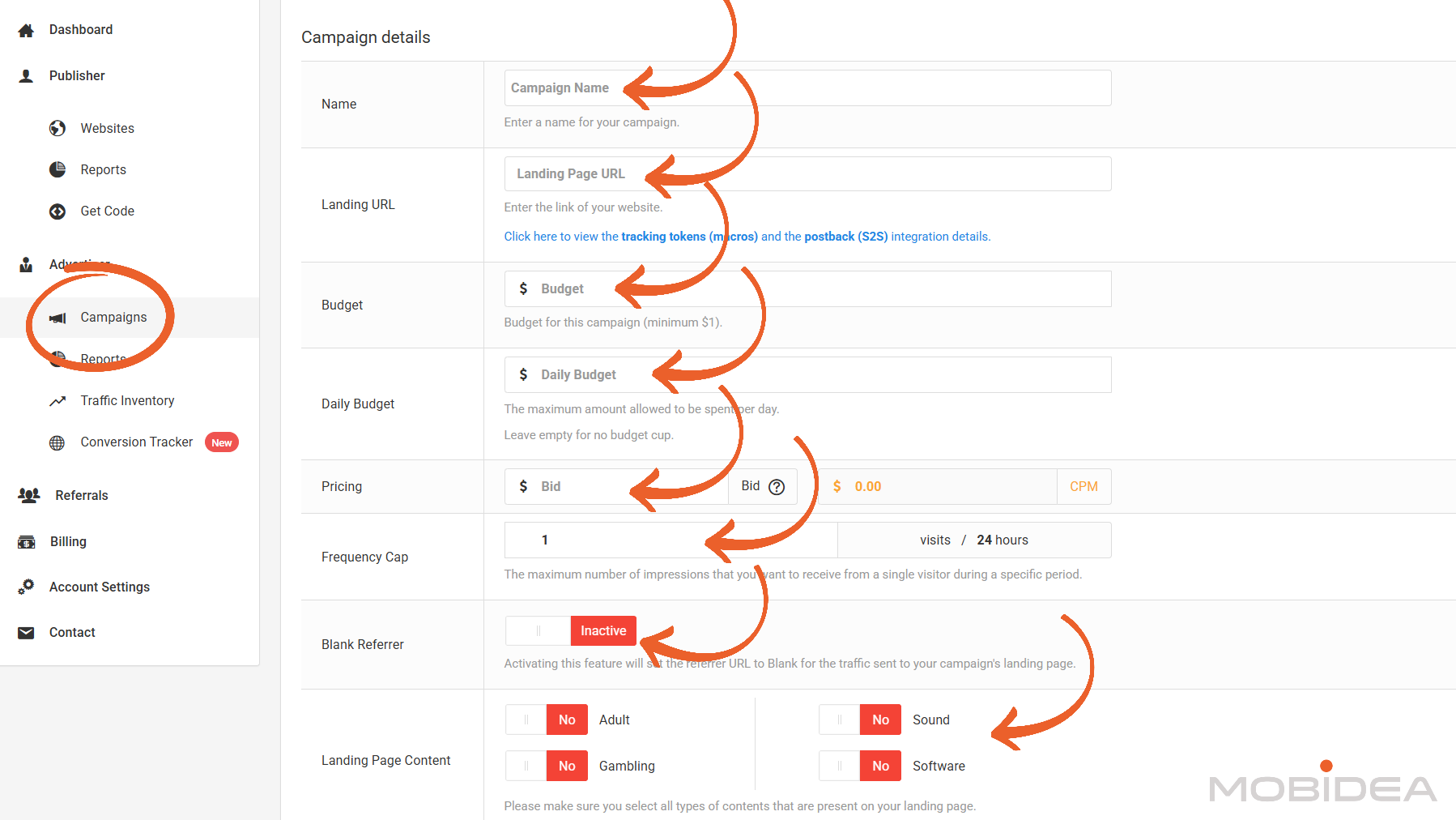
Campaign Name
Give your campaign a clear name that helps you remember what it is for.
Good examples are “Dating-US-Test1” or “Sweeps-Mobile-Brazil”.
This makes it easy to find your campaigns later.
Landing Page URL
Put the website address where people will go when they click your ad.
This can be your landing page or your tracking link.
Make sure this page loads fast and works correctly.
Below this field, you will see a link to view tracking tokens and postback integration details.
Click this link if you need to add tracking parameters to your URL.
Here’s what Popcash accepts:

Budget
Enter the total amount of money you want to spend on this campaign.
The minimum is $1.
But please don’t place the minimum amount or you will not get meaningful results from your campaign.
Daily Budget
This is the maximum money you want to spend each day.
When you reach this amount, your campaign stops for the day and starts again the next day.
If you leave this empty, there is no daily limit.
Your campaign will keep running until your total budget runs out.
Bid Amount
Enter how much you want to pay per 1,000 impressions (CPM).
The platform shows you what other advertisers are currently bidding.
You can bid higher to get more traffic faster, or bid lower to spend less money.
Frequency Cap
This controls how many times the same person sees your ad.
The default setting is 1 visit per 24 hours.
This means each person will see your popunder only once per day.
You can change this number if you want.
Setting it higher means the same person can see your ad more times per day.
Blank Referrer
This option is usually set to Inactive.
When you turn it on, the referrer URL becomes blank for traffic going to your landing page.
Most advertisers keep this inactive.
Landing Page Content
Here you tell PopCash what type of content is on your landing page.
You need to select all content types that match your page:
- Adult: Turn this to Yes if your page has adult content
- Sound: Turn this to Yes if your page plays sound automatically
- Gambling: Turn this to Yes if your page is about gambling or betting
- Software: Turn this to Yes if your page is about software or downloads
You must select all types that match your landing page.
This is important because some publishers do not accept certain content types on their websites.
After Approval
Choose what happens after your campaign gets approved:
- Start campaign: Your campaign starts running automatically after approval
- Pause campaign: Your campaign stays paused, and you need to start it manually later
Most advertisers choose “Start campaign” so they can begin getting traffic right away.
Configuring Targeting Settings
After filling in your campaign details, the next section shows your targeting options.
This is where you choose who will see your ads.
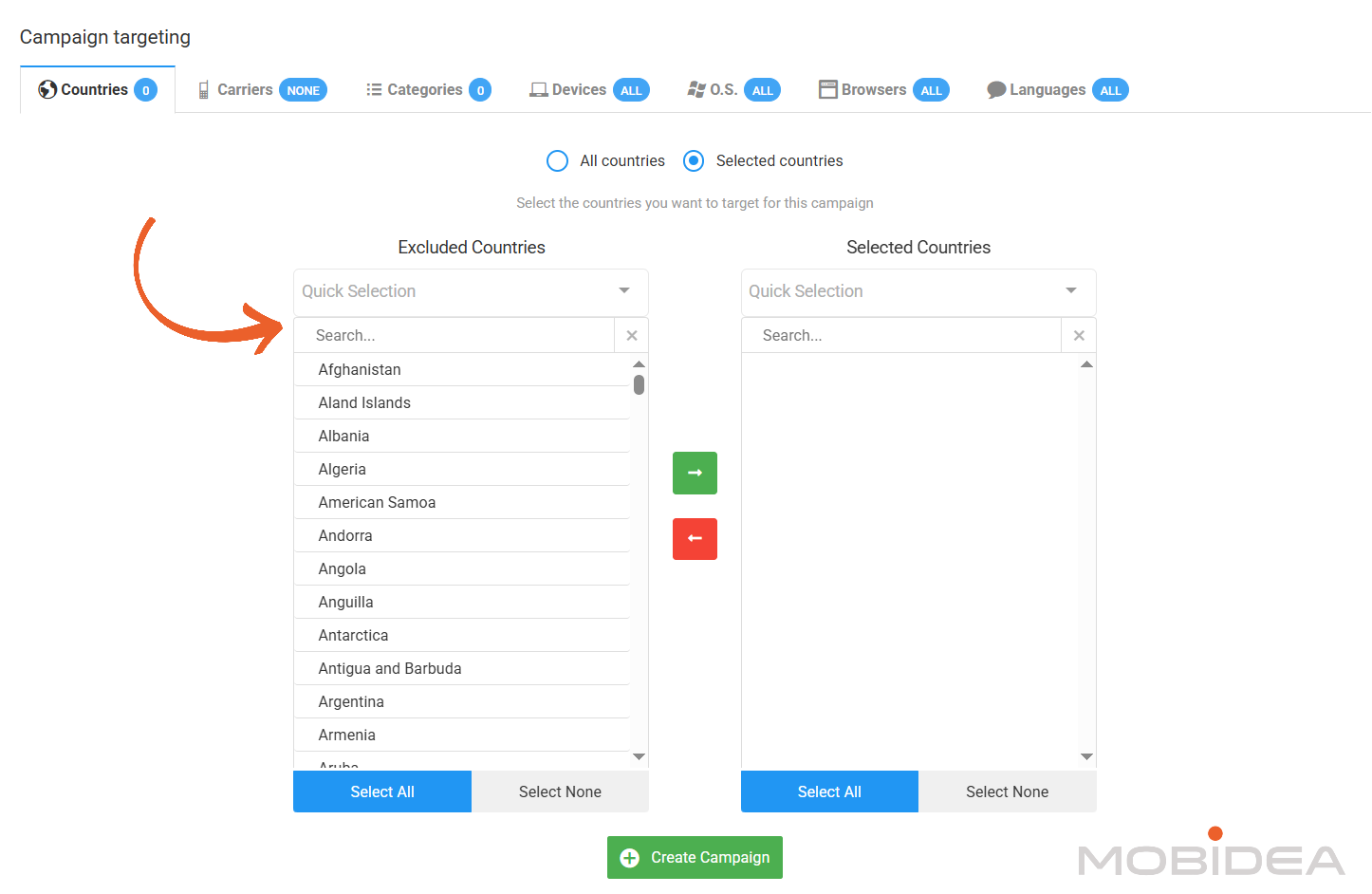
Countries
First, select the countries where you want your ads to show.
Use the green arrow button to move countries from left to right (to select them).
Use the red arrow button to move them back (to remove them).
You can also use Quick Selection options at the top to choose countries based on continents: Africa, Asia, Europe, North America, Oceania, and South America.
Carriers
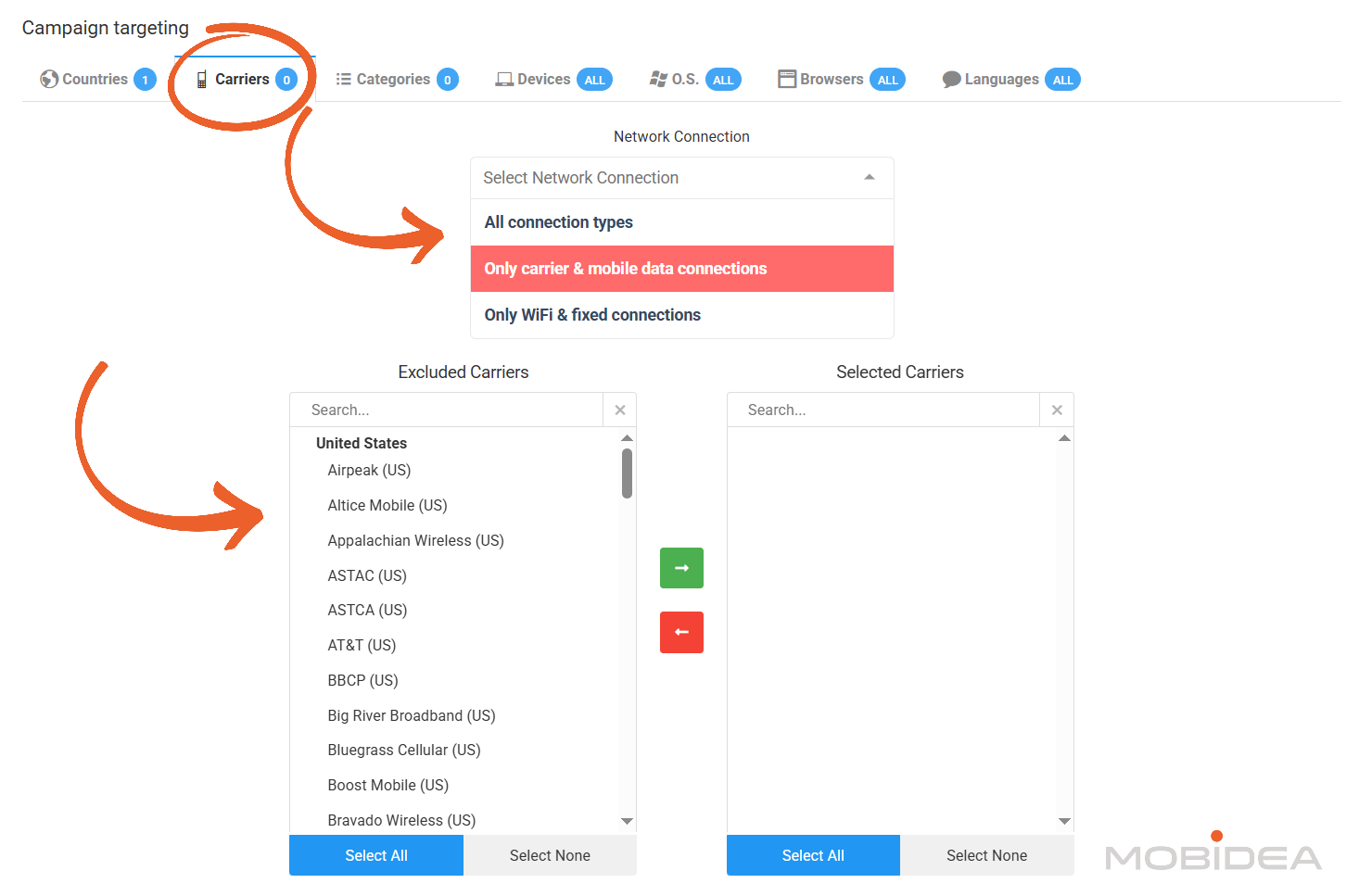
The Carriers tab lets you choose the network connection type.
This option only becomes available after you select at least one country in the Countries tab.
You have three connection options:
- All connection types: Both mobile data and WiFi users
- Only carrier & mobile data connections: People using mobile data only
- Only WiFi & fixed connections: People using WiFi or wired internet only
If you want to target specific mobile carriers (like AT&T, Verizon, etc.), you can select them from the carrier lists. Move carriers between Excluded and Selected using the arrow buttons.
You can also choose to select All Carriers.
Categories
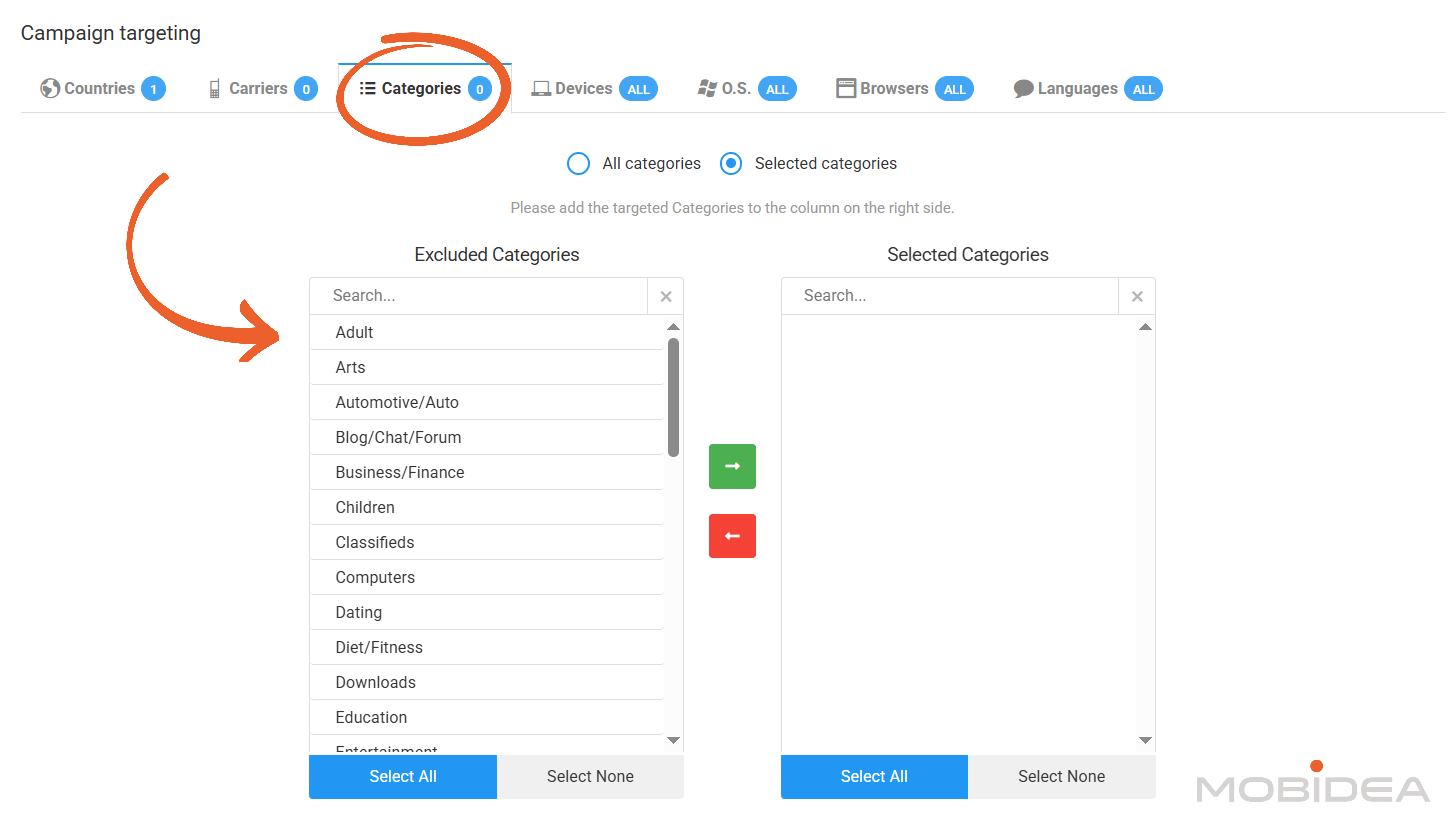
Choose the website categories where your ads should appear. Available categories include Adult, Dating, Gambling, Streaming, and more
You can choose:
- All categories: Your ads show on all website types
- Selected categories: Pick specific categories that match your offer
Devices
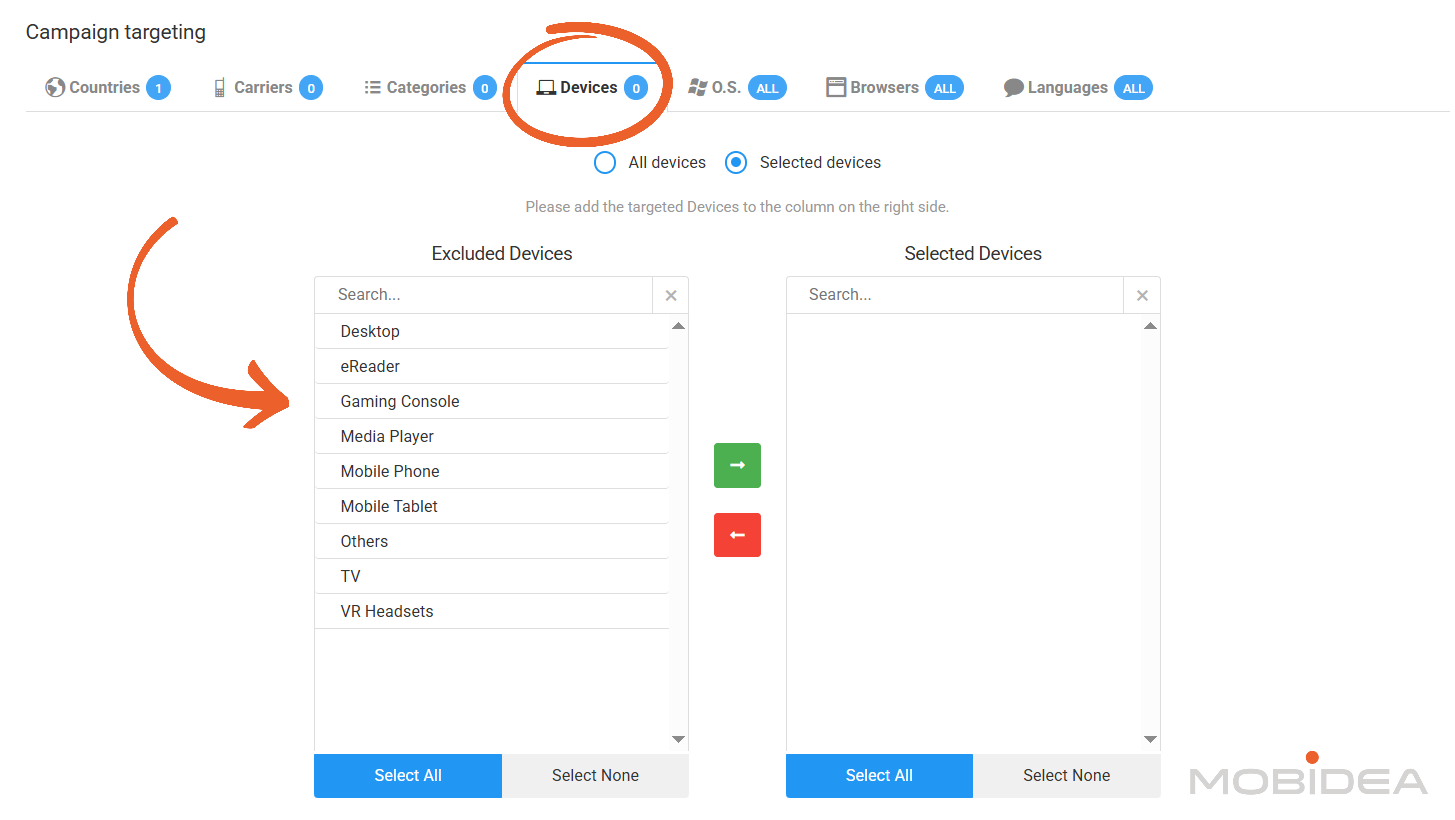
Choose which devices should see your ads:
- Desktop: Regular computers
- Mobile Phone: Smartphones
- Mobile Tablet: Tablets like iPad
- eReader: E-readers like Kindle
- Gaming Console: PlayStation, Xbox, etc.
- Media Player: Smart TV boxes
- TV: Smart televisions
- VR Headsets: Virtual reality devices
- Others: Other device types
As always, you can select all devices or choose specific ones.
This is useful when your offer works better on certain devices. For example, mobile app offers should target Mobile Phone only.
Operating Systems (O.S.)
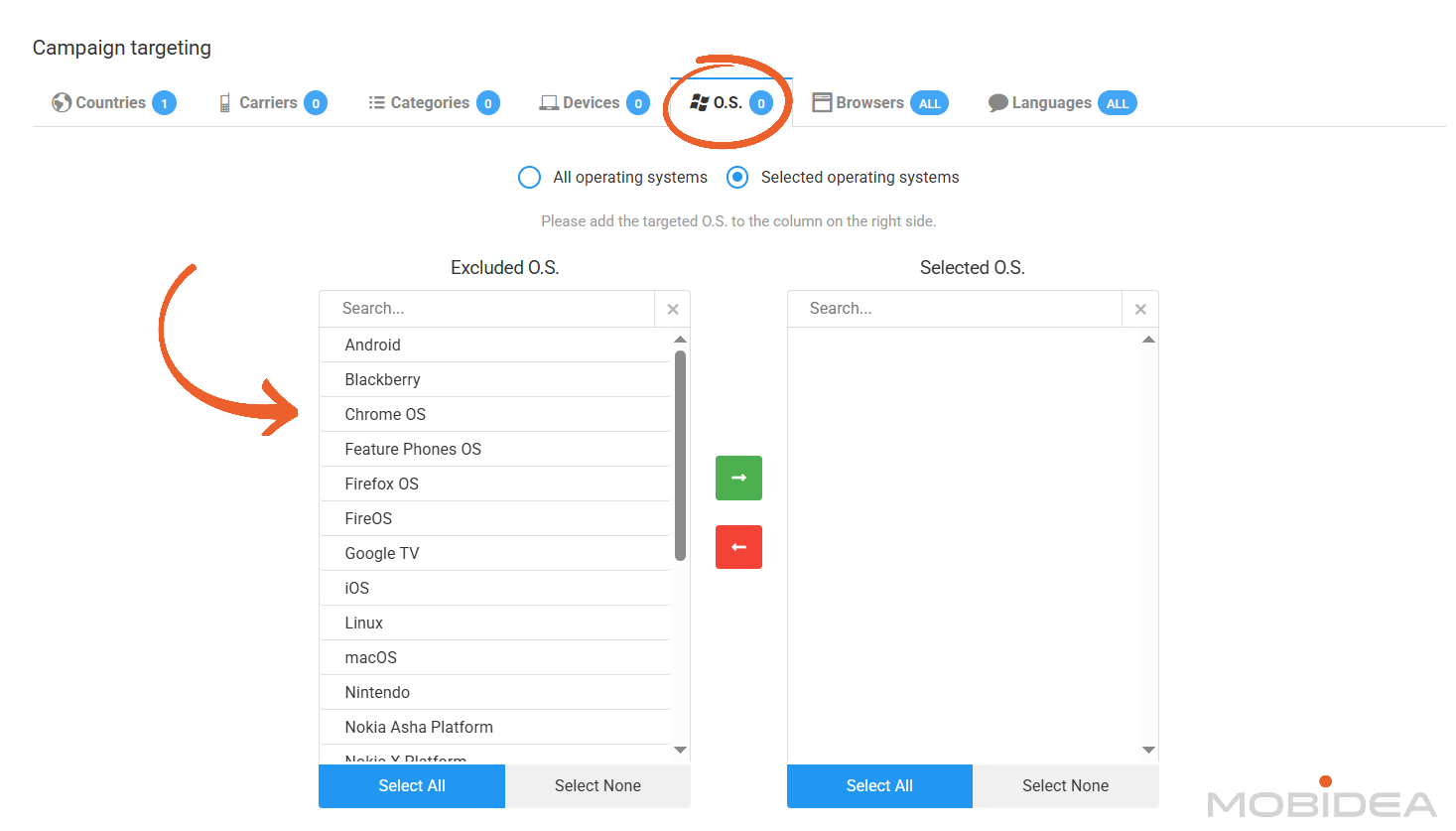
Select the operating systems you want to target:
- Android
- iOS
- Windows
- macOS
- Linux
- Chrome OS
- And many others
Choose specific operating systems when your offer requires them.
For example, if you promote an iOS app, select only iOS.
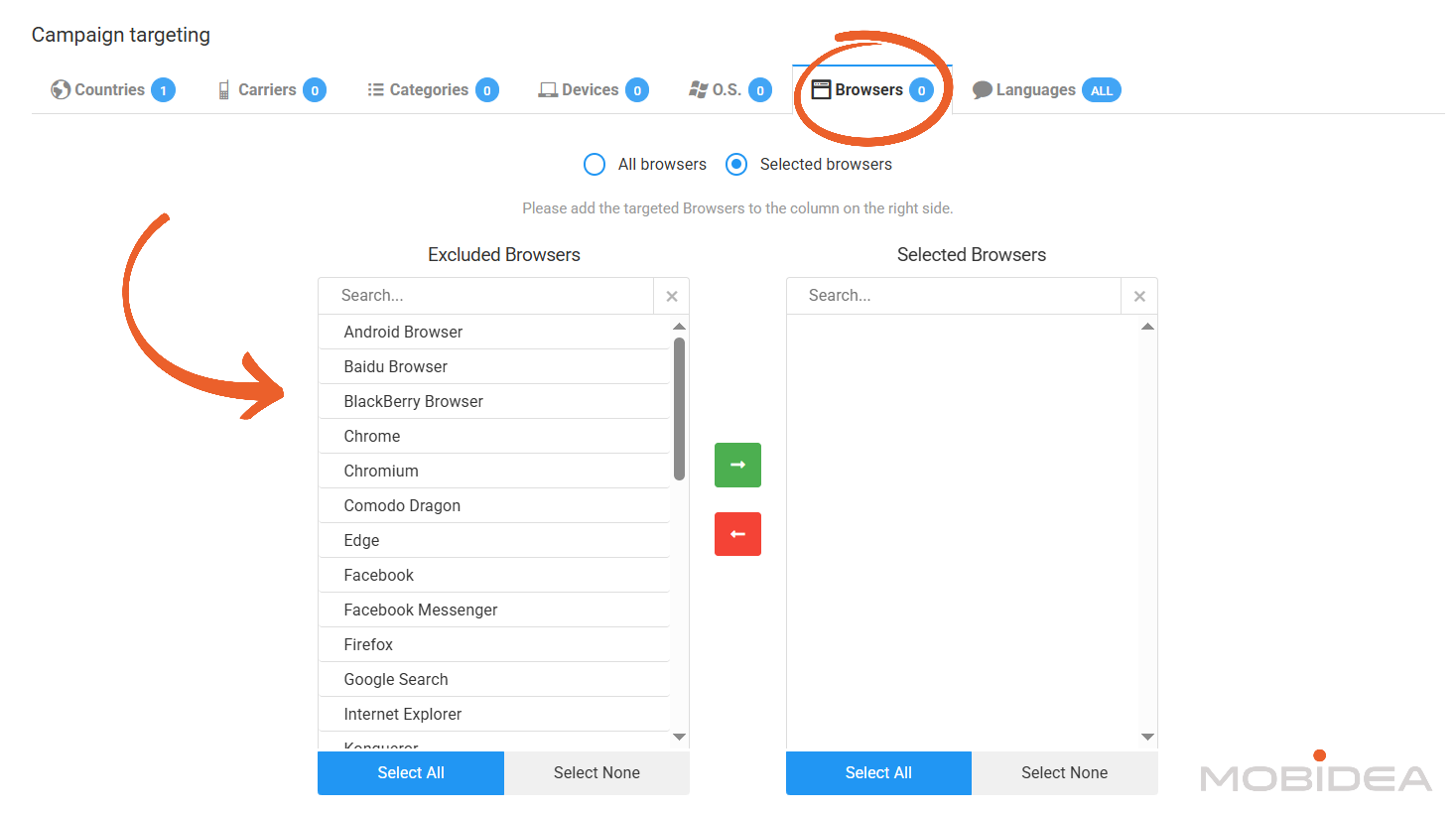
Browsers
Target users based on their web browser:
- Chrome
- Firefox
- Safari
- Edge
- Internet Explorer
- Opera
- And many others
Most advertisers select all browsers unless they have specific browser requirements, like promoting a Chrome extension.
Languages
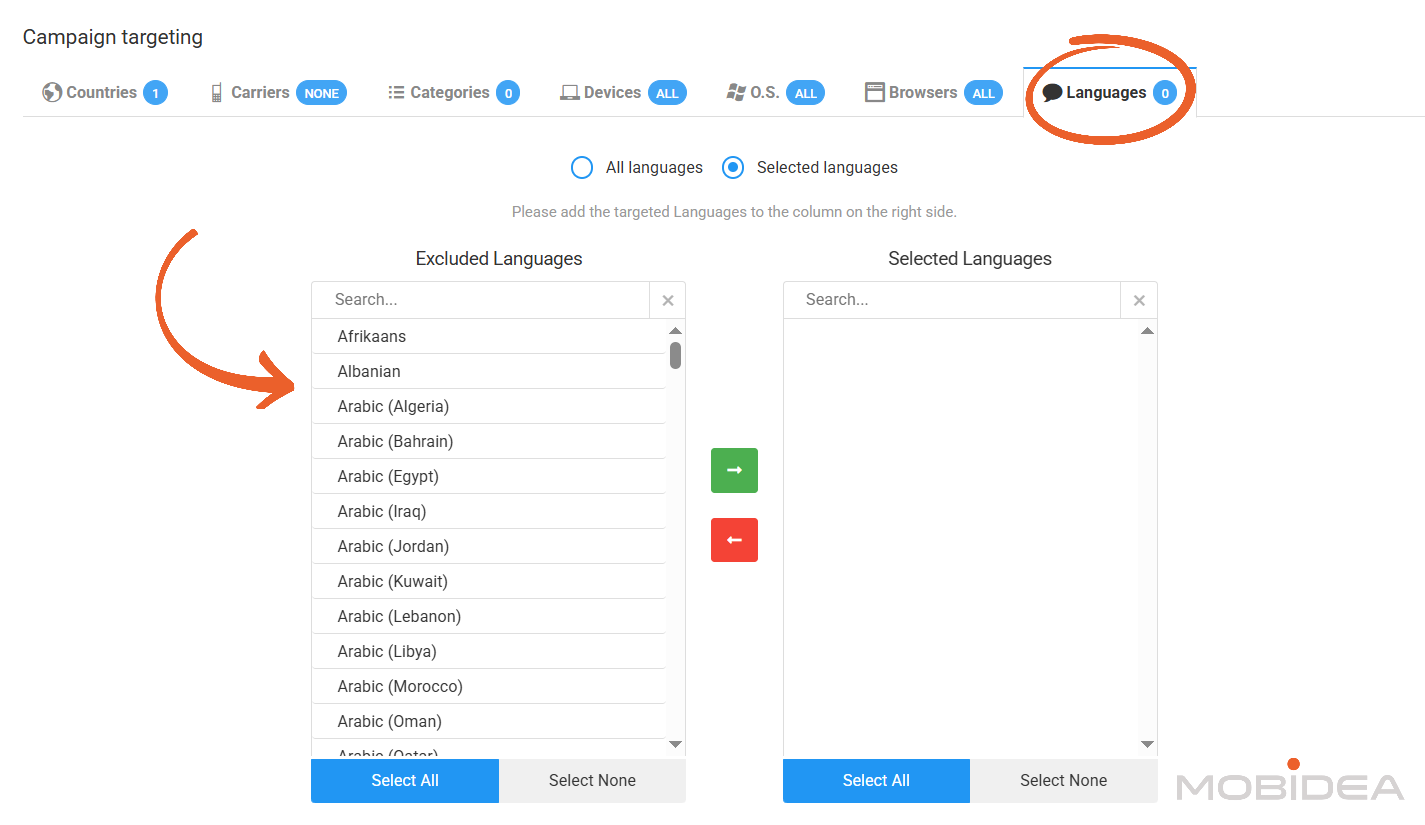
Choose languages based on browser language settings. Available languages include:
- English
- Spanish
- French
- German
- Arabic (multiple regions)
- Chinese
- Japanese
- And many more
This helps match your landing page language with visitor preferences.
For example, if your landing page is in Spanish, select Spanish language targeting.
Finalizing Your Campaign
After setting all your targeting options, review everything to make sure it is correct.
Then click the “Create Campaign” button at the bottom of the page.
Your campaign will go to moderation for approval.
You will get a notification when it is approved and ready to run.
Campaign Approval and Launch
After completing campaign setup, submit it for moderation.
The approval process typically takes less than one hour during regular business hours.
Moderators review campaigns to ensure compliance with platform policies.
They check for prohibited content, verify landing pages are functional, and confirm ads don’t contain misleading elements.
If your campaign gets approved, it begins running immediately (if you set it that way) assuming sufficient account balance.
You’ll receive a notification confirming activation.
If rejected, you’ll get feedback explaining what needs changing.
Common issues include landing pages that don’t load, prohibited content categories, or unclear offer terms.
Make the necessary corrections and resubmit for another review.
Monitoring Campaign Performance
Once your campaign is live, monitor its performance through the Reports section.
The hourly update schedule means you can check progress multiple times per day.
Run campaigns for at least 24-48 hours before making major changes.
This timeframe gathers enough data to identify clear patterns while not wasting budget on obviously poor performers.
Optimizing Campaigns
After collecting initial performance data, begin optimization by identifying and blocking underperforming traffic sources.
Look for site IDs with high click volume but low or no conversions.
To blacklist publishers, go to your campaign settings and locate the Blacklist/Whitelist button on the upper right side of the page.
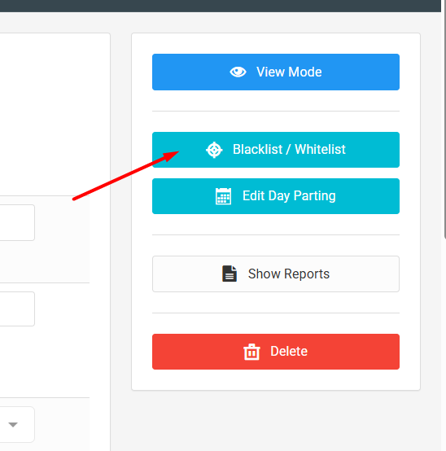
Enter site IDs you want to exclude, placing only one site ID per row.
Save your changes and the platform stops sending traffic from these sources within 10 minutes or so.
As campaigns mature, you can create new campaigns targeting only your best-performing publisher IDs.
This whitelist approach focuses spend on proven traffic sources, typically improving overall campaign ROI.
PopCash Best Features for Publishers
Website owners looking to monetize traffic through popunder ads will find several features designed to maximize earnings while maintaining control over ad placements.
Let’s examine what PopCash offers publishers.
Competitive Revenue Share
PopCash operates on a revenue-sharing model where publishers earn a percentage of what advertisers pay for traffic from their websites.
It operates on an 80-20 Revenue Share, wherein the publisher gets 80% of the ad earnings.
Higher quality traffic from engaged users in valuable geographic markets typically commands better rates.
Sites with traffic from Tier 1 countries like the United States, Canada, United Kingdom, and Australia generally earn more per impression than Tier 3 traffic.
Simple Integration Process
Adding PopCash popunder ads to your website requires minimal technical knowledge.
The platform provides a JavaScript code snippet that you paste into your website’s HTML.
After creating your publisher account and adding your website, PopCash generates a unique code snippet.
This code should be placed in your website template, typically in the header or footer section so it loads on every page.
Once the code is active, popunders begin serving to your visitors automatically.
You don’t need to create individual ad placements or manage multiple ad units.
The single code snippet handles all popunder delivery.
The lightweight code loads asynchronously, meaning it doesn’t block your main content from appearing.
This helps maintain site speed and user experience even with ads running.
Payment Flexibility
PopCash offers multiple withdrawal methods to accommodate publisher preferences:
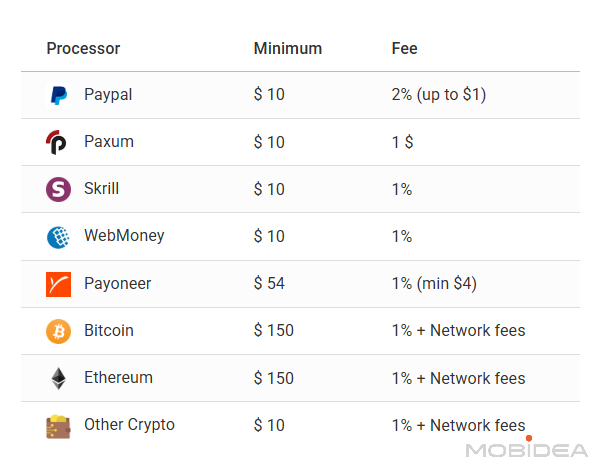
The minimum withdrawal threshold sits at $10, a relatively accessible amount that most publishers can reach within a reasonable timeframe.
Once you request a withdrawal, processing times vary by payment method.
PayPal, Paxum, and Skrill withdrawals typically process within 24 to 48 hours after request.
The quality of your traffic will then be evaluated, and payment will be sent once everything is cleared.
Performance Statistics
The publisher dashboard provides statistics showing how your website monetization performs. Available data includes:
- Daily impression counts
- Earnings per day
- CPM rates by country
- Traffic sources
- Overall account balance
These statistics update regularly, allowing you to monitor performance and identify trends.
You can see which countries generate the most revenue and whether earnings are increasing or decreasing over time.
The interface also shows pending earnings separately from available balance.
Pending earnings typically reflect a holding period before funds become available for withdrawal, common practice in ad networks to account for potential invalid traffic.
Category Flexibility
PopCash accepts websites across many content categories, providing monetization opportunities for diverse publishers.
Accepted categories include:
- Entertainment and streaming content
- Download and file-sharing sites
- Gaming and hobby websites
- News and information portals
- Technology and software sites
- Various other content types
The platform does restrict certain content categories and traffic types.
Publishers should review the terms of service to ensure their websites comply with platform policies before integrating ad codes.
How to Earn Money with PopCash
Website owners can monetize their traffic through PopCash‘s popunder advertising system.
This section explains the process from registration through receiving payments.
Publisher Registration
Register at Popcash to gain access to the publisher dashboard.
If you’ve already signed up as advertiser before, there’s no need to create a separate account.
Adding Your Website
Once logged in, navigate to the Website section under Publisher to add your property.
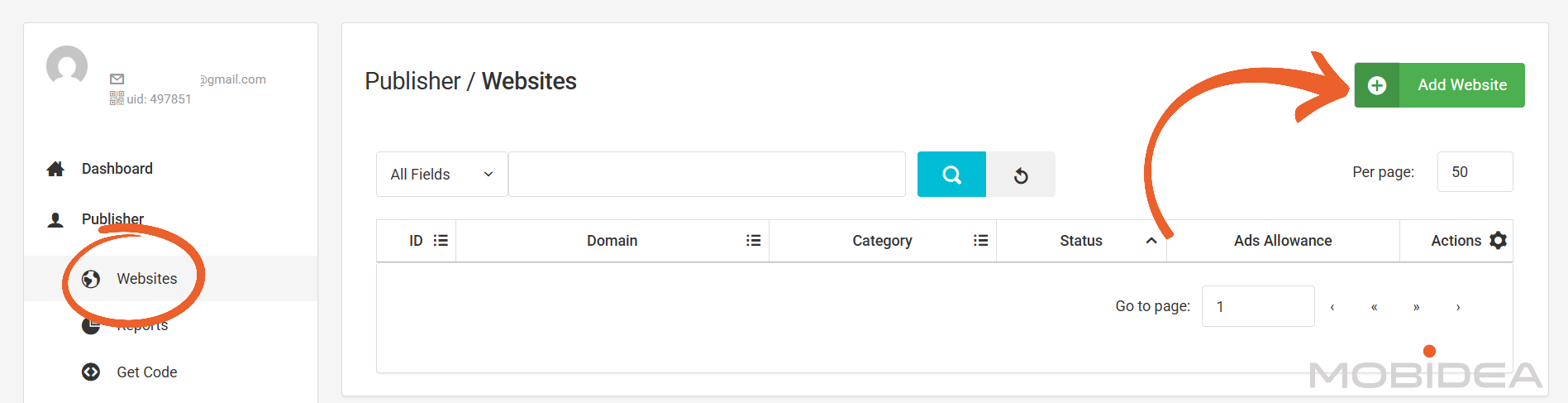
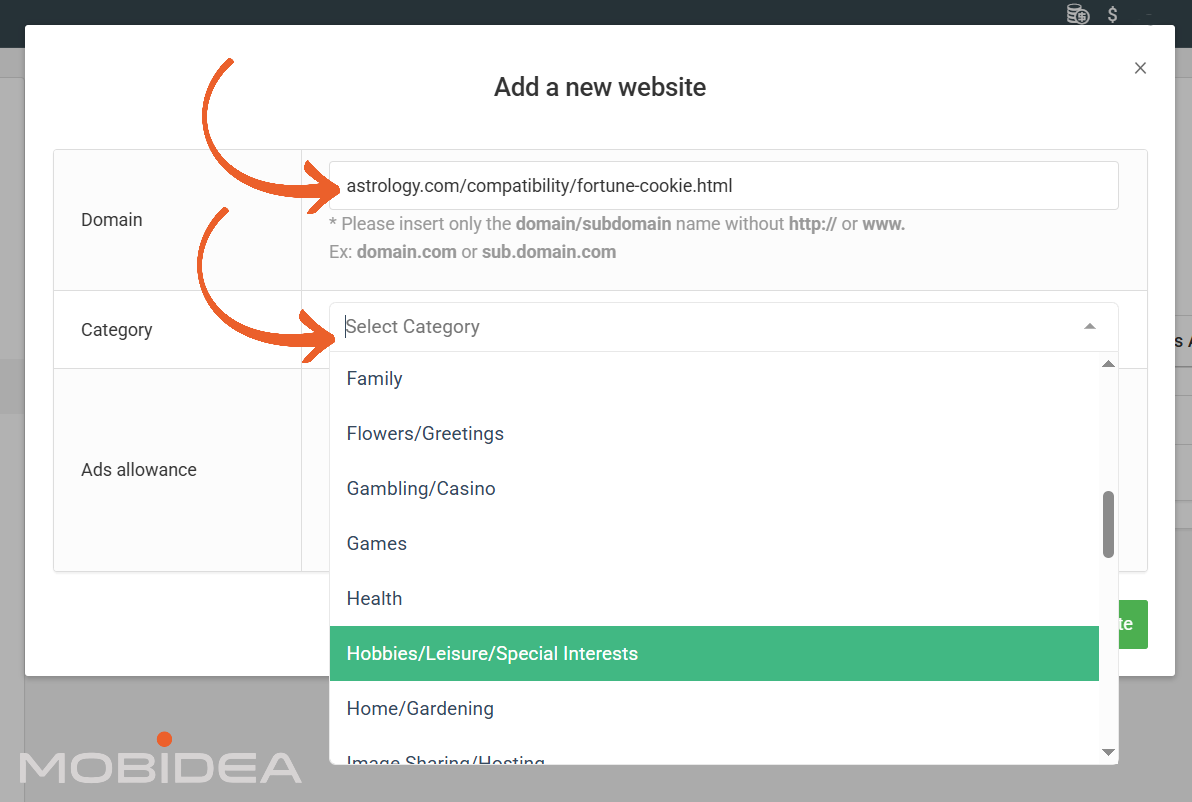
You’ll need to provide:
- Website URL: Enter the domain name or the subdomain of your website.
- Website Category: Select the category that best describes your content.
Available options include entertainment, downloads, technology, dating, gambling, and other categories.
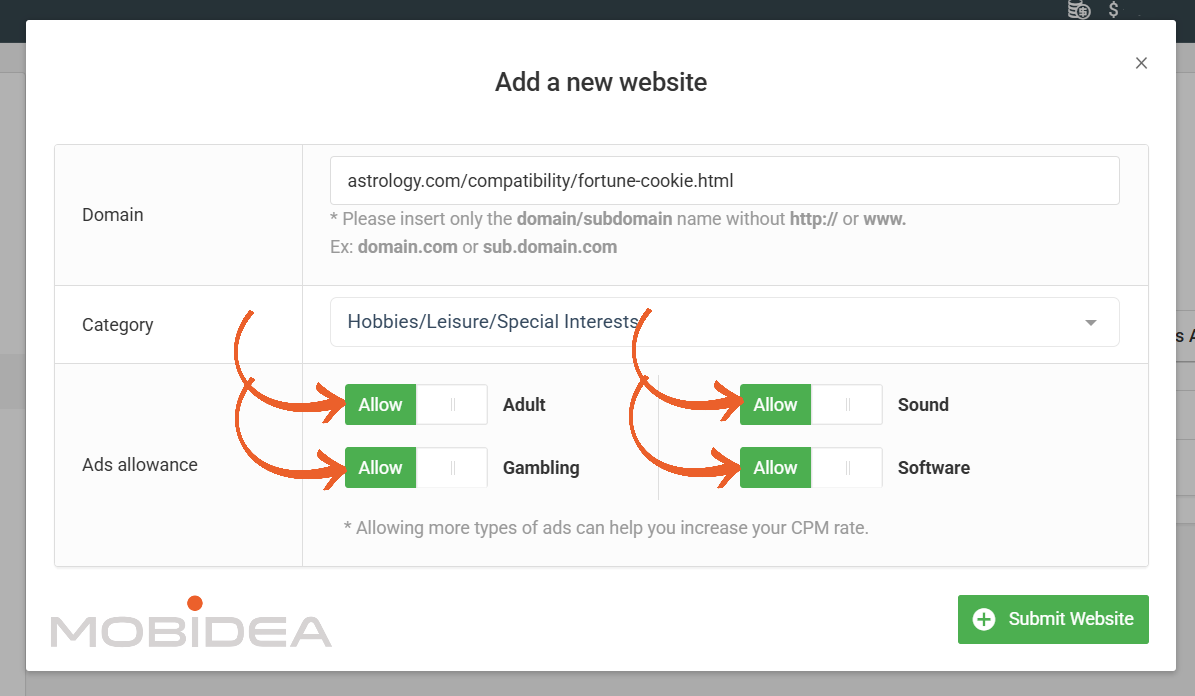
- Ads Allowance: Select the items that you allow for ads that appear on your website.
You can choose to allow either Adult, Gambling, Sound, and Software.
Validate Domain
Before your website is sent to the customer care team for review, you will first need to validate the website to prove that it’s really yours.
You can find validation options below:
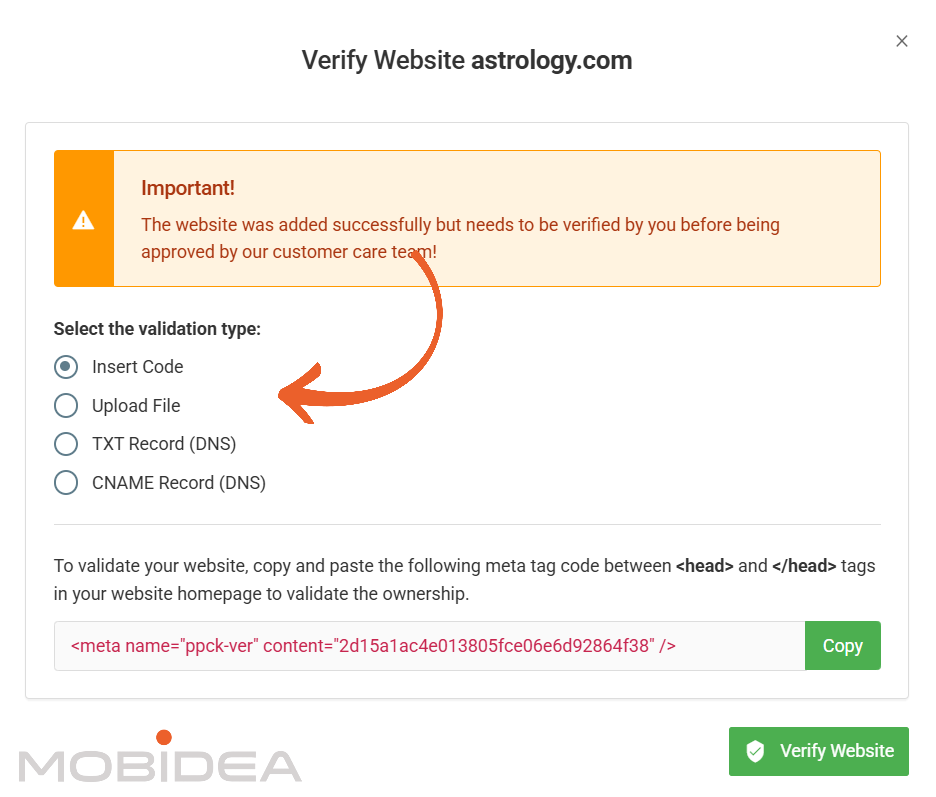
Once you’ve verified your website, it will automatically be sent to the review team.
The platform reviews submitted websites to ensure they meet quality standards and comply with terms of service.
This approval process typically takes 24-48 hours.
Acceptable websites generally include those with:
- Original content updated regularly
- Real human visitors
- Clear navigation and functional design
- Compliance with legal requirements
The platform rejects websites containing prohibited content or using artificial traffic generation methods.
Installing Ad Code
After your website gets approved, PopCash provides a JavaScript code snippet to place on your pages.
Access this code from your Publisher dashboard under Get Code.
Copy the code and paste it into your website’s body, ideally within the body tags.
For WordPress sites, you can use a plugin that allows adding custom code to headers or footers.
For custom HTML sites, edit your template file directly.
After installing the code, visit your website in a browser to verify popunders are serving.
You should see a popunder open behind your main browser window when visiting pages with the code installed.
Requesting Withdrawals
Once your available balance reaches the $10 minimum, you can request a withdrawal.
Navigate to the Billing section of your dashboard and select Cashout.
Input the amount you want to withdraw (of course, depending on your earnings as shown in your publisher reports) and select your payment method.
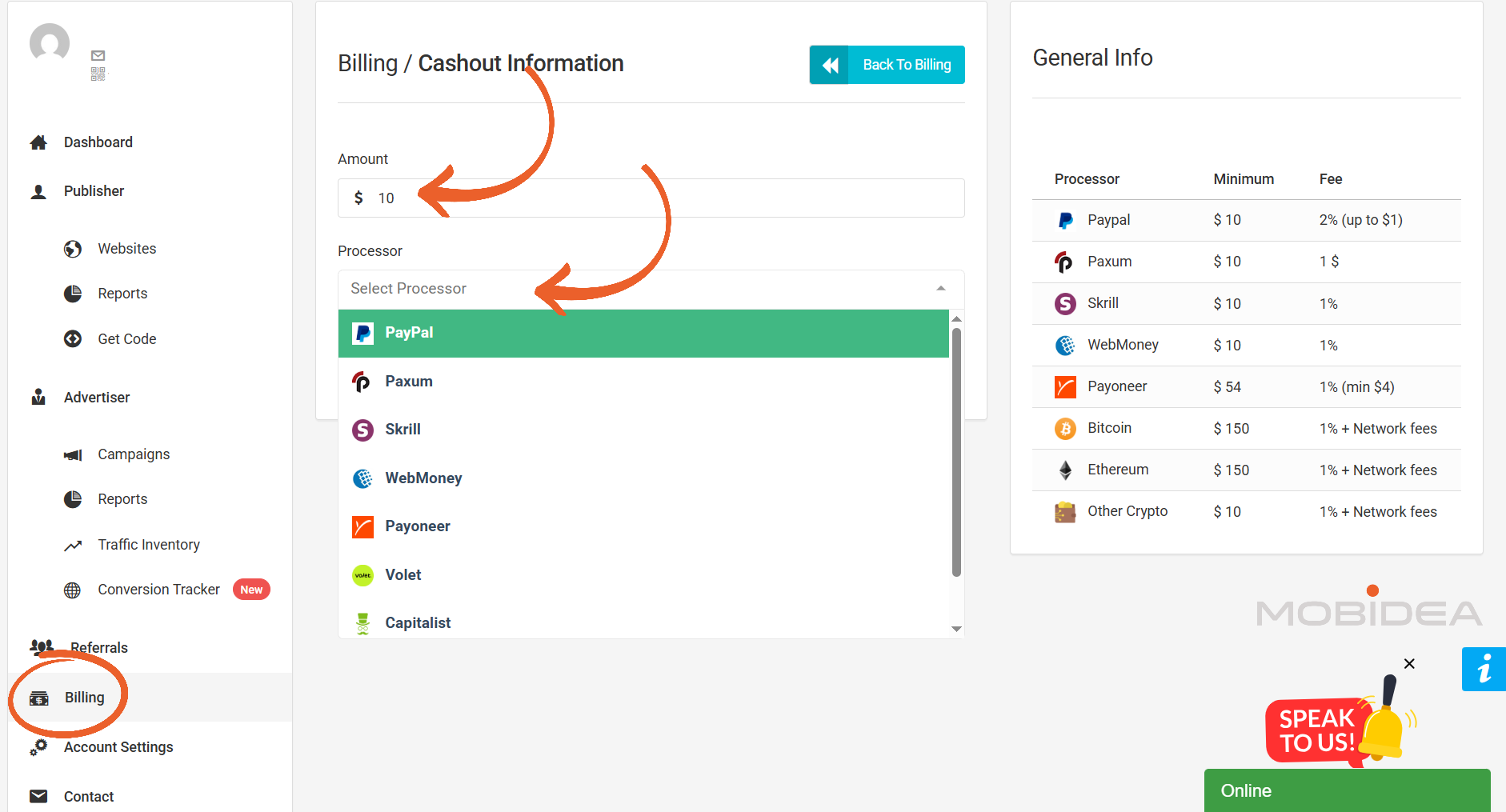
Enter your payment details for the selected method.
Submit your withdrawal request and the platform processes it according to the timeline for your chosen method.
You’ll receive confirmation once payment is sent.
There’s no limit on withdrawal frequency beyond meeting the minimum threshold each time.
Some publishers withdraw weekly while others wait for larger amounts to reduce transaction fees charged by payment processors.
PopCash Verdict
Should you try Popcash? Definitely!
The $5 minimum deposit makes it easy to start, which is perfect for entry-level media buyers and advertisers who want to try popunder traffic.
Or if you have offers that already convert well on other platforms, PopCash can give you more traffic at good prices. You can scale away easily.
To succeed, you need to spend time on optimization, use the blacklist features often, and check traffic quality with your own tracking tools.
New advertisers will like the simple interface, fast campaign approvals (usually under one hour), and very fast live chat support that answers in seconds.
Ready to try PopCash?
The minimum deposit is only $5, so you’ve got virtually nothing to lose just to test it out!
PopCash FAQs
What is PopCash?
PopCash is a self-serve popunder ad network.
It launched in 2012 and has stayed focused on one thing: popunder traffic, for both advertisers and publishers.
How much money do I need to start advertising on PopCash?
Just $5. That’s the minimum deposit, and it’s one of the lowest you’ll find in the popunder space.
It’s low enough to try the platform before you put in more budget.
Does PopCash offer any ad formats besides popunders?
No. PopCash sticks to popunder ads only.
If you want other formats like native or push, you’ll need to look at their sister network, Mondiad.
How fast does PopCash approve new campaigns?
Usually under an hour.
During busy weekends, it can stretch to about 12 hours, but that’s still faster than a lot of other networks out there.
Is PopCash a good fit for publishers too?
Yes. Publishers get an 80-20 revenue share and a $10 minimum withdrawal.
Setup only takes a single code snippet, and PopCash accepts sites across many categories, so it works even if you’re just starting to build an audience.
What payment methods can I use with PopCash?
PayPal, Paxum, Skrill, and wire transfer. Electronic methods like PayPal usually clear within 1 to 3 business days.


Explore this independent review of ExoClick, covering its campaign setup, targeting options, reporting and advertising tools.

Discover the best ad spy tools for affiliate marketers today! Compare features, pricing, and exclusive discounts to outsmart your competition.

Discover why TrafficStars is a leading adult ad network, offering high-quality traffic, scalable ad placements, and advanced optimization tools for affiliate marketers.