
This Post is brought to you by Semrush.
Is your website invisible to AI tools like ChatGPT and Gemini?
If you’re not getting traffic from any AI chatbots, it might be the case.
About 30% of websites today are actually hidden from AI.
It may not be because the content is bad. Not even because the brand is unknown.
It may be much simpler than that—your website is built in a way that AI simply cannot read.
That’s the AI readability crisis.
And if you haven’t fixed it by now, you’re already losing ground.
Wanna know how to get unstuck here?
Let’s walk through what’s causing it and what to do about it in this post.
How AI Crawlers Read Your Website
Before we get into the fixes, there’s something you need to know first: AI crawlers are not the same as Google’s.
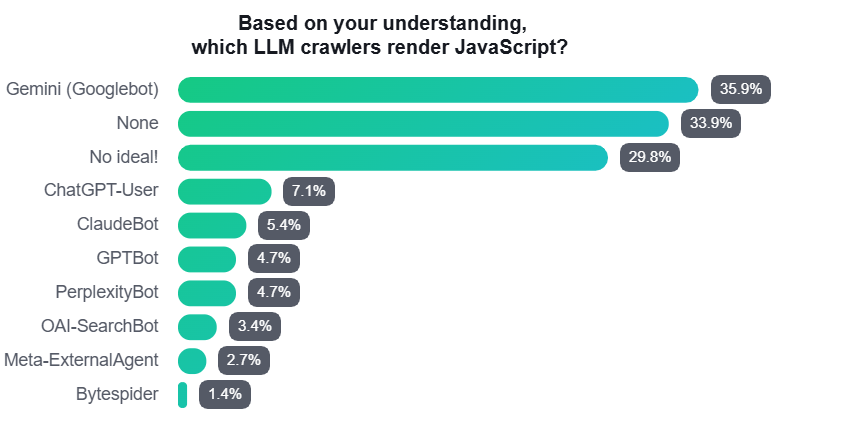
Do LLMs crawlers render Javascript?
According to Sitebulb’s Javascript SEO 2025 Report, majority of SEO survey respondents are not sure.
When a person visits your website, their browser runs all the code on the page.
JavaScript fires, React components mount, lazy-load scripts execute, and the final result is a fully built page with all your content visible.
AI crawlers don’t do that.
Tools like GPTBot and OAI-SearchBot (from OpenAI), ClaudeBot (from Anthropic), and PerplexityBot only read the raw HTML, which is the basic version of your page that your server sends out first.
They don’t run JavaScript.
They don’t even wait for content to load—what they see on the first request is all they get.
In a joint study by Vercel and MERJ analyzed over 500 million GPTBot visits, they found zero evidence that GPTBot ever ran JavaScript, even when it downloaded the JS files.
Apparently, ClaudeBot and PerplexityBot work the same way.
Now, why does this matter?
Because by 2026, platforms like ChatGPT, Gemini, Perplexity, and Microsoft Copilot have become what you could call citation engines.
They give users direct answers inside the chat, so users don’t need to click anywhere.
If your site isn’t cited here, it’s as if it doesn’t exist.
More and more people are relying on AI to find answers for them!
Missing a Google crawl delays your rankings.
But missing an AI crawl? That’s a different problem entirely.
You’re simply not in the answer pool, with no queue, no retry, and no recovery mechanism.
How Many Sites Are Invisible Right Now?
More than you’d think. And honestly? The numbers are a little alarming.
According to eSparkBiz, 98.7% of websites rely on JavaScript in some way.
For a large portion of these, critical content only exists after JavaScript runs, which means AI never sees it.
The content most at risk includes the following:
- Product descriptions and pricing on ecommerce and SaaS pages
- Blog post body text loaded through headless CMS tools
- FAQ sections that only appear after the page fully loads
- Testimonials and review sections added by third-party scripts
- Feature and service descriptions on pages built entirely in React or Vue without server-side rendering.
The last one catches a lot of marketers off guard because the pages look completely normal to human visitors.
For example, a SaaS company that writes excellent guides and in-depth tutorials can become a victim.
Their website looks great to any human visitor, but when a potential customer asks ChatGPT, “What’s the best tool for X?” the company isn’t mentioned.
We already know it’s not because their content is poor—it’s because the AI never saw it.
So a competitor with a simpler, machine-readable website gets the citation instead.
In the end, that’s traffic and conversions lost.
Soemtimes it’s not about better content, but to better infrastructure.
How do we fix it?
Let’s talk solutions.
Three Technical Problems Behind the Crisis
The AI readability crisis comes from three separate issues that often work together.
Fixing only one of them won’t be enough, so you need to understand all three before touching anything.
Gap 1: The JavaScript Blind Spot
This is the biggest and most common problem.
It happens when your important content only appears after JavaScript runs, as we already mentioned.
AI reads the raw HTML first.
If the content isn’t there yet, AI assumes the page is empty.
To find this problem, compare two things:
- What your server sends first (the raw HTML)
- What the page looks like after everything has loaded (what your users actually see)
The difference between those two versions is your blind spot. That’s what AI can’t read.
To fix this, you need a structural change, not just a patch.
Move your critical content to Server-Side Rendering (SSR) or Static Generation.
This means the content is already in the raw HTML when the server sends it, so no waiting is required.
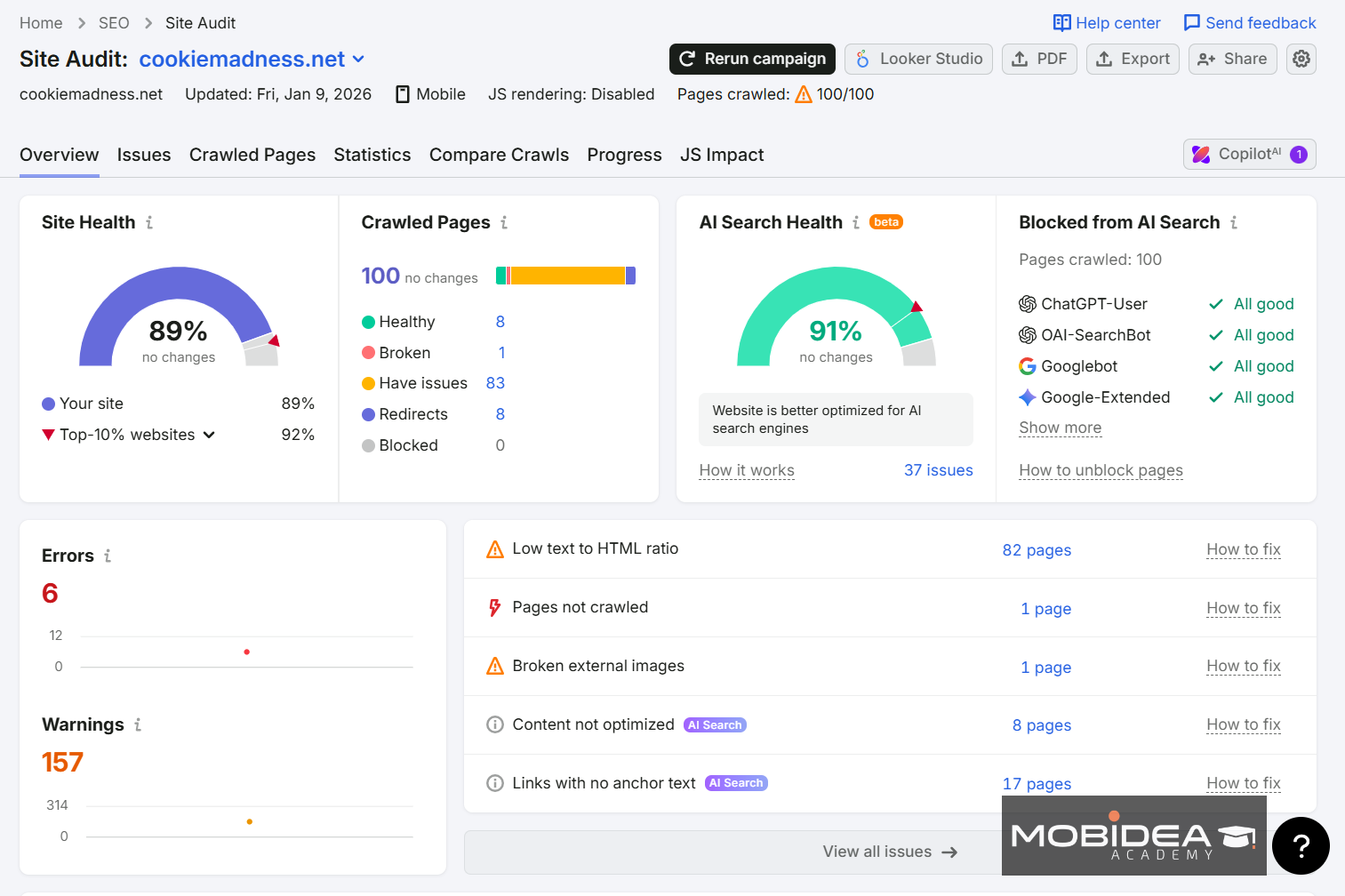
Semrush One‘s Site Audit JS Impact Report can show you exactly which pages have this problem and how much content AI is currently missing.
It compares your raw HTML against the JavaScript-rendered version and gives you a clear list sorted by traffic importance.
Gap 2: Missing Machine Identity (Schema Markup)
AI doesn’t just read words—it looks for connections.
When it visits your site, it tries to understand who you are, what your brand is, and what topics you’re an expert in.
Without structured data (also called schema markup), the AI treats your site like a random collection of pages instead of a real business.
This is an important distinction to keep in mind as you audit your site.
The most important schema to add is Organization schema.
This tells the AI your brand name, logo, social profiles, and contact details.
Without it, the AI might confuse you with another company or fail to give you credit when answering a question.
Article schema on blog posts tells the AI who wrote the content and when it was published.
FAQ schema is also powerful.
Since FAQs are already structured as questions and answers, AI can pull those answers directly into its responses and credit your site as the source.
Of course, consistency matters too.
AI cross-checks whether your brand information matches across your website, your LinkedIn page, and your Google Business Profile.
If any details don’t match up, the AI gets confused and becomes less likely to recommend you as a source.
Semrush One‘s Site Audit finds all of these missing schema codes for you.
It gives you a simple, prioritized list of what to add to your most important pages so AI can finally understand who you are and what you do.
Gap 3: Confusing Page Structure (Semantic Collapse)
This problem happens when your page looks perfectly fine to human readers but is messy and confusing for AI.
AI doesn’t read your page the way a person does.
Instead, it scans the HTML structure—the headings, the tags, and the hierarchy—to understand what the content is about.
If that structure is broken or inconsistent, the AI can’t reliably extract information from it.
A page with a clean, simple structure will perform better with AI than a cluttered one, even if the cluttered one has more content.
I think a lot of site owners underestimate how much this matters.
AI also uses your internal link structure to figure out which pages are your most authoritative ones and how your topics connect to each other.
Broken links or inconsistent anchor text make it harder for AI to build an accurate picture of your site’s expertise.
Semrush One‘s Site Audit can also check for all of these issues.
Bad heading structure, missing alt text, broken links—it flags them all and gives you a clear priority list showing how much each fix could impact your traffic.
The Bottom Line
Fixing your AI visibility is one of the more important technical projects your site can take on right now.
Of course, results will always depend on your content quality, your niche, and how competitive your space is.
But the foundation has to be there first.
The gap between sites that get cited and sites that get ignored comes down to three things:
- whether your content is in the raw HTML,
- whether AI can identify who you are, and
- whether your page structure is clear enough for machines to parse.
Get those three things right, and your content finally gets the visibility it deserves.
If you’re content dipped at the start of the year, check out our post on How to Diagnose and Recover From the Q1 2026 Google Quality Update.


There's a new challenge: How do you optimize content so AI tools actually cite your brand? Let's talk ways in this blog post.

Get to know what is semantic web by checking an article written by Courtney McGhee, a true SEO master pro with a whole lotta info to share!

It's finally time for you to understand how SEO can work alongside your ASO strategy by checking an article written by an SEO pro!