How to Run Dating Campaigns with AI: A Practical MCP Workflow for Affiliates
October 9, 2026 9 min read
Our friends from Mondiad share how to connect their platform’s MCP connector to AI assistants like Claude or ChatGPT for smarter, faster dating campaign management.
The dating niche stays relevant, but it requires constant attention.
Creatives need to be changed and tested often, and results can vary greatly from one geographical area to another.
A campaign can work well in one country and consume the budget without results in another.
Sometimes the difference between a profitable week and a bad one comes from a few segments that were not checked in time.
Running dating campaigns with AI can take a lot of that checking off your plate.
This is where AI-based tools can be useful in the work of a media buyer.
We are not just talking about using AI to generate a few headlines, but about working directly with real campaign data.
This is possible through a tool called the MCP connector.
In this guide, we explain what an MCP connector is, how you can set it up in an ad network and what prompts you can use to analyze and manage dating campaigns directly from the chat.
We will use Mondiad as a practical example, since dating traffic and the MCP connector are available on the same platform.
The connector is free to use and allows you to both generate reports and make changes to campaigns.
TL;DR
- An MCP connector links your advertising network account to an AI assistant, such as Claude, ChatGPT or Cursor, enabling it to read your real-time statistics and make changes on demand.
- The dating niche is ideal for this approach, as success hinges on the constant monitoring of segments: geographic location (GEO), device, operating system, mobile carrier and ad creatives.
- Mondiad is a practical platform for testing this out: it offers dating-niche traffic across eight+ ad formats, plus a free MCP connector, all within a single account.
- Setup takes just a few minutes: generate an API key, add a custom connector and enter your credentials.
Below, you’ll find five ready-to-use (“copy-paste”) prompts and a daily checklist you can start using today.
What Does an MCP Connector Actually Change?
MCP stands for Model Context Protocol and is an open-source standard launched by Anthropic in late 2024.
In short, it allows an AI assistant to connect to external tools and work with real data, not just the general information it already has.
When an ad network uses an MCP server, the AI assistant can work directly with the information in your account.
It can generate reports, display campaigns by status or country, check campaign settings, clone or modify a campaign and manage ads.
Instead of going to the dashboard and applying multiple filters to find the information you need, you can simply ask the AI.
One important thing is that the assistant does not get direct access to your login details.
The MCP server handles the authentication and only gives it access to the actions it is allowed to take.
If you want to better understand how MCP works in affiliate marketing, you can find more details in this introductory guide: MCP servers and affiliate marketing.
Why Dating Campaigns Can Benefit the Most
Some verticals depend on a few big decisions. In dating, results depend more on many small adjustments.
There are a few reasons why an AI assistant that can work with account data is useful.
Ads quickly lose effectiveness. Users frequently see similar ads and messages.
An ad that performed very well last week may start to decline rapidly.
The sooner you notice the change, the faster you can react.
Problems can be hidden in small segments.
Overall, a campaign may look good, but a specific operating system, carrier or city may be consuming budget without results.
Mondiad’s targeting options go down to OS version and city, so there are a lot of segments to go through.
Manually checking all of them every day is time-consuming.
Expanding to other GEOs means a lot of repetitive work.
If a campaign works in one country, the next step may be to test the same concept in other similar GEOs.
Often, this means rebuilding the campaign and changing the targeting for each country.
Mainstream dating and adult dating need to be treated differently.
They may have different traffic sources, ads and formats.
Therefore, they should not be analyzed according to exactly the same rules and require separate monitoring.
All of these situations involve the same thing: quickly checking a large amount of data and being able to act on it.
This is where an assistant connected via MCP comes in handy.
Where Mondiad Comes In: Dating Traffic and MCP in the Same Account
Many ad networks offer dating traffic, and more and more are starting to introduce AI-powered tools.
But combining the two is important, because an MCP connector is really useful when it can work directly with the inventory and data available in the platform.
In Mondiad, dating campaigns can run on eight+ formats: classic push, in-page push, native, banners, popunders, Telegram mini-app ads, parked domains and pre-roll video ads (beta testing).
You can check the current volume by country and format in Mondiad’s traffic inventory.
Mondiad Ad Formats for Dating Campaigns
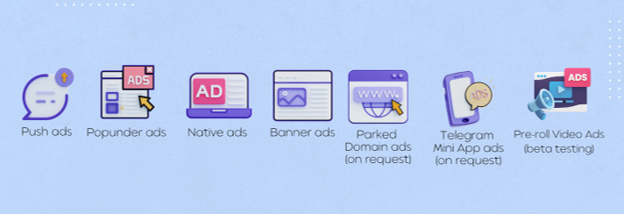
| Format | How It Works | What Stands Out | Pricing | Dating Fit |
|---|---|---|---|---|
| Classic push | A notification lands on the user's screen, on desktop or mobile, after they've subscribed to a site's push alerts | High visibility and strong CTR, good for direct response and re-engagement | CPC, TargetCPA | Mondiad's own dating guide calls push "great for this vertical" because it grabs attention right away. |
| In-page push | A push-style ad shown inside the web page itself, with no subscription needed | Reaches iOS users and people who never subscribed, across browsers and devices | CPC, TargetCPA | Same hook as classic push with extra iOS reach. One of Mondiad's top two formats for dating, so it belongs in your first tests. |
| Native | Ads that blend into the site's content as recommendation-style placements | Non-intrusive and builds trust. Works well for content-style intros | CPC, CPM, TargetCPA | Mondiad lists native among formats that work for dating. Suits softer mainstream angles |
| Banner | Responsive display banners in standard sizes (300x250, 728x90, 468x60 and others) | Visibility and brand recall, useful for retargeting | CPM, TargetCPA | A top performer for dating on Mondiad, especially in North America, Europe and Latin America |
| Popunder | Your landing page opens in a background tab while the user keeps browsing | Full-page exposure with nothing competing for attention. High volume at a low cost | CPM | Mondiad lists pops among formats that work for dating. |
| Telegram Mini App ads (on request) | Ads shown inside Telegram mini apps, with no installs or redirects | Engaged, mobile-first audience, strong in Asia, Africa and Eastern Europe | CPM, CPC | Dating isn't on Mondiad's list of best-fit verticals for TMA, so treat it as an experiment |
| Parked domain (on request) | Users who type a misspelled or expired domain go straight to your landing page, no click needed | Warm type-in traffic with intent. Targeting by RON or keywords | CPV | Intent-driven traffic that's worth a test for dating. |
| Pre-roll video (on request) | A video plays in the player before content the user chose, on mobile and desktop | Video builds trust, and you choose skippable or non-skippable | CPM | Suggested setup: skippable 10 to 15 second spots built for muted playback, with text on screen from the first second. |
This is especially useful when you want to compare the performance of multiple formats.
With the MCP connector, you can check, for example, which format drives the best conversions for a dating offer in a specific geographic area, using data from your own campaigns.
This way, decisions are not just based on general recommendations about what “should” work, but on actual results from your account.
Where Dating Traffic Performs Best
Dating traffic on Mondiad performs best with in-page push and banner ads, and these formats do well in North America, Europe, and Latin America.
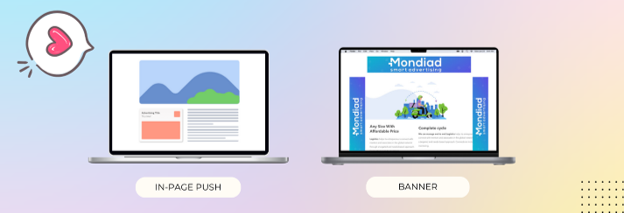
In-page push shows the offer directly on the page without requiring a subscription, so it reaches users on every browser and device, including iOS. Banners give dating offers a visual hook through profile-style creatives.
| Top GEO / Region | Countries | Best Formats |
|---|---|---|
| North America | US, Canada | In-page push, Banner |
| Europe | UK, Germany, France, Italy, Netherlands, Belgium, Poland, Czech Republic | In-page push, Banner |
| Latin America | Mexico, Argentina, Colombia | In-page push, Banner |
| Asia-Pacific | Australia, Japan, China | In-page push, Banner |
They’re a good place to start a new dating campaign or expand an offer that’s already converting.
Before you change your budget, ask your assistant how your own campaigns are performing in each of them.
How to Configure the Mondiad MCP Connector
Setting up the Mondiad MCP connector takes just a few minutes.
Follow these three steps to connect Mondiad to your MCP-compatible AI client.
Step 1: Generate Your Mondiad API Credentials
Log in to your Mondiad account and open Account Settings from the left sidebar.
From there, generate a new API key.
Give the key a name and, optionally, a short description.
If you manage (or plan to manage) multiple API keys, use a descriptive name so you can easily identify each one later.
Once the key is created, securely save your:
- Client ID
- Client Secret
You’ll need both credentials when configuring the connector in your AI client.
Step 2: Add Mondiad as a Custom Connector
The exact setup may vary slightly depending on the MCP-compatible client you’re using, but the principle is the same: you’re adding Mondiad as a new tool the AI client can access.
- Claude: Open the Connectors menu and add a custom connector.
- ChatGPT: Open the Developer Settings or Connectors section and add a new connector.
- Cursor: Add the Mondiad server details to your MCP configuration.
Then enter the Mondiad connection details:
Server URL: mcp.members.mondiad.com
Client ID: Your Mondiad Client ID
Client Secret: Your Mondiad Client Secret
Step 3: Confirm the Connection
Once the setup is complete, your AI client should display a confirmation, such as a green checkmark or a Connected status.
That’s it. Mondiad is now connected and available as a tool within your AI conversations.
The full walkthrough with screenshots is in the Mondiad MCP connector guide.
Workflow: 5 Prompts to Run Dating Campaigns with AI
Here’s a routine you can use pretty much as is. The numbers in the prompts are just examples, so set your own targets.
1. Morning Check
Show me all my active dating campaigns. For each, show me the spend, conversions and CPA for yesterday compared to the day before.
Flag any campaign where the CPA increased by more than 20%.
First 20 minutes of the day, done. Well, they’re not gone, you just don’t waste them scrolling through the dashboard anymore.
You get a short list of what needs your attention and that’s it.
2. Segment Hunt
For the [name] campaign, break down yesterday’s performance by country, OS and device.
Show me the segments that spent money without converting.
Get the breakdown first and only then decide what to cut and where to lower the bid.
If you run mobile traffic, add carriers as well.
3. Creative Check
Show me all the creatives in my active dating campaigns, with CTR and conversions for the last 7 days compared to the previous 7 days.
Which ones are declining?
When you see a creative starting to decline, ask the assistant for a new version in the same campaign.
That way you change it while it’s still working. Not after it’s completely dead, like most of us do.
4. Expanding to New GEOs
Clone the [name] campaign and change the targeting to [country].
Keep the same creatives, set the status to paused and show me the full configuration before I activate it.
The key word here is paused. It’s your safety net.
You read the configuration, then you start the campaign yourself.
What used to be a 15-minute rebuild is now just a quick read.
5. Weekly Analysis
Compare this week to last week for all my dating campaigns.
Which campaigns, countries and formats should get more budget and which are quietly losing money? Explain your reasoning.
Don’t skip that last line.
Asking for the reasoning makes the assistant show which numbers it used, so you can check the logic before you move budget.
Some Useful Rules
If you use the MCP connector to work directly with campaigns, keep in mind a few simple rules:
1. Check Before You Change
Always ask for a preview before the assistant updates or activates a campaign.
2. Start with Reports
At first, use the connector only for reports and analyses. After you verify that the data is correct, you can move on to changes.
3. Keep in Mind the Limits
In Mondiad, the MCP connector cannot:
- add funds to the account
- permanently delete campaigns or creatives (it only changes their status)
- access billing data, except for the current balance
4. You Make the Final Decision
The AI can analyze the data and identify problems or opportunities, but you decide what changes are made to the campaigns.
FAQ
Do I need coding skills to use an MCP connector?
No. Once it’s connected you write instructions in plain language, the same way you’d brief a teammate.
Can the AI see my data from other networks?
Only the platforms you connect. You can add several MCP servers to the same assistant if you want to compare networks in one conversation.
Which traffic formats work best for dating?
Dating traffic on Mondiad performs best with in-page push and banner ads, and these formats do well in North America, Europe, and Latin America.
Is it safe to give an AI access to my ad account?
The connection runs on an API key you create and can regenerate whenever you want. Keep the credentials private and review changes before they go live.
Get Started with the Mondiad MCP Connector
Dating rewards whoever spots changes first. The setup above takes a few minutes.
After that, most of your daily checking happens in a chat window, and the weekly read tells you where the budget should go next.
New to Mondiad? Use code MOBIDEA15 on your first deposit of $100 or more and get 15% extra added to your balance.
More budget to test GEOs, formats and creatives from day one.
Create a Mondiad account here!


Explore Affiliate World Asia 2024 in Bangkok—connect, learn, and thrive with top marketers, and don’t miss Mobidea’s exclusive Always Winning party for ultimate networking and celebration.

Advertisement📢 Looking for the latest? Affiliate marketing is always evolving—check out our Affiliate Marketing Trends 2026 for the most up-to-date…
Stop promoting mVAS blindly in Africa! Here's a full playbook on the best geos to start promoting in Africa right now and why.