
Mondiad Review At a Glance
What Is Mondiad?
Mondiad entered the advertising scene in 2019, but its roots go back much further.
The team behind it built its reputation years earlier through PopCash, a popunder network that had already carved out a solid name in the performance marketing space since 2012.
Check out our Popcash review if you want to learn more about it.
So rather than starting from zero, the founders used that decade of hands-on experience to build something bigger.
Mondiad is a multi-format network that could serve advertisers and publishers across a wider mix of ad types and verticals.
It is a self-service, global ad network that was built by people who already knew what could break in ad tech and used that knowledge to build Mondiad from the very first day.
Mondiad Best Features for Advertisers
Mondiad packs a lot into a single dashboard.
Instead of picking one ad format and specializing in it, the network gives advertisers a full mix of formats, targeting layers, and optimization tools that all live under one account.
Let’s take a closer look at what advertisers actually get to work with.
Traffic Volume and Reach
According to Mondiad, its platform generates more than 11 billion impressions and 50 million clicks per day across more than 200 countries.
These impressions are split between mainstream and adult audiences, so advertisers in niches like dating, sweepstakes, casino, nutra, e-commerce or app installs can run campaigns here.
Of course, scale does not automatically equal results.
But what is more important is that it provides a broad reach across a diverse set of GEOs, from Tier 1 markets such as the US and UK, to Tier 2 and 3 markets where CPMs are lower and volume is higher.
This means that advertisers targeting premium GEOs will find a network that can handle that and advertisers looking to scale budget-friendly campaigns in emerging markets will also be able to do that.
Traffic Inventory
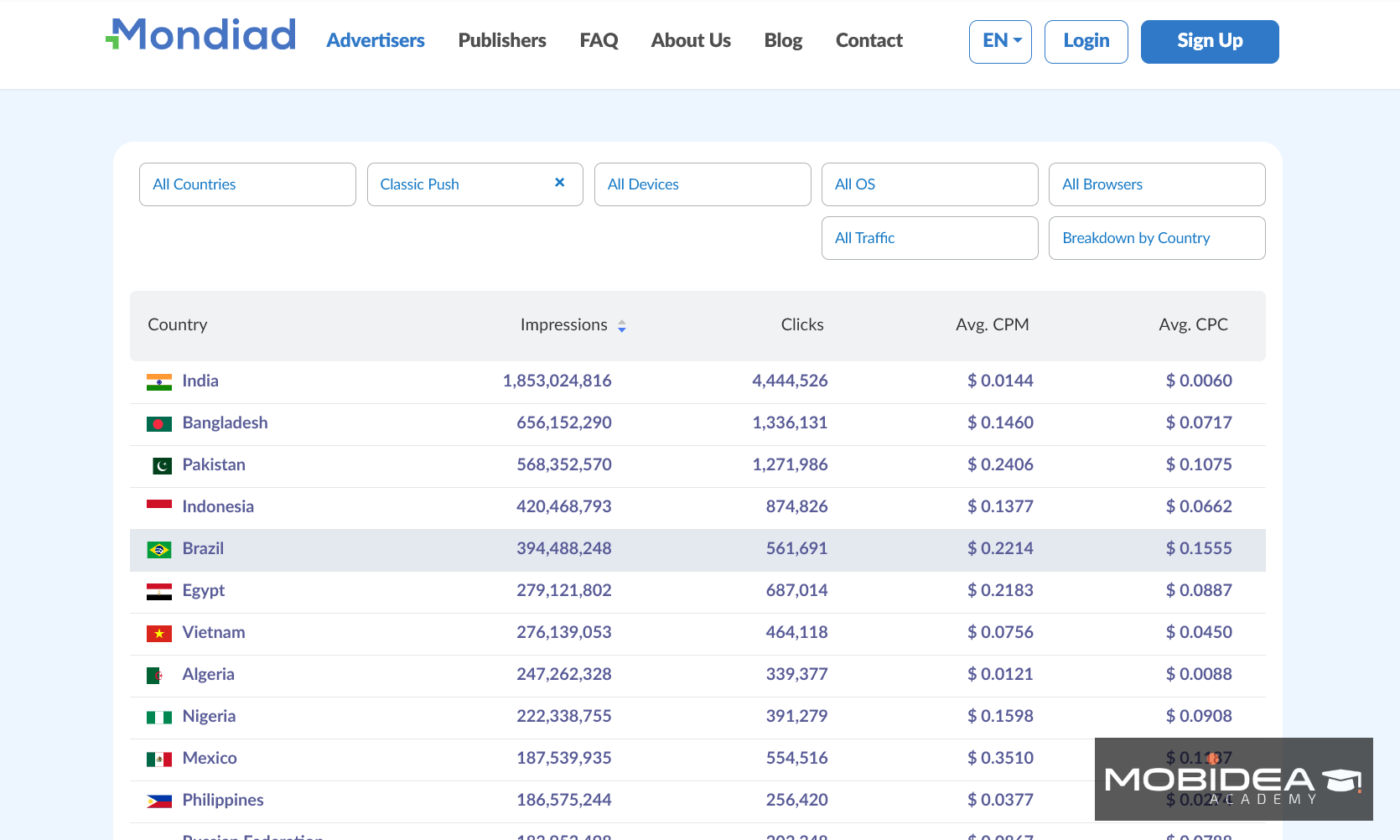
While most networks will only publish a single headline number (say number of impressions), Mondiad has a live Traffic Inventory tool on its site where it provides breakdowns of impressions, clicks and average CPM/CPC over the last 24 hours (updated hourly),
Results can be categorized by ad format (Classic Push, In-Page Push, Native CPC, Native CPM, Banner CPM, Popunder, Video), traffic type, country, device, OS and browser.
For the ad formats currently delivered by request only, Telegram and Parked Domain ads, users are encouraged to contact the customer care team for the latest insights.
This provides advertisers with a means to double-check actual near real-time numbers for their exact format/GEO combination before putting their bids and budget.
Not only is it useful for campaign creation, but it also supports their claims of the amount of traffic they can really deliver.
Ad Formats
Mondiad runs 9 ad formats and inventory types in total.
There are 6 core formats plus 3 additional, rarer options covered further below.
Each one is built for a different stage of the funnel, so advertisers can mix and match depending on whether the goal is broad reach, engagement, or conversions.
- Classic Push
This is the original push notification format, and is what started everything.
Ads pop up directly on a user’s desktop or mobile device, just like system notifications would appear.
They can be bought on a CPC or Target CPAbasis.
It remains one of the most tested formats on the network.
The top countries for classic push based on traffic volume are India, Bangladesh, Pakistan, Indonesia, and Brazil.
- In-Page Push
In-Page Push provides the same style for notifications as classic push notifications, but instead of sending these to the device screen, it’s put directly within the web page itself.
This is incredibly important in practice, as it means that the content is supported on all devices, OSs, and browsers—including iOS, which classic push notifications cannot reach.
As for top countries in terms of traffic volume, we have India, US, France, and Indonesia.
- Native ads
Native ads are supposed to fit into the content of a publisher’s page, so they blend in more seamlessly than other ads.
Native is well-suited for offers that need an easy content feel before asking for a click, such as Financial, Sweepstakes, or subscription products.
Native ads has three payment models: CPC, CPM, and TargetCPA.
For those purchasing Native Ads in CPC, top countries are France, US, Philippines, Russia, Germany, and India,
For Native Ads CPM, it’s US, India and China.
- Banner ads
Banners are one of the most recognizable ad formats and Mondiad supports eight of the standard banner sizes:
- 300×250
- 468×60
- 250×250
- 728×90
- 120×600
- 300×100
- 950×250
- 315×300
These sizes cover most of the common spaces on a publisher’s layout, from the sidebar skyscrapers to the top leaderboards.
The countries with the most traffic volume for banner ads are US, India, France, Japan, and China.
- Popunder Ads
Popunder ads are displayed in a separate window behind the active browsing window.
This format is designed for high volume, and it works particularly well for verticals like Sweepstakes, Betting, Utilities, etc. where full page exposure is helpful, especially as you begin to expand to Tier 2 and 3 GEOs.
The top geo sources for pops in Mondiad are Indonesia, India, and US.
- Video Ads (Beta)
Video is Mondiad’s newest format, currently running in beta.
Access is granted on request rather than appearing by default in the campaign builder.
It runs as a pre-roll ad, playing before a user’s chosen video content on both mobile and desktop, and can be set as skippable or non-skippable depending on the offer.
Buying runs on CPM.
Creative specs are straightforward: MP4, AVI, or MOV files, up to 20MB, an 8 Mbit/s bit rate, a minimum resolution of 240p, and a maximum length of 30 seconds (though shorter spots around 15 seconds tend to outperform the full 30).
It works especially well for verticals with something visual to show and a fast path to conversion, think iGaming, Sweepstakes, App Installs, mVAS, Dating.
Top countries for video ads are India, Russia, and US.
- Telegram Mini App Ads
They also have ads in the Telegram mini app space, which is an ad space that most major mainstream push or native ad networks overlook.
This means that you are going to have your campaign appear in front of a highly engaged and active audience, without the extra work of creating and managing a telegram ad network from scratch.
- Parked Domain Traffic
Parked and expired domain traffic is available on request, tapping into type-in visitors who land on a domain by accident or old habit rather than through a search or a click.
This is an often-overlooked source of high-intent traffic that can convert well for the right kind of offer.
The last two ad formats are not standard self-serve options in the main dashboard, so if you’d like to try them, you should contact your account manager.
Audience Targeting
Advertisers have a lot of control over who sees their ads at Mondiad.
Filters available are:
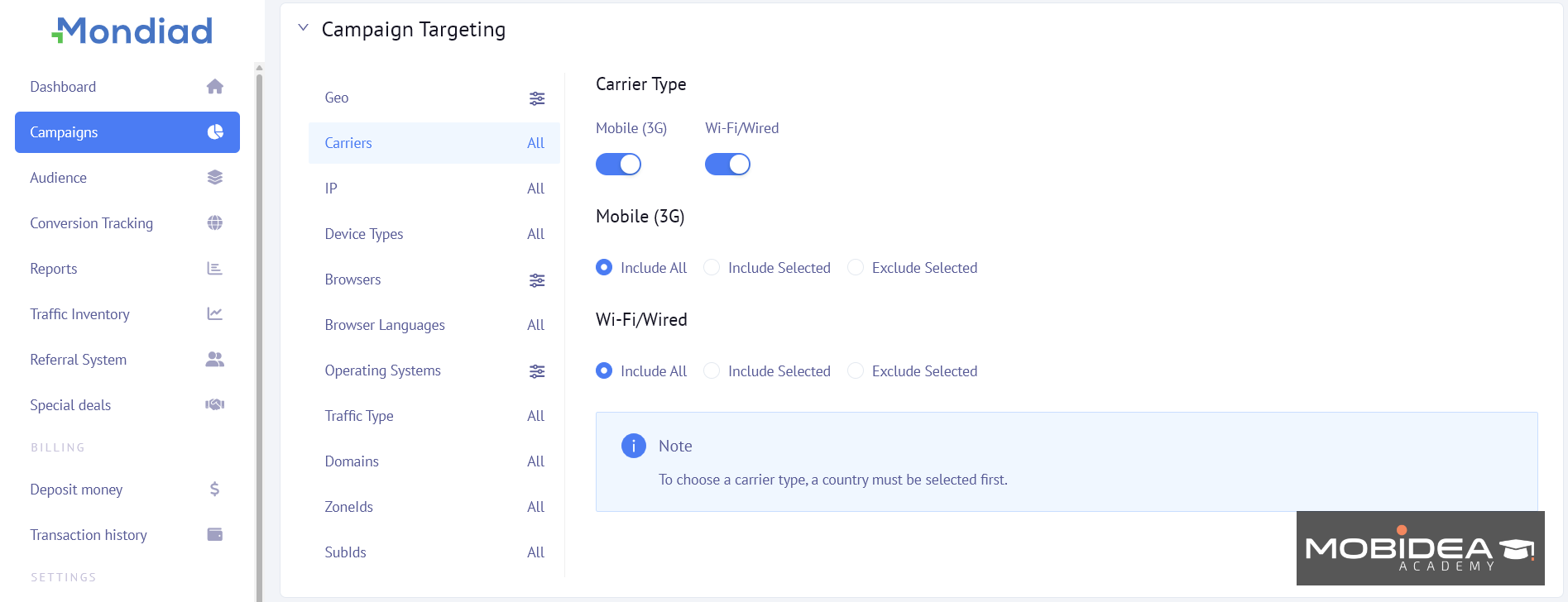
- Geography: Targeting down to the region or city level and reaching more than 200 countries.
- Device type: Desktop, mobile, or tablet.
- Operating system and os version
- Browser & Browser languages
- Carrier: Targeting for mobile-based campaigns to specific mobile networks.
- Language: Match ad creatives to the visitor’s browser or system language.
- Traffic type: Mainstream or adult
In addition to the basic filters, advertisers may apply custom bidding based on ZoneID, SubID, or country, which allows them to vary bid amounts based on which specific placements or traffic sources are delivering the clicks.
Campaign Optimization
When a campaign has enough data to work with, advertisers with Mondiad can make their ads perform better without having to spend all day babysitting the dashboard.
Here’s how:
- Audiences
Beyond letting the automated rules handle it, advertisers can manually blacklist or whitelist specific ZoneIDs and SubIDs at any time, based on their own read of the data.
These lists can be saved as reusable Campaign Audiences, so a proven blacklist or whitelist from one campaign does not need to be rebuilt from scratch on the next one.
- Advanced Bidding
Instead of just bidding one rate on your whole campaign, advertisers are able to enter custom bid amounts via ZoneID, SubID, or country using the Advanced Bidding option.
In cases where some sources are clearly better than others and it’s a waste for advertisers to bid at the same rate, more of that traffic can be captured by bidding more at specific sources, without scaling back the weaker sources all the way down to zero.
- TargetCPA
Instead of manually adjusting CPM or CPC bids, advertisers set a target cost-per-acquisition (CPA).
The system then adjusts bids in real time based on the likelihood that a given impression or click will convert.
This shifts a chunk of the guesswork away from the advertiser and lets the algorithm chase performance directly.
- Smart Optimization Rules
Smart Optimization in Mondiad does more than just pause underperforming traffic sources.
You can set a rule to pause a creative, a SubID, a ZoneID, or an entire campaign.
You can also automatically reduce the bid, or add the placement directly to a blacklist or whitelist audience once a certain threshold is crossed.
For example, you can reduce the bid of a SubID that has spent $5 with no conversions in the past 24 hours by 10%.
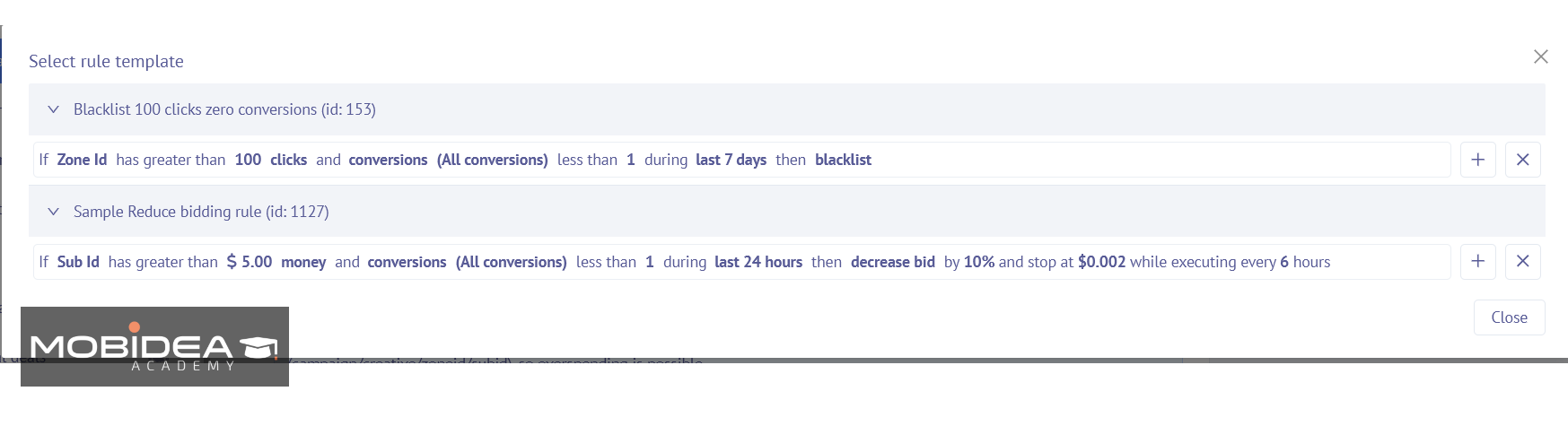
You can apply up to 5 rules to each campaign.
These checks are performed and applied automatically every few hours (still based on your settings) to ensure that your budget isn’t going to placements that aren’t converting even if no one is actively monitoring the dashboard.
One thing to keep in mind is that you have to set-up a conversion tracker first because the rules require conversion tracking data.
- Multiple Creatives per Ad Group
Advertisers can upload several creative variations within a single ad group, letting traffic split across them to see which one pulls better results.
You won’t need to set up separate campaigns for each test.
Analytics and Integrated Tracking
Mondiad’s built-in reporting dashboard provides enough details, broken down per campaign and per creative.
You don’t just see how much traffic you get, but also the:
- Custom bid
- CTR
- Impressions
- ROI
- win rate
- click count
- viewability
- viewability rate
- actions
- actions rate
- CPM
- Average CPC
- spent
- conversions
- conversion cost
- Revenue
The last three in the list you will see if you’ve set up the conversion tracking.
But if you’d like more comprehensive reports, we suggest you integrate it with your tracking solution.
Mondiad supports postback integrations with top performance marketing trackers such as BeMob, Voluum, Binom, RedTrack, PeerClick, AdsBridge and FunnelFlux.

How to Start Advertising with Mondiad
Getting a campaign live on Mondiad does not take long.
The whole path from signing up to launching a first campaign is built to move fast, without a long verification queue standing in the way.
Registering as an Advertiser
- Visit Mondiad and click on the sign-up with advertiser option.
- Fill the registration form with the basic account information required.
- Click on the activation email sent to your inbox at the same time as signing up.
That is really all it takes.
Unlike the publisher side, where each submitted website goes through manual review, advertiser registration itself has no deeper verification step.
Most advertisers can go from landing on the homepage to having a live account in about 10 minutes.
Dashboard Overview
Once logged in, the dashboard brings together the information an advertiser needs to check daily, rather than burying it across separate menus.
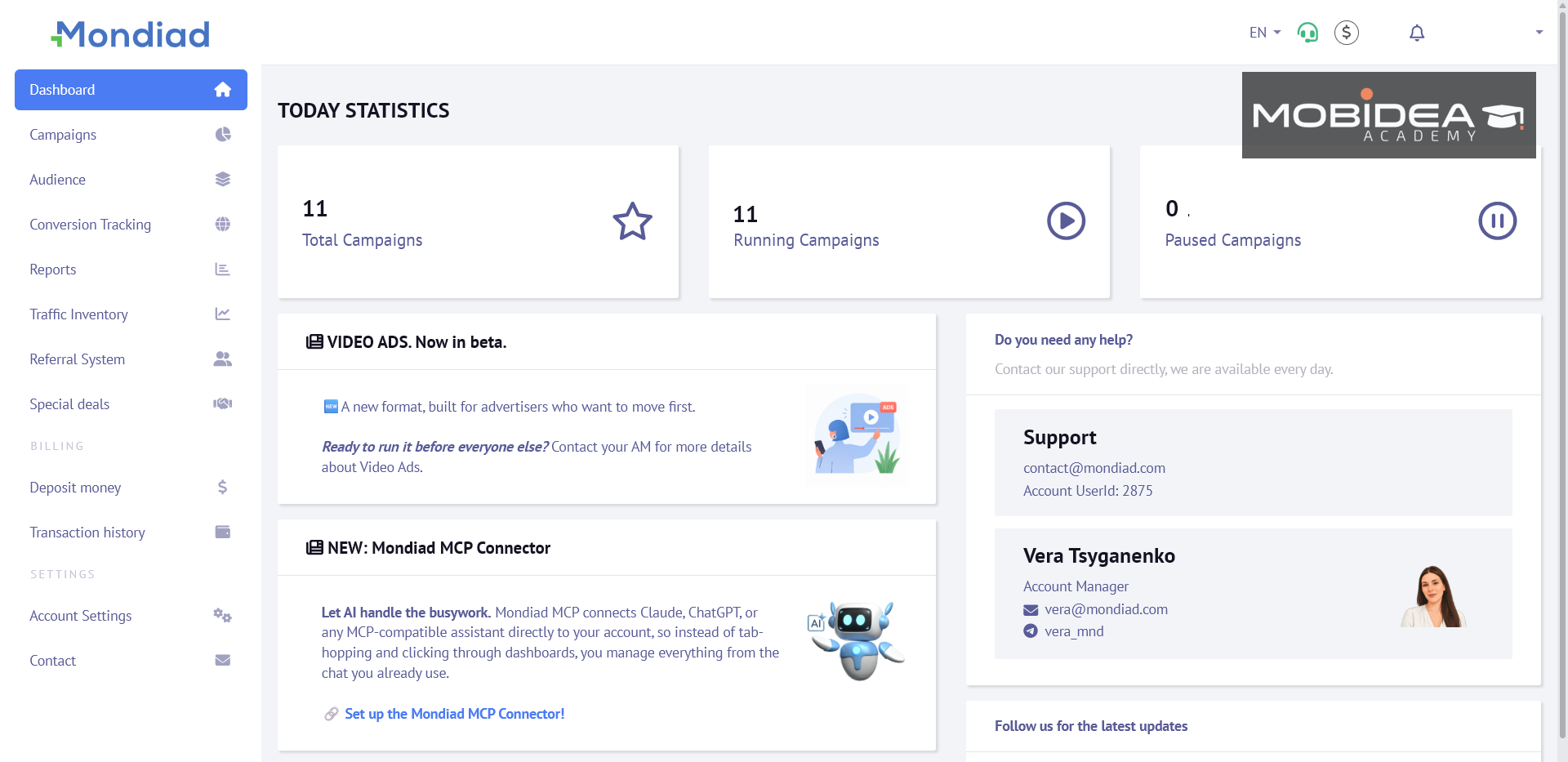
It has the following tabs:
- Main Dashboard – shows a quick overview of your account
- Campaigns – where all your campaigns live
- Audience – the audiences you create based on previous campaign data
- Conversion Tracking – where you can set-up your tracking, add conversion goals, apply your Google Tag Manager, etc.
- Reports – shows all your campaign stats
- Traffic Inventory – shows traffic volume per ad format, geo, etc.
- Referral System – 5% referral program for inviting advertisers or publishers to Mondiad
- Special Deals – discounts and bonuses from Mondiad’s partners
- Deposit Money – where you fund your account
- Transaction History – shows all deposit and/or withdrawal transactions
- Account Settings
- Contact
Its layout is fairly simple and intuitive.
Funding the Account
Before a campaign can go live, it must have funds in the account.
Minimum deposit amounts are:
- $50 through card, e-wallet, or cryptocurrency
- $1,000 for wire transfer
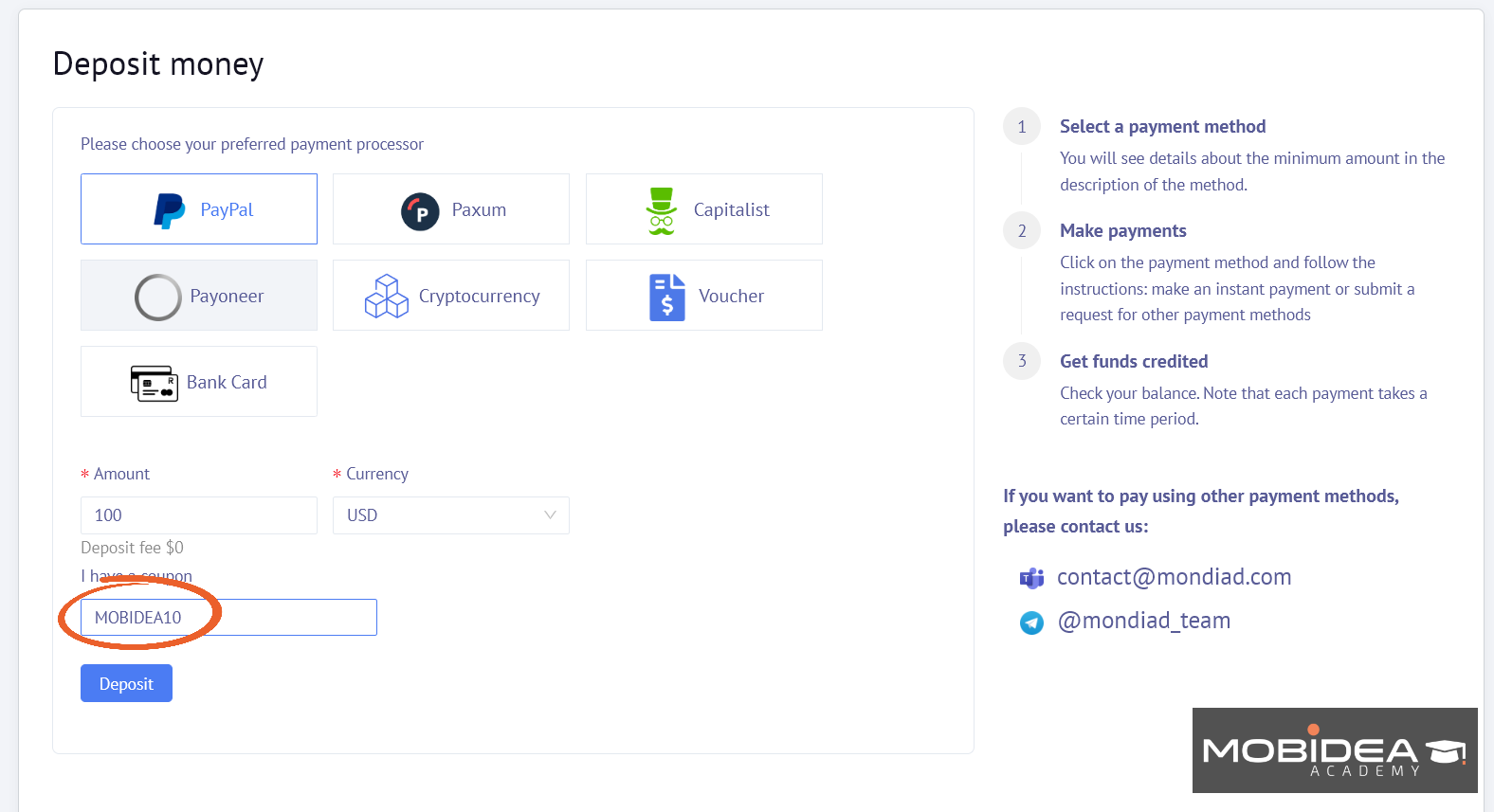
Payments can be accepted by PayPal, Paxum, Payoneer, Capitalist, bank cards and many cryptocurrencies (Bitcoin, Etherium, Litecoin, USDT, etc.)
Enjoy a 15% bonus on your first deposit of at least $100 when you use the coupon code MOBIDEA15.
Creating a Campaign
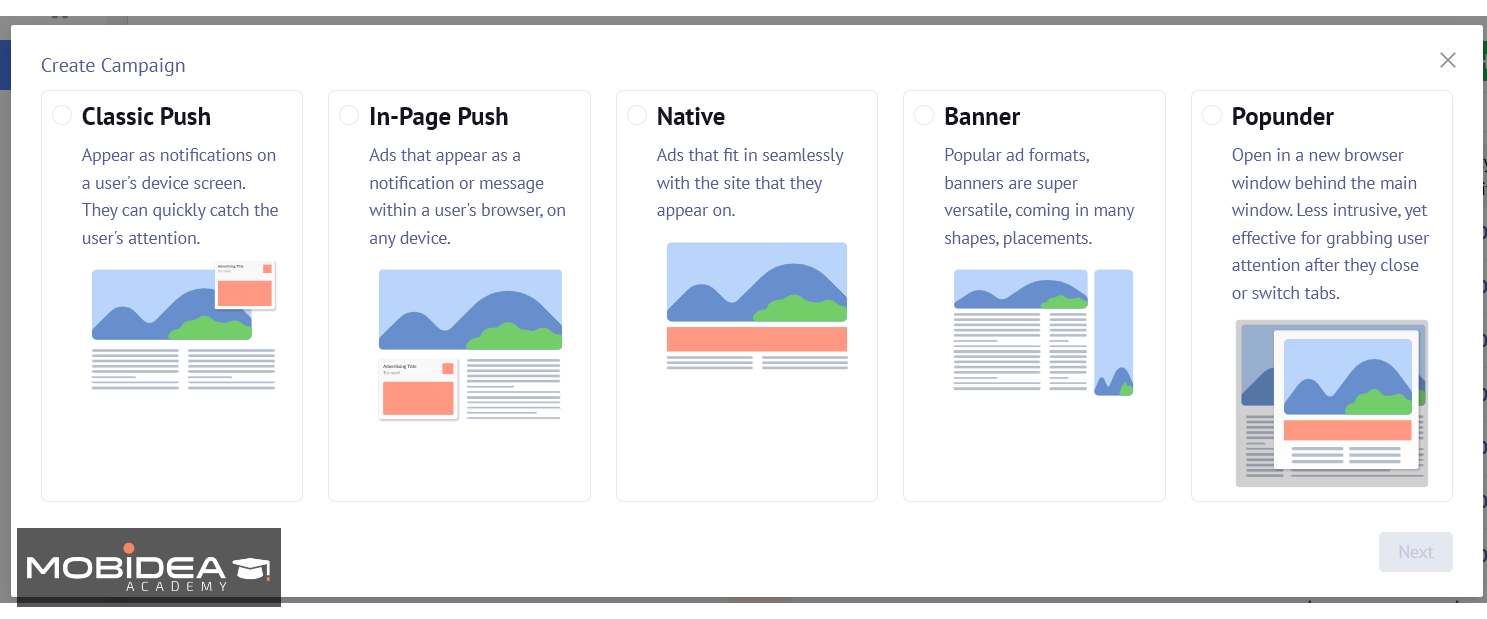
Open the Campaigns section in the left menu bar, click Create Campaign, and choose the ad format for the current campaign.
The basic ones are Classic Push, In-Page Push, Native, Banner, and Popunder.
Video, Telegram Mini Apps, or Parked Domain ads are available by request.
If you’d like to try those, send a message to your account manager (contact info found in the dashboard).
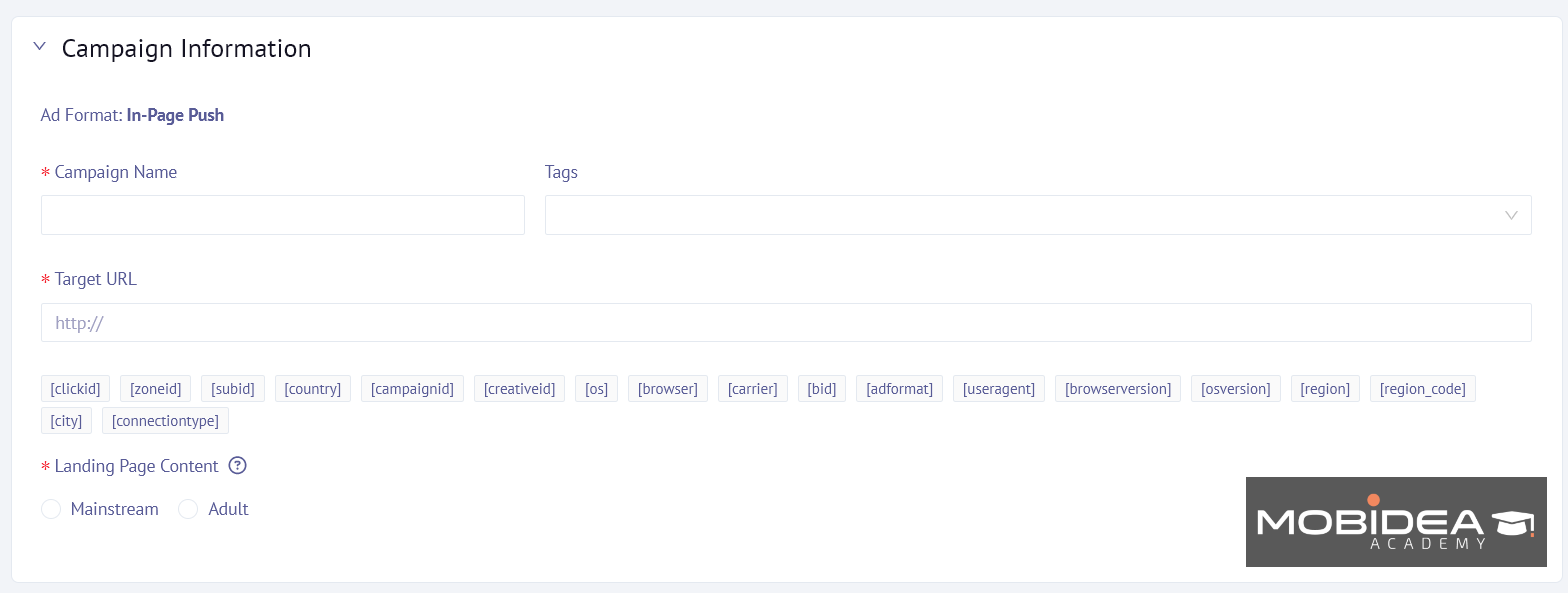
Name the campaign, add tags to help with management later, and build the URL with Mondiad’s tracking tokens ([clickid], [zoneid], [subid], and [country]) to ensure conversion data is tracked back correctly.
Select whether the landing page is Mainstream or Adult.
Next, add your creatives.
Add the title and description, then upload the icon image needed for the desired format.
Push and native creatives allow you to use tokens such as [city] and [country].
This allows each visitor to see their own specific location inserted into the ad automatically.
Emojis are also supported.
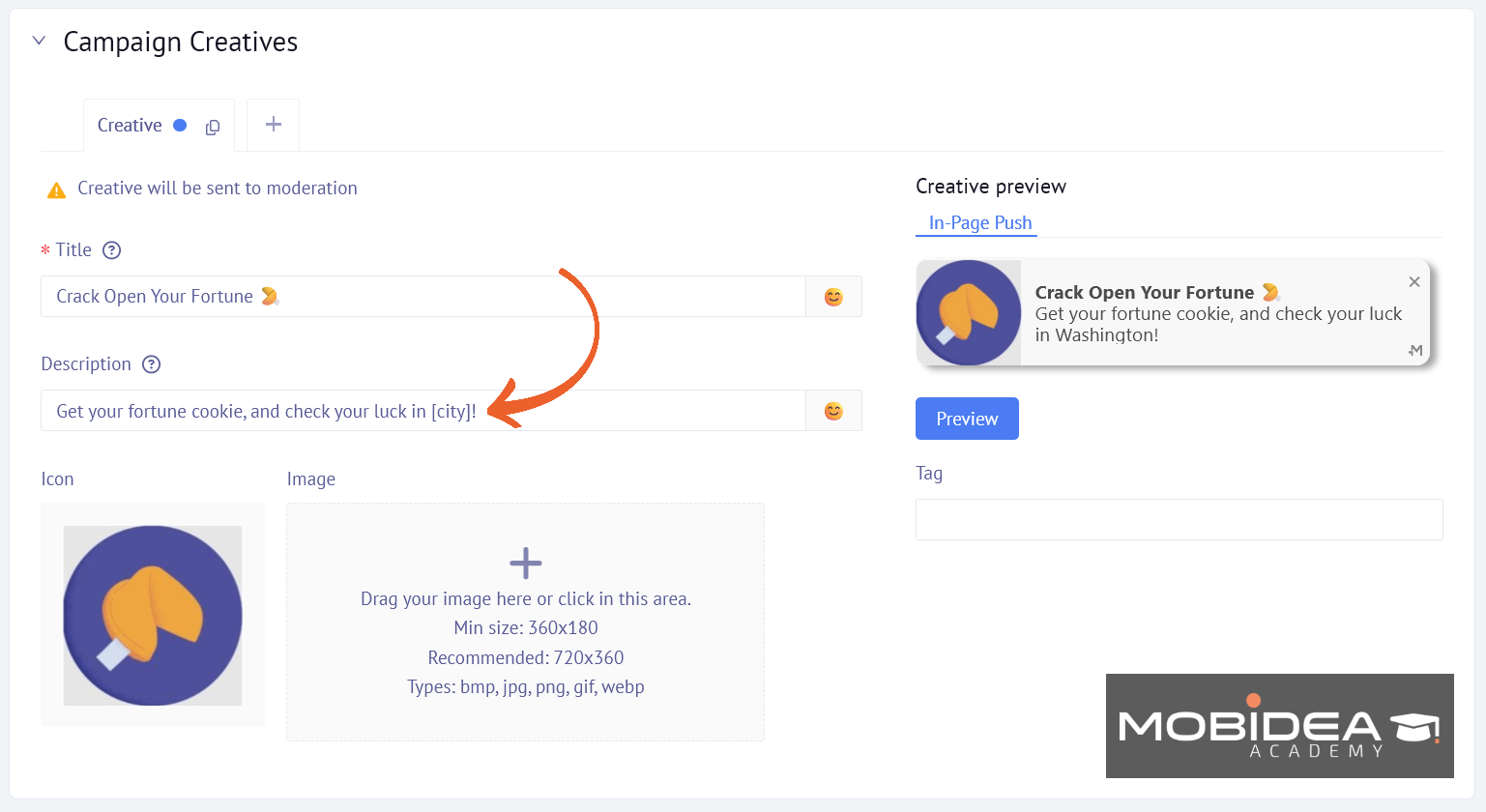
You can have up to 10 creatives running at once in a single campaign, which should provide enough room for solid A/B testing without needing a separate campaign for each variation.
A small but useful tip here: We recommend running Classic Push and In-Page Push as separate campaigns rather than combining them, since it keeps reporting and optimization cleaner down the line.
The next section is targeting, with filters we’ve already discussed above.
These filters are not trivial, and the list is quite deep, which means we can be very specific with targeting without having to rely on a managed service to set it up.
Next is the Campaign Budgeting section, where you can set the following:
- Total budget: minimum $10, or left unlimited
- Daily budget: minimum $10, or left unlimited
- ZoneID daily budget: a separate cap for individual ad zones
- CPA Goal
These are all optional, but we discourage you from leaving the budgets unlimited.
At the very least, set a Total Campaign budget to avoid overspending on traffic with nothing to show for it.
Bidding runs on CPC, CPM, or TargetCPA, starting from a minimum bid of $0.0001, though not every format supports every model.
Push, for example, runs on CPC and TargetCPA but not CPM, while Banner runs on CPM and TargetCPA but not CPC.
Keep in mind that Target CPA is currently in beta mode, so it’s not yet perfect and may encounter some issues.
If in doubt, save it for later.
Mondiad notes that daily budgets may be slightly exceeded on push campaigns, due to how push notifications are delivered.
If you’ve been running push for quite some time now, you know that this is a common occurrence since some users may click on the ad hours after it was pushed to their device.
Afterward, you need to configure the campaign delivery.
It’s where you specify a frequency cap (the number of times an ad can be shown to a user in a given number of hours), a timezone, and a day parting (campaign running all the time, or campaign running on a custom list of days and hours).
A campaign can be launched on a specific start and end date, or can run indefinitely until it is manually stopped.
Finally, there’s the optimization tools, which are optional but highly recommended.
I usually prepare optimization rules beforehand by saving them as a template, then I’ll just choose which rules to apply to a specific campaign.
Viewing Reports
Now when it comes to viewing reports per campaign, you can either go to the Reports tab or the Campaigns tab.
Each campaign also has a quick menu that allows advertisers to Resume, View, Edit, Clone, pull up Reports, or Archive the campaign.
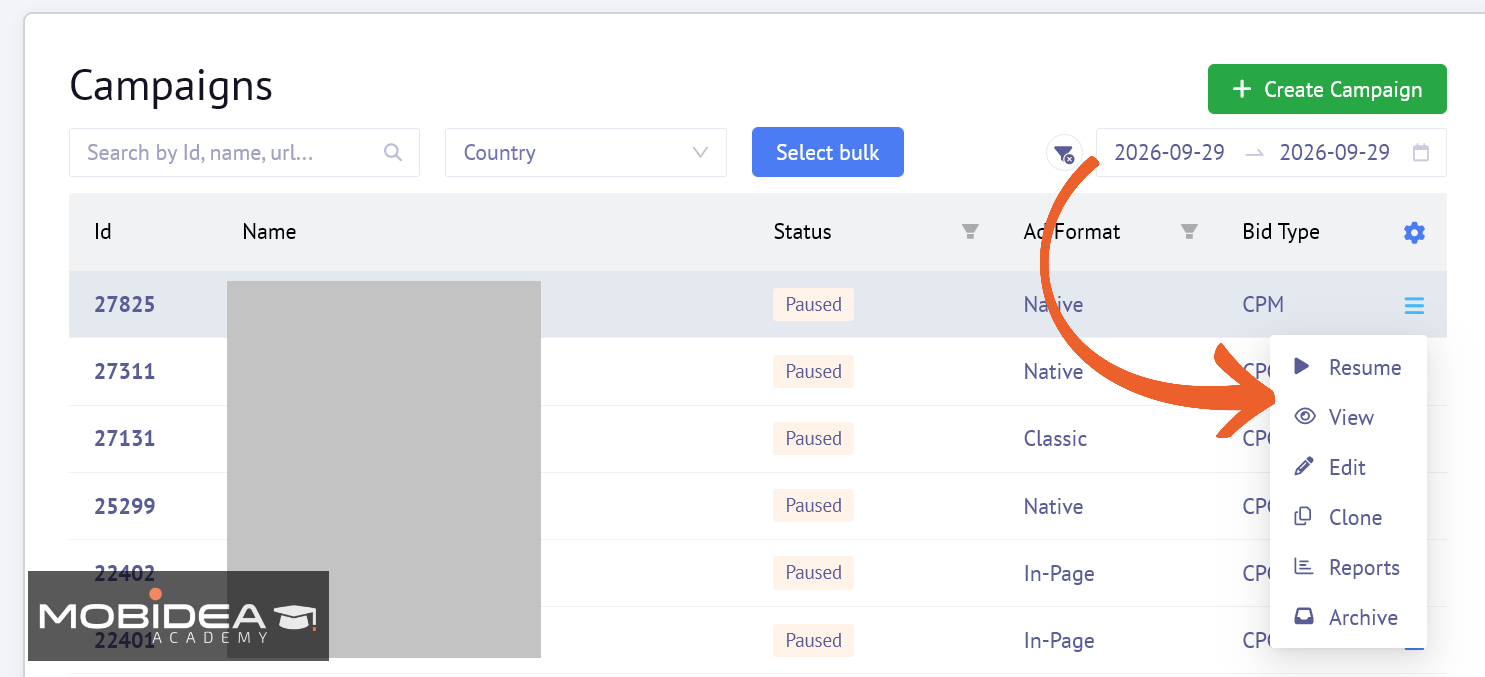
Advertisers can also select multiple campaigns and pause or resume those campaigns at the same time.
So beyond that, optimizing is mostly a matter of using the tools that we create during campaign creation:
- letting Smart Optimization Rules to automatically turn off underperforming ZoneIDs and SubIDs
- making adjustments to Traffic Audience blacklists with data as it comes in
- using TargetCPA once we have enough conversion data that the algorithm can rely on.
How to Earn Money with Mondiad
Monetizing a website through Mondiad follows a similarly quick setup to the advertiser side, just with a manual review step added in, since every submitted website gets checked before it goes live.
Registering as a Publisher
Sign up on the publisher side of Mondiad and submit your website for review.
Mondiad checks that the site has real, regularly updated content, functions properly, and stays within its content policy.
Most sites get approved in under an hour during working hours, though it can take up to 12 hours outside of that window.
Adding Your Site and Ad Units
Once approved, add your website inside the dashboard and choose which ad format to run: Classic Push, In-Page Push, Native, Banner, Interstitial, Dynamic, or Popunder.
Mondiad also offers a WordPress plugin for sites on that platform, which simplifies placing the ad code, and a preview feature so you can see what an ad unit will look like before it goes live.
Besides websites, Mondiad also serves app monetization via SDK. Mondiad SDK lets Android app developers earn from their apps by integrating push monetization, followed by banner monetization(by request.
Getting Paid
Payouts can be requested daily, on demand, and are usually processed within 24 to 48 hours, or set to run automatically on a weekly or monthly schedule.
Minimum withdrawal amounts vary by payment method, starting around $10 for options like PayPal, Paxum, Capitalist, and cryptocurrency, and scaling up for methods like bank transfer.
There is also a referral program: publishers can earn 5% of what a referred user spends or earns on the platform, up to $1,000.
Mondiad Verdict
There’s one primary reason why Mondiad is one of the ad networks you should definitely test: it offers an incredible selection of formats and tools to advertisers within one self-serve account.
It features eight formats and inventory types, a live inventory traffic tool that is backed up with the actual volume numbers, TargetCPA bidding, and Smart Optimization Rules that pause, lower bids, and blacklists automatically.
All of this adds up to an ad network that actually gives advertisers real control, rather than just a dashboard with lots of buttons.
It’s a great network for advertisers with performance campaigns in verticals such as Sweepstakes, Dating, iGaming, Utilities, and Finance.
If you run offers from any of these verticals, it’s time to give Mondiad a try!
Oh, and don’t forget to use our exclusive coupon code MOBIDEA15 to get 15% bonus.
Mondiad FAQ
What is Mondiad?
Mondiad is a self-serve global ad network launched in 2019 by the team behind PopCash. The platform supports both mainstream and adult traffic, and provides 8+ ad formats.
What ad formats does Mondiad support?
Mondiad runs 8 ad formats and inventory types in total.
The core ones are Classic Push, In-Page Push, Native, Banner, Popunder, and Video (currently in beta), and the 2 additional ones are Telegram Mini App ads and Parked Domain traffic.
How much is the minimum deposit required to start advertising on Mondiad?
$50 minimum top-up for card, e-wallet, or cryptocurrency.
How long does Mondiad take to moderate a campaign?
During working hours, campaign approval will take less than one hour.
Outside working hours, on weekends or during holidays it may take up to 12 hours.
Each campaign will be manually verified to avoid mistakes or promotion of forbidden content.
What bidding models does Mondiad offer?
CPM, CPC, and TargetCPA which is an automatic bidding strategy that automatically adjusts your bids to achieve the target cost per acquisition.
What affiliate verticals convert best on Mondiad?
The verticals that do well on Mondiad are Sweepstakes, Dating, iGaming and Betting, Utilities, Finance and Crypto, and e-Commerce. Mainstream and adult traffic are both well-served.
Does Mondiad provide a personal account manager?
Yes. Advertisers get their dedicated account manager, on top of general support available 24/7 through live chat, WhatsApp, Telegram, Skype/Teams, and email.
Can I use my own tracker?
Yes. Mondiad comes with a native pixel and event tracker, and it supports postback integration with other third-party trackers, such as BeMob, Voluum, Binom, RedTrack, PeerClick, AdsBridge, and FunnelFlux.
Can I check Mondiad traffic volume myself before committing a budget?
Yes! The Traffic Inventory tool in Mondiad has a list of all real impressions, clicks, and average CPM/CPC in the past 24 hours, segmented by ad format, traffic type, country, OS, and browser and updated hourly.
Is Mondiad legit?
Mondiad is a legitimate ad network that has been live since 2019 and has a decent history dating back to the PopCash network and reviews on independent review platforms like Trustpilot and G2, not to mention we have also personally tested this ad network ourselves.
Does Mondiad support automated campaign optimization?
Yes, through Smart Optimization Rules. Up to 5 rules can run per campaign, though a conversion tracker needs to be set up first for the rules to work.


With its ultra-low minimum deposit of $5, Popcash is competing head-to-head with other popular traffic sources. Read this Popcash review and see if this ad network is worth testing.
Thinking about EvaDav for your next campaign? Read this EvaDav review before you deposit, then grab your exclusive bonus code.
AdvertisementA-Ads Review At A Glance A-Ads: Offers & Verticals Ad types: Text Ads and Banner Ads A-Ads: Payment & Investment…