
Imagine you’re a digital marketer, juggling multiple accounts across various advertising platforms, each with its own set of demands.
Your day is filled with crafting compelling ad campaigns, keeping an eye on competitors, and managing a host of social media profiles.
But lurking in the background are persistent challenges: online tracking, the risk of account suspension, and constant threats to data security.
You find yourself in a digital minefield.
And it can be frustrating when, despite your best efforts, your accounts get flagged for suspicious activities because they were accessed from the same device!
Thankfully, there is an end to the nightmare.
Enter Dolphin Anty, an anti-detect browser touted as a potential game-changer for marketers grappling with these concerns.
It promises to cloak your online activities in anonymity, manage multiple accounts effortlessly, and provide strong data security.
But can it really fulfill these promises?
In this Dolphin Anty review, we’ll go through its features and capabilities and shed light on whether it truly is the ultimate solution for you.
What is Dolphin Anty?
Think of Chrome getting an MBA in digital marketing and deciding to become a master of disguise, that’s essentially what Dolphin Anty Browser brings to the table.
Launched in 2021 by Denis Zhitnyakov, this antidetect browser has quickly evolved into a powerhouse tool for digital marketers, particularly those in the affiliate marketing and traffic arbitrage spaces.
The browser’s claim to fame came when it snagged the #1 Antidetect Browser award at the Affiliate Space Awards from Conversion Club, validating its position in the competitive online marketing tools landscape.
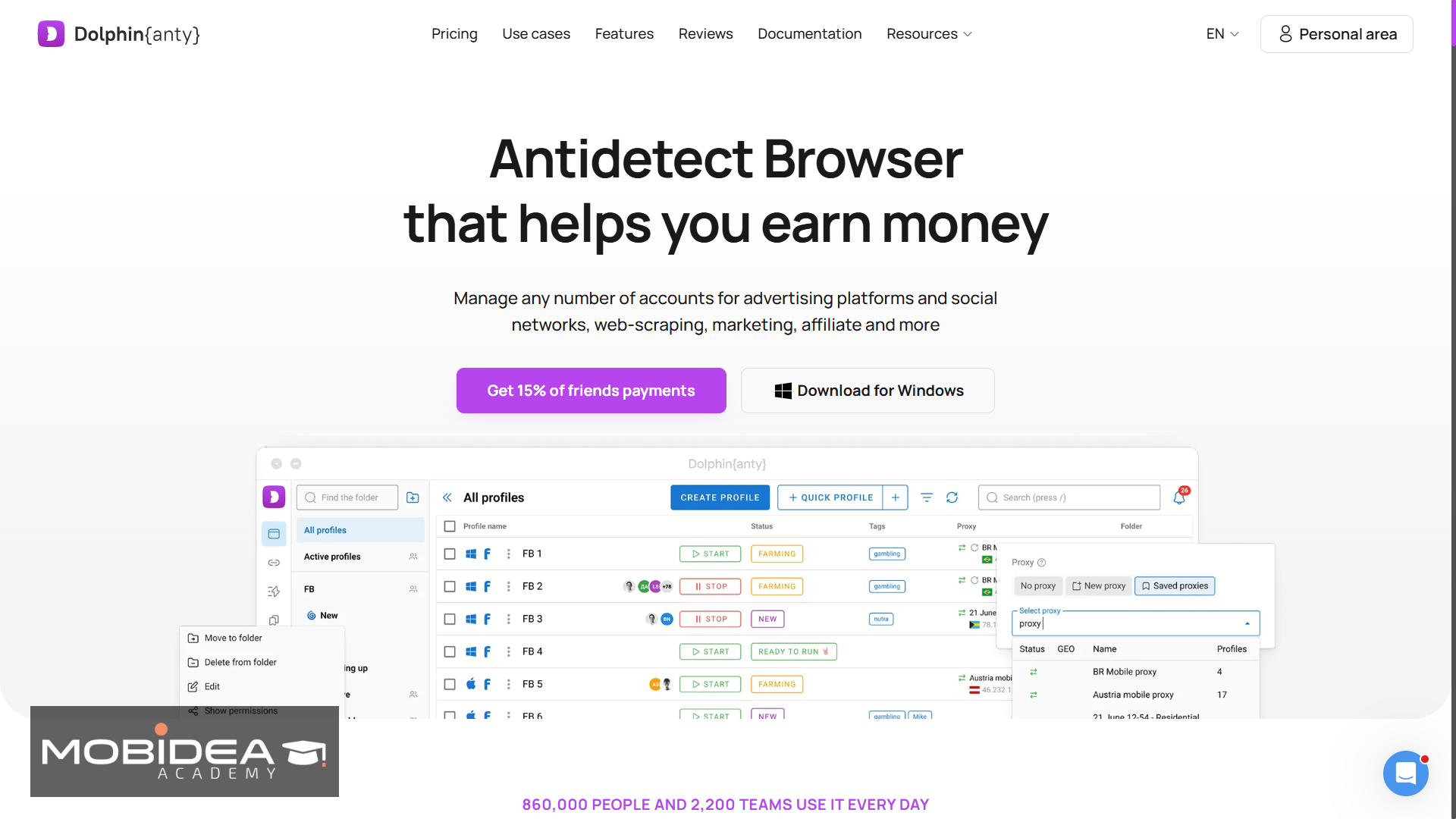
What sets Dolphin Anty apart is its laser focus on the needs of webmasters and media buyers, it’s essentially a tool built by marketers, for marketers.
The company behind it is registered as Zhitnyakov Software Solutions LTD, based out of Limassol, Cyprus, and it serves an international user base that stretches well beyond its original Eastern European roots.
The Dolphin ecosystem extends beyond just the browser, featuring complementary solutions like:
- Dolphin Server
- Dolphin Cloud
- Dolphin{parser} for data extraction
- Dolphin{agent} automation tool (in the pipeline).
Their primary user base consists of media-buying affiliates and social media marketers who require robust fingerprinting capabilities and seamless profile management.
The company now claims around 860,000 users and 2,200 teams working inside the platform every day.
It is professional enough for enterprise use by mid to large companies yet accessible enough for individual marketers.
And while it’s had a few years to mature since launch, it’s still very much a tool that keeps shipping new features rather than resting on its early reputation.
Dolphin Anty Features
If Dolphin Anty were a superhero, its superpower would be digital shape-shifting.
Let’s dissect what makes this browser a powerhouse in the world of digital marketing and multi-account management.
Quick Note: Since we want other non-techy marketers out there to understand Dolphin Anty’s features more, we’ll try our very best to make the antidetect browser’s capabilities easier to understand.
While there may be a bit of technical stuff here, we’ll try our best to make it as layman as possible.
Fingerprint Management
Think of browser fingerprints as your digital DNA, Dolphin Anty has mastered the art of genetic engineering in this space.
Dolphin Anty’s fingerprint management works by imitating normal user data.
This is different from just staying anonymous.
When you’re anonymous, your real information is hidden.
But with this imitation, your data is changed to blend in with millions of other regular users.
This way, you don’t draw attention from systems that detect unusual activity or fraud.
To achieve this, your digital fingerprint shouldn’t be too unique; instead, it should resemble other people’s fingerprints.
Making sure your fingerprint fits in with others is tricky, but that’s what Dolphin Anty aims to do.
Each profile is guaranteed to maintain its own unique digital identity, which is crucial for managing multiple accounts.
This setup makes it easier for users to navigate and operate across various platforms without the hassle of manual adjustments or the risk of overlapping identities.
If you’ve used a specific set of cookies for one particular account and you’d like to stick to them when crafting fingerprints, you can do so since Dolphin Anty has the capability to import cookies to profiles.
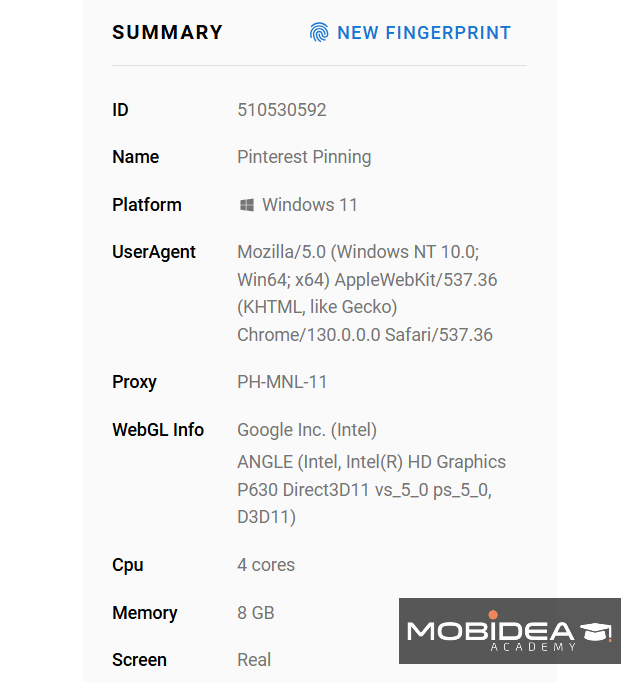
Dolphin Anty spoofs at least 20 device and browser parameters to make this work, and these are:
- OS – Options include Linux, macOS, Windows 10 and 11.
- Useragent
- IP-address – This comes from the list of proxies you upload to the anti-detect browser
- Timezone
- Language
- Geolocation
- WebRTC
- WebGL
- WebGL info
- Canvas
- WebGPU
- Client rects
- Client Hints
- Processor and memory
- MAC-address
- Device name
- Screen
- Media devices
- Webcam
- Voices
- Ports
- Do not track setting
- Command line switches
Dolphin Anty has also been quietly deepening a handful of these over time.
WebGL, WebGPU, Client Hints, and Voices spoofing have all been pushed further recently.
That’s on top of newer additions like webcam parameter spoofing, so the fingerprint you hand over looks even more like it came from a genuine, everyday device rather than a spoofed one.
You can customize these parameters by yourself, but unless you know exactly what you’re doing, I suggest you don’t touch it and let Dolphin Anty work its magic for you.
No matter how well-meaning, human error is still a common occurrence, after all.
Quick Profile Creation
Because you can let Dolphin Anty create the fingerprints for you in just one click, it means you can create a profile easily and quickly.
No need to learn how each parameter should be set up and how you can make it unique, you can leave that to Dolphin Anty.
Dolphin Anty offers out-of-the-box fingerprint settings that are optimized for maximum effectiveness, so users experience default excellence from the get-go.
Account Switching
If you or your team juggle more than one Dolphin Anty account (say, one for your own campaigns and another belonging to a client, or separate logins for different departments), Account Switching lets you jump between them without logging out and back in every time.
It works a lot like the account switcher you’d find on a Google account: click your profile picture, see the other accounts already linked, and pick the one you need.
There’s also an “Add Account” option right there for linking a new one on the fly.
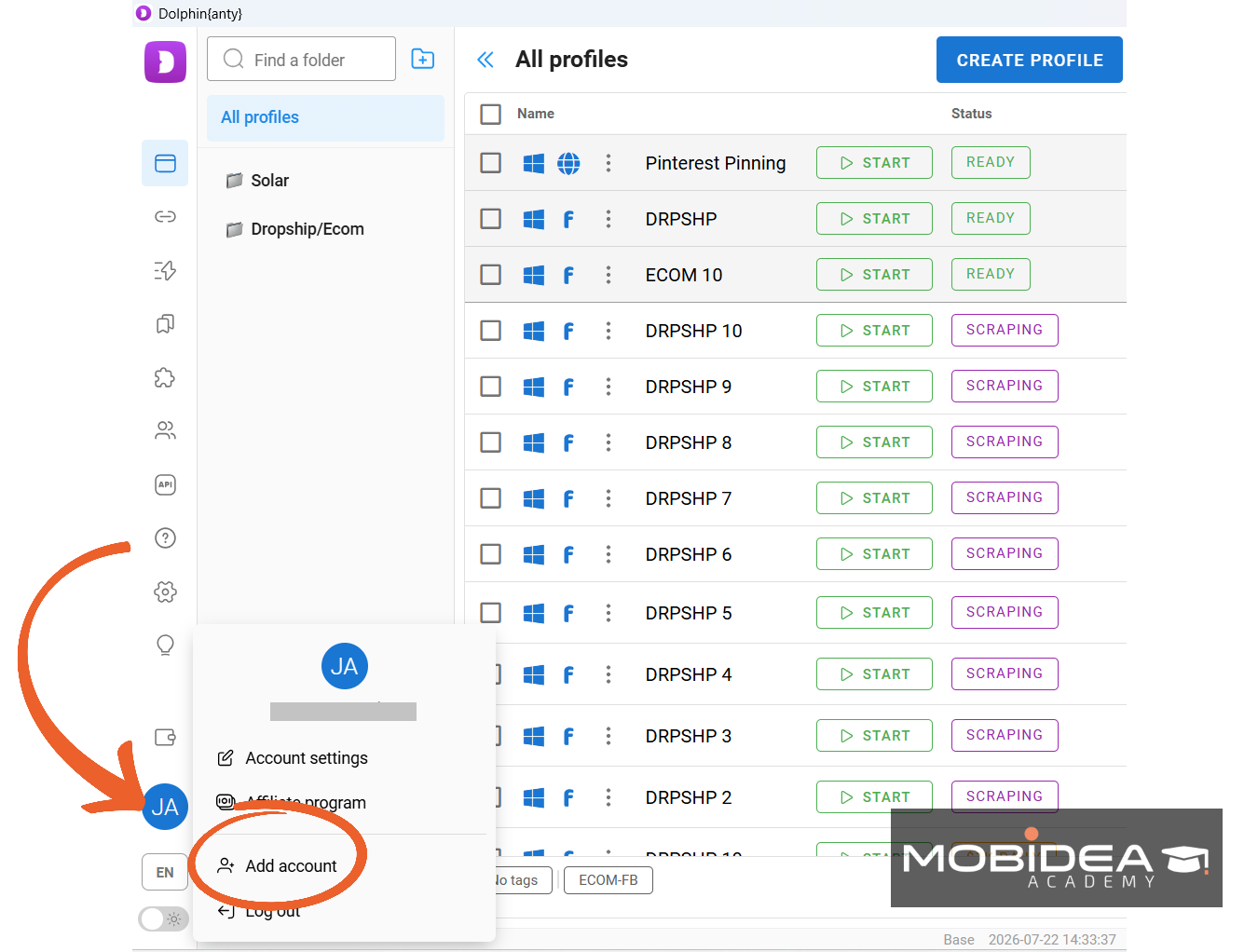
This is a paid-plan feature, and how many accounts you can link depends on your tier.
Base gives you 2, Team gives you 3, and Enterprise stretches that to 10.
It’s a small quality-of-life feature, but if you’re an agency bouncing between client accounts all day, it saves a genuinely annoying amount of clicking.
Automation Options
Dolphin Anty’s automation feature is essentially your digital clone who never needs coffee breaks.
So, while you’re sipping your morning brew, it’s already logging into your accounts and handling those mind-numbing repetitive tasks that we all secretly hate.
If you’re managing content across different time zones, you also won’t need to wake up at odd hours.
You can set up the system to post content at the optimal time for each region. It will handle everything while you sleep.
And if you’re trying to collect massive amounts of data, this automation can help with that too.
Automation is particularly useful for tasks that would be time-consuming when performed manually, such as scraping, data extraction, or automated form filling.
Now, there are two ways to make this work within Dolphin Anty, and that’s through the following:
Basic Automation
With this one, all you need to do is set up automation using tools like Playwright, Postman, Selenium, Puppeteer, and more.
If you already have experience using these platforms, then you won’t have a problem integrating them into your processes within Dolphin Anty.
Dolphin Anty has also been working on making these automated sessions harder to distinguish from a real person browsing, specifically against sites that lean on extra JavaScript checks and behavioral signals to sniff out bots.
Script Builder
If coding is not your strongest skill (or you really have no idea how to code), there’s no reason you can’t still utilize automation within Dolphin Anty.
That’s what the Script Builder is for.
It is a powerful automation tool that allows users to create complex browser automation sequences by chaining together various ready-made action blocks.
The tool essentially transforms repetitive browser tasks into programmable “scripts” that can be executed across multiple browser profiles, mimicking human interactions with precision.
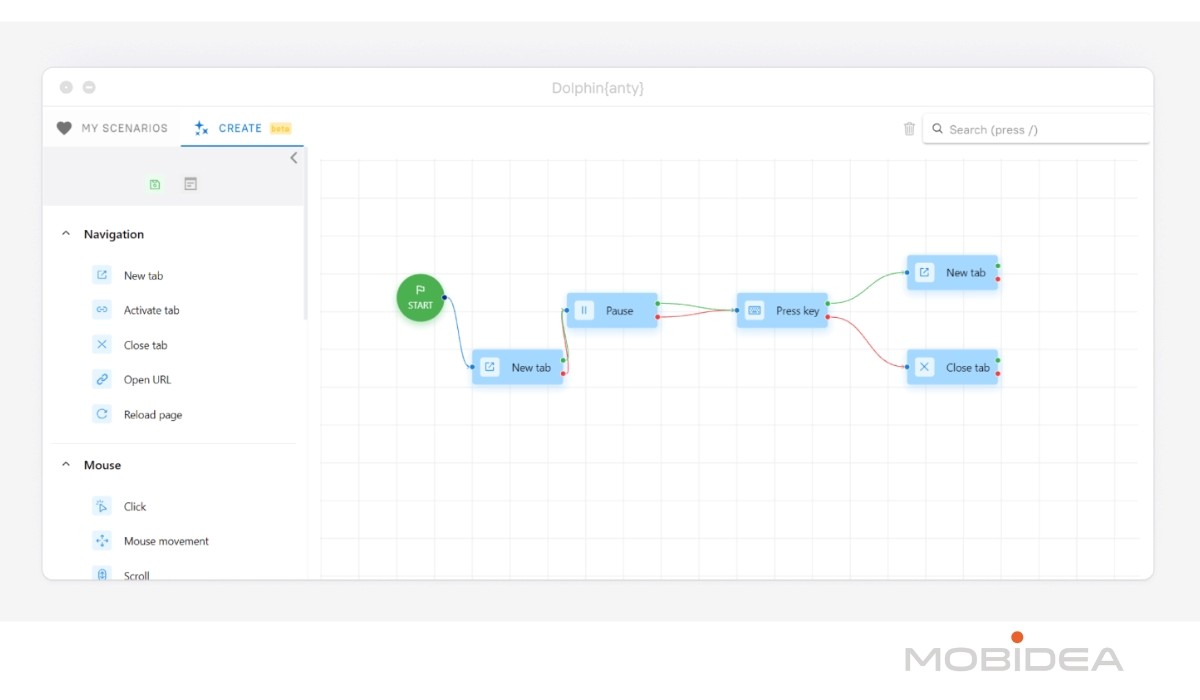
Users can build scripts using intuitive drag-and-drop blocks spanning categories like Navigation, Mouse, Keyboard, Data, and Conditional Logic.
Key features of the Script Builder include:
- Extensive block types for web interactions (clicking, typing, scrolling)
- Support for complex logic with conditionals and loops
- Advanced selectors like XPath, CSS, and text-based element identification
- Ability to work with system variables and create custom variables
- Integration with external services like captcha solving and SMS verification
By providing granular control over browser actions and supporting several profiles, Dolphin Anty enables users to create sophisticated automation workflows that can save significant time and reduce human error.
Dolphin also has a more advanced automation tool, Dolphin{agent}, listed as coming soon on their roadmap, so expect this side of the platform to keep growing.
Profile Synchronizer
This feature is like having a digital copy machine for browser actions, but smarter. Here’s what it does:
- Multi-Profile Action Replication: Perform an action once, replicate everywhere
- Time-Saving Multiplier: Exponentially reduce repetitive tasks
- Precision Control: Choose which actions to synchronize across profiles
It allows users to perform actions in a designated “master” profile, so the synchronizer automatically replicates these actions across other associated profiles.
Instead of going through the hassle of repeating tasks in different windows, users can stick to one profile, saving a lot of time and effort.
For example, if you’re listing tokens or running ads, the synchronizer makes sure everything you do on the master profile is copied over, making everything run smoothly.
This feature is compatible with MacOS, Windows, and Linux, but it’s important to note that it’s not available on the Free plan, only Starter and higher.
While the synchronizer does simplify many tasks, there are some limitations to be aware of.
For example, it’s sensitive to window size discrepancies; if windows aren’t uniform, actions might not duplicate correctly.
Also, if profiles have different numbers of tabs or extensions, the synchronizer might falter, as it duplicates the click position rather than the target.
To avoid these issues, you should make profiles as identical as possible, albeit with different cookies and fingerprints.
There’s no cap on the number of profiles you can run, as long as your computer can handle the load.
You can also close specific profiles that you no longer want to be included with the synchronization.
Mass Actions
Ever tried managing a ton of browser profiles and felt like you’re drowning in tedious setup?
Dolphin Anty’s got your back with some killer mass management features.
Imagine creating several profiles in one go.
Just grab their template, fill it out like a pro, and boom, you’re done.
The cool part?
You can customize settings for an entire batch of profiles without losing your mind clicking through individual configurations.
The bulk management features are particularly powerful.
Users can execute actions across selected profiles with just a few clicks.
Key mass actions include:
- Running scripts simultaneously
- Tagging and organizing profiles
- Exporting cookies and local storage
- Refreshing fingerprints across an entire batch of profiles at once
- Transferring profile rights
- Changing proxies en masse
- Starting or stopping numerous profiles
- Deleting profiles in bulk
That last one used to make us a little nervous, deleting the wrong batch of profiles by accident is the stuff of nightmares, but Dolphin Anty now has a Trash Bin (available on Base plans and up) that lets you recover profiles you deleted by mistake instead of losing them for good.
Just a heads up, though, always double-check your template before importing.
Nothing kills productivity faster than a bunch of misconfigured profiles.
Trust me, I’ve been there, and it’s not pretty.
Smart Paste
Ever feel like websites are watching your every move?
Smart Paste is like your digital ninja, making your copy-paste look totally human.
Instead of instantly dropping text into input fields, it mimics actual typing, complete with that human-like randomness that throws off anti-fraud systems.
It’s basically your secret weapon against those super-suspicious websites that get nervous about instant text appearances.
Cookie Robot
This one is like an automated digital assistant that casually browses websites, collecting cookies like a pro and making it “legit.”
Want to appear like a real user?
This feature visits sites in the background, building up a natural-looking browsing history.
Proxy Management
This anti-detect browser recommends that marketers use proxies to make its anti-detection functions work to the fullest.
However, Dolphin Anty does not offer proxies on their own, so you need to purchase this elsewhere.
Still, the browser makes proxy management easy once you get your hands on a good list of proxies.
We recommend you visit our list of the Best Proxy Services for good options.
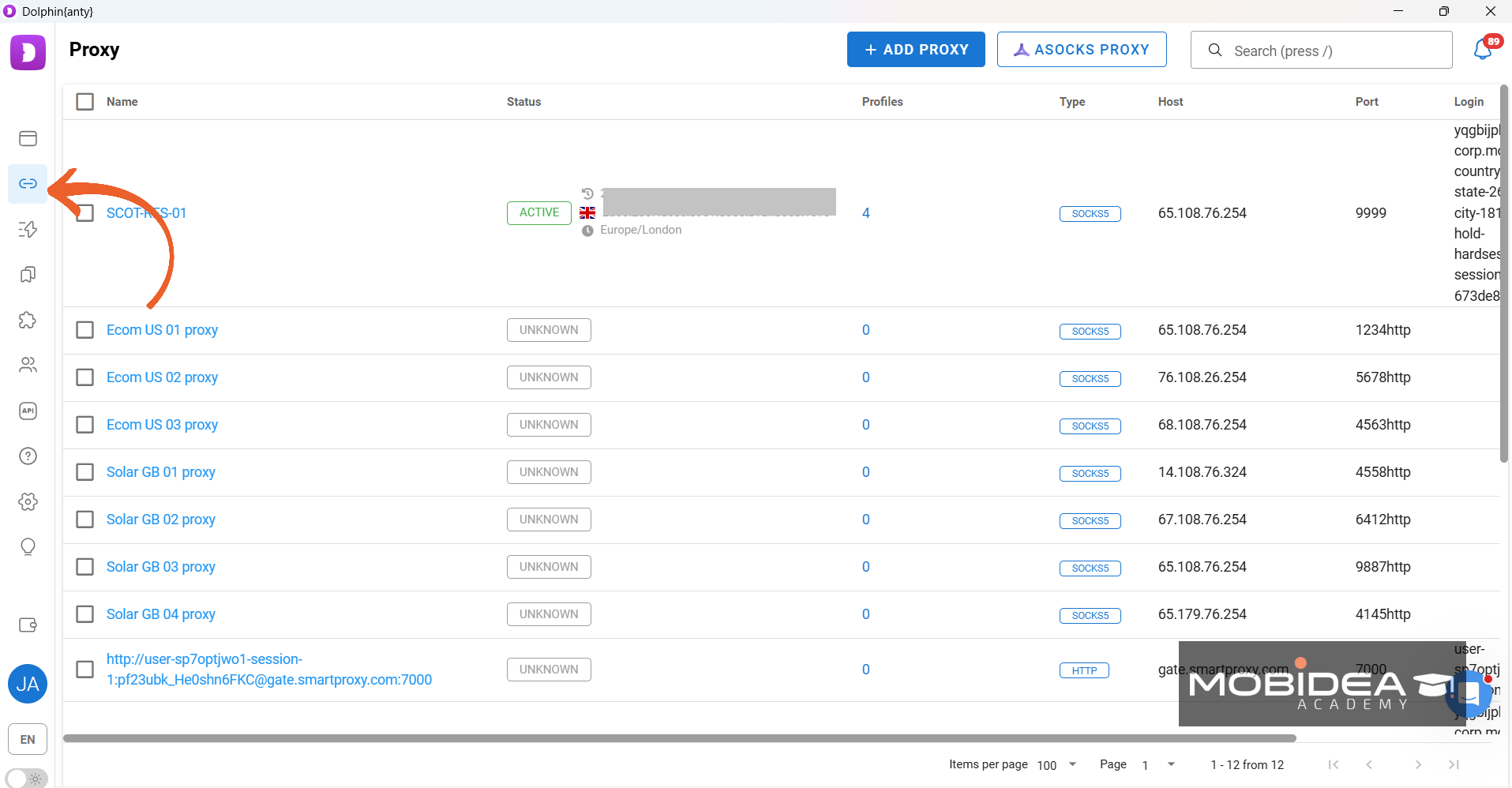
You can bulk add proxies, edit or assign them in a few clicks, or check if they’re working properly.
Dolphin Anty will also flag if a proxy address shows up on a known spam or blacklist database, so you can swap it out before it drags a profile’s reputation down.
This feature is only available on paid plans, though.
The platform also keeps adding built-in proxy partners so you don’t have to shop around as much.
911Proxy is the newest one to join the roster (alongside ASocks, which we’ll walk through below), and you can plug their proxies in with just an API key, either while creating or editing a profile, or directly from the Proxy section.
Team Collaboration Features
Ever tried managing browser profiles with a team and ended up in total chaos?
Dolphin Anty’s teamwork features are like a digital command center that keeps everyone on the same page, without the headache.
Think of it like a collaborative playground where you can share profiles, manage access, and keep things running smooth.
The role system is where things get interesting. You’ve got three key players:
- The Admin: The all-seeing, all-powerful boss who can basically do anything. Want to change user roles? Create or delete accounts? This person’s got the master keys.
- The Team Lead: The middle management guru who can oversee and manage specific team members’ profiles, but can’t go full nuclear with account changes.
- The User: Your everyday team member who can create, use, and share profiles, but doesn’t get to play with the big admin buttons.
You can share profiles and proxies and even transfer profiles completely (removing you from access).
Keep the latter in mind because if you delete a user in the future, all profiles transferred to him will also be deleted.
If a profile holds something sensitive, Starter and higher plans let you lock it behind a profile password, so a teammate can use it without being able to peek at what’s inside.
There’s also an audit log (available even on the Free plan) that keeps a record of who did what, which is handy the moment something in a shared profile goes sideways and you need to figure out why.
Your subscription starts with just you (even if you’re on the paid plan), but you can add as many user slots as you need to your plan.
Organizations Capabilities
Let’s talk about keeping your browser profiles organized without losing your mind.
Dolphin Anty’s sorting and tagging system is like having a digital filing cabinet that actually makes sense.
You’ll be able to find exactly the profile you need in seconds, no more scrolling through endless lists or playing detective with your own browser setups.
Here’s how you can make the system more organized for your use:
- Ability to find all Facebook profiles
- Option to search for profiles with a specific proxy
- Filters available by user, status, and search through profile notes
- Up to five filters can be stacked simultaneously for precise searches
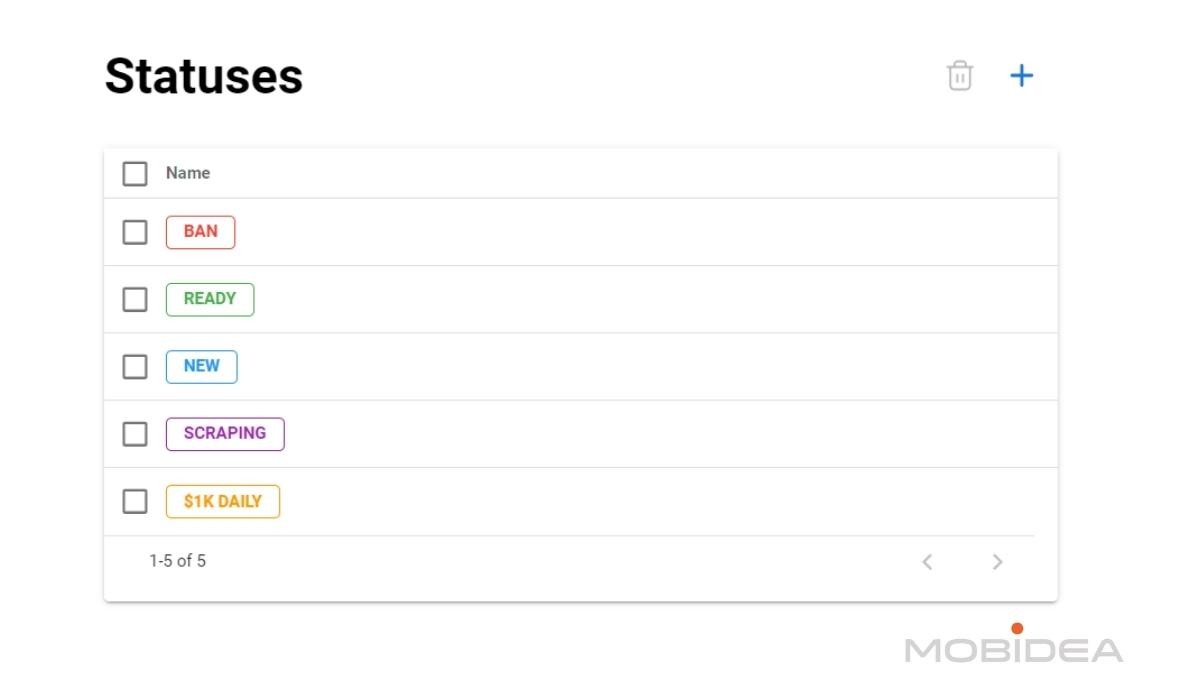
- Color-coded statuses enhance tracking of profile journeys
- Add notes, tags, and statuses to each profile as necessary
Cloud Synchronization
Dolphin Anty’s cloud synchronization is like having a magic briefcase that carries all your browser profiles wherever you go.
Whether you’re switching from your beefy desktop to a lightweight laptop, or jumping between operating systems, this feature keeps your digital workspace intact and ready to roll.
This means:
- Instant profile synchronization across multiple devices
- Backup of your entire browser environment
- No more manual transferring or reconfiguring
- Seamless switching between operating systems
The real magic happens behind the scenes.
Your profiles, cookies, proxies, and extensions get whisked away to the cloud the moment you close a profile, ensuring everything’s waiting for you on your next device.
It’s basically like having a digital clone of your workspace that follows you around.
If you’d rather not have everything living in the cloud, paid plans also give you the option to turn cloud sync off and keep your profiles stored locally on your own machine instead, useful if you have specific privacy or compliance needs.
And if you also use Dolphin{cloud}, the ecosystem’s cloud-phone and scaling product, you can now transfer a batch of profiles over to it directly in a couple of clicks, rather than exporting and re-importing everything by hand.
Dolphin Anty Plans and Pricing
Is this antidetect browser worth it for you?
Here’s a detailed overview of Dolphin Anty’s subscription plans:
For anyone who needs even more than that, Dolphin Anty also offers a fully Custom plan with unlimited browser profiles, unlimited user seats, and personalized pricing based on your exact profile count, aimed squarely at large teams and companies with needs the standard tiers don’t cover.
A quick note for anyone automating through the API: every paid plan, Starter and up, comes with a shared request limit of 1,500 requests per minute.
The Free plan has no API access at all.
You can get 20% off for a 6-month commitment and 40% off for a 12-month payment for any of these plans.
These plans cater to a range of users from individuals to large enterprises, providing flexibility in profile management and team collaboration.
Each plan is designed to scale with the user’s needs, offering various features and user capacities.
Get 20% OFF your first purchase when you use our coupon code MOBIDEA upon checkout!
How to Use Dolphin Anty
It’s really not that hard to use Dolphin Anty browser.
It’s almost like installing and using a typical browser like Chrome, except that there are a few extra steps when creating and managing profiles.
Even total beginners can do it.
For the purpose of demonstration, let’s go through the process together.
Account Creation and Installation
First things first, let’s see if the software matches your hardware.
You wouldn’t want to subscribe and then find out you can’t use it on your computer, right?
These are the minimum requirements to use Dolphin Anty:
- Operating System:
- Linux
- Windows 10 or newer
- macOS 10.15 or later
- RAM: At least 2 GB.
- Hard Disk: Minimum of 40 GB free space.
- CPU: Any dual-core processor.
Since Dolphin Anty relies on the Chromium engine, it must adhere to the same requirements as Chrome does.
If you want to use the features to the fullest, a paid plan is a must.
Upon logging in, the website will ask about your usage and familiarity with anti-detect browsers and what you are planning to use it for.
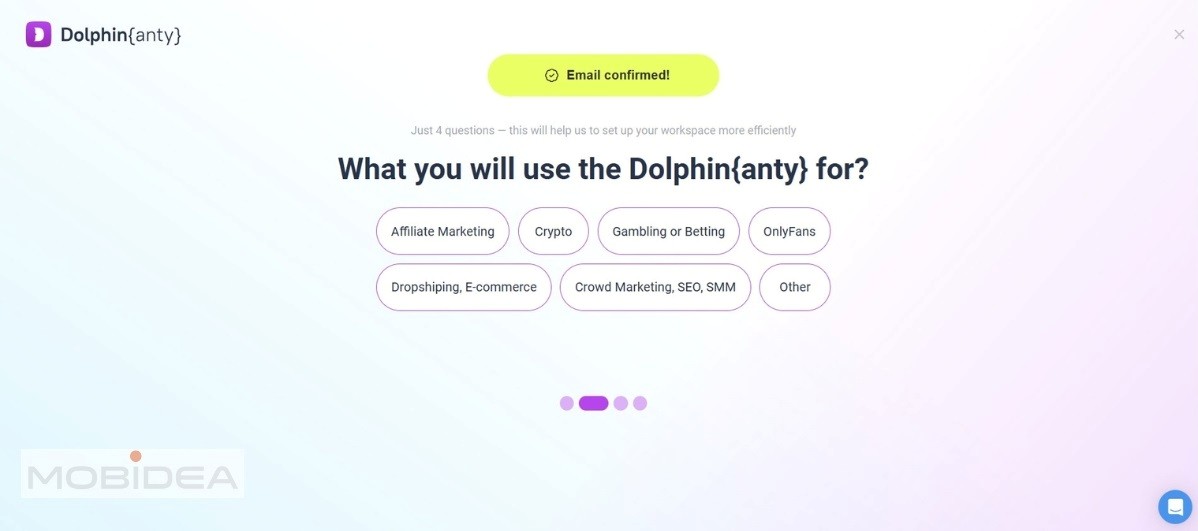
After answering these questions, you’ll be shown the dashboard that contains your subscription, account limits, the FAQ, and the affiliate program.
This is also where you generate a token for API integration of your automation tool.
And if you need assistance from the support team, the live chat is your friend.
During working hours (from 10:00 am to 01:00 am UTC -3), they respond within minutes of your inquiry.
Upon installation and logging in, you’ll be faced with the user-friendly interface, which you can switch from light to dark mode, depending on your preference.
The navigation menu is on the left panel, where you can find most of what you need.
Let’s start with adding proxies.
Adding and Using Proxies
We’ll add proxies first since we’re going to need them when creating profiles.
Click on the second icon on the menu to get to the proxies page, then select +Add Proxy if you are already working with a proxy provider.
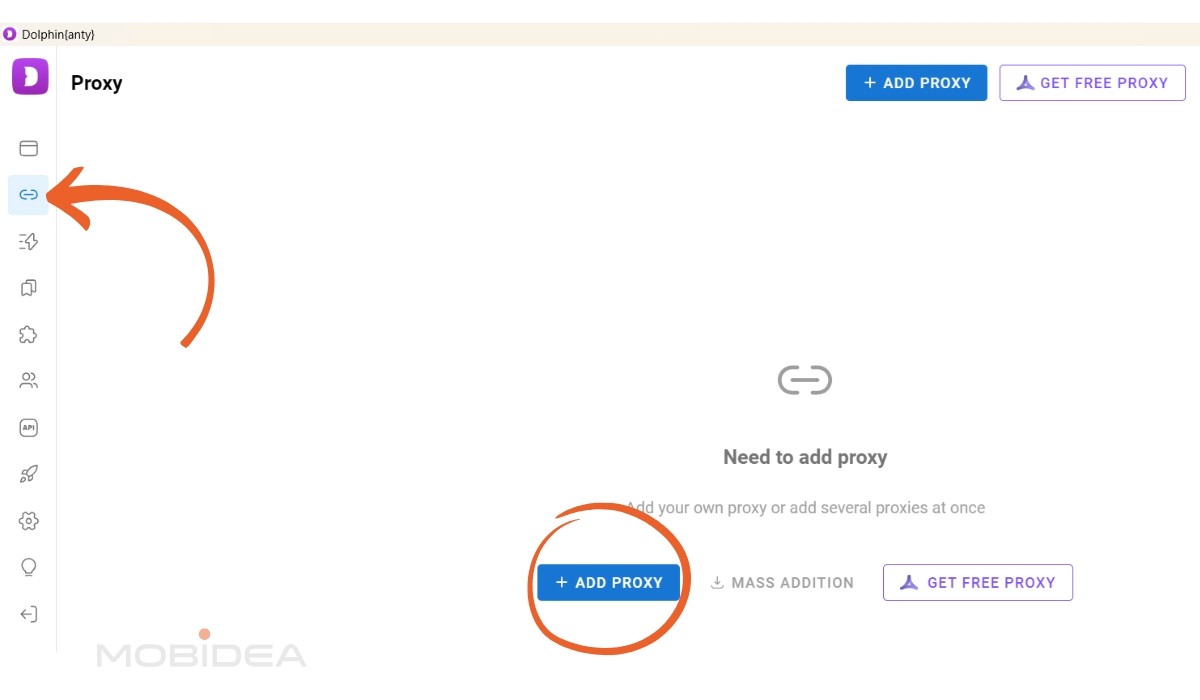
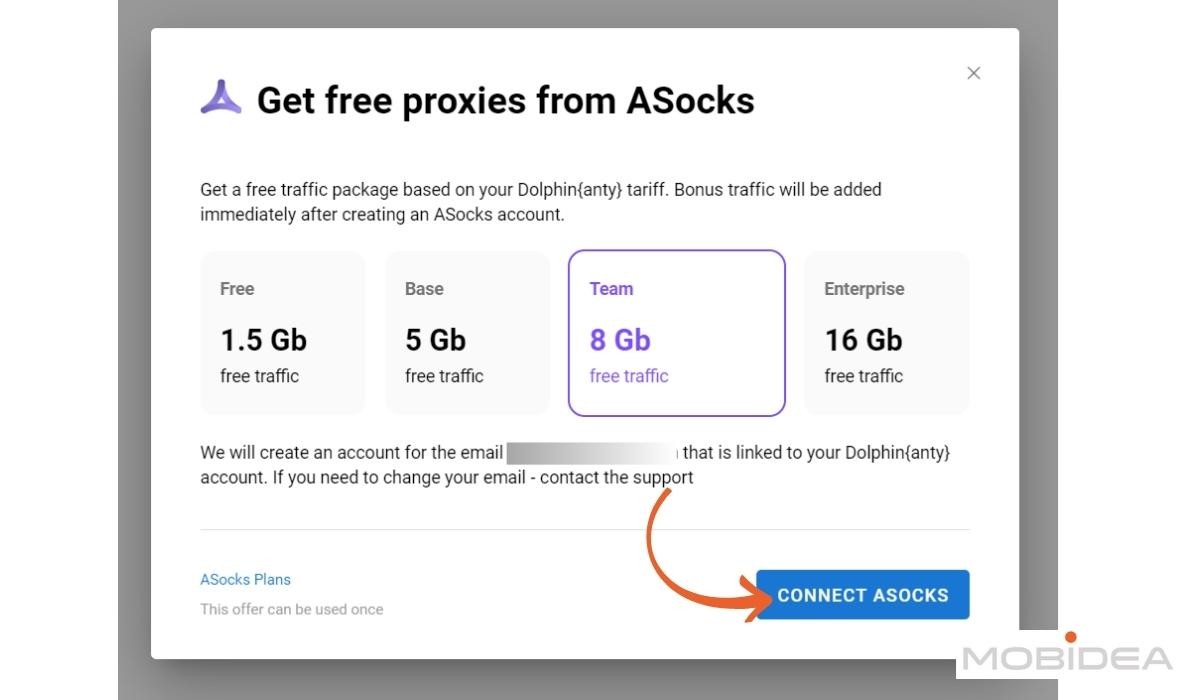
At the moment, Dolphin Anty is offering free proxies from ASocks based on the subscription plan, so I’m going to take advantage of that and use their proxies for this test.
Just click on Connect Asocks and it’ll create an account using the same email as your Dolphin Anty login.
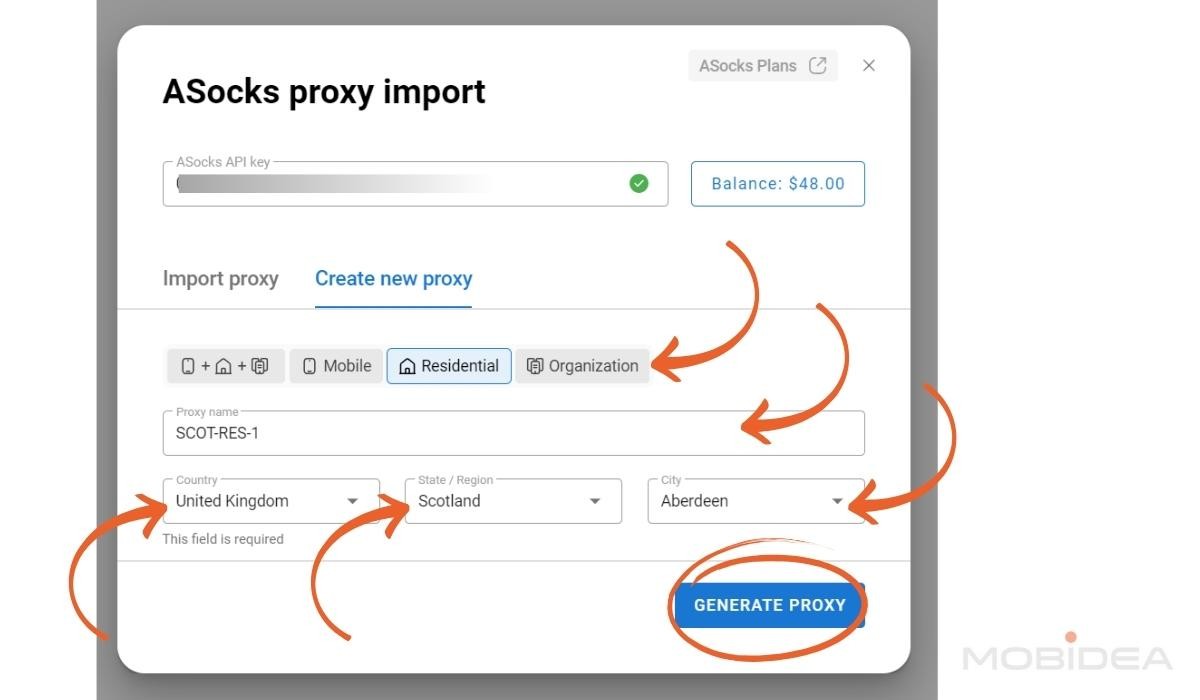
Adding a proxy from ASocks is really simple, I can just choose the type of proxy I need (I prefer residential proxies when using proxy for marketing) and its location.
Add a name, and voila! It’s connected to the account.
Let’s go back to adding a proxy manually, in case you’re not interested in ASocks.
So, click on +Add Proxy, and this pop-up window will show up:
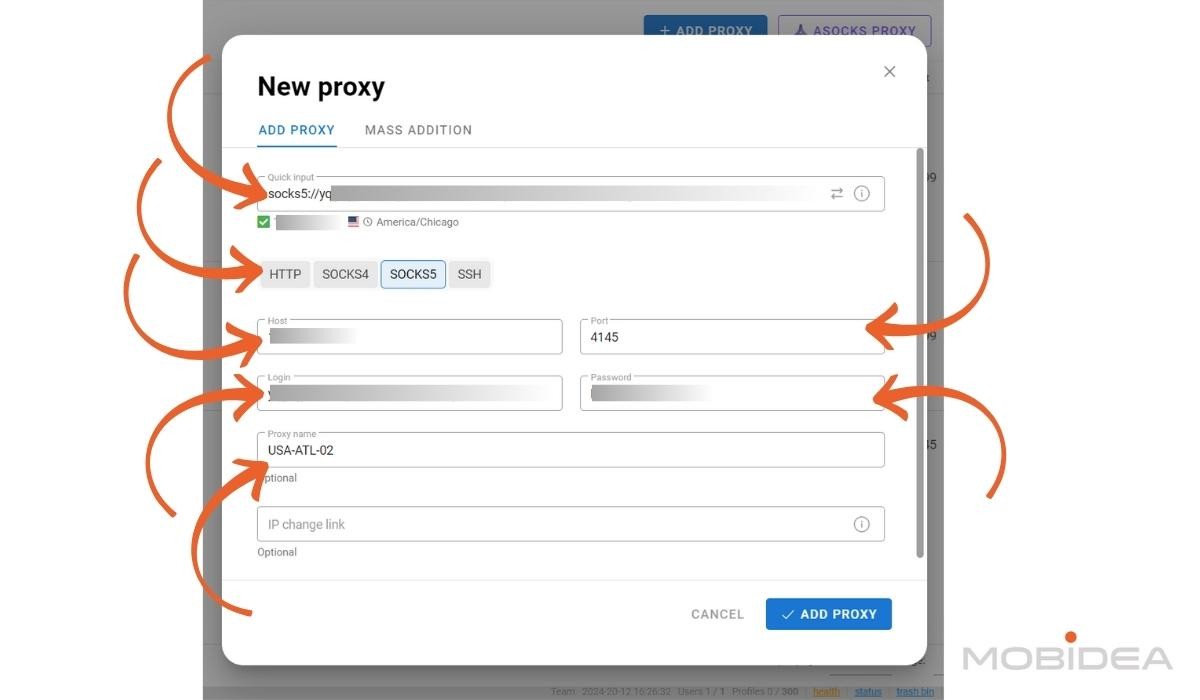
Fill out the details.
You can do quick input using the right format (depends on the proxy type) or you can fill out other fields (Host, Port, Login, Password).
Proxy name and IP change field is optional, but if you want to attach specific proxies to profiles, better place an identifiable name.
Notice the green checkmark under the Quick Input field?
Dolphin Anty checked the proxy and it’s showing that connection has been established successfully.
Once done, click Add Proxy.
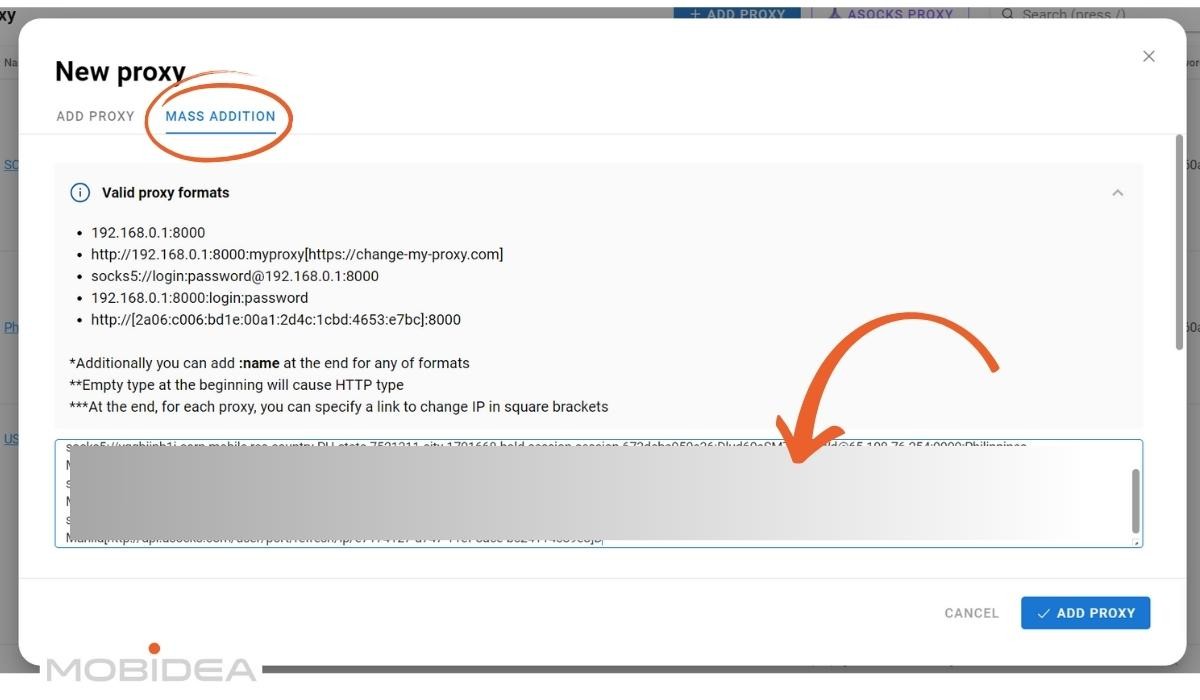
For bulk adding proxies, click Add Proxy button, then select the Mass Addition Tab in the pop-up window.
Add all proxies in one go, making sure you follow the correct format based on proxy type.
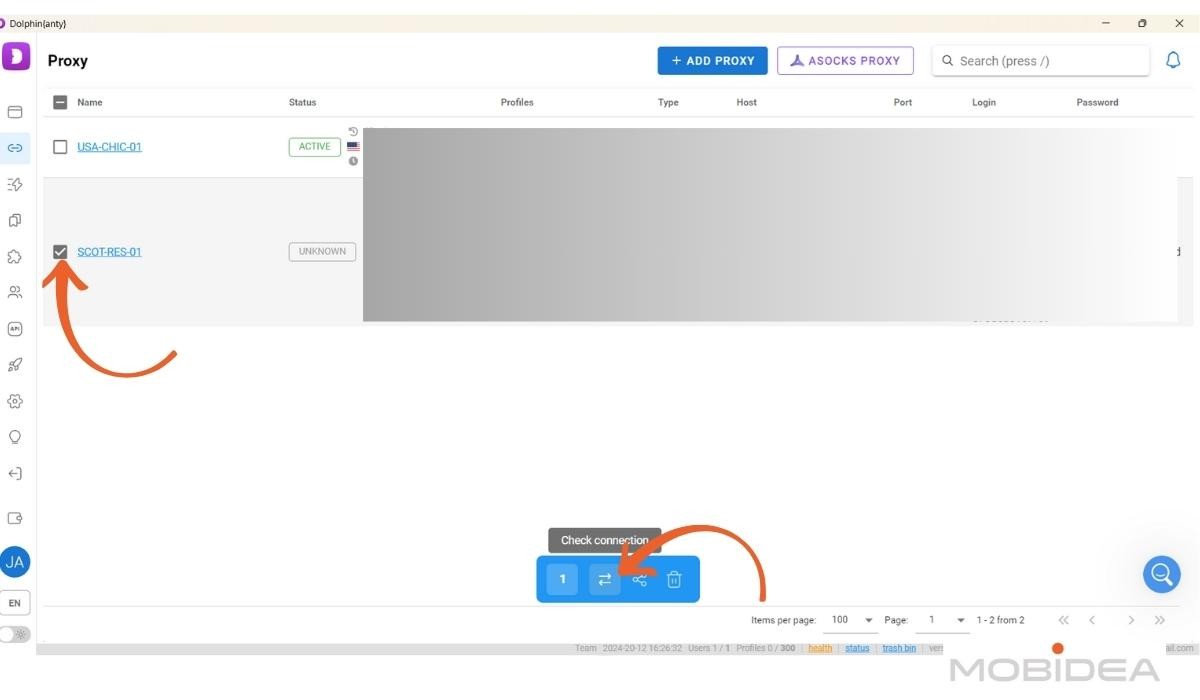
For checking proxies, select the item then click the two opposing arrows icon on the blue bar that appears at the bottom of the page.
This checks the connections and will either result in Active or Error.
Profile Creation and Management
Let’s demystify the profile creation process in Dolphin Anty.
It’s like setting up a digital workspace that’s uniquely yours, with just enough customization to keep things interesting.
As I mentioned above, this can be done easily, unless you want to make some changes to the parameters.
Only do that if you have enough experience with creating profiles, though.
A profile that’s too unique will cause your fingerprint to stand out too much and be flagged.
If you’re not there yet, click on the first icon in the navigation menu.
Next, click the +Add Profile button.
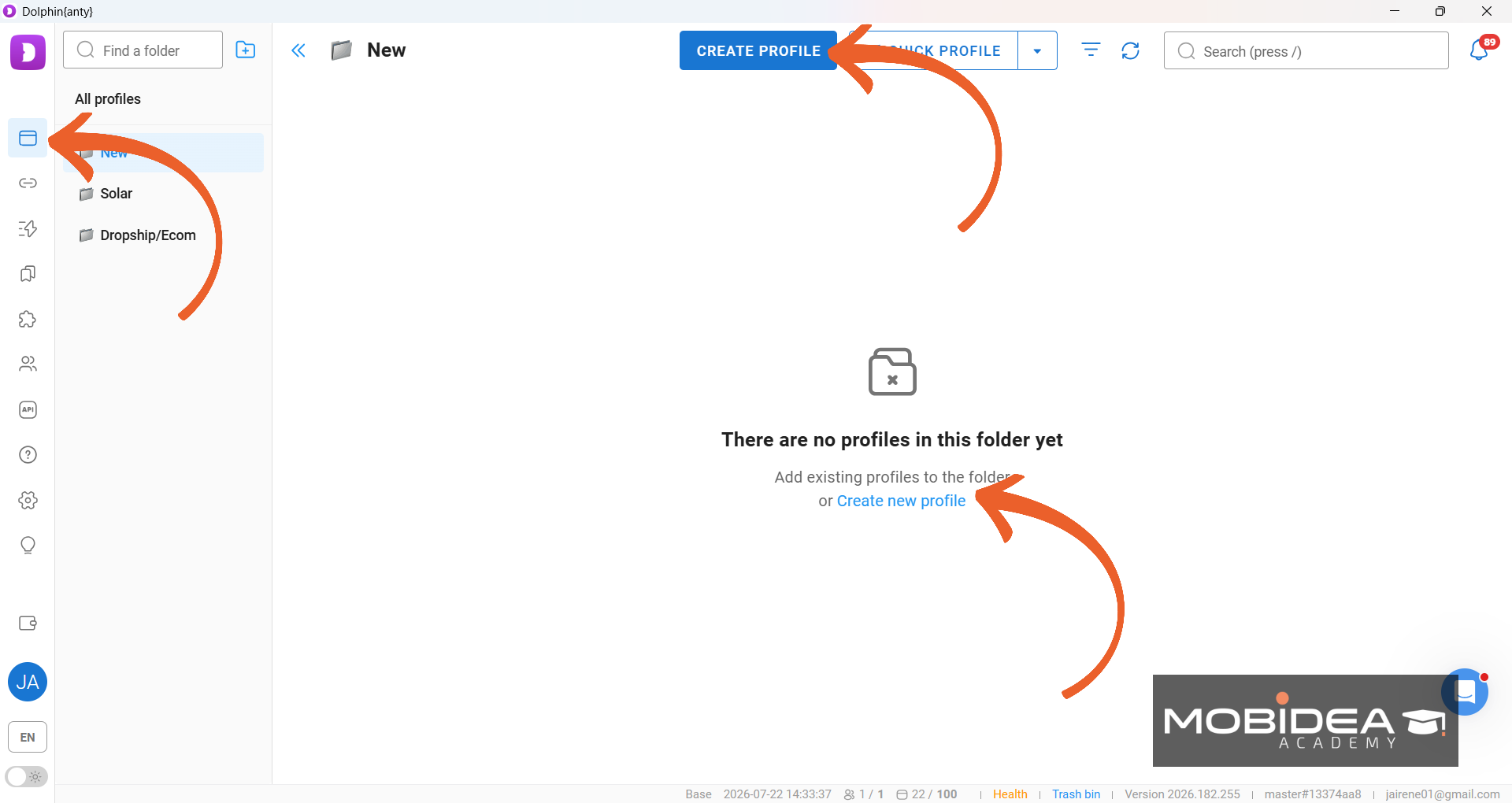
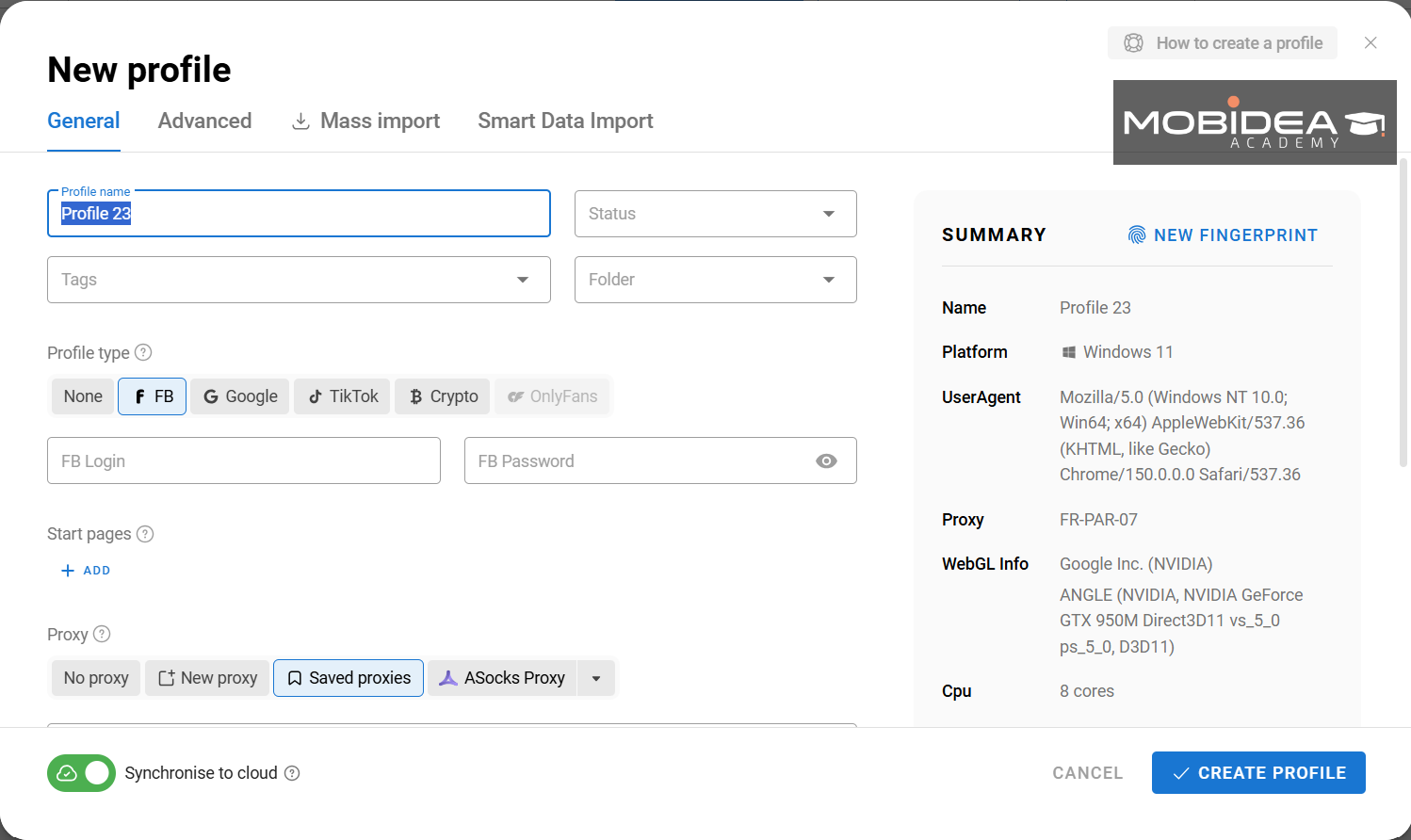
A new window will open, presenting you a form with a blank slate.
Here’s where you get to play digital architect:
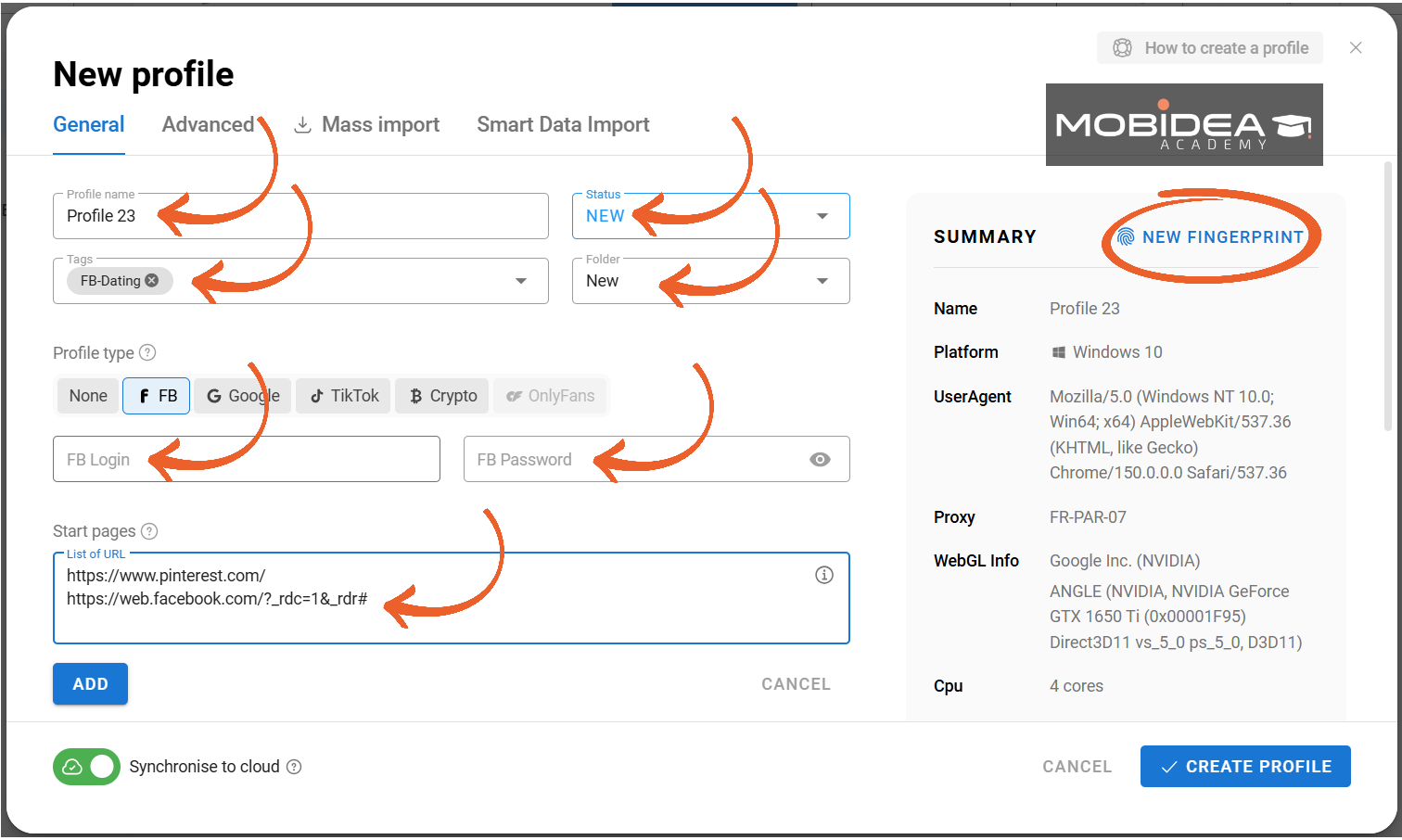
- Profile Name: Give your profile an identity.
- Status: It’ll show any stats you create.
By default, it has Ban, Ready, and New, but you can add more.
- Tags: Add some tags for better identification or for ease of searching.
- Folder: If you already have a folder that you want to add this to, do so.
It’s not required. You can also add it to a folder later on.
- Profile Type: Not a make-or-break decision. If you’re planning to use this across multiple sites, use “None”.
If you’re going to use it for Facebook/Meta Ads, Google Ads, TikTok Ads, and a couple of other platforms, you can choose those and enter the login details so it gets logged in immediately.
- Start Pages: Add some pages that you want to open immediately when this profile is in use.
- Proxies: Optional, but it’s highly recommended, especially if you’re looking to add an extra layer of anonymity.
Not using proxies might get you noticed by the systems you’re trying to avoid.
Select from the proxy you previously added like what we did in the previous section or create one from this page.
The steps are the same.
- Cookies: Add these if you have them already.
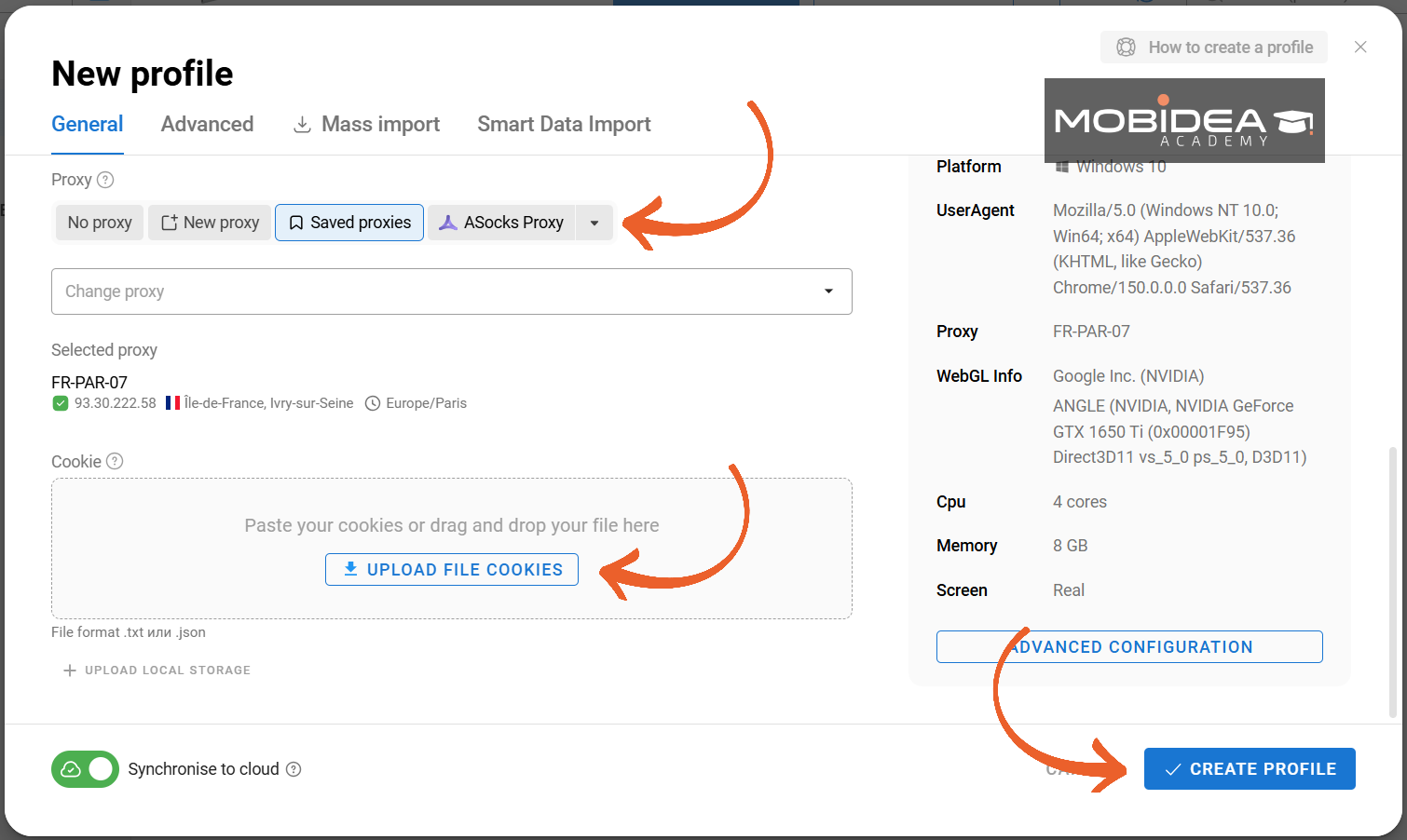
You’ll see a preview of the profile and fingerprint details on the right column within the pop-up window.
If you’re not satisfied with the fingerprint, simply click on the New Fingerprint link at the very top and it will generate a new one for you.
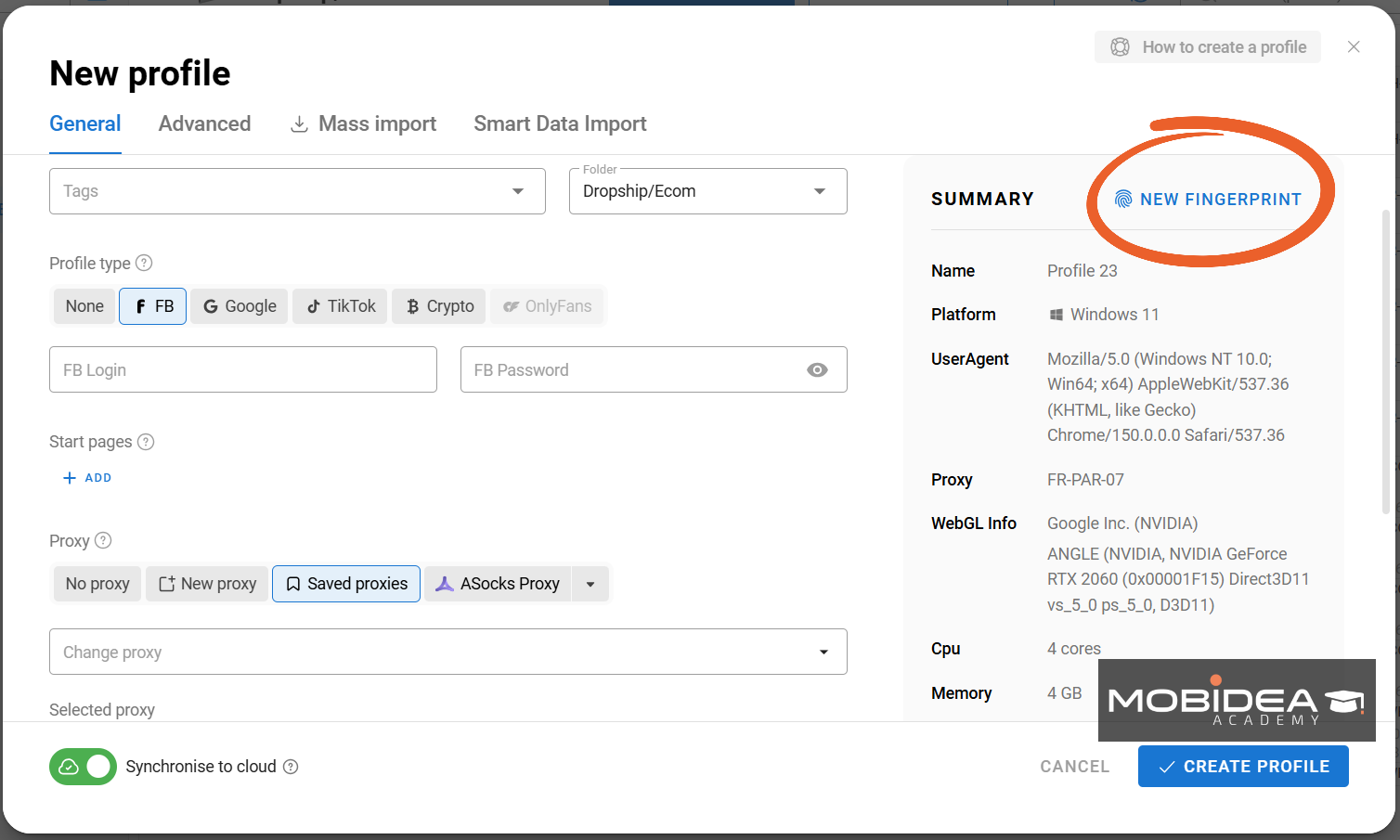
You can also do this when you want to refresh the fingerprint for that profile in the future, or use the mass action version of this same button when you need to refresh a whole batch of profiles at once.
Now click on Create Profile (or Save, if you’re editing) and you’re done!
It’s that simple, really.
But of course, if you want to get more hands-on with your profile settings, you can click on the Advanced Tab within the profile creation window.
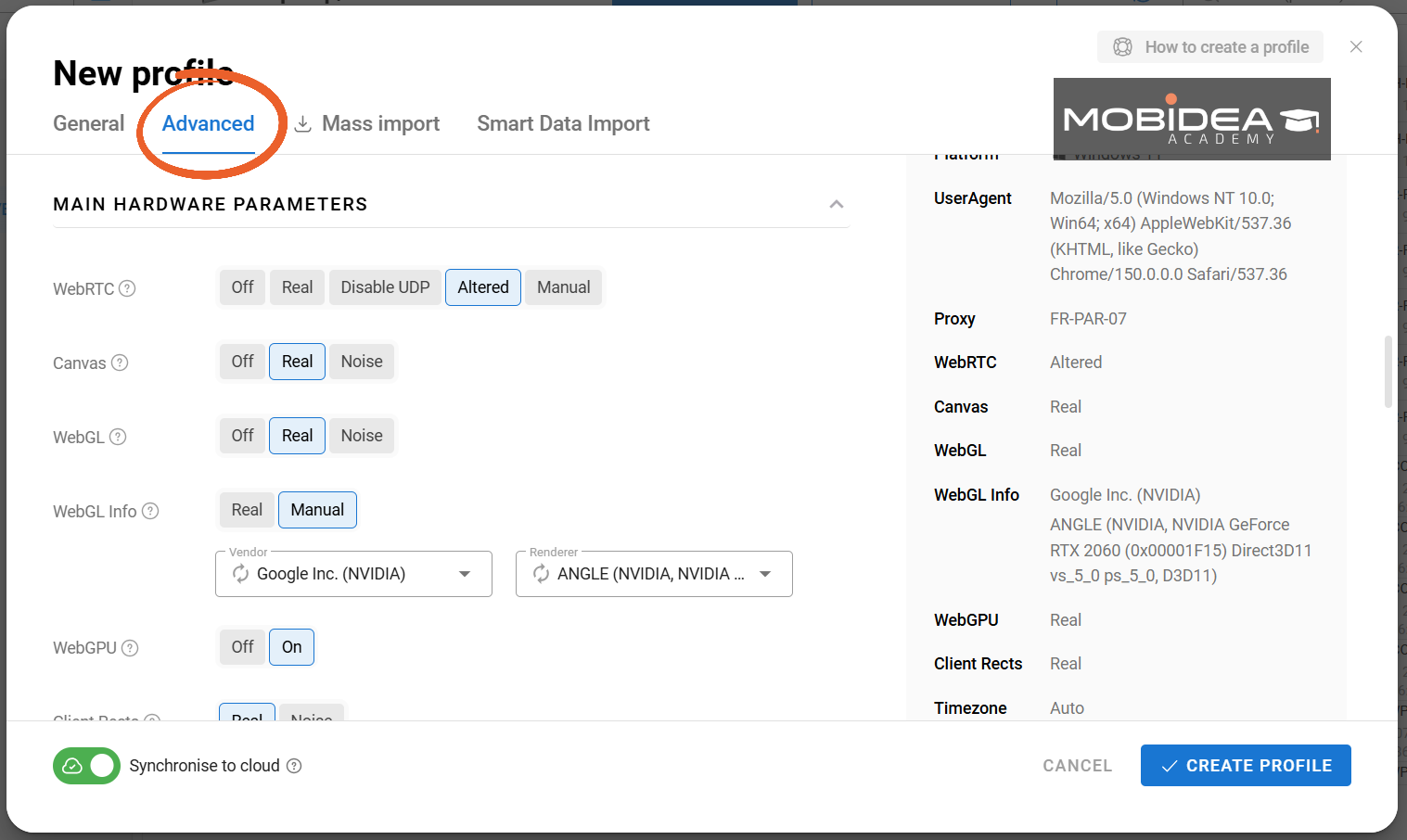
On top of the initial required input, this page also shows the fingerprint parameters that you can edit.
Let’s talk about those intriguing customization options:
- Advanced Parameters: WebRTC, Canvas, WebGL, and more are all at your fingertips.
- The Golden Rule: Change parameters only if you understand the ‘why’ behind your modifications.
- Safe Zones: Time zone, language, GEO, processor, memory, screen, and media settings are generally safe to tweak.
- Proceed with Caution: The “Do not track” parameter? Leave it be. Most websites rely on tracking for functionality.
Once you’re satisfied with your configuration, hit “Create Profile” in the bottom right. Congratulations, you’ve just birthed a new digital persona!
Mass Import
Need multiple profiles?
There are two ways to do that en masse.
First is by switching to the Mass Import tab in the Add Profile pop-up window.
You can download the xlsx template, fill it out with the info you need, and upload here.
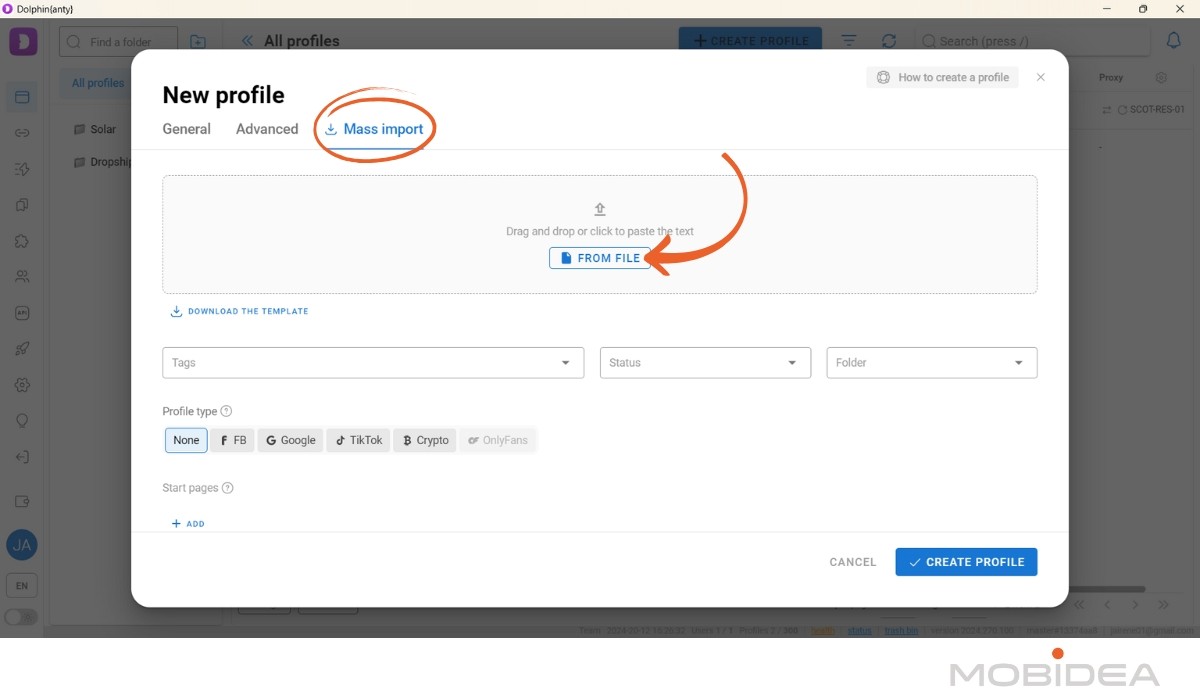
Once uploaded, click the Check Data link to see if your input was uploaded properly.
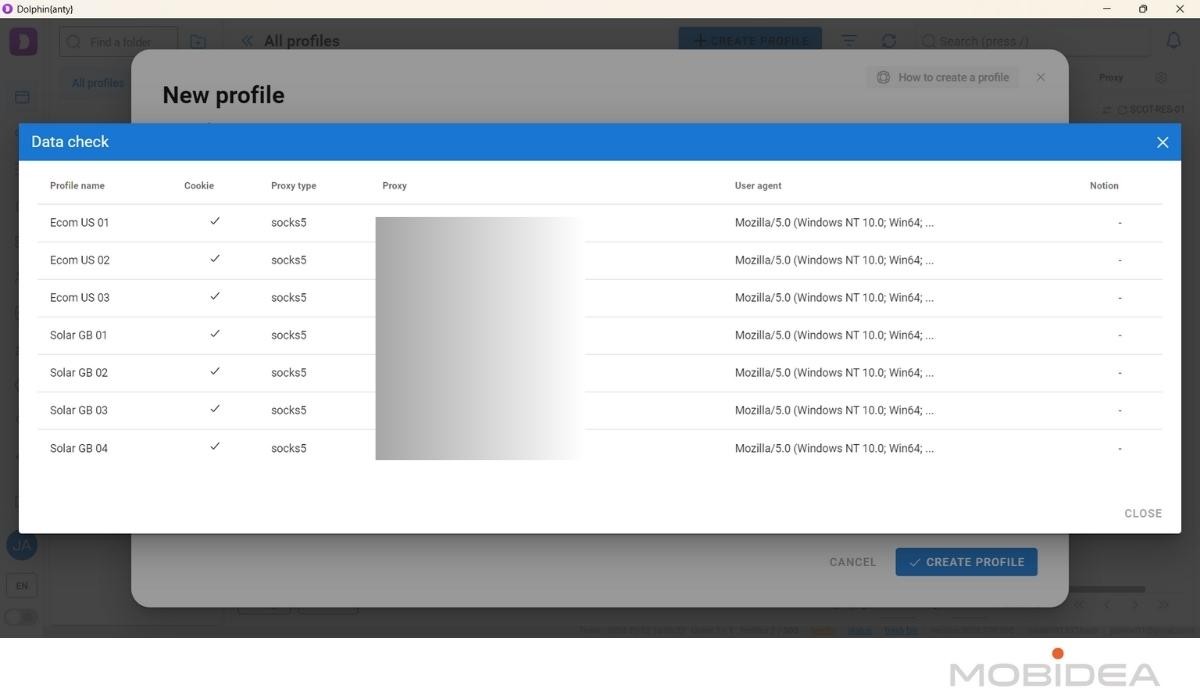
If everything checks out, you can proceed with editing all other parameters, just like with the Advanced section.
But you can also leave the settings be and Dolphin Anty will create unique fingerprints for each profile in your file when you click on Create Profile.
Depending on how many profiles you added, it might take a few minutes for them to be created.
Smart Data Import
Sitting right next to it is a newer tab called Smart Data Import, a faster route if you don’t want to be boxed into the fixed template.
Instead of filling out a spreadsheet in a specific format, you can drag and drop a file straight in or just paste raw account data as text, and it accepts .txt and .csv on top of .xlsx.
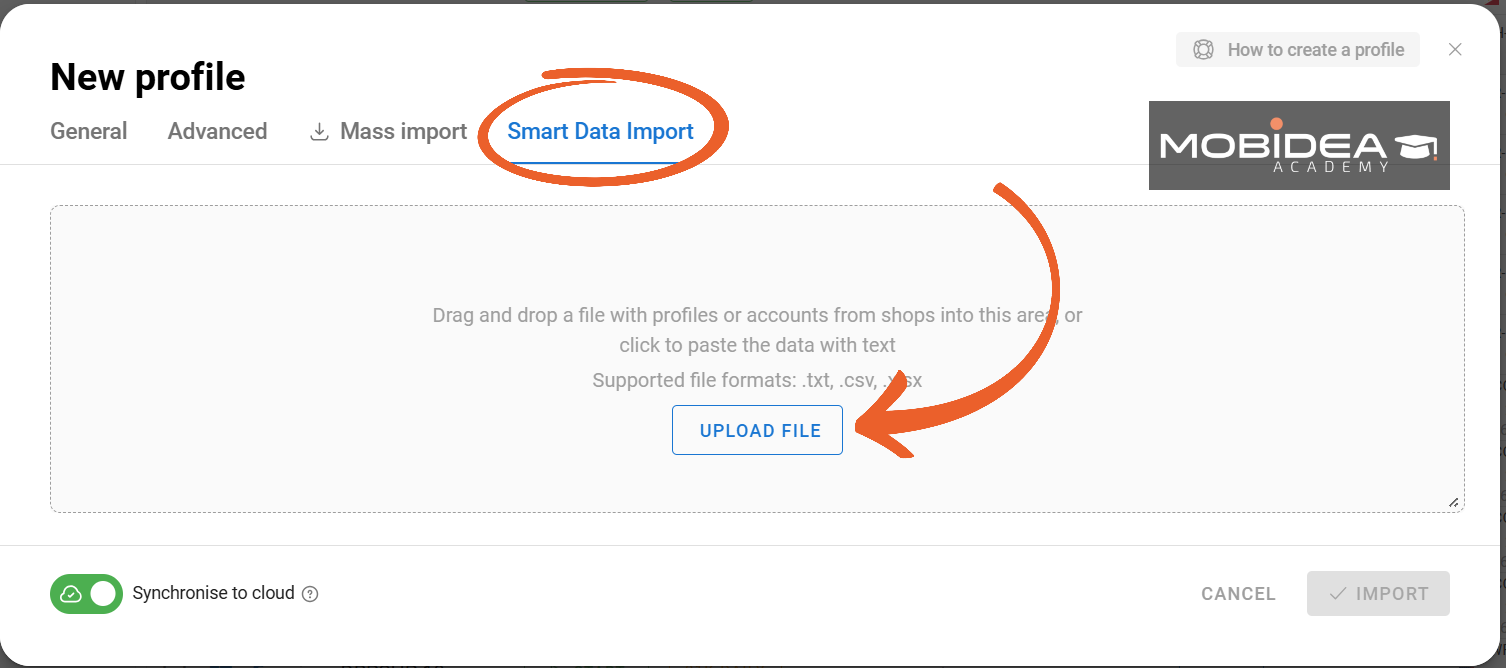
The system automatically recognizes the data structure and maps it to the right fields (auth login, password, email login and password, user-agent, cookies, proxy, auth token, and so on), so most of the time all you need to do is glance over it and hit Import.
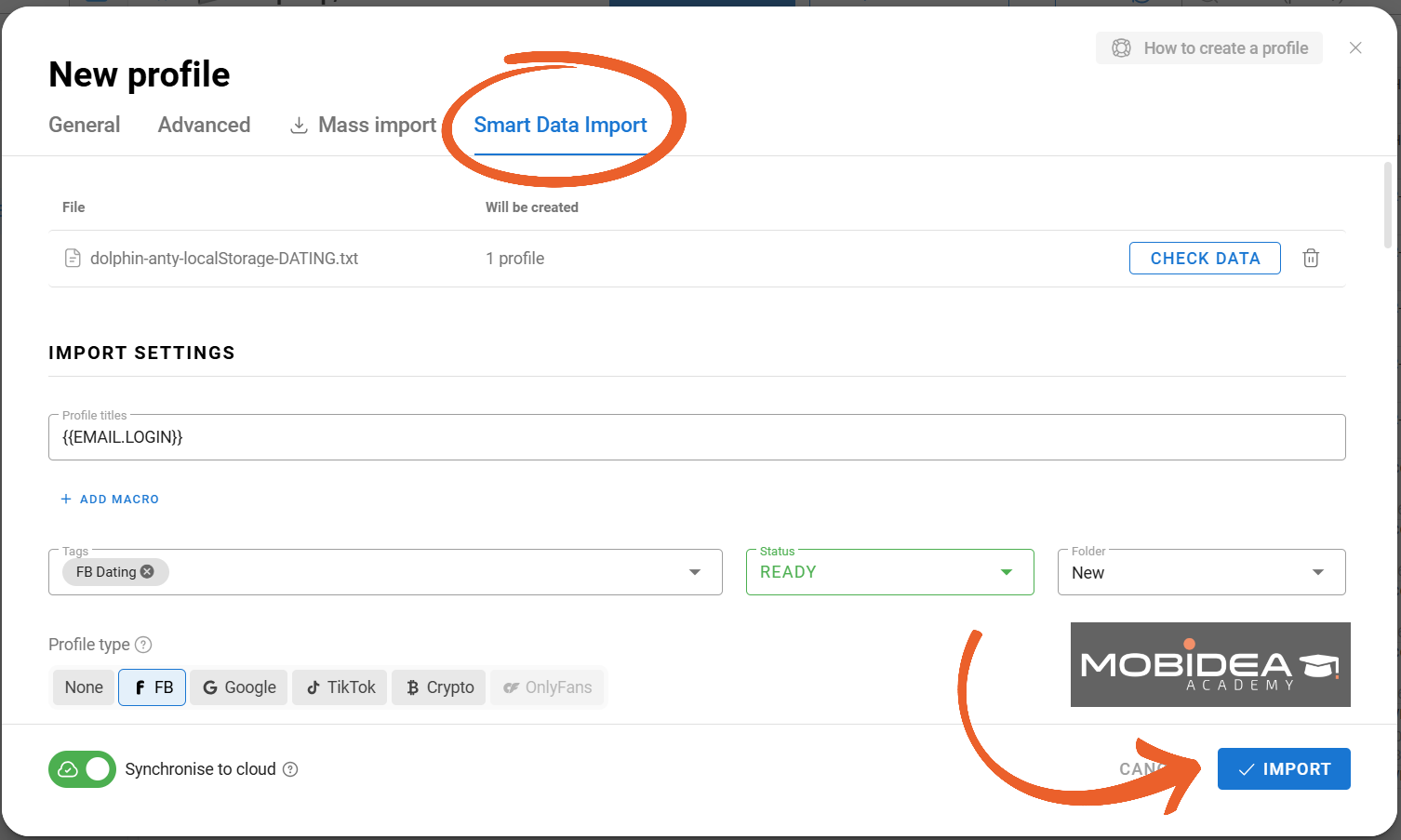
Double check that all information and settings are correct before hitting Import.
Copy Profiles
Another option to create multiple profiles at a time is by duplicating existing ones.
To do this, click the kebab menu (the 3 dots) next to the profile you want to copy.
A whole lot of new options will show up.
Select “Copy profile.”
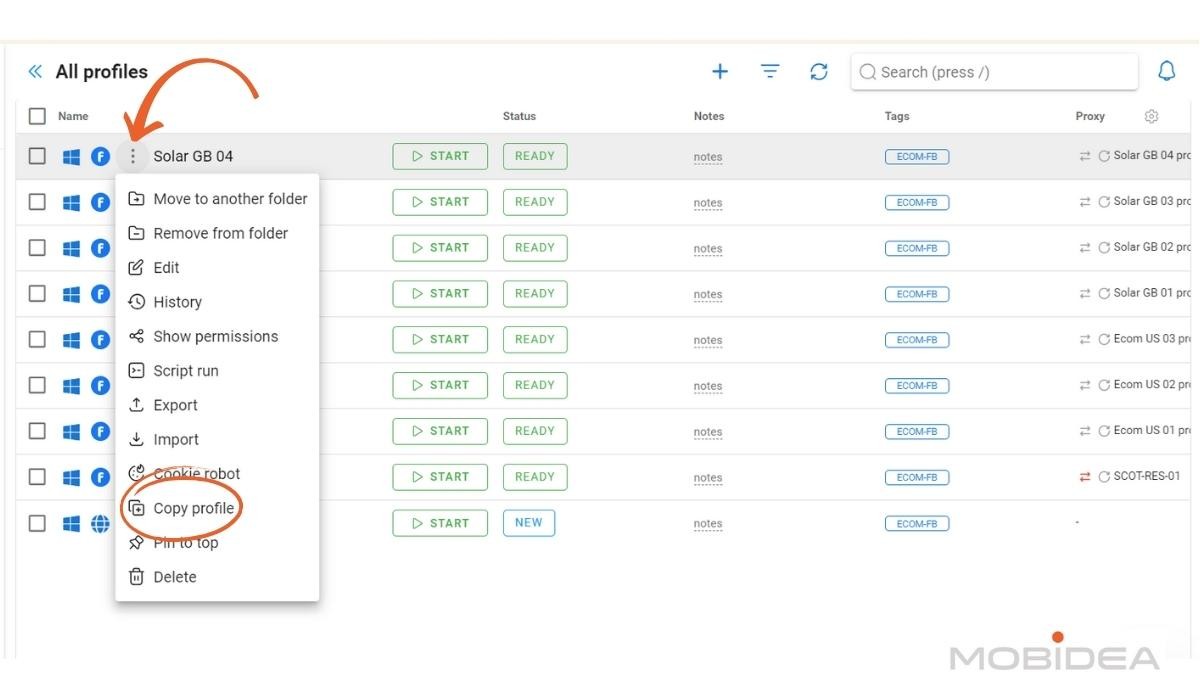
In the pop-up window, specify the number of copies you want.
You can add up to 30 profiles in one go.
Toggle “Randomize fingerprint” for unique identities.
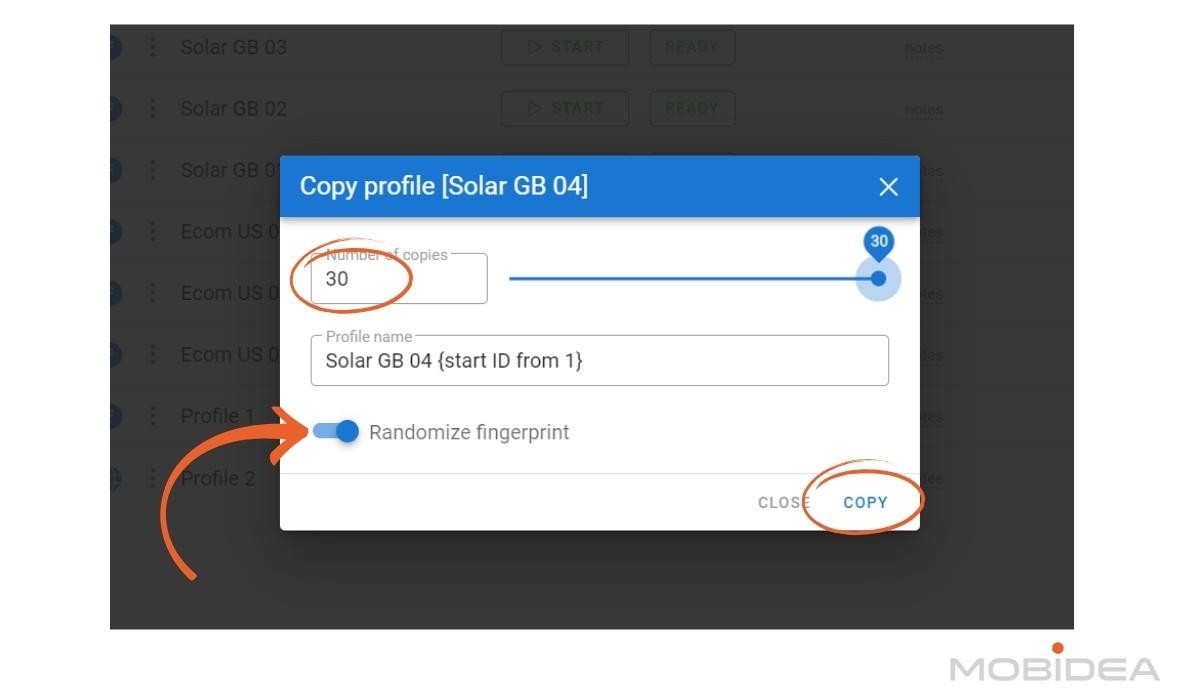
Click Copy and the system will create fresh new profiles for you in a matter of minutes.
Note: Free plan users are limited to 5 profiles in total, and the system will cap your creation at the maximum allowed.
Launching Your Profile
To open an instance of Dolphin Anty browser for your profile, click on the Start button across your chosen profile.
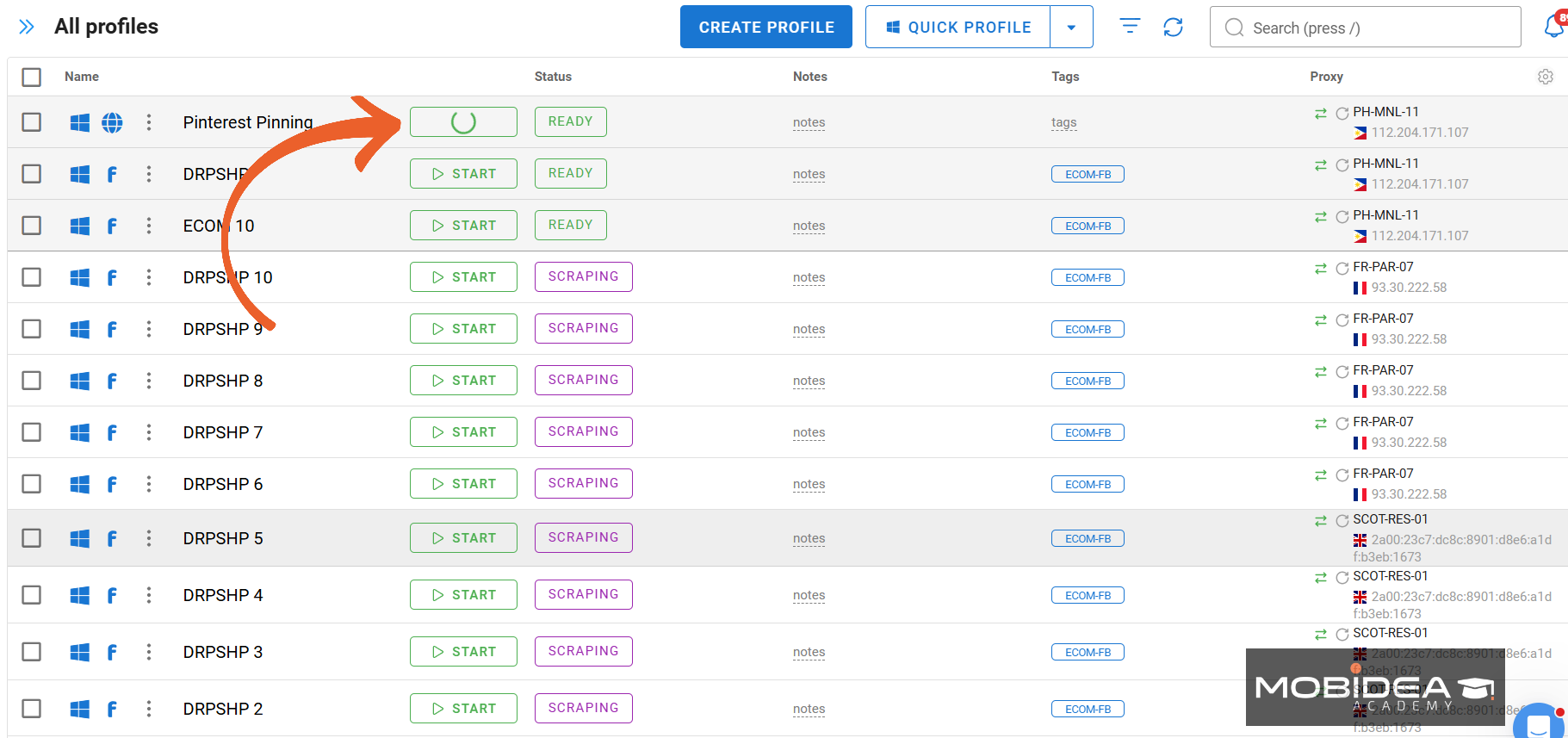
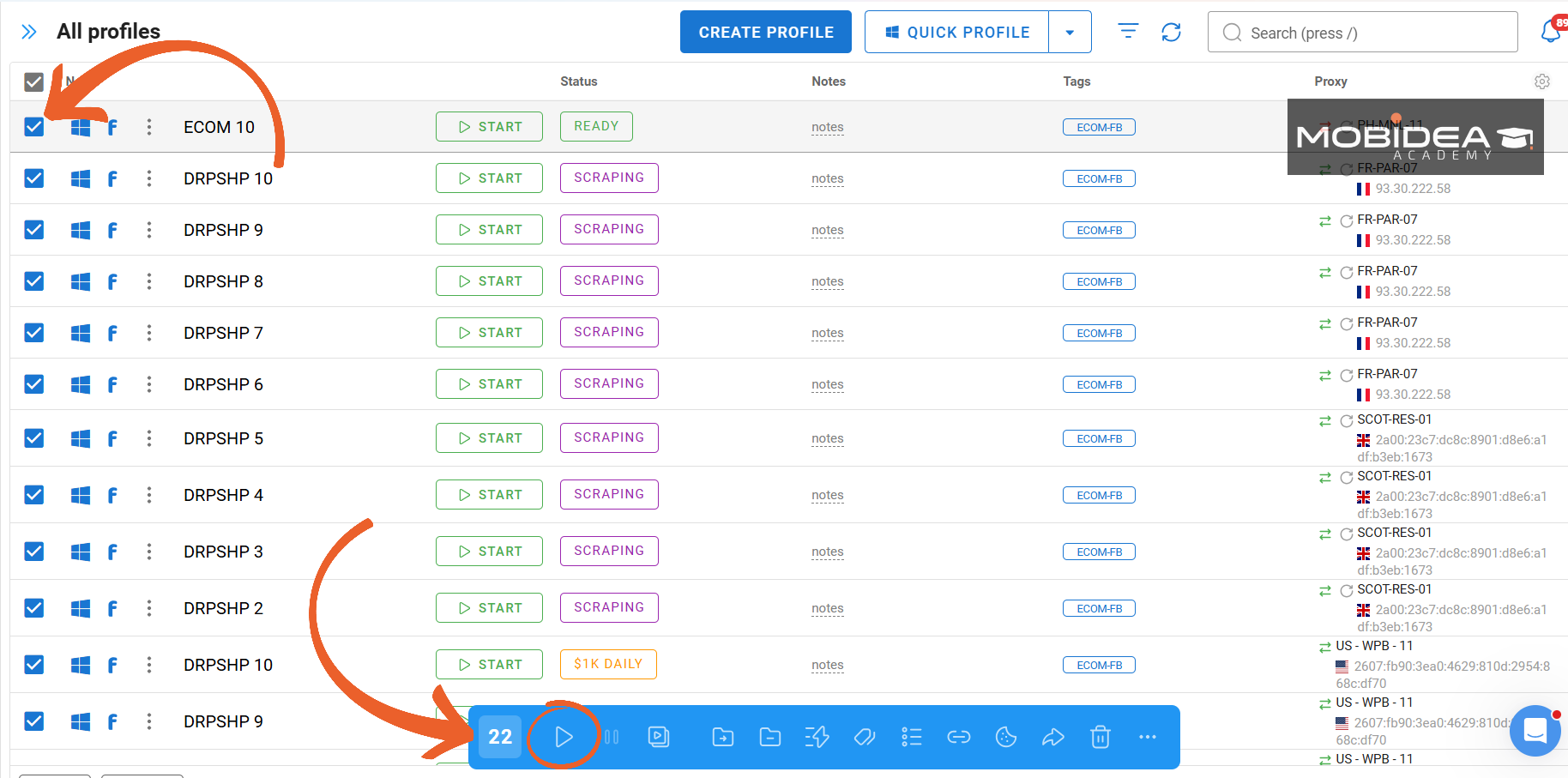
If you want to launch several at a time, select the check box next to the name and press the Start button on the blue menu bar that opens at the bottom of the page.
Several instances of Dolphin Anty browser will open for you.
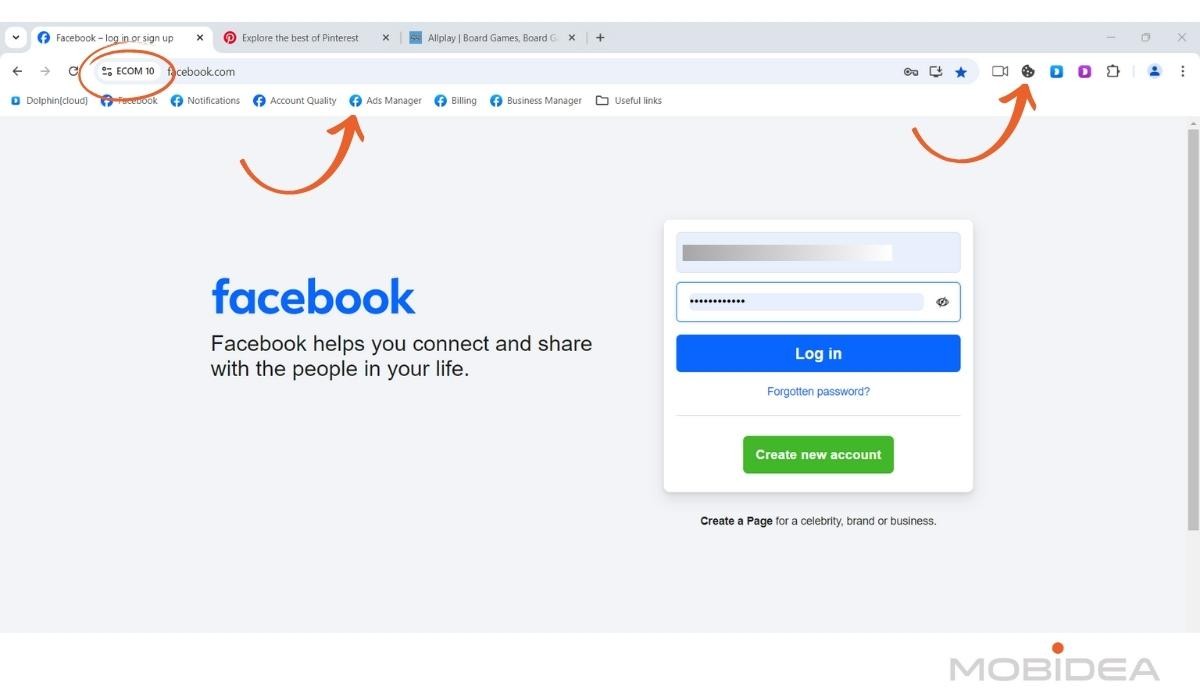
Here’s the instance for one of my profiles.
As you can see, the name of the profile is shown right on the sight settings button, so you won’t get confused.
The first 4 letters of the profile name are also shown in the taskbar icon for this browser.
As I have chosen the FB profile type, the bookmarks bar is showing quick links relevant to Facebook Ads, a nice touch.
You can also click on the cookie icon on the browser extensions section to quickly save the cookies for this profile.
Since I use Chrome extensively, I’m happy to say I found the browser very convenient to use, it was basically a flat learning curve for me.
Synchronizer
This feature allows you to perform a singular action across multiple profiles. It could be really helpful, if it can perform as promised.
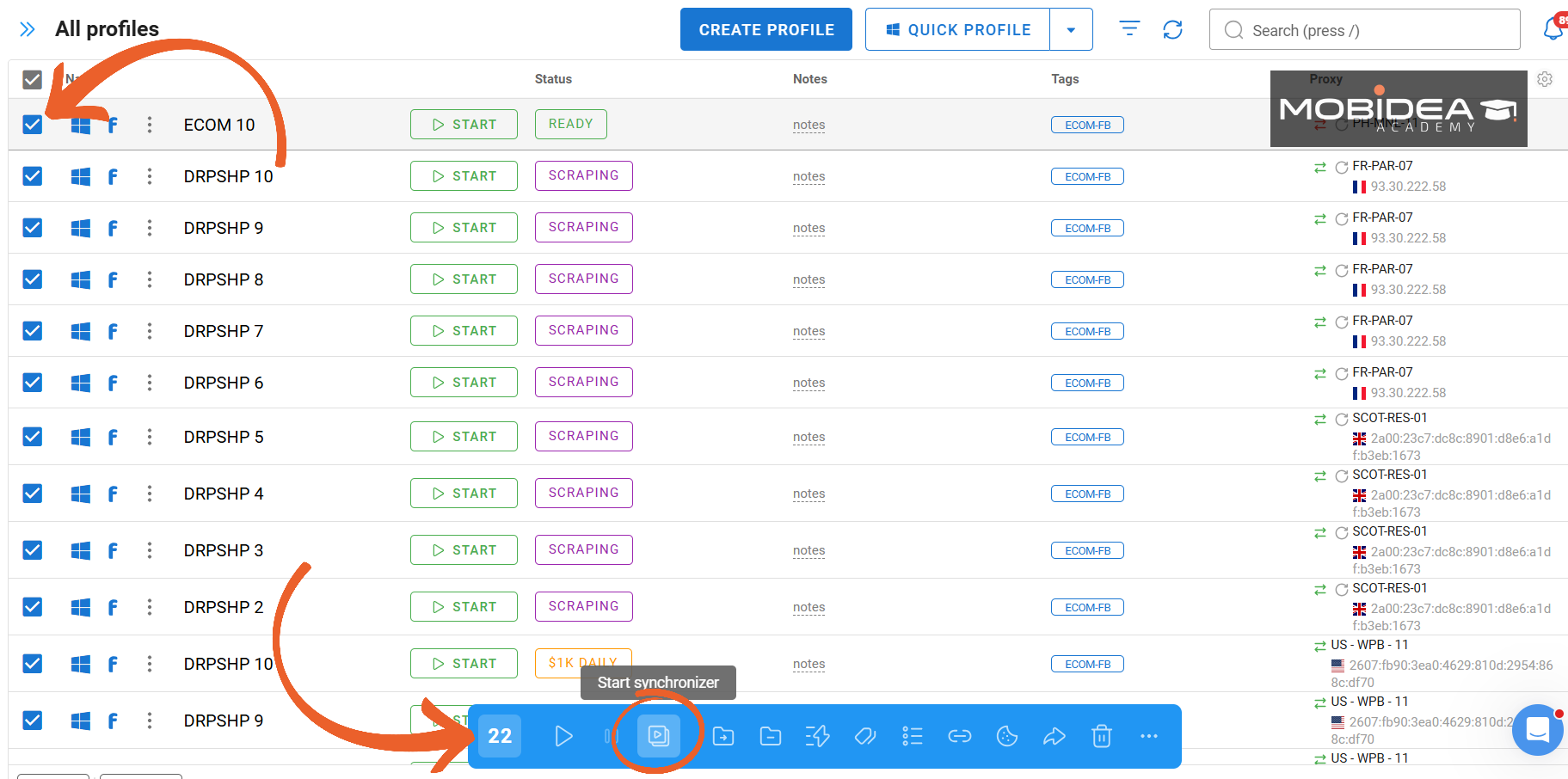
So here’s my dashboard, complete with duplicate profiles.
I clicked on the checkboxes right next to the profile name that I want to synchronize, then clicked on the third icon from the left on the blue menu that appears at the bottom.
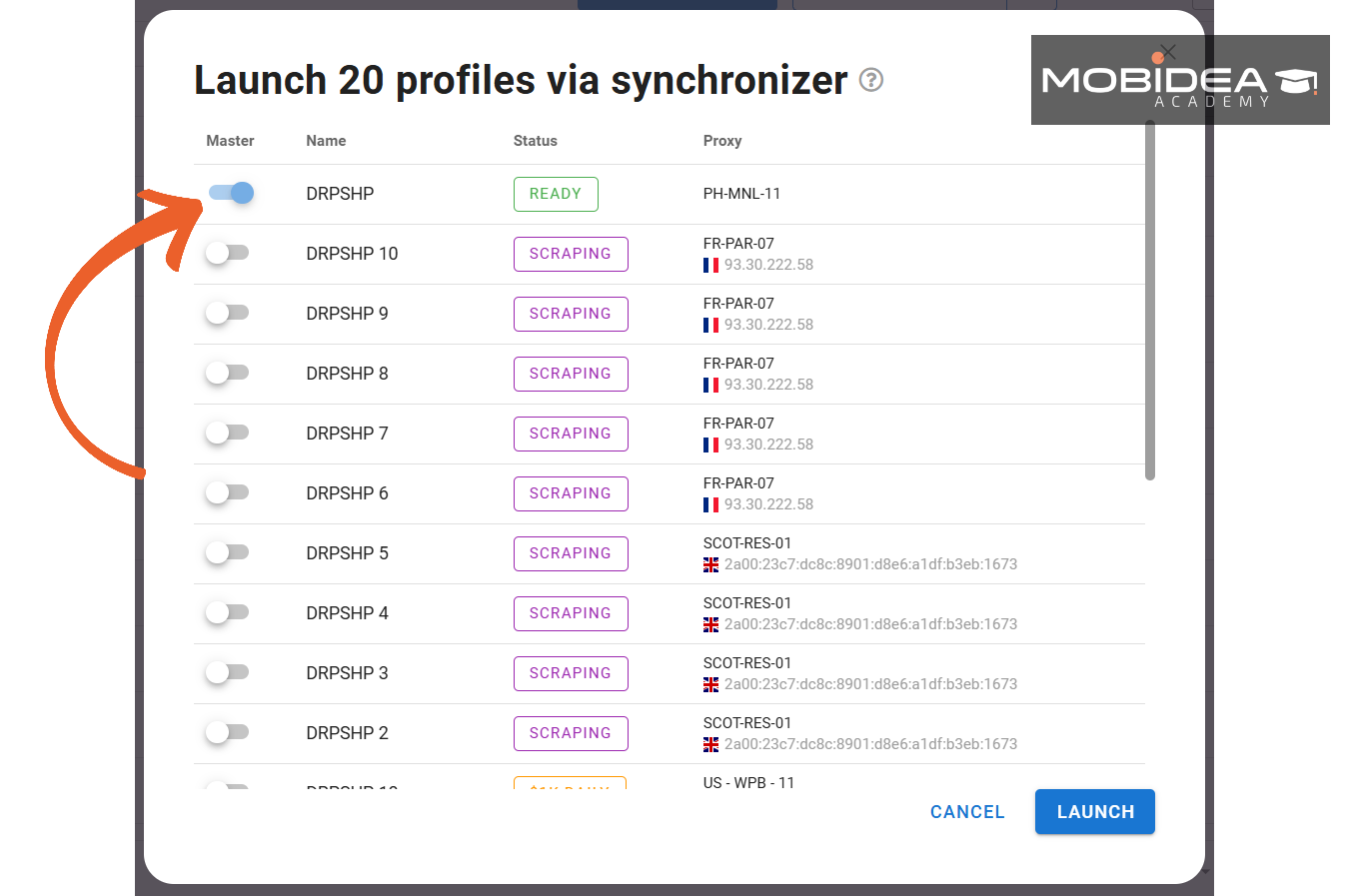
A pop-up window opened up to ask me which profile I want to use as Master profile.
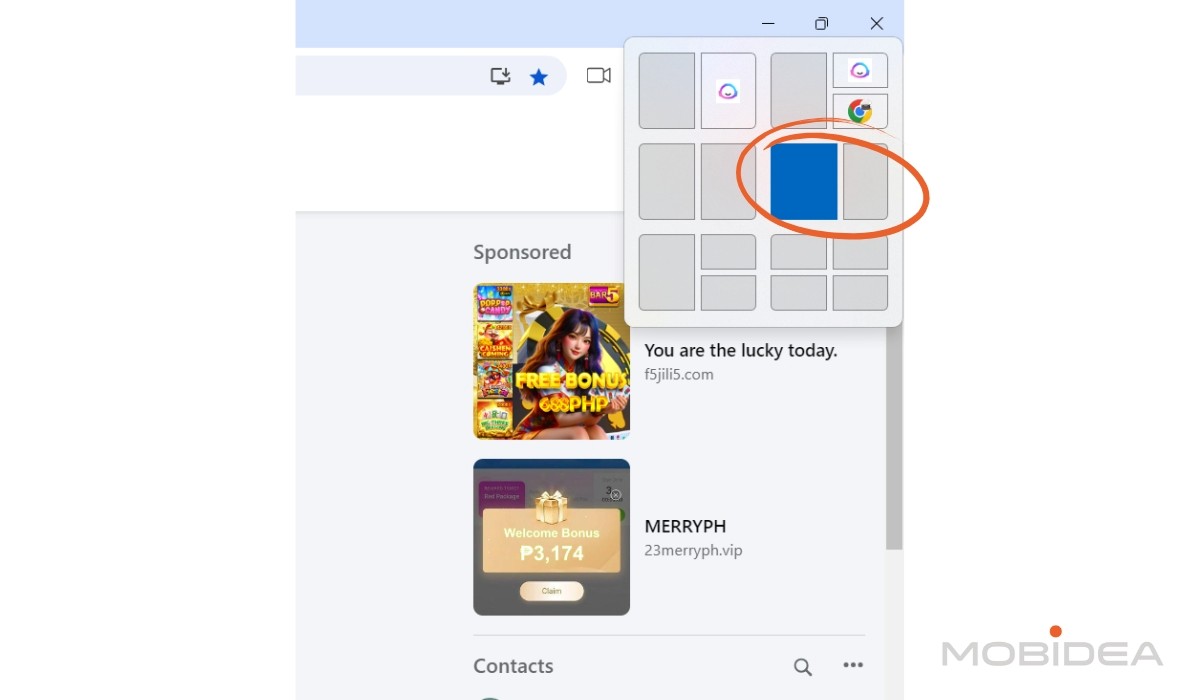
According to Dolphin Anty’s knowledgebase, page navigation and clicks will not work if the antidetect browsers are in full screen, and that the synchronizer is sensitive to window sizes.
So, I made sure to hover over the window size and selected the same window size for all the instances I opened.
All profiles have the same tabs open, Facebook.
From the FB homepage, I navigated to the Ads Manager, chose an ad account, and started to edit a campaign.
What I found is that all instances need to be exactly the same for it to work.
If one profile has something minutely different, let’s say a site setting notification asking to allow the site to send push notifications, this profile will not be able to follow the main profile’s steps.
So it’s imperative that you check that each and every profile is following so far.
Also, there is a slight delay for profiles to copy the actions.
While some profiles were able to follow quickly, others showed a delay of one to two seconds.
If you forget to wait for the other instances to load to the correct page, they will be left behind and may not be able to copy the actions.
I navigated three pages as I normally would and found that some profiles were not able to follow the clicks.
While the profile is still “loading” the previous actions, other actions that it missed will not be followed entirely.
Worse, it might even click on something different because of the delay.
I have a feeling that the synchronizer works by following mouse movements, scrolls, and clicks, so any delay to reaction time can result in wrong clicks.
For instance, I noticed that the depth of scrolling down across all profiles is not the same.
If I scroll and then click on something a second later, some of the profiles may click on a different item or on a white space.
I had 10 antidetect browsers opened, excluding the master profile.
In the end, only about six of them were able to perform the exact same steps.
Here’s the master profile, where I changed the age and gender of the target audience:
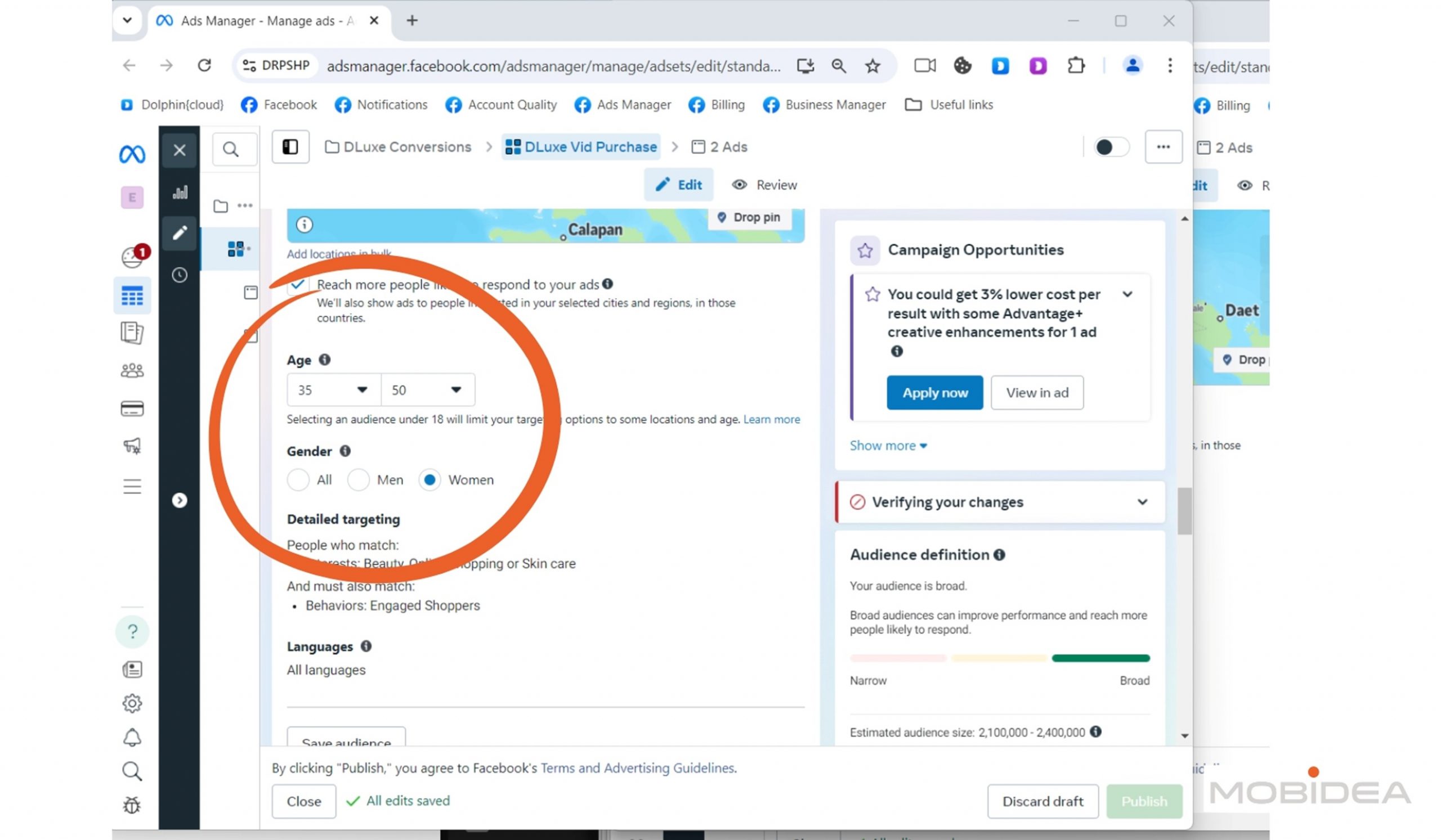
Here’s one of the profiles that synced properly:
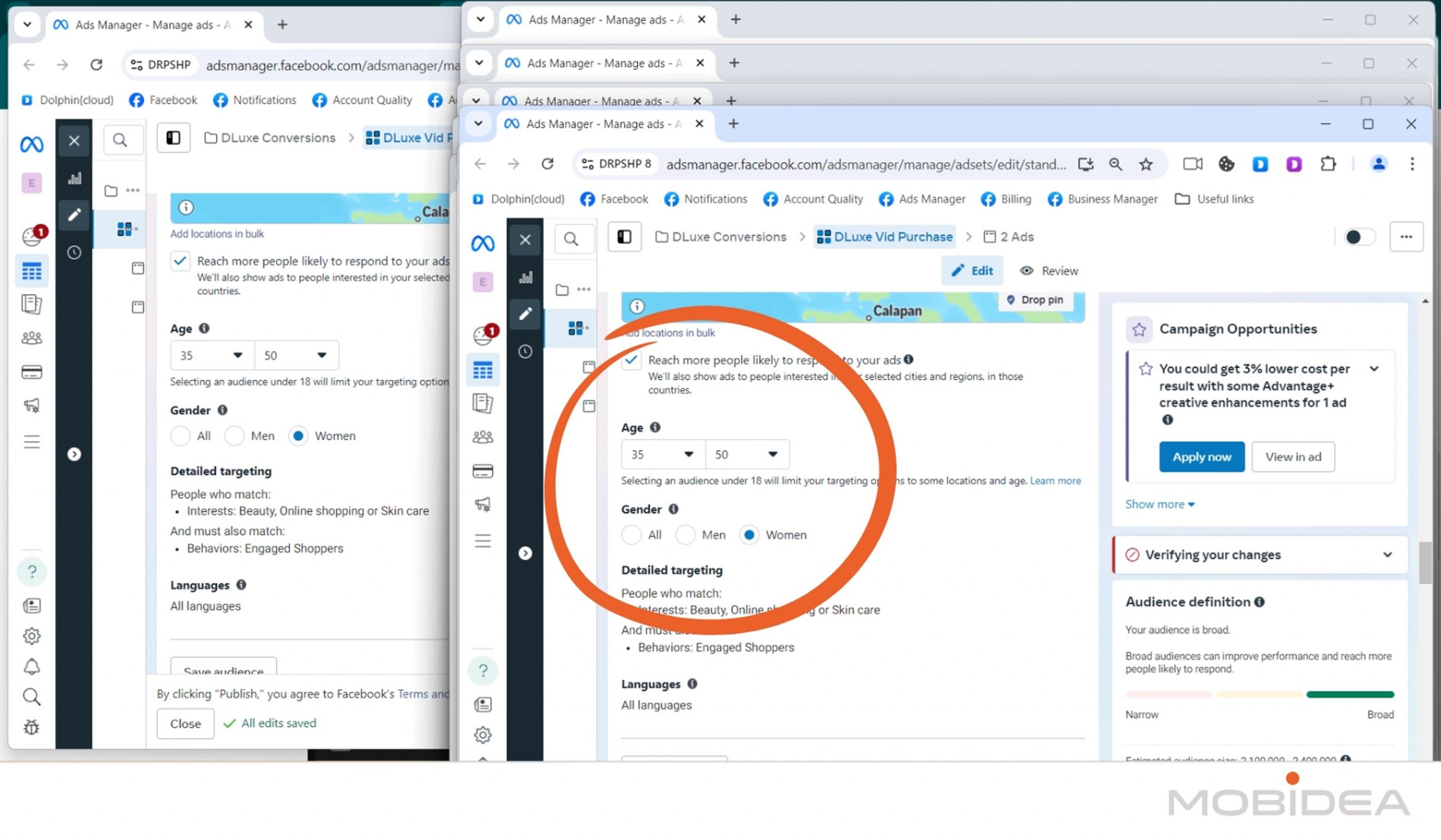
And here’s one of the profiles that did not:
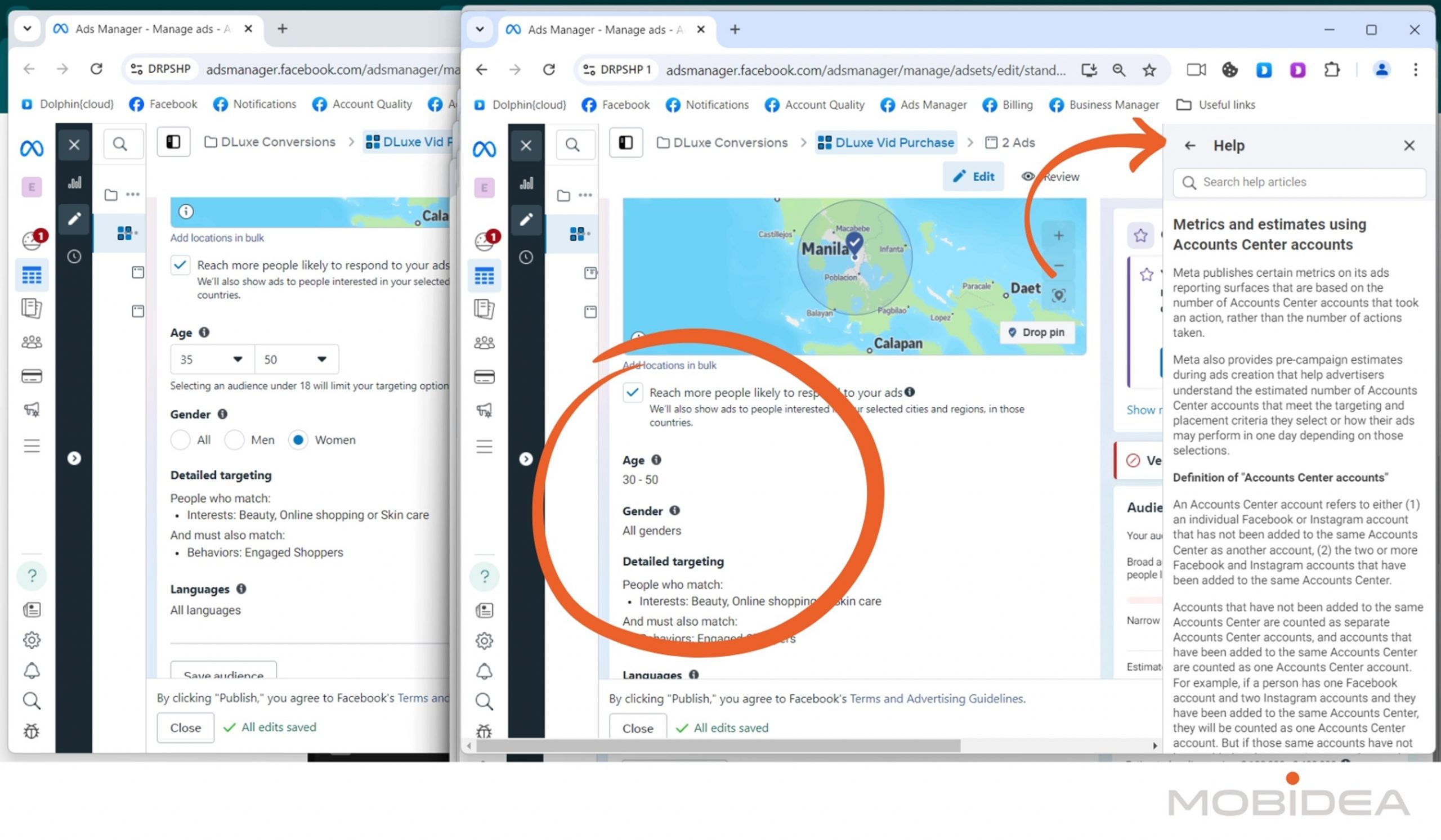
If you notice, it did not follow the changing of audience, and for some strange reason, the Help Center was opened.
But it could be that it’s my computer that’s the culprit here.
After all, I removed the concern about connection speed (as I did not use a proxy for all profiles), and also eliminated the possible differences in what appears in the ad account (as I use the same ad account for all).
The delays in mouse actions could be caused by the limitations of my computer, so I checked my task manager (I’m using Windows 11, by the way), and saw this when the browsers are idle (when I’m not clicking on anything).
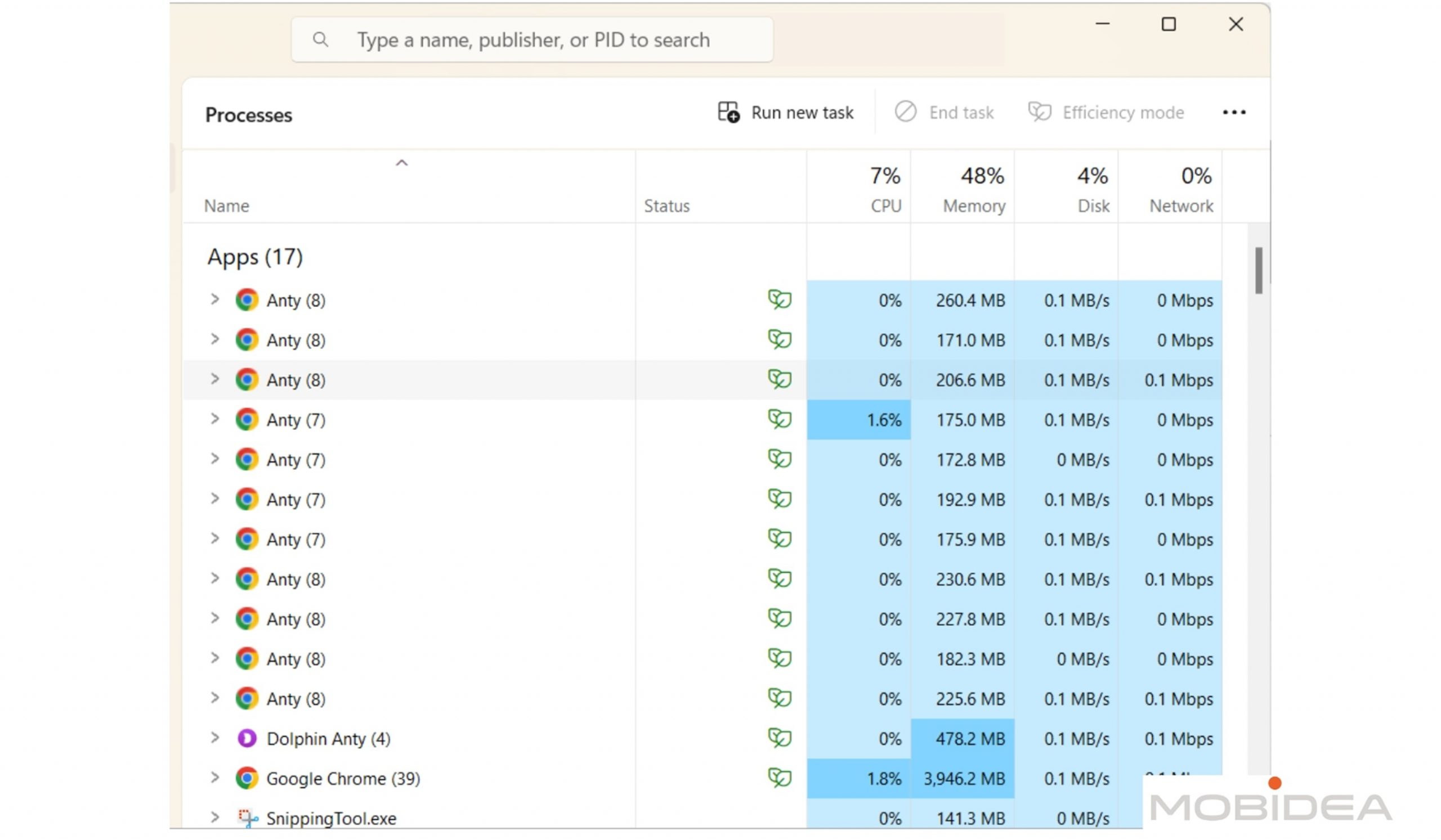
And here’s my task manager when I perform an action (when I clicked on a link):
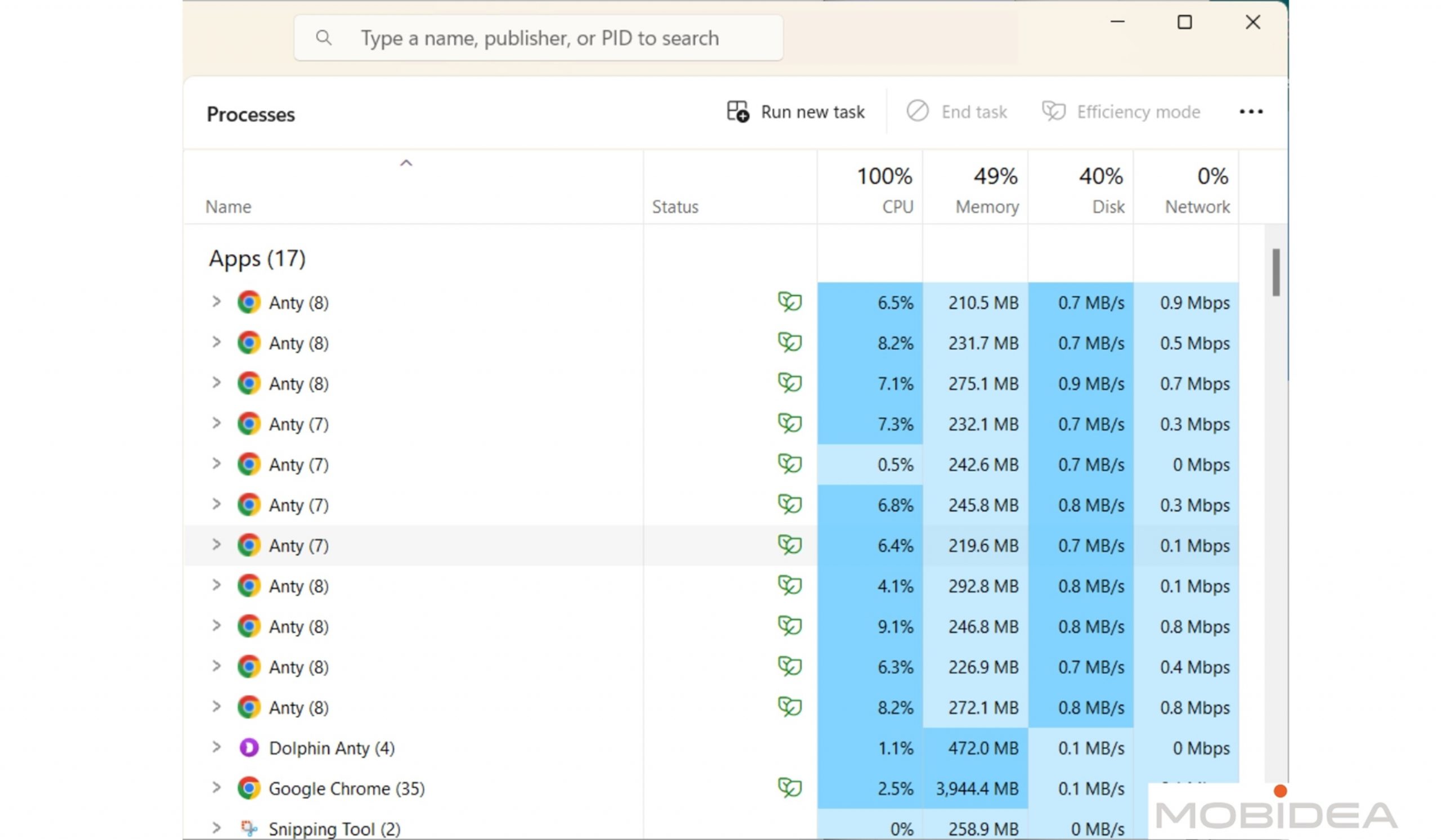
As you can see, my CPU usage has reached 100% when the profiles were trying to follow the actions done within the Master profile.
I think my computer’s sweet spot for using synchronizer is 6 profiles (plus the master profile). Any higher than that and I get delays.
Based on these tests, I recommend you find the sweet spot for your computer when using the synchronizer.
This way, you can be sure all your actions in the master profile are followed without issues.
I tested the synchronizer with just 6 profiles plus master profile and everything worked perfectly!
Still, I think synchronization is resource intensive but I wouldn’t be surprised if this gets smoother in future updates.
Using Smart Paste and Cookie Robot
Using Smart Paste is super easy.
Just right-click on an input field and select “Smart Paste”, or use the hotkey (CTRL+SHIFT+B on Windows/Linux, CMD+SHIFT+B on Mac).
It’s like having a tiny robot that types exactly how you would, minus the typos and hesitation.
Setting up the Cookie Robot is also a breeze.
Just pop into your browser settings of your selected profile, then click Cookie Robot.
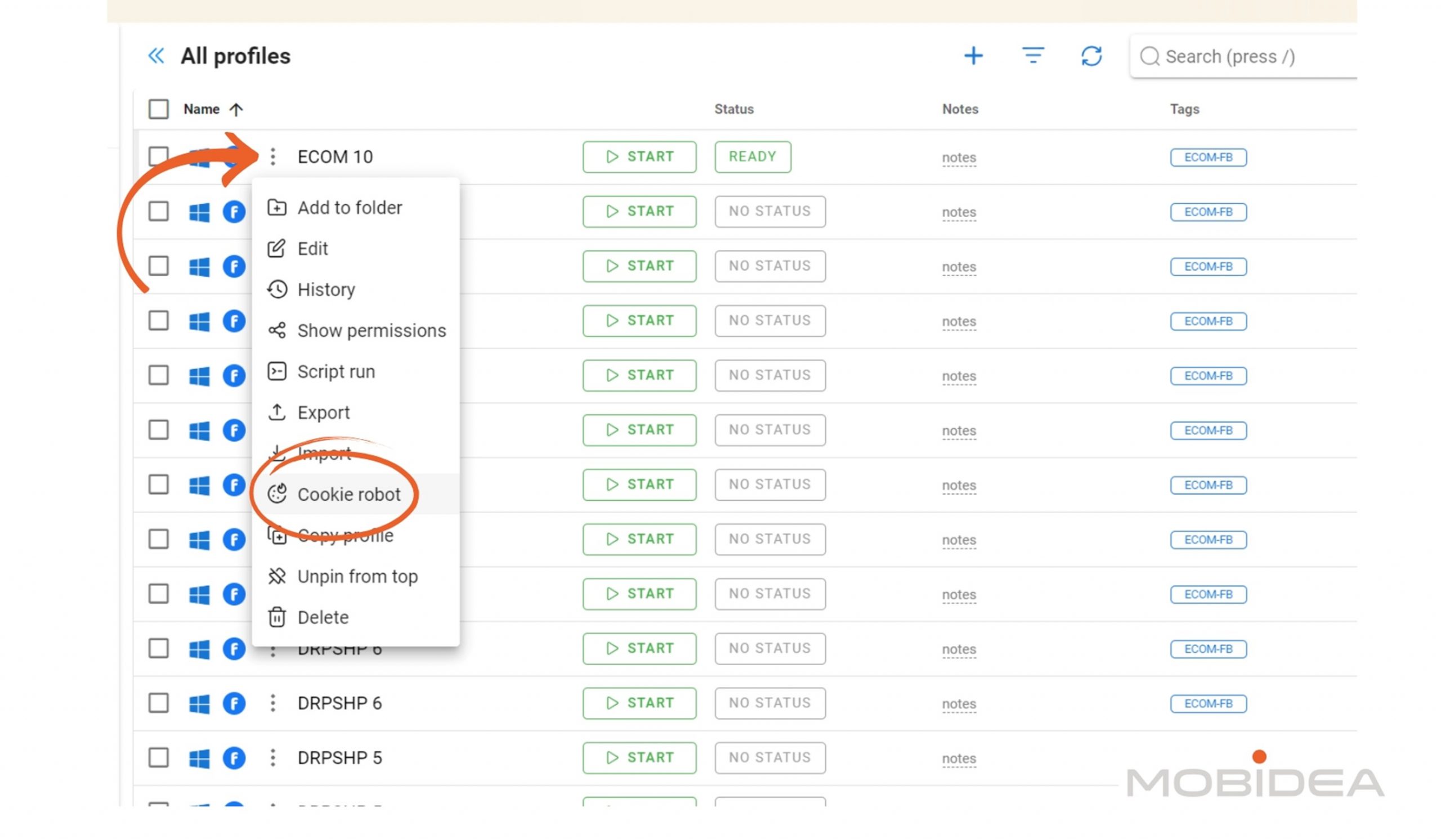
List the websites you want the profile to visit automatically.
Input sites that’ll make your browser profile look genuinely used, something that you yourself would visit.
Mix entertainment sites with lifestyle or business ones to make it seem random.
You can add as many as you need.
You don’t have to load the images to avoid overusing your proxy’s bandwidth.
Running in headless mode means the task is performed behind the scenes (you won’t see it happening).
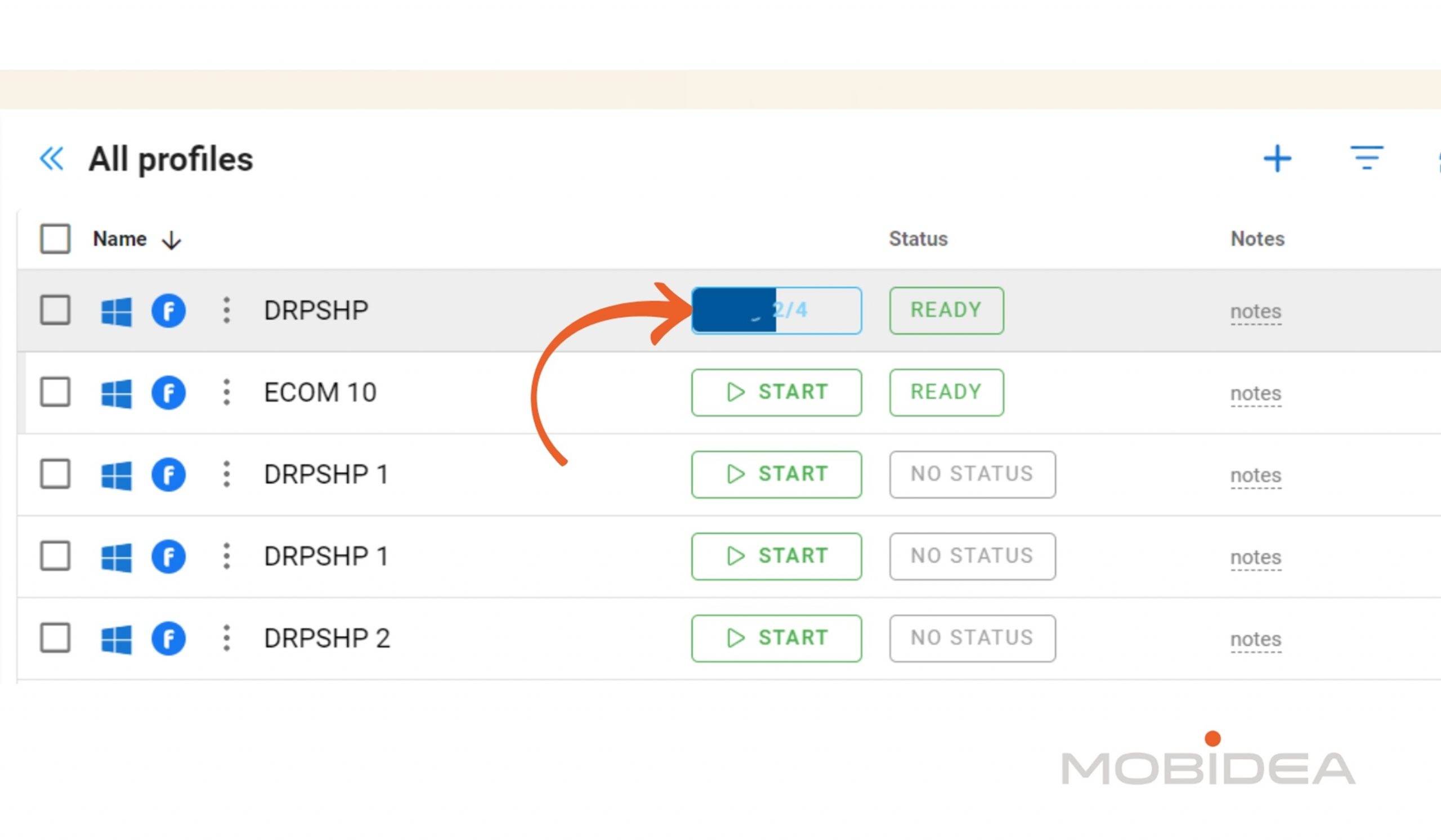
Once you’re done with the settings, click start and let it do the work while you leave your computer or do something else.
It takes only a few seconds if you have a handful of websites, and a few minutes if you’ve got dozens.
The status bar across the profile name shows that it’s still running.
Link Automation Tools
To begin automating tasks in Dolphin Anty using third-party tools, you need to launch the desired profile with the DevTools Protocol enabled via API.
This step is essential as it allows external automation tools to interact with the browser.
Visit your account info to get your token (as we mentioned when first creating your account).
The next step involves connecting to the profile’s port.
With the connection established, you can now run your custom automation script.
This script will execute through the open connection to the profile, allowing you to automate tasks such as data scraping, form submissions, or other repetitive actions.
Writing effective scripts requires a fundamental understanding of the automation tool you are using and the tasks you aim to perform.
If you use these tools already, chances are you already know how to code some scripts, so I won’t go into much detail about that. Instead, let’s visit scripts.
Automation via Scripts
Imagine having a digital assistant that can perform browser actions faster than you can say “automation magic”, that’s essentially what the Script Builder does.
It’s like teaching a robot to browse the internet, but without the whole “taking over the world” vibe.
To get started, click on the third icon from the top of the menu bar, then press Create Scripts.
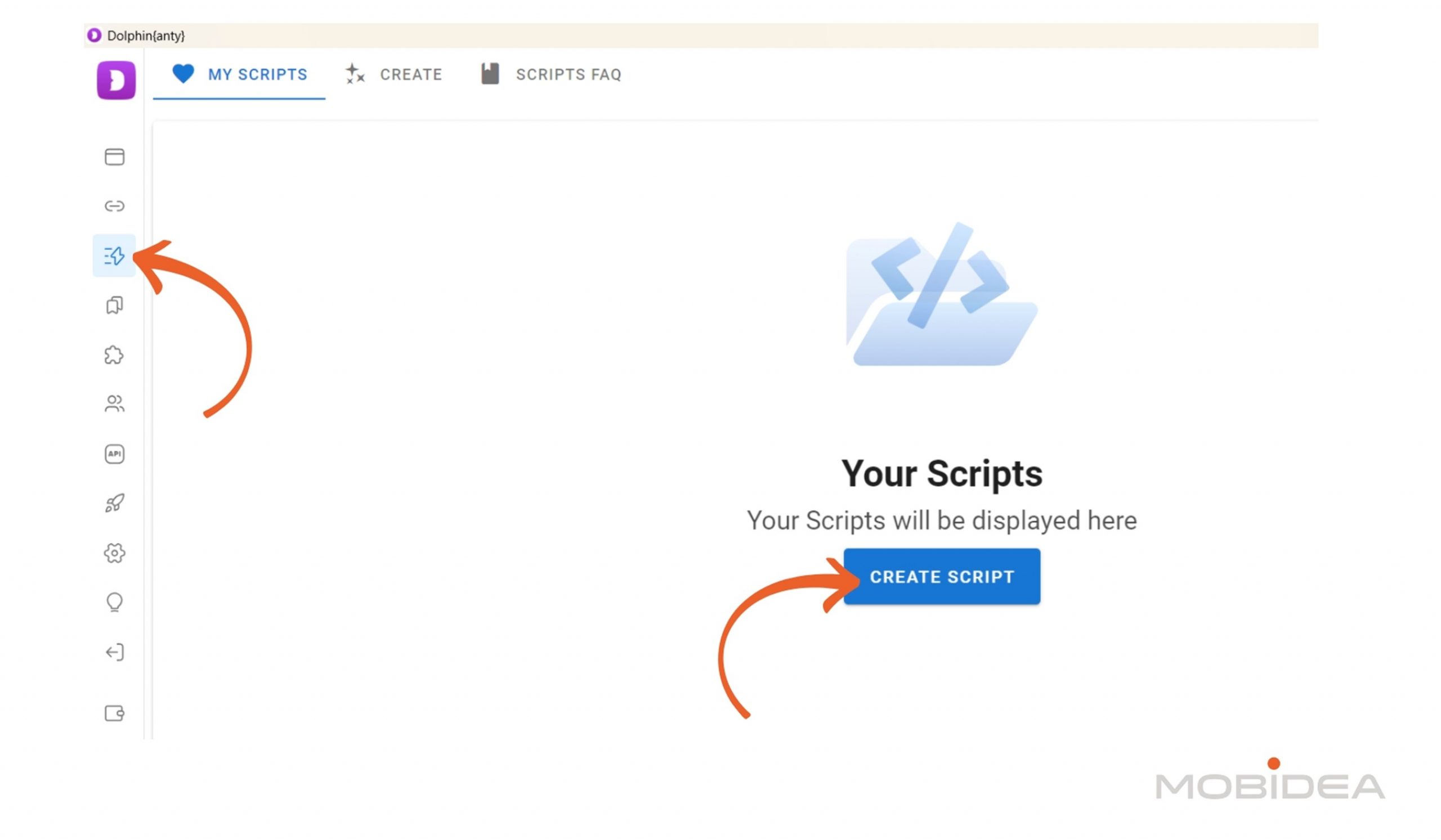
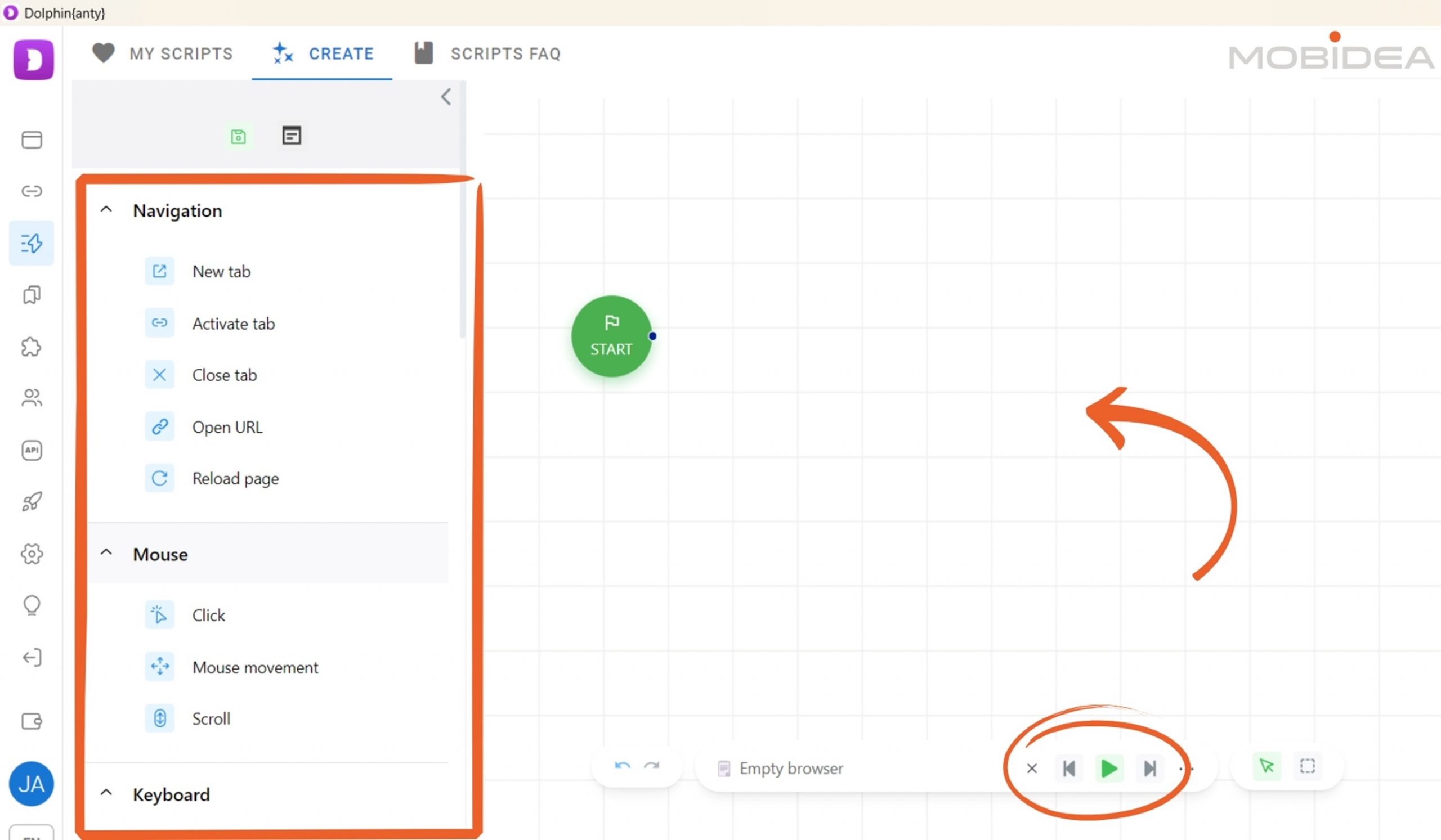
The middle portion is the workspace where you drag and drop elements, actions, and more.
The left panel shows all elements you can possibly need to make the script work.
These are divided into Navigation, Mouse, Keyboard, Data, Dolphin{anty} (for actions to be performed on your profile), and Other (functions).
Let’s try creating a script for visiting Pinterest and scraping some data.
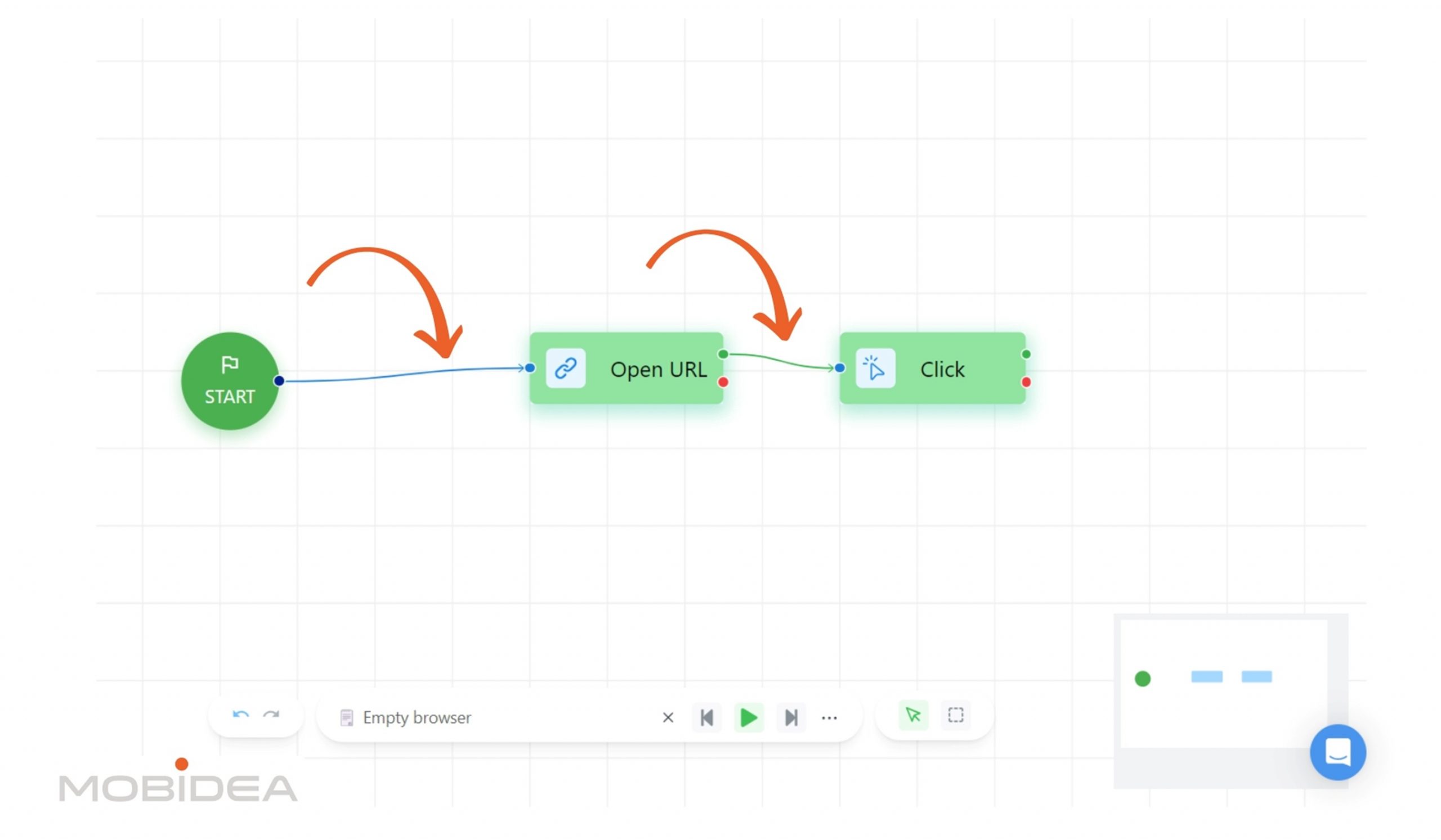
From the navigation section, let’s drag Open URL and place https://www.pinterest.com/.
Connect Start to Open URL element.
I’d like to login first before going through the website, so I’ll get the XPath of the login button.
To do this, I opened Pinterest in a browser, then inspected the login button.
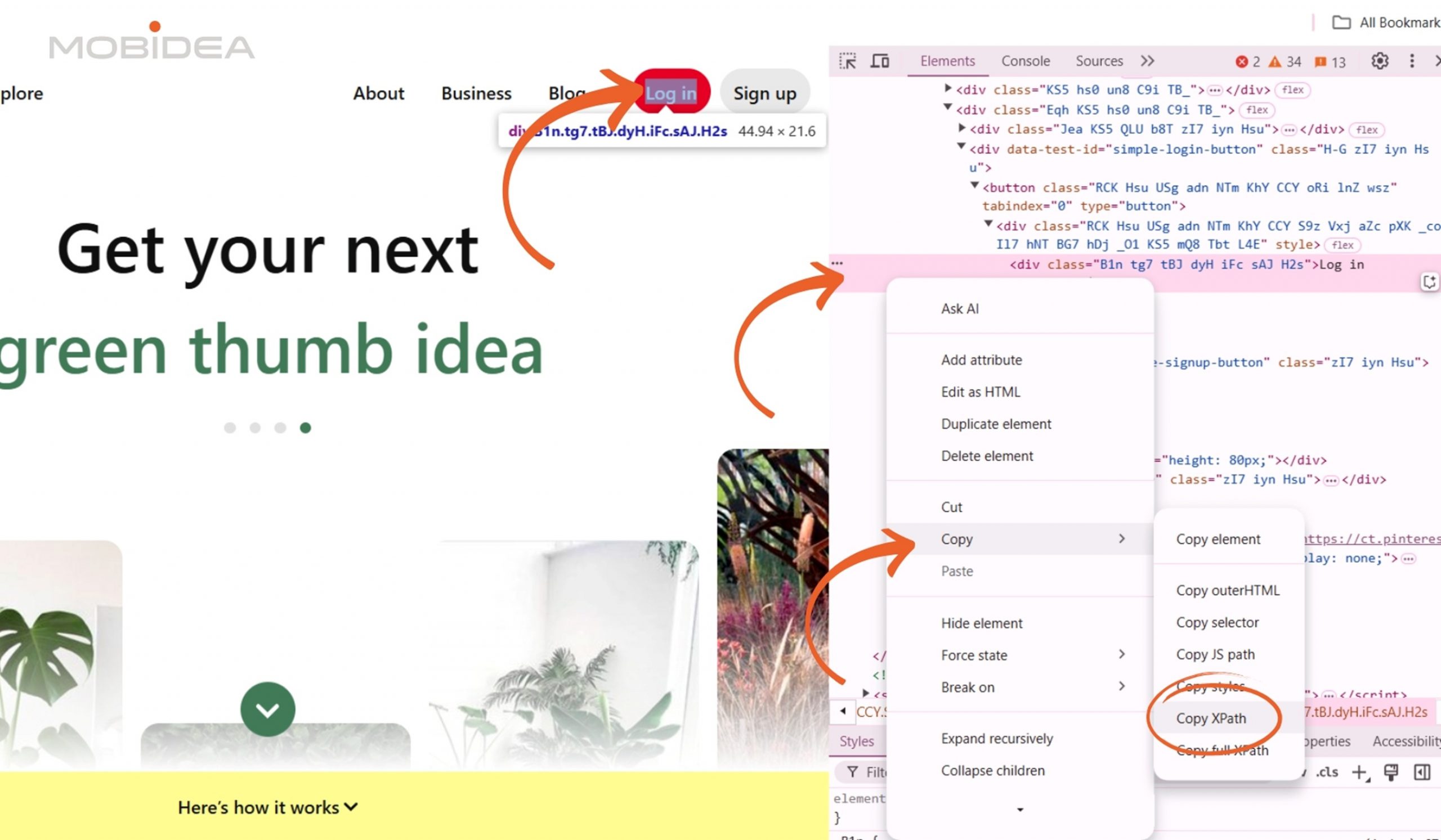
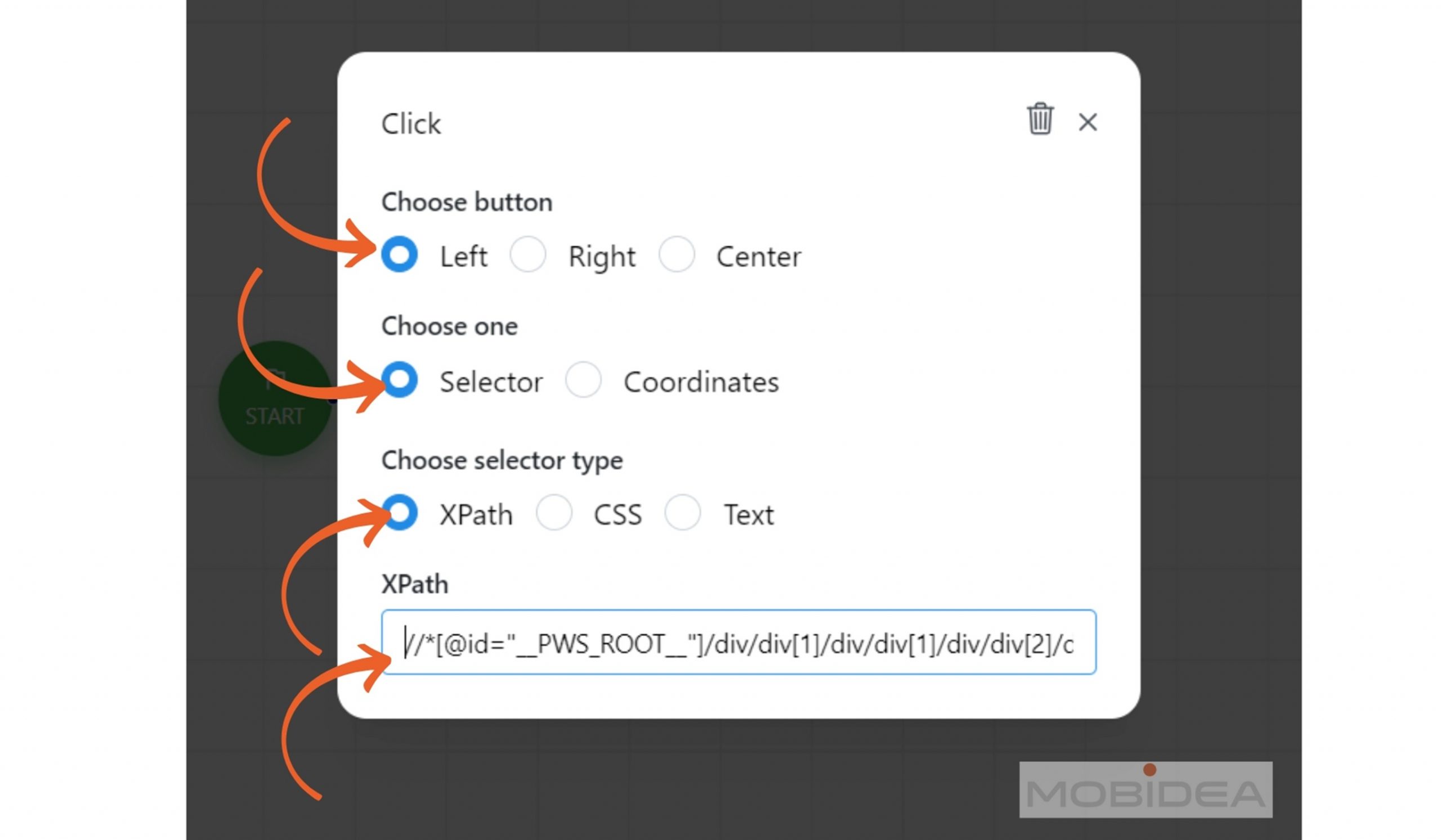
In the scripts page, I picked up the Click element under Mouse section and dropped it in the workspace.
I then pasted the XPath for the Login button.
I then connect the Open URL element to the Click element. I do this as well every time I add a new element.
As the cursor already appears on the email field during Pinterest login, I no longer need to add a click, and instead directly have the email typed in using the Type Text element.
I repeat the process of adding click and type text for the password, and another click for the login button.
I routinely do a test if it’s working properly by clicking on the Play button to run it.
Note: If you’ll be using this script for a specific profile every time and the website does not have an auto-logout feature, you won’t have to login every time. I’m just showing this here for demo purposes.
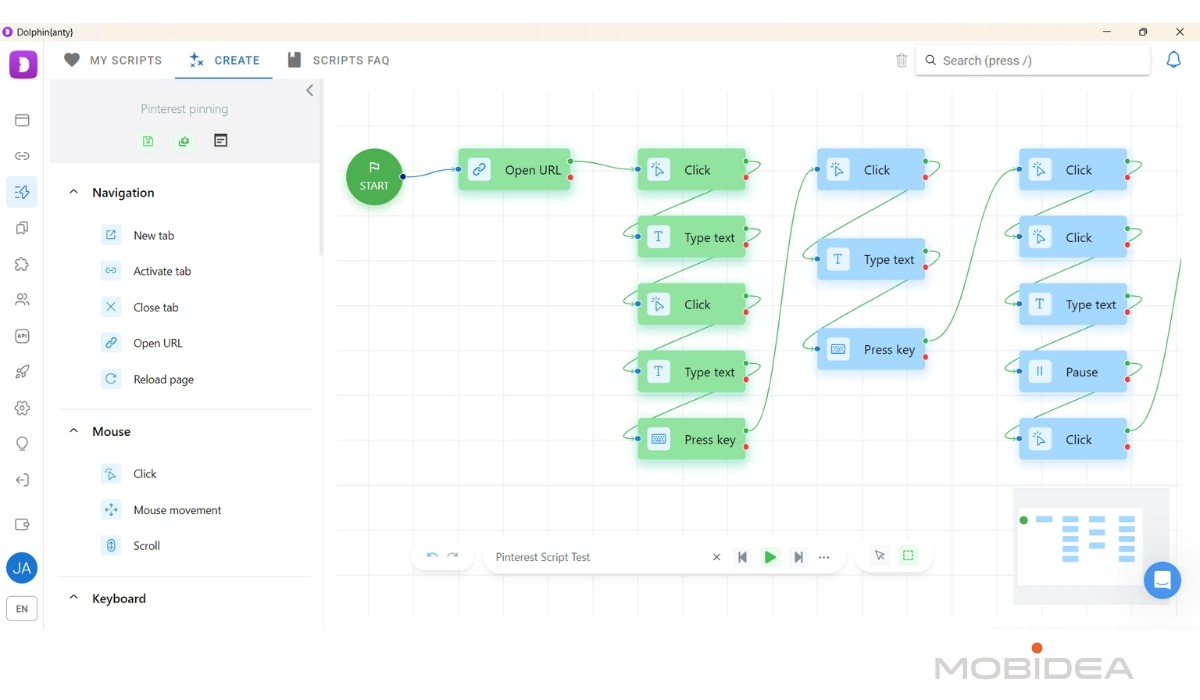
Now, my goal here is to create pins, so my next steps are:
- click on the search icon
- type my keyword phrase
- press enter
- click on the collection button on the first pin
- type the first word of the collection I want to add this pin
- select the collection to Save the pin
And that’s it! I’ll do this for the first 3 pins that come up.
Here’s what my script looked like so far:
You can then assign the script to whichever browser profile you have.
You can run it headless (in the background) and with the images disabled to avoid overusage of bandwidth.
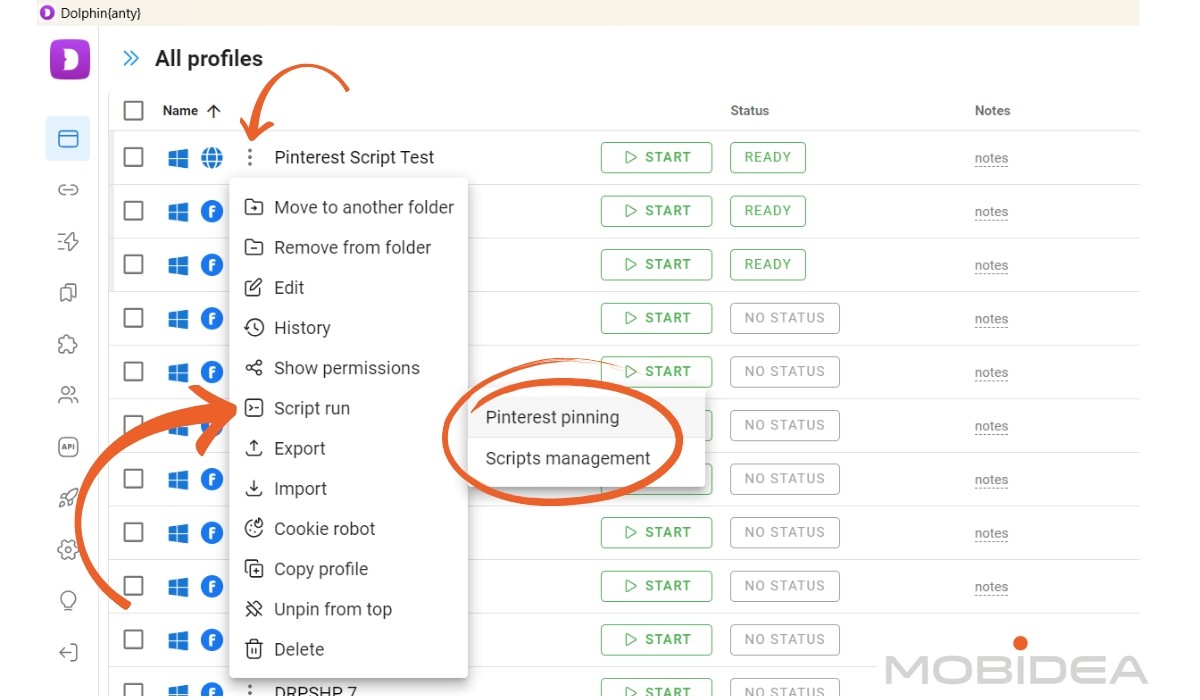
When done, don’t forget to save your work on the upper left corner of the workspace.
I made a grievous mistake of not saving mine before checking something in the profiles page, so I ended up losing what I created.
I hope they add an autosave feature in the future.
You can also find the logs here, so if there’s an error in your script, you’ll see the issue in the logs.
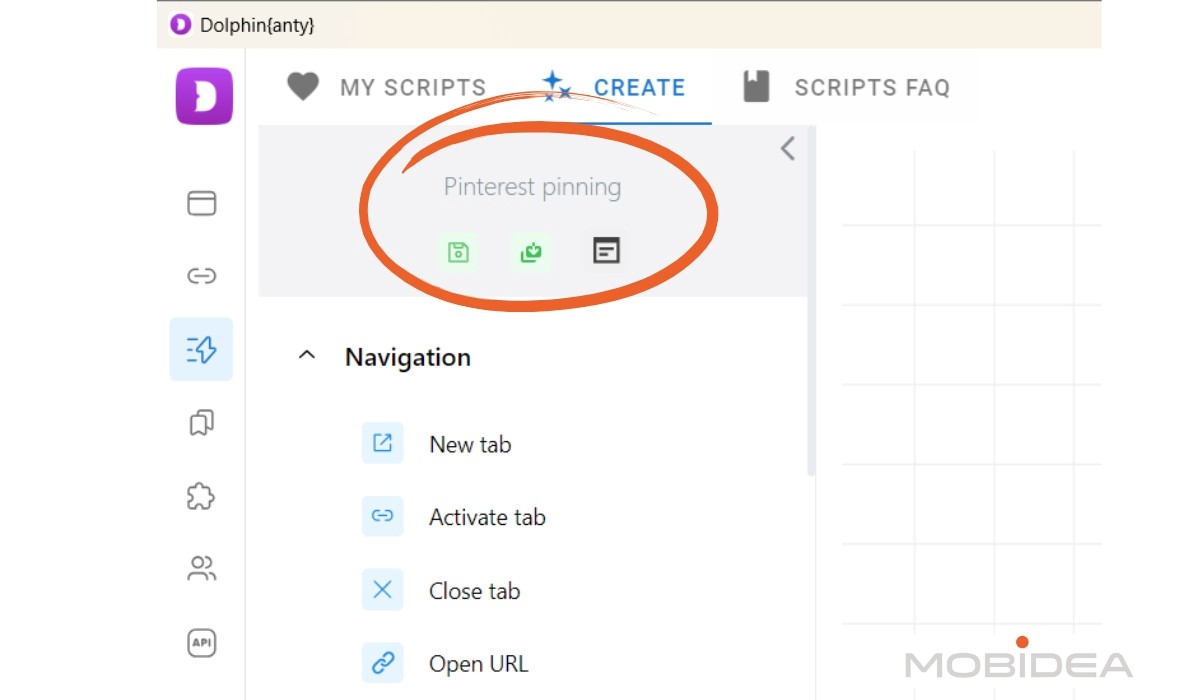
Of course, this is just a very simple script, but you can see how effective it can be for time consuming tasks yet robotic tasks, like pinning, scraping data, cryptomining, and more.
If the task is routine, you can create a script for it and let it run while you do something else!
Adding Extensions
Some Chrome extensions I simply can’t live without, and if you’re like me, being able to add these extensions to my antidetect browser is a blessing.
Dolphin Anty allows you to do this, and adding one has never been easier.
All you need to do is either get the Chrome Web Store link to the extension or download an archive file of it.
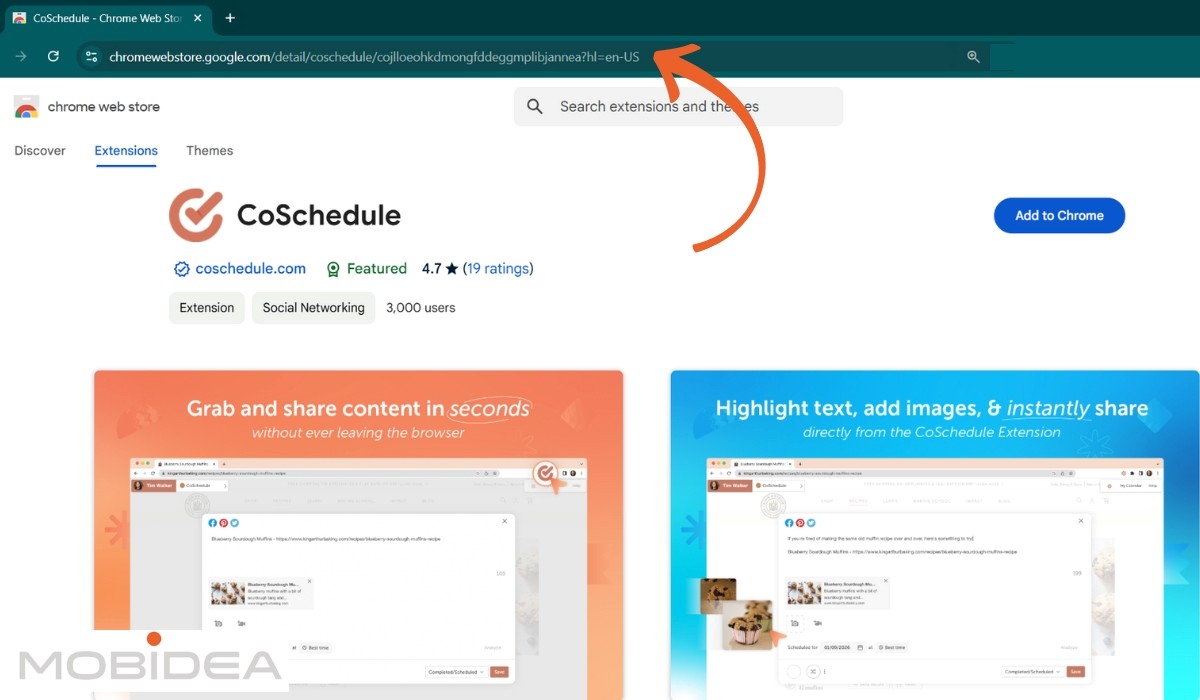
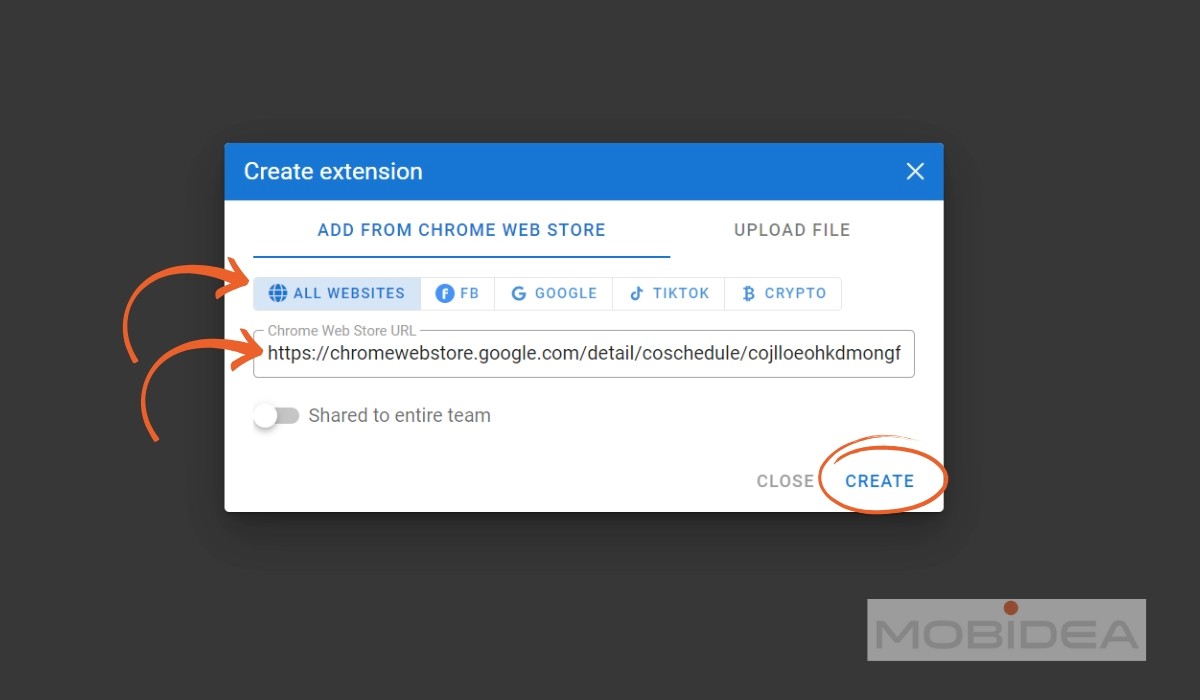
Head to Dolphin Anty and visit the Extension page by clicking on the puzzle icon on the menu (fifth from the top). Click the + button to create a new extension.
Choose to either Add from Chrome Web Store or Upload File.
Then select which profile grouping you want this extension to appear in (All Websites, FB, Google, TikTok, Crypto). Press Create and that’s it!
The Chrome Web Store browsing experience inside Dolphin Anty has also gotten a tidy-up recently.
A bunch of promotional clutter that used to make it annoying to browse and install extensions has been stripped out, so the store now feels cleaner and less like it’s trying to upsell you on something every time you’re just looking for a simple extension.
Dolphin Anty Review Verdict
Dolphin Anty is one of the best anti-detect browsers out there.
In essence, it’s what happens when you combine deep understanding of affiliate marketing needs with sophisticated browser technology, a tool that helps digital marketers operate more efficiently while maintaining the necessary privacy and identity management capabilities required in today’s complex online marketing landscape.
Dolphin Anty isn’t just a browser, it’s a complete digital marketing operations platform.
Whether you’re a solo operator or managing a team of digital marketers, it provides the tools needed for sophisticated multi-account management while maintaining security and efficiency.
The steady stream of smaller upgrades, like bulk fingerprint refreshes and account switching, shows this isn’t a tool that’s coasting on its early reputation.
What sets it apart is not just the feature set, but how these features work together seamlessly.
It’s like having a digital orchestra where each instrument (feature) plays its part perfectly, creating a symphony of efficient digital marketing operations.
Remember: While the default settings are optimized for most use cases, the real power lies in how you combine these features to create your own perfect workflow.
The platform’s flexibility means it can adapt to your needs, not the other way around.
So, do we recommend using Dolphin Anty for your marketing needs? The answer is a resounding YES!
Go try it yourself with the free plan.
Use MOBIDEA coupon code to get 20% on your first purchase.
You won’t regret it!


Read our comprehensive YeezyPay review and discover how effortlessly you can secure Google Ads Agency accounts.

Discover how Influencer Analytics simplifies influencer marketing with powerful analytics, campaign management, and competitor insights. Explore this Semrush app's features, pricing, pros, and cons in our detailed review.

Discover how AdClarity, accessible through Semrush, can transform your digital advertising strategy with powerful data-driven insights on advertisers, publishers, and campaigns. Learn to optimize your campaigns effectively.