Clickaine’s New Clickaine Assistant AI Helper – Never Clocks Out!
November 19, 2026 4 min read
The Clickaine team introduces AI Helper, a Telegram chat assistant that gives instant answers about your campaigns whenever you need them.
The support team for your account is not available right now, your ad campaign is running and it’s not performing as expected and you desperately need to talk to your account manager.
What to do and who to turn to for help in the ad network?
The Clickaine support team’s working hours have expired but you still need help with your advertising campaign that’s not performing well.
And it’s late at night.
You need help quickly from the ad network’s management team.
A Quick Word on Clickaine
The global advertising network Clickaine has been operating since 2017.
Advertisers on Clickaine platform can buy traffic worldwide, both mainstream and adult targeted, in different advertising formats: Popunder, Native, Banner, Skim, In-Stream Video, Video Slider, Spotlight and others.
Pricing for campaigns varies depending on the advertisement type (e.g. Popunder, Native Ads, Banner Ads, etc.) and is calculated based on CPM, CPC, or Smart Bidding.
Minimum campaign spend is $20 for any campaign.
S2S postbacks are also supported for tracking purposes.
Clickaine integrates with most popular tracking softwares such as Voluum, Binom, Keitaro, RedTrack, BeMob and CPV Lab.
For optimization there are source-level statistics, whitelists and blacklists, as well as Smart Bidding which bases the bids on signals like location, device and user behavior.
Funding your Clickaine account can be done via credit card, Paxum, Crypto-Currency or by bank transfer.
Clickaine provides our customers with tools for self-management of their campaigns.
This means that our customers can create, manage and optimize their campaigns 24/7.
In addition to tools for self-management, Clickaine also provides dedicated account managers and a 24/7 support team.
The new AI Helper tool is another tool to support our customers.
What is AI Helper?

This is a chat assistant in Telegram, opened in a Telegram chat window.
You ask a question to Clickaine AI Helper in the same way you would ask a question to an ad network manager.
You get an immediate answer.
No forms to fill in, no delay.
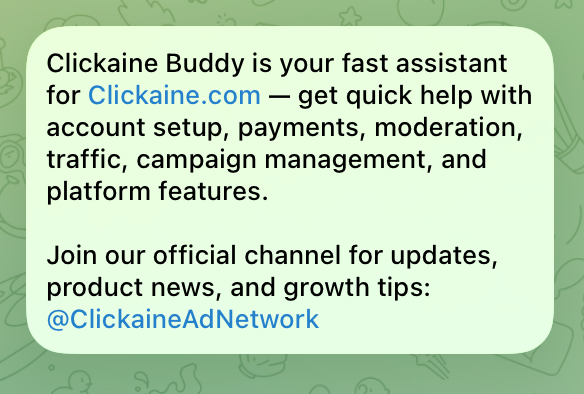
What questions does Clickaine AI Helper answer?
Absolutely all questions related to the platform.
- Setting up and optimizing campaigns. What could be causing a low conversion rate on a campaign?
- Traffic and websites. Sources, placements, and webmaster-side setup.
- Creatives and payouts. This can include what types of creative are allowed, how you will receive your payout, how you will be paid and when you will be paid.
- Platform features. Not sure what a particular setting does or where to find it? Ask.
- Account questions. Routine administrative tasks that usually take ten minutes to find the information you need.
If your question isn’t on this list, just ask anyway.
Why is this tool incredibly useful?
The AI Helper is always available when Clickaine support staff are not.
Advertisers and webmasters work long hours in many parts of the world, 24/7, seven days a week.
A media buyer based in Lisbon for example may work overnight and have no contact with Clickaine support staff until the following Monday.
Until then Clickaine’s AI Helper saves the day.
The AI support assistant speaks your language.
Even for technical questions it is easier to first ask them in the language you are most comfortable with.
This Clickaine AI Helper support assistant answers questions in multiple languages.
A simple example for this are the following questions translated into Spanish: “¿Por qué mi campaña blanca listeda no está gastando dinero?”
Most of the questions you would have to ask to understand how to use Clickaine’s features are routine, and the AI Helper is there to handle them for you.
The AI will also create a support ticket which will be handled by a specialist from the Clickaine team if the issue requiring human intervention cannot be solved by the AI Helper.
This way you get two layers of support – instant help with routine issues and human help when needed.
By virtue of the platform being accessible to beginners and very low minimum ad spend, to set up a self-service dashboard for Traffic purchasing there is some training required for the full range of features, such as setting up conversion tracking, understanding of CPA models, source analysis, blacklists etc.
And that even for relatively straightforward Traffic purchasing the novice advertiser will have numerous questions relating to very minor details that will be answered by the campaign’s assistant in the first few days of their setting up their first campaign.
The most important thing during testing – every day of data is important.
You spend 10 minutes searching for an answer to a question here, and another day waiting for an answer to another question there.
And in the meantime, you could already be moving forward with your testing.
Who will find AI Helper most useful?
- Media buyers and partners who launch campaigns of various types (formats & geos) and need to verify certain details in the middle of the campaign.
- Beginners setting up their first campaign and still learning the terminology and dashboard.
- Agencies and teams who manage multiple Clickaine campaigns and experience slight hiccups while working with them.
- Publisher – needs to get answers to questions regarding traffic, websites or payments quickly without having to go to support.
Also, please note that AI Helper is not meant to replace Media Buyer or do work for him/her.
It gives quick answers to questions that normally take some time to find out.
Note that Clickaine AI Helper is an assistant to provide quick answers.
It won’t optimize your ad campaigns nor guarantee you to make profit.
Proper setup and follow-up of your campaigns as well as proper tracking of conversions is required.
As with any other ad network.
If you have a specific issue with your account, you will be referred to a team of specialists that can assist you with your questions.
How to get started
Open the bot here: https://t.me/ckchat_got_bot
You can test the chatbot right away by opening this link: https://t.me/ckchat_got_bot and typing in your question.
If you contacted Clickaine support recently, this is a great opportunity to send them another question.
If you haven’t signed up for a Clickaine account yet – create one and let the AI Helper assist you with setting up your very first campaign here.
Bonus for Mobidea readers:
You can use the Mobidea promo code to deposit $50 or more to get an additional $50 to your ad balance.
Contact your Clickaine support manager after you deposit with the promo code to get the bonus.


Our friends at TrafficStars share how Gryzo AI, their built-in assistant, helps media buyers set up, analyze, and optimize campaigns faster using natural language.

Explore Affiliate World Asia 2024 in Bangkok—connect, learn, and thrive with top marketers, and don’t miss Mobidea’s exclusive Always Winning party for ultimate networking and celebration.

Advertisement📢 Looking for the latest? Affiliate marketing is always evolving—check out our Affiliate Marketing Trends 2026 for the most up-to-date…