Multilogin Review: Anti-Detect Browser for Multi Account Management
December 12, 2025 30 min read
Picture yourself managing multiple Facebook ad accounts, operating several Amazon seller profiles, and coordinating various media buying campaigns across different platforms.
Your business is scaling beautifully until the inevitable happens—account suspension. Then another.
Before you know it, you’re caught in a frustrating cycle of platform bans, and your carefully constructed digital empire faces serious threats.
Sound familiar? If you’ve ever felt like you’re walking a tightrope every time you log into multiple accounts, you’re definitely not alone.
Traditional browsers and basic VPNs just don’t cut it anymore when platforms are getting smarter about detecting suspicious activity.
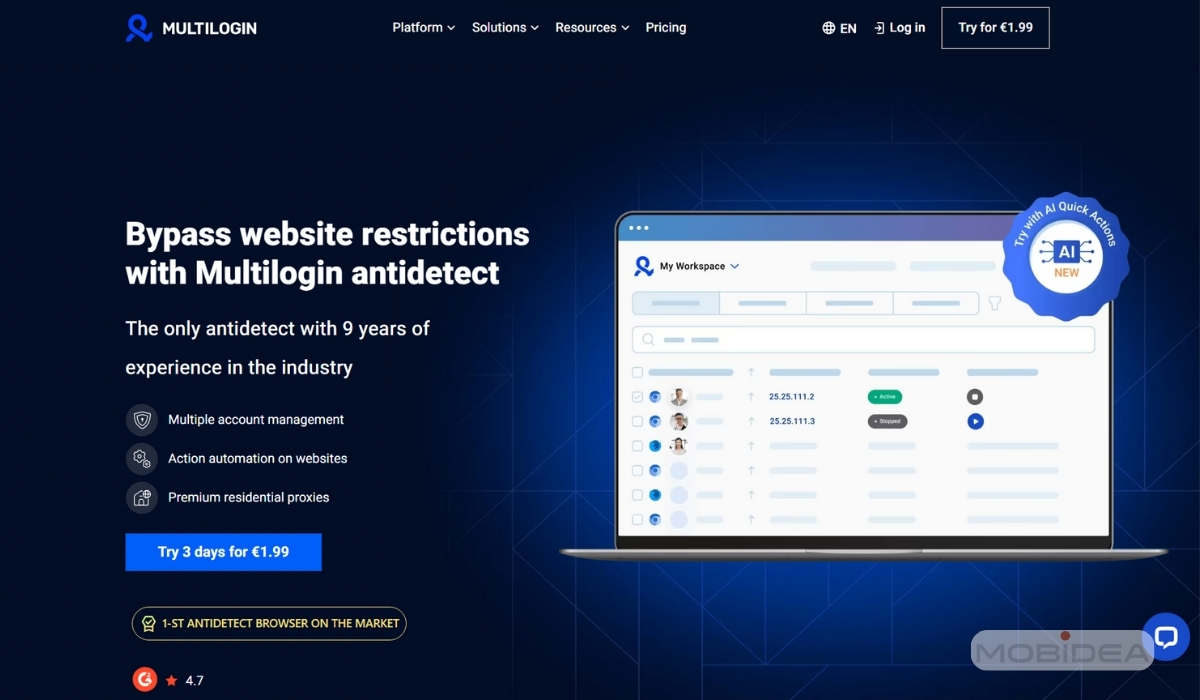
Enter Multilogin—a comprehensive anti-detect browser solution that goes far beyond simple IP masking.
In this comprehensive review, we’ll dive deep into every aspect of Multilogin’s capabilities, whether it’s worth the premium price tag, and why it’s become the go-to tool for serious marketers, e-commerce pros, and anyone who needs to manage multiple online identities without losing sleep over account bans.
Key Takeaways
If you’re just scanning for the highlights, here are our main takeaways about Multilogin:
👉The OG Antidetect Browser That Still Leads the Pack: With nearly a decade in the game since 2015, Multilogin isn’t just riding on reputation—they’re constantly evolving.
👉Built-In Residential Proxies That Actually Work: Forget juggling multiple proxy providers or dealing with sketchy IPs that get you banned instantly. Multilogin includes premium residential and mobile proxies from an IP pool of 30 million, with 95% clean IP records, city-level targeting across 1,400+ cities, and 24-hour sticky sessions.
👉Pre-Made Cookies (The Account Warming Game-Changer): Instead of spending weeks building up browsing history, you get aged cookies from 500+ popular websites that make your profiles look like they’ve been used for months. Each set is unique, so you’re not sharing cookie patterns with thousands of other users.
👉Pricing That Finally Makes Sense: Starting at just €5.85/month (not the €99+ everyone talks about), Multilogin has ditched the enterprise-only pricing. You can test everything for €1.99 over 3 days, then scale up as you grow. With this pricing, it’s now a perfect choice for beginners, small teams, and individuals. On top of that, all plans include proxy traffic already!
👉AI That Actually Does Something Useful: While other browsers add AI features that are basically glorified chatbots, Multilogin’s AI Quick Actions can launch profiles, assign proxies, and perform several tasks in one command. It’s not perfect yet, but when it works, it’s like having an assistant who actually understands what you’re trying to accomplish.
👉Real Android Browsing Safely From Your Desktop: Create fully isolated Android profiles that reproduce real device behavior—not just user-agents, but screen resolutions, touch gestures, sensors, and hardware signals. Connect via HTTP, HTTPS, or SOCKS5 proxies for flexible, stealthy browsing, and manage everything from your desktop.
👉Team Features Without the Team Headaches: Unlimited team seats on Business plans, granular role permissions, and profile sharing without exposing login credentials.
👉The Real Test (It Just Works): At the end of the day, Multilogin’s 55+ fingerprinting options consistently passes detection tests, and their cloud sync keeps your profiles accessible everywhere. It’s the kind of tool that fades into the background and lets you focus on your business instead of fighting with software.
What is Multilogin?
Founded in 2015 and based in Estonia, Multilogin claims to be the first anti-detect browser in the market, giving it nearly a decade of experience in this specialized field.
Unlike conventional browsers that leave traceable digital fingerprints, Multilogin creates virtualized browser environments that operate independently of one another.
The core technology behind Multilogin revolves around comprehensive browser fingerprint manipulation and session isolation.
Each profile within the platform maintains its own complete browsing environment, including unique hardware signatures, behavioral patterns, and network configurations.
This approach ensures that websites and tracking systems perceive each profile as originating from an entirely different device and location.
In essence, Multilogin is an all-in-one solution. They’re one of the only providers to combine advanced anti-fingerprinting with their own built-in residential proxies in every single plan.
This integrated setup saves you from the nightmare of juggling different services and dealing with the technical issues that often get accounts banned.
The platform has gained significant traction among various professional segments, including:
- Digital advertising specialists managing multiple campaign accounts across platforms
- E-commerce professionals operating across different marketplaces and regions
- Affiliate marketers running diverse promotional strategies and traffic sources
- Web scraping operations requiring varied access points and IP distributions
- Social media management teams handling multiple brand accounts and campaigns
- Agency professionals managing client accounts while maintaining separation
What distinguishes Multilogin from simpler proxy solutions or basic browser isolation tools is its attention to the subtle details that modern detection systems analyze.
Beyond basic IP address masking, the platform manipulates dozens of browser parameters that collectively form a device’s digital signature.
This comprehensive approach addresses the reality that sophisticated platforms like Google, Facebook, and Amazon employ increasingly advanced detection algorithms that analyze behavioral patterns, hardware configurations, and browsing characteristics.
The development team behind Multilogin has continuously evolved the platform to stay ahead of detection methods, incorporating feedback from enterprise clients and adapting to new fingerprinting techniques employed by major platforms.
This ongoing development cycle ensures that users can maintain operational security even as detection technologies advance.
Multilogin Features
Multilogin isn’t just your average browser with some fancy tricks up its sleeve—it’s a complete digital identity management powerhouse that’s been fine-tuned over years of real-world testing.
Think of it as your personal digital costume shop, where each “outfit” is so convincing that even the most suspicious websites won’t bat an eye.
Advanced Browser Fingerprint Protection and Management
Here’s where Multilogin really shows off—and trust me, this is the stuff that separates the pros from the wannabes.
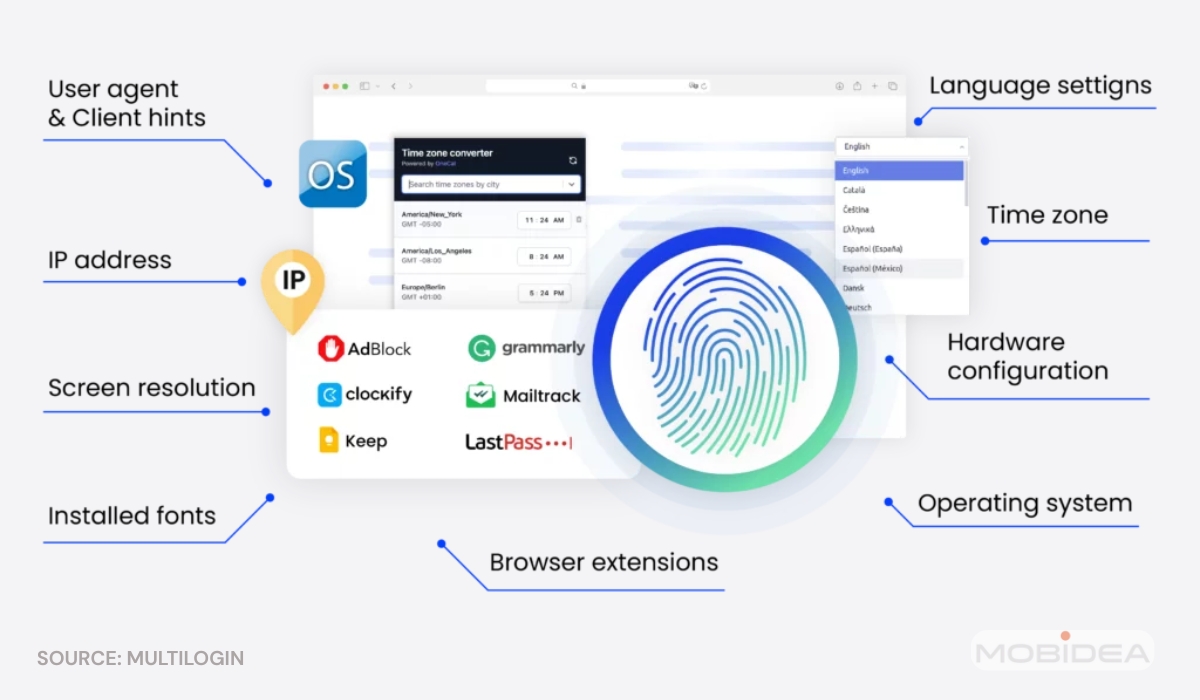
Every time you visit a website, your browser is basically handing over a detailed ID card with dozens of unique characteristics. Multilogin takes that ID card and gives each of your profiles a completely different one.
- WebGL Fingerprinting Control
This handles the graphics rendering signatures—think of it as giving each profile its own graphics card personality.
- WebRTC Leak Protection
This is a crucial one. Even with a proxy, many browsers can accidentally expose your real IP address through WebRTC connections.
- Font Detection Spoofing
Now, here’s something most people don’t think about: Websites can actually fingerprint you based on what fonts you have installed (sneaky, right?).
Multilogin presents different font libraries to different profiles, mimicking the natural variation you’d find across different computers.
Some profiles might look like they’re running on a fresh Windows machine, while others appear to be on a Mac that’s been customized for years.
Other Fingerprinting Protection Options
- Timezone and geolocation spoofing – These work hand-in-hand with your proxy settings to make sure all your location data tells the same story.
- Audio Context Manipulation – creates unique audio fingerprints that don’t match your actual hardware. It’s like each profile has its own set of ears.
- Hardware Concurrency Manipulation – controls how your browser reports CPU information.
- Memory And Storage Reporting – can be adjusted to match different device categories.
Multilogin plugs these leaks completely, ensuring your actual location stays hidden even during complex web interactions.
Comprehensive Proxy Integration
Multilogin’s proxy game is seriously next-level. While other tools just let you plug in a proxy and hope for the best, Multilogin treats proxy management like a science.
Various Proxy Types Allowed
The platform plays nice with all the major proxy types you’d want to use:
- residential proxies
- datacenter proxies
- mobile proxies
Setting up proxies is surprisingly painless thanks to automated integration with major proxy providers.
But if you’ve got specialized requirements or a custom proxy setup, Multilogin accommodates that too.
The system is smart enough to automatically check if your proxies are working properly and whether the geographic data makes sense—it’ll actually warn you if something looks fishy before it causes problems.
Built-In Residential and Mobile Proxies
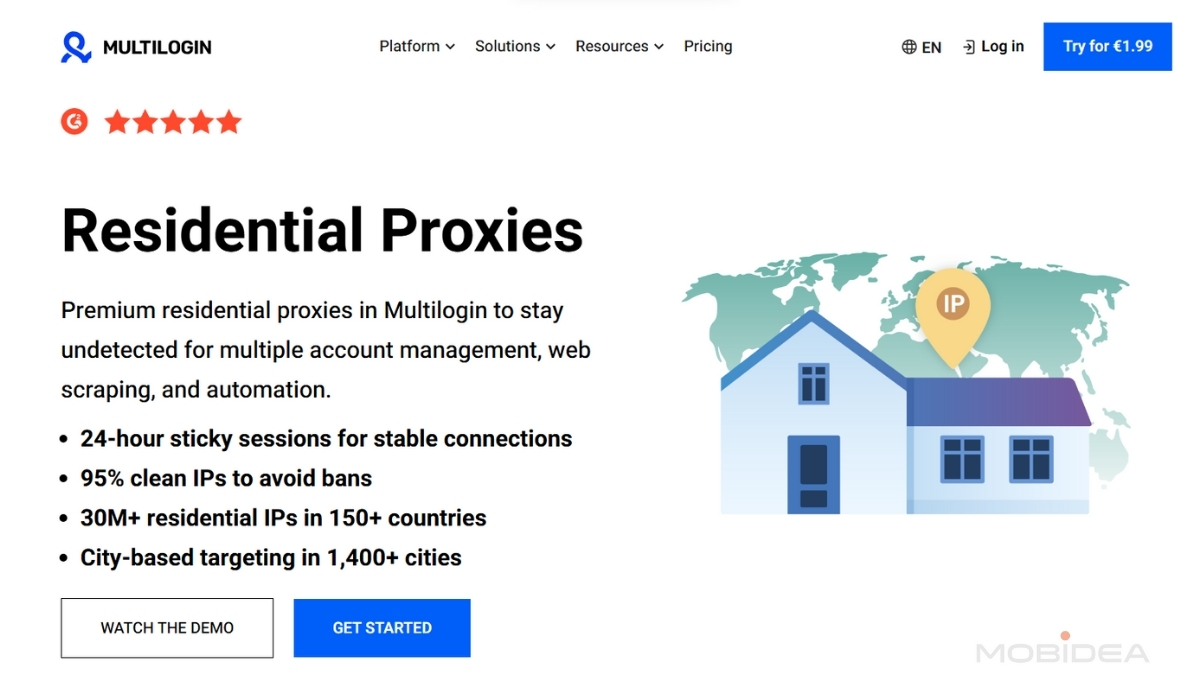
If you don’t want the hassle of working with another provider for proxies, you can always opt for the more than 30 million residential proxies that Multilogin provides.
The advantage of going this route is that Multilogin guarantees that these proxies are 95% clean, helping you avoid potential suspensions or shadow bans.
It also offers city-based and ISP-based targeting (to more than 1,400 cities worldwide) and 24-hour sticky sessions (no dropping!).
DNS Customization
This adds another layer of geolocation consistency (because details matter when you’re trying to be convincing), while the platform’s geolocation spoofing ensures that location-based services get data that perfectly matches where your proxy says you are.
No more awkward situations where your proxy says you’re in New York but your browser is reporting a different location entirely.
Proxy Rotation
This capability lets you automate switching between different IP addresses based on whatever schedule makes sense for your operation.
This is absolutely golden for high-volume activities across multiple accounts—it helps make your usage patterns look natural instead of like a bot army marching in formation.
Session Data and Cookie Management
This is where Multilogin really earns its keep in the “complete isolation” department.
Each profile maintains its own completely separate storage for cookies, local storage, session storage, and indexed database content. Think of it as giving each profile its own private filing cabinet that no other profile can peek into.
- Cookie Import And Export Functionality
You can import cookies from existing accounts to maintain login sessions or transfer established account states between different environments.
This is particularly brilliant for account warming strategies—you know, that gradual activity buildup that helps establish account legitimacy over time.
- Session Persistence
Session persistence across application restarts means your logged-in states and browsing data stay intact even after closing and reopening profiles.
No more logging into everything again every time you restart the app (because honestly, who has time for that?).
This also helps maintain those natural usage patterns that platforms expect from real users.
- Pre-Made Cookies
Pre-made cookies are part of what’s called “account warming”—the process of making new accounts look natural and established.
Combined with Multilogin’s fingerprint spoofing and proxy management, pre-made cookies help create profiles that are much harder for platforms to detect as suspicious.
Pre-made cookies are essentially browsing data that Multilogin has collected from real websites.
When you add them to a profile, it’s like you’ve been browsing the internet for months, visiting popular sites like Google, Facebook, Amazon, and hundreds of others.
This makes your profile appear much more natural to detection systems.
The cookies are unique for each profile—you’ll never get the same set as another user.
This is crucial because if you manage multiple accounts that had identical cookie patterns, it would be a dead giveaway that they’re used by the same person.
Team Collaboration and Access Control
Managing a team without Multilogin’s collaboration features would be like trying to conduct an orchestra where half the musicians can’t see the conductor.
The platform supports detailed role-based access controls that let administrators define exactly what each team member can access and modify.
- Profile sharing mechanisms enable controlled access to specific accounts without exposing sensitive login credentials.
- Permission levels can be configured for read-only access (perfect for monitoring) or full operational control for active management.
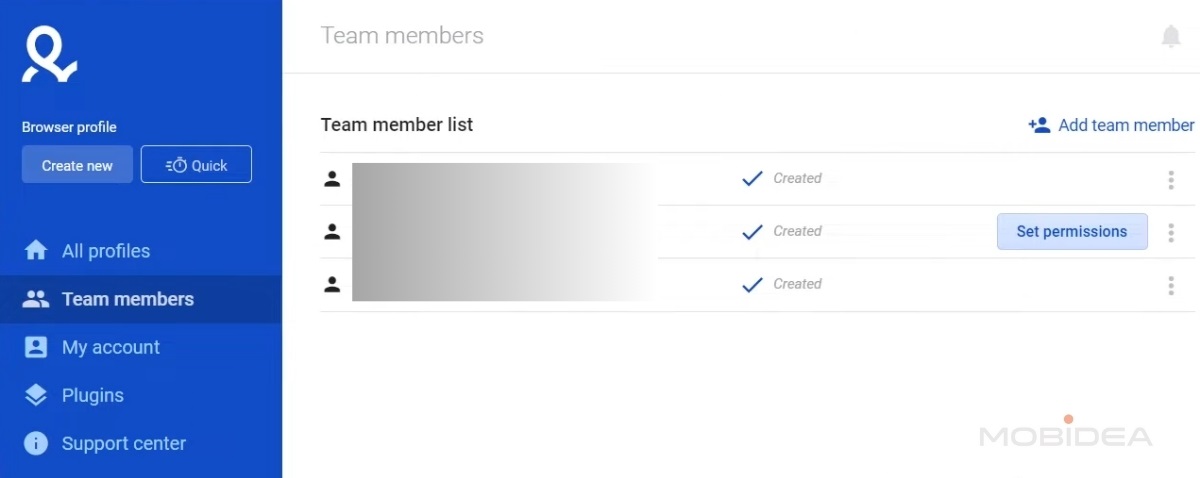
The platform’s team collaboration extends to workflow management, allowing teams to organize profiles into logical groups and assign responsibility for different account categories.
It’s like having a digital filing system that actually makes sense and helps larger teams stay efficient while keeping account management systematic and secure.
Cloud Infrastructure and Synchronization
Multilogin’s cloud-based setup is like having a magic briefcase that follows you everywhere.
All your profile data—cookies, session information, configuration settings—gets encrypted and stored in a secure cloud infrastructure.
This means your profiles stay accessible no matter which device you’re using, plus you get robust backup protection against those “my computer crashed and I lost everything” disasters.
Real-time synchronization means changes made to profiles are immediately available across all authorized devices.
Working from your laptop today and your desktop tomorrow? No problem—everything stays perfectly in sync.
The cloud infrastructure enables some advanced features like automated backup scheduling.
Cross-platform compatibility ensures that profiles created on Windows systems work identically on macOS installations, and vice versa.
This flexibility is a lifesaver for teams using diverse computing environments or professionals who bounce between different devices.
API and Automation Capabilities
For the tech-savvy folks who want to take things to the next level, Multilogin provides a comprehensive OPEN API that allows you to automate virtually every aspect of profile management and operation.
We’re talking profile creation and modification, session launching and termination, proxy assignment and rotation, and integration with external automation tools.
Developers can build custom workflows that integrate Multilogin with existing business systems, CRM platforms, or specialized tools.
The API plays nicely with popular frameworks, including Selenium, Puppeteer, and Playwright—basically, if you’re into automation, Multilogin speaks your language.
Webhook capabilities enable real-time notifications about profile status changes, session events, or system alerts.
This allows for sophisticated monitoring and response systems that can automatically address issues or adjust operations based on changing conditions.
Performance Optimization and Resource Management
Higher-tier Multilogin plans include some seriously impressive performance optimization features designed to support large-scale operations without bringing your computer to its knees.
- Intelligent resource allocation algorithms – These distribute CPU and memory usage across active profiles, preventing any single session from hogging all your system resources.
- Load balancing capabilities distribute intensive operations across available system resources, ensuring consistent performance even when you’re juggling dozens of simultaneous sessions.
This is particularly important for operations that require rapid switching between multiple accounts or running automated activities across large profile sets.
Multilogin Pricing Plans
Here’s where things get interesting—Multilogin has completely revamped their pricing structure, and honestly, it’s a breath of fresh air compared to the premium-only approach we’ve seen from many antidetect browsers.
They’ve created a range that actually makes sense for different types of users, from solo operators just getting started to enterprise teams managing thousands of accounts.
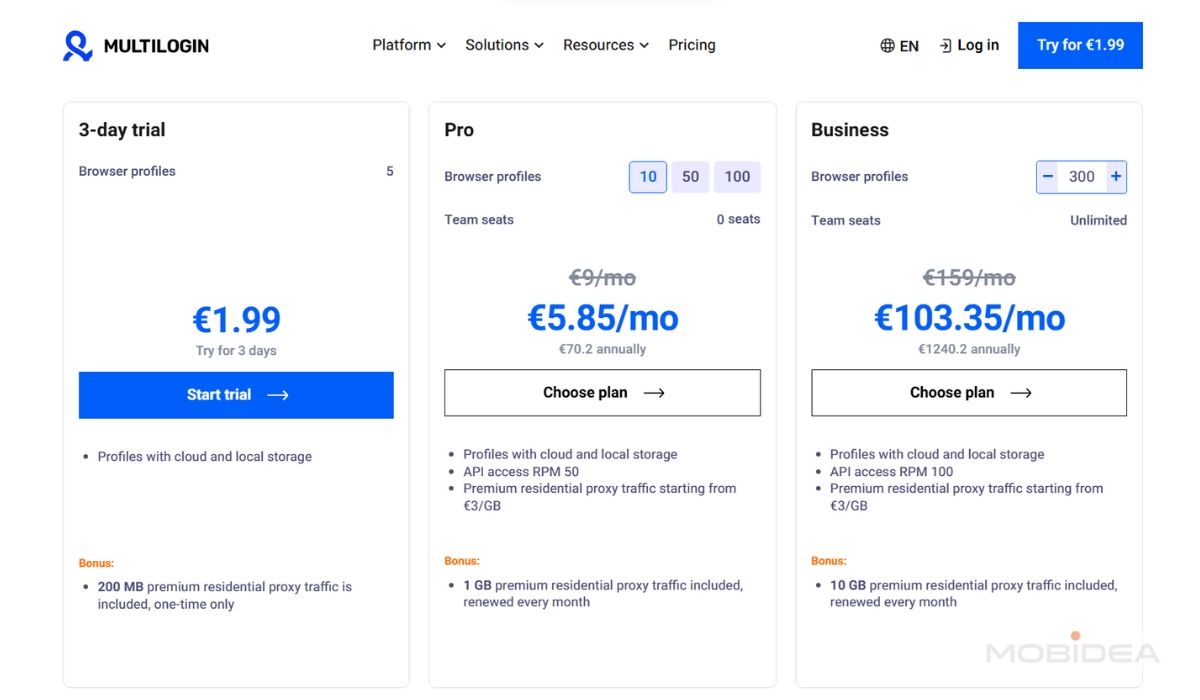
Trial Plan — €1.99 for 3 Days
Before we dive into the main plans, let’s talk about that trial option (finally!). For less than the cost of a fancy coffee, you get:
- 5 browser profiles to test the waters
- 200 MB of residential proxy traffic as a one-time bonus
- 3 days to really put the platform through its paces
- No API access (but hey, it’s a trial)
This is perfect if you want to see how Multilogin’s fingerprinting actually works before committing real money.
At €1.99, there’s really no excuse not to test it out if you’re on the fence.
Pro Plans — For Individuals and Small Operations
The Pro tier is where most solo operators and small teams will find their sweet spot. Multilogin offers three different levels here:
Pro 10
- €5.85/month (paid annually) or €9/month (paid monthly)
- 10 browser profiles (perfect for getting started)
- 1 GB/month of residential proxy traffic included
- 50 RPM API access for basic automation
- No team seats (just you)
This is an absolute steal for anyone just getting into serious multi-account management.
At €5.85/month, you’re getting enterprise-grade fingerprinting for less than most people spend on streaming services.
Pro 50
- €31.85/month (paid annually) or €49/month (paid monthly)
- 50 browser profiles for more complex operations
- 3 GB/month of residential proxy traffic
- 100 RPM API access for stepped-up automation
- Still single-user but with much more capacity
If you’re running multiple affiliate campaigns or managing several e-commerce stores, this plan gives you serious room to grow without breaking the bank.
Pro 100
- €51.35/month (paid annually) or €79/month (paid monthly)
- 100 browser profiles for substantial operations
- 5 GB/month of residential proxy traffic
- 100 RPM API access for automation workflows
- 2 team seats (finally, you can bring a partner or assistant)
This is where things get really interesting for small agencies or partnerships.
Two users can collaborate while maintaining all the security benefits, and 100 profiles can handle pretty substantial operations.
All Pro plans include both cloud and local storage for your browser profiles, plus access to premium residential proxies starting at €3/GB if you need more than your monthly allocation.
Business Plans — For Teams and Enterprises
When you outgrow the Pro tier, the Business plans are designed to scale with larger operations:
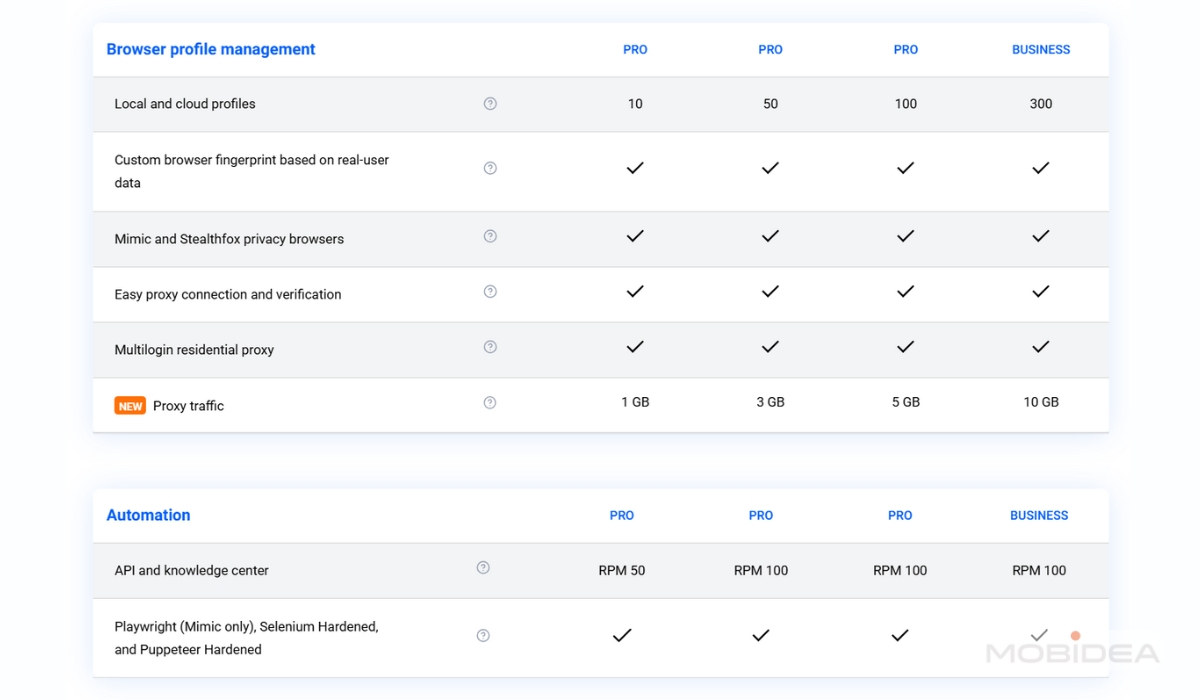
- Pricing starts at €103.35/month (paid annually) or €159/month (paid monthly) for 300 profiles
- Profile range: 300 to 10,000 browser profiles (depending on your needs)
- Unlimited team seats (bring the whole crew)
- 100 RPM API access for enterprise automation
- 10 GB/month residential proxy traffic included
The pricing scales based on how many profiles you need, but you’re getting unlimited team seats regardless of which Business tier you choose.
This includes advanced team management features like profile sharing and permission controls—essential when you’re coordinating larger teams with complex workflows.
Pro tip: All plans include access to both Mimic (Chromium-based) and Stealthfox (Firefox-based) browsers, plus AI Quick Actions for automating repetitive tasks.
The comprehensive knowledge base and support team means you’re not left figuring things out on your own.
Multilogin Pricing Plans Overview

How to Use Multilogin: A Complete Step-by-Step Guide
Getting started with Multilogin can feel overwhelming at first, but it’s really not that complicated once you know what you’re doing.
It’s almost like using any other browser, except there are some extra steps when creating and managing profiles.
Even if you’re completely new to antidetect browsers, you can definitely do this.
For this walkthrough, I’m going to take you through the entire process from start to finish, just like I did when I first set up Multilogin for my own operations.
Account Creation and System Check
First things first—let’s make sure Multilogin will actually work on your computer. You really don’t want to subscribe and then find out your system can’t handle it properly.
Based on user reports and testing, here’s what you actually need:
Minimum vs. Recommended Requirements
Minimum (Basic Testing)
- RAM: 4GB minimum
- Free disk space: 1GB
- OS: Windows (10 and later), macOS (14 Sonoma and later), Linux (Ubuntu 22 and later)
- With GUI availability
Recommended (Real-World Usage)
- RAM: 8GB for 1-5 profiles, 16GB for 10-20 profiles, 32GB for 50+ profiles
- Free disk space: 5GB+ for profile data and cache
- OS: Latest versions (some users reported issues with older macOS versions)
- CPU: Quad-core processor for smooth multi-profile operations
One thing that caught me off guard initially—Multilogin X requires a desktop agent to run in the background.
Unlike some browser-based competitors, you can’t just open it in a web browser and start working. You’ll need to install actual software on your computer.
If your system meets these requirements, head over to Multilogin and create your account.
I’d strongly recommend starting with the €1.99 trial for 3 days.
Yes, it’s not free, but it gives you 5 profiles to test with, and honestly, that’s enough to figure out if Multilogin works for your needs before committing to a monthly plan.
If you’re already determined to get a subscription, use the coupon code MOBIDEA20 to get a 20% discount on your purchase. You’ll get huge savings if you sign-up for an annual subscription.
During the signup process, Multilogin will ask you some questions about how you plan to use the platform and your experience level with anti-detect browsers.
Answer these honestly—it actually helps optimize your experience and the recommendations you’ll get later.
Installation and First Login
Once you’ve subscribed, you’ll need to download and install the Multilogin X agent.
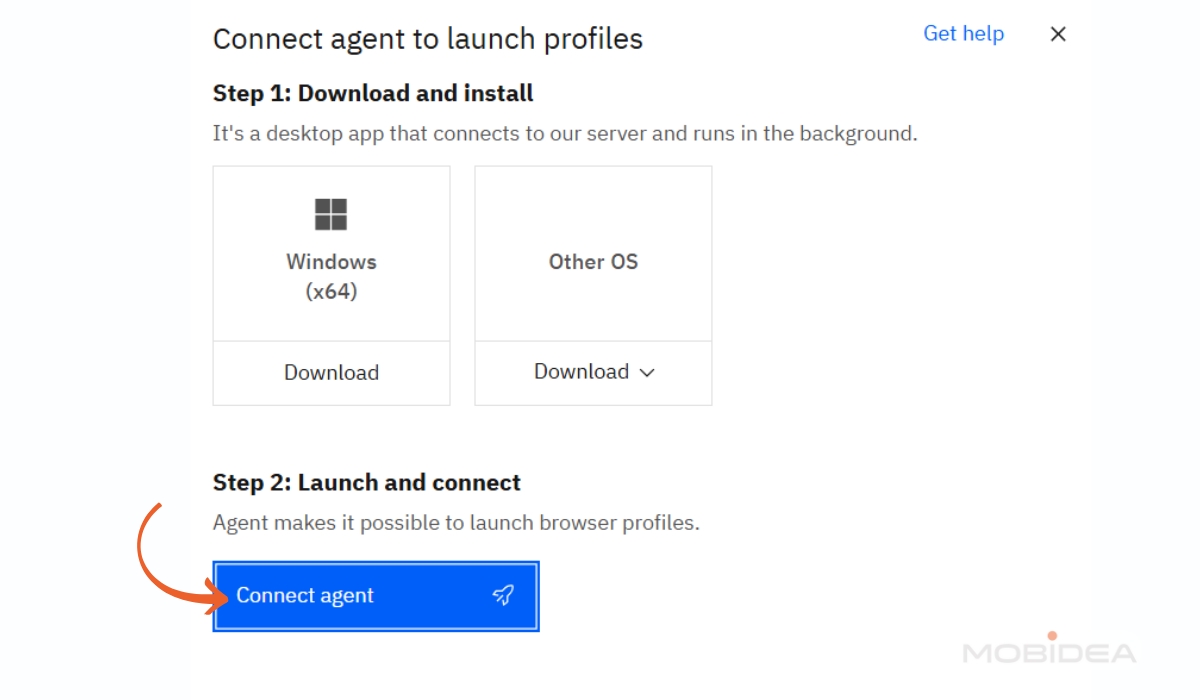
This is where things can get a bit tricky, especially if you’re on macOS.
You may get the typical “unverified developer” warning. Don’t panic—this is completely normal for software that’s not distributed through the App Store.
You’ll need to go to System Preferences, then Security & Privacy, and click “Allow Anyway” next to the Multilogin warning.
If that doesn’t work, you might need to temporarily disable Gatekeeper. Open Terminal and type: sudo spctl –master-disable.
This turns off the security feature just long enough to install Multilogin, and you can turn it back on afterward.
Note: On newer macOS versions like Sequoia, this command requires additional steps—you’ll need to keep System Settings open, run the command, then manually select “Anywhere” in Privacy & Security settings.
Multilogin’s support documentation provides specific steps for different macOS versions if you run into installation issues.
Windows users generally have an easier time with installation, though Windows Defender might flag it initially. Just click “Allow” when prompted.
After installation, launch the agent—you’ll see it running in your system tray or menu bar. Then open your web browser and go to the Multilogin X web interface.
The agent handles all the heavy lifting while you work through the clean web interface.
When you log in for the first time, you’ll see a dashboard that shows your subscription details, profile limits, and quick access to support.
Take a minute to familiarize yourself with the layout—the main navigation is on the left side, and this is where you’ll spend most of your time.
Creating Your First Profile
Now comes the fun part—creating your first browser profile. This is where Multilogin really shines, but it’s also where you can mess things up if you’re not careful.
By default, you’ll be on the Profiles page. It’s also the first item in the left navigation.
To create a profile, click “Create” on the upper part of the user interface. There’s also the “Quick” button, but let’s talk about that later.
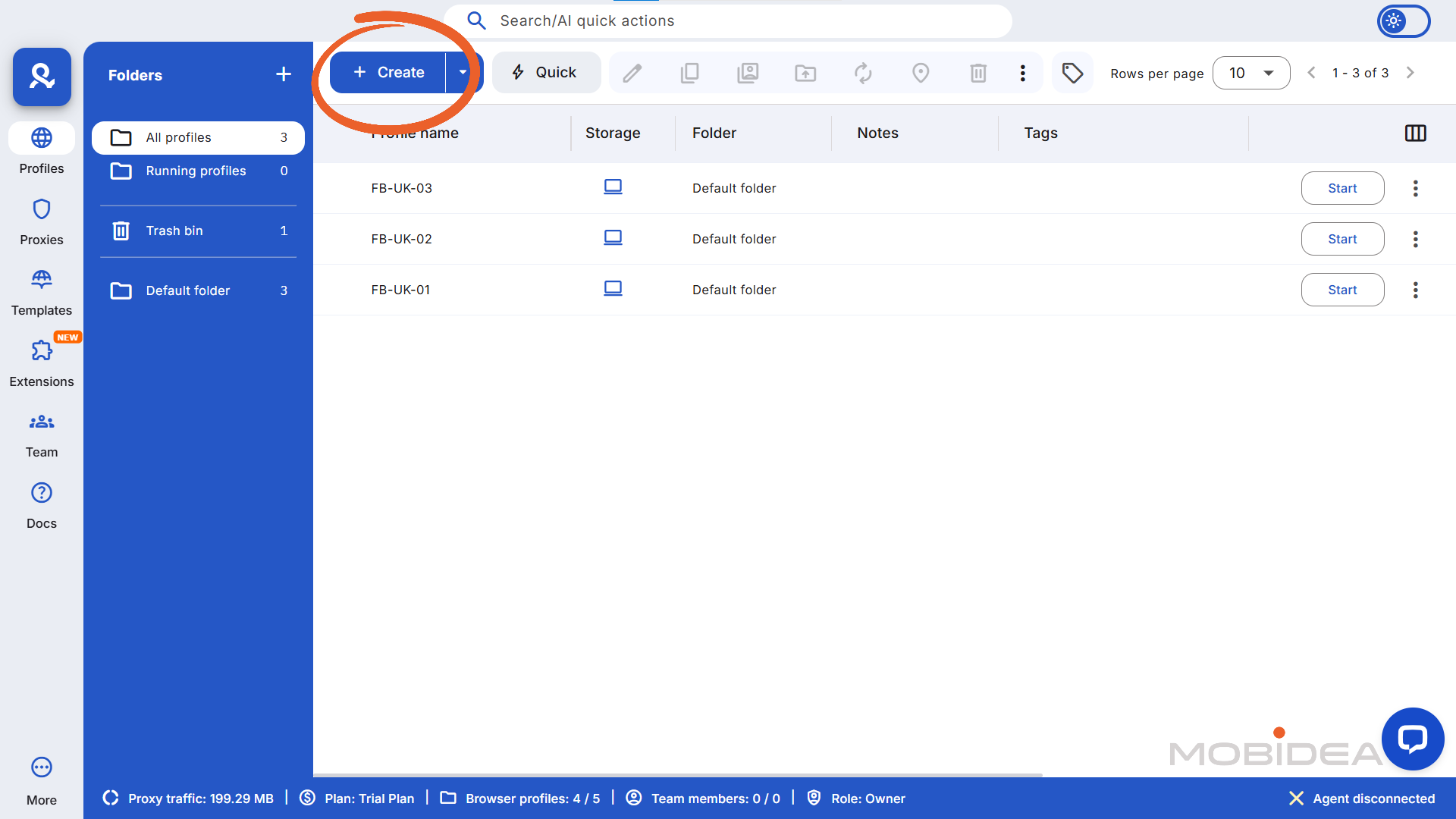
In the new window that opens up, you’ll see several tabs and options. Let’s start with the basics on the “General” tab.
Give your profile a name that makes sense. I like to use descriptive names like “FB-UK-01” or “Amazon-Store1″—something that immediately tells me what this profile is for.
You can also add notes here, which are super helpful for organization. Words like “facebook,” “advertising,” “client-a” make profiles much easier to find later.
If you work with a team, this is a good place to add descriptions that tell the user what the profile is for exactly.
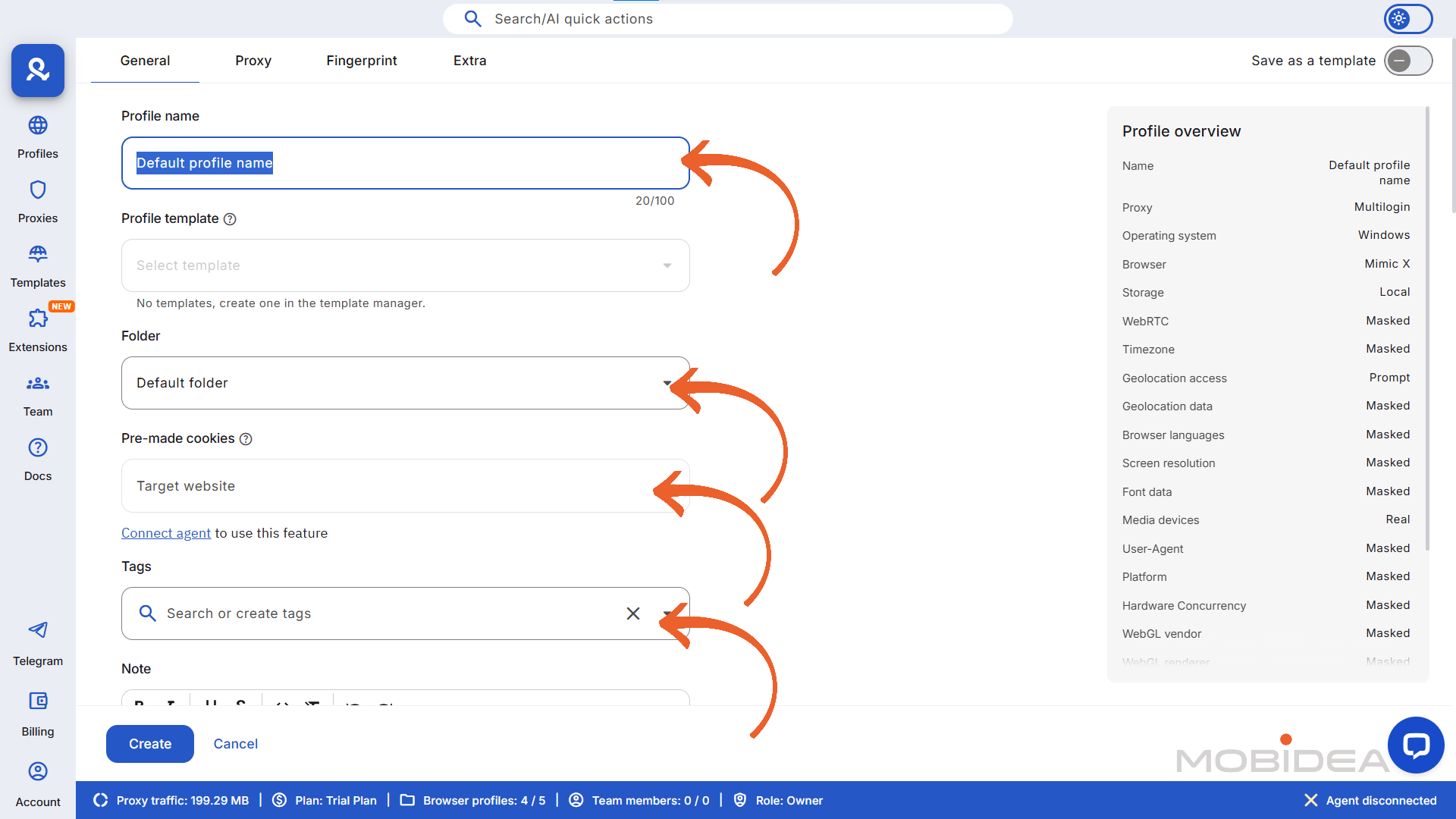
Next, you’ll see the Profile Template field. As its name suggests, you can create a template that follows a set of parameters you set.
You can create one by clicking on Template in the navigation menu. Or you can save this profile as a template, once you are finished setting everything up.
Next, select the Folder for this Profile. These help make your profile look aged.
When using pre-made cookies, you can select specific websites from a list. Websites include:
- Amazon
- Bing
- Ebay
- Etsy
Or you can choose a custom one. We’ll discuss more of the Pre-Made Cookies option later.
Now, the Tags field is another way to organize your profiles. Each tag is color-coded so you can identify them fast. You can add up to 10 tags.
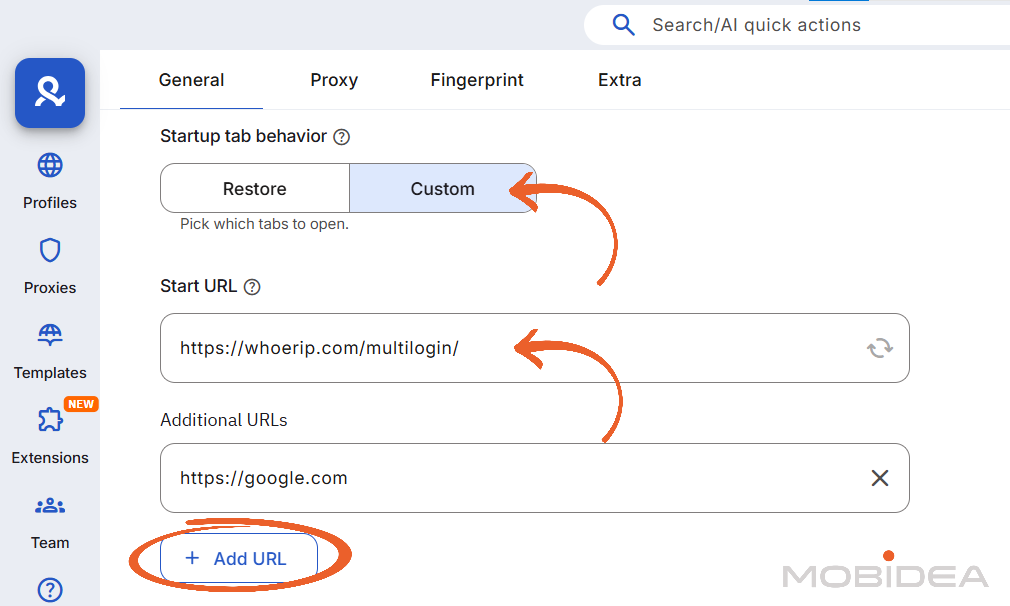
The Startup Behavior setting determines what happens when you start the profile, whether it will continue a session or open custom websites.
Then we have the Operating System and the Browser. Your browser options are:
- Mimic X, which is built on Chrome
- Stealthfox X, which is built on Firefox
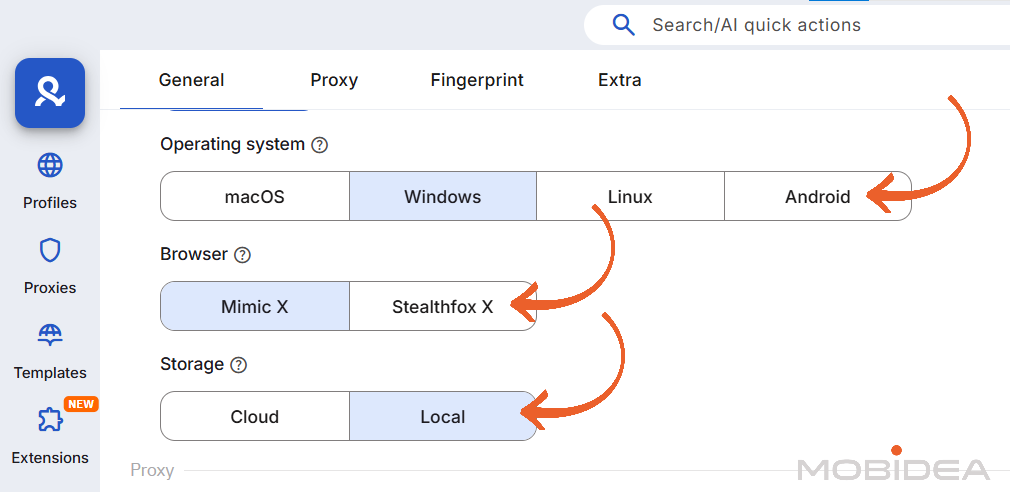
You can also define whether you want your profile stored locally (in your device) or in the Cloud storage (online).
Choose the latter if you have team members that you want to have access to the profile.
On the right side is a summary of the profile you are currently creating. This is a good way to keep track of your creation.
Proxy Assignment
In the same window, you’ll see a Proxies section. This is crucial.
If you don’t assign a proxy, you’re basically using your real IP address, which defeats the purpose.
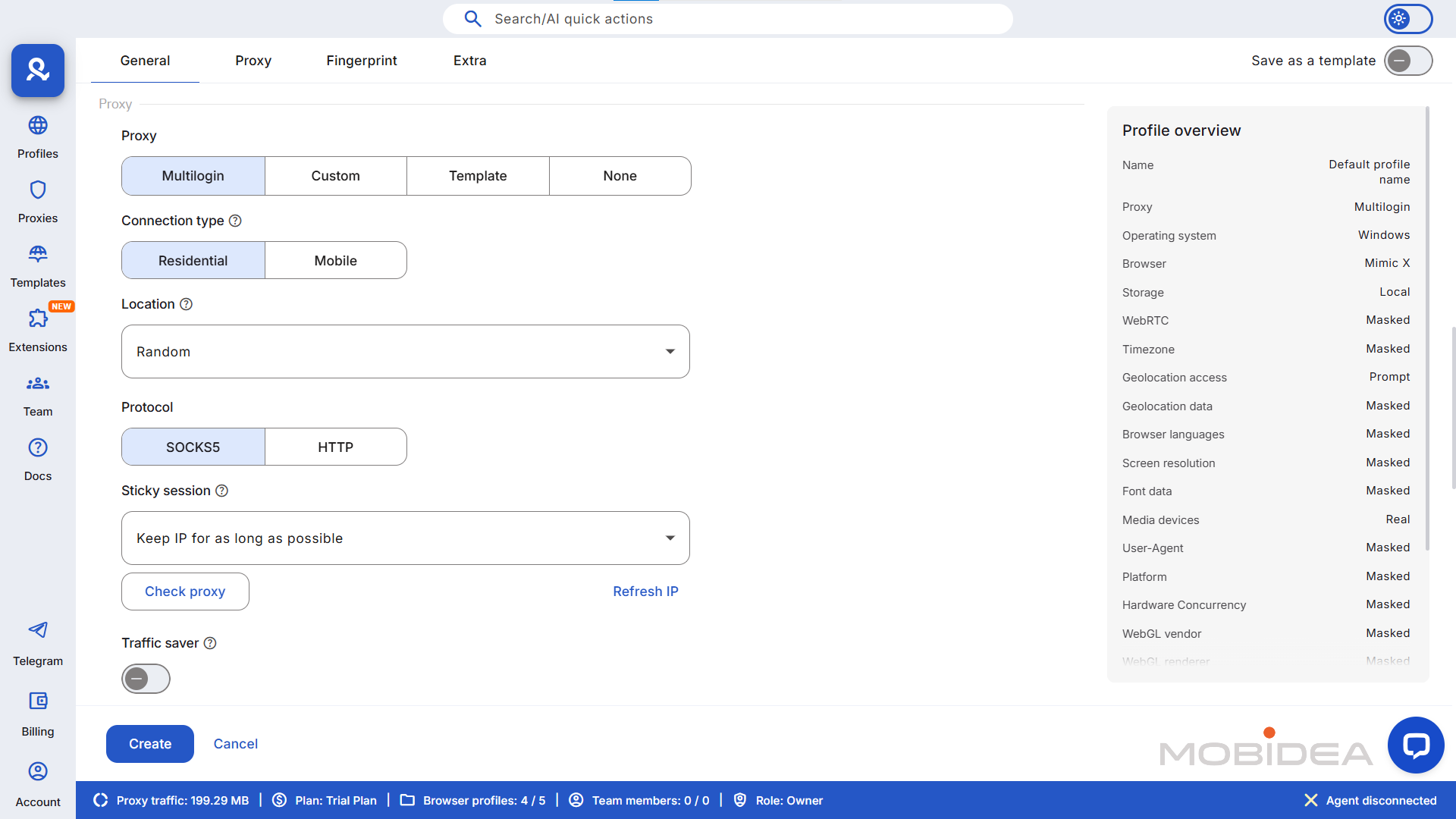
Now, you have four main options here:
- Multilogin
- Custom
- Template
- None
Multilogin includes built-in residential proxies with all plans, which is actually pretty convenient.
You get a certain amount of proxy traffic included (1GB with the basic plan), and you can buy more at €3 per GB.
For beginners, I’d recommend starting with these built-in proxies—they’re tested, integrated, and just work without any fuss.
If you choose Multilogin, select the connection type and location. country, region, and city, with the last two being optional.
You can also select your ISP.
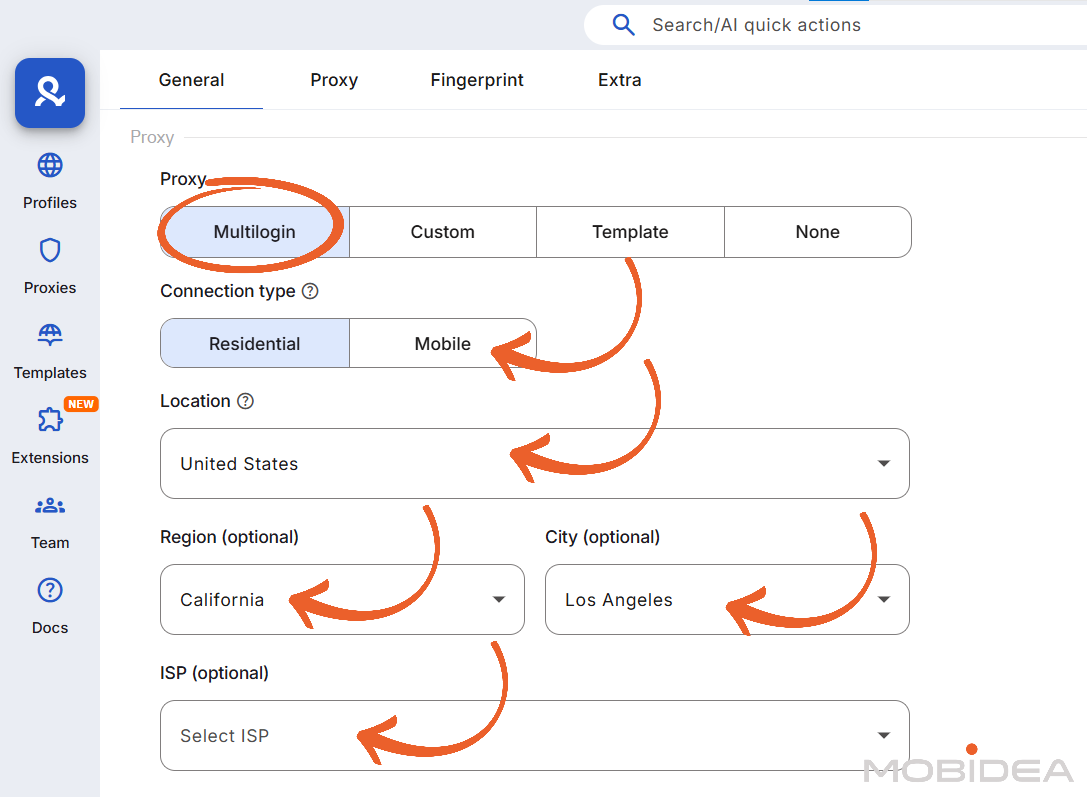
Then choose either SOCKS5 or HTTP.
Next, under Sticky section, indicate whether you want to keep the same IP for as long as possible, or if you’d like to use a different IP after some time.
If you choose custom time, you must indicate the time interval for changing IPs.
There’s also an option to reduce proxy traffic by enabling the Traffic Saver option.
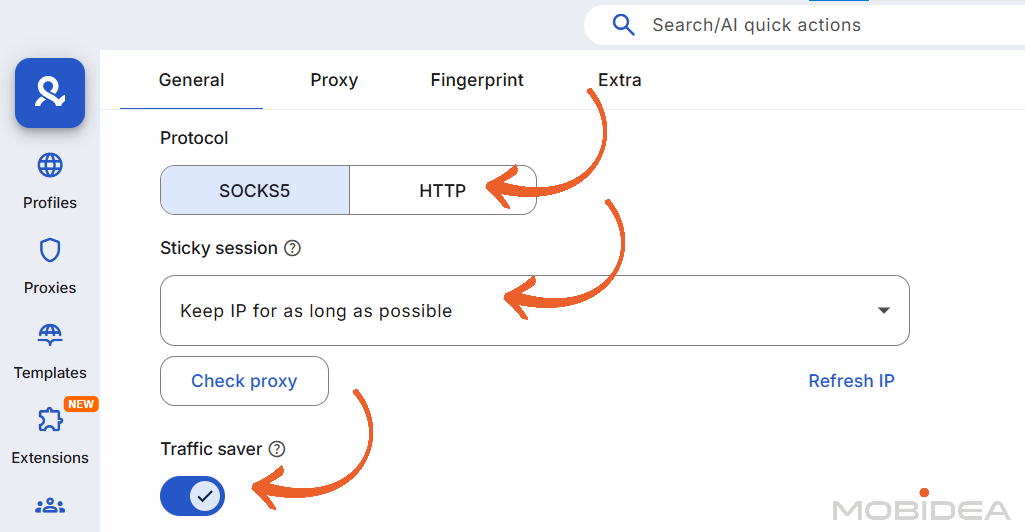
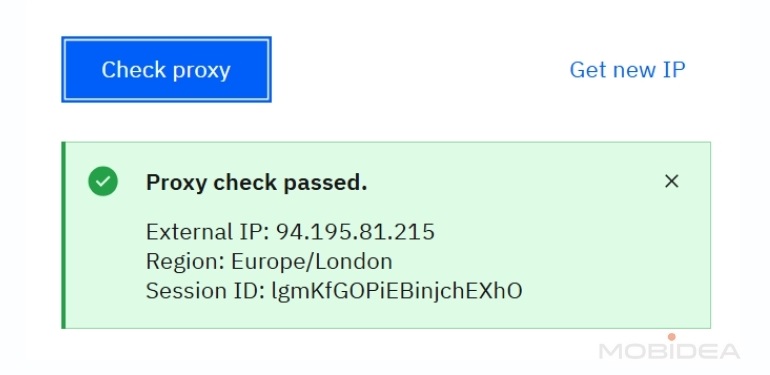
I recommend checking the proxy first before proceeding with creating the rest of the profile.
You’ll get a notice like this once all’s good:
If you want to use your own proxies (maybe you already have a relationship with a proxy provider), click “Custom”.
You can either use the quick input format or fill out the individual fields for Host, Port, Username, and Password.
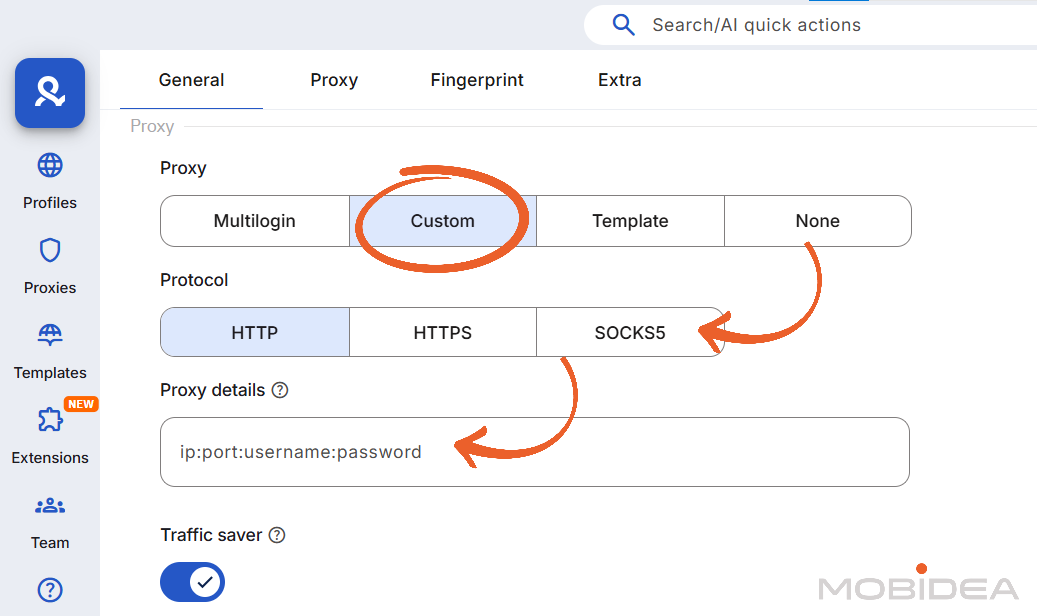
For the Template option, you can set it up if you’ll be repeating the proxy settings in the future.
Finally, there’s the “None” option, which simply means no proxy. I don’t recommend this option.
Adding Cookies
One of Multilogin’s newer features that I’ve found incredibly useful is pre-made cookies.
This feature can save you hours of manual work when you’re setting up new profiles that need to look like they’ve been used for a while.
Think of it this way: when you create a fresh browser profile, it’s completely clean—no browsing history, no cookies, nothing. To websites, this looks suspicious.
Real users have cookies from dozens of sites they’ve visited over months or years.
Pre-made cookies solve this problem by giving your new profiles a realistic browsing history instantly.
Here’s where you need to make a strategic decision.
Multilogin will ask you to choose your primary website from a dropdown menu. This determines what type of cookies your profile will receive.
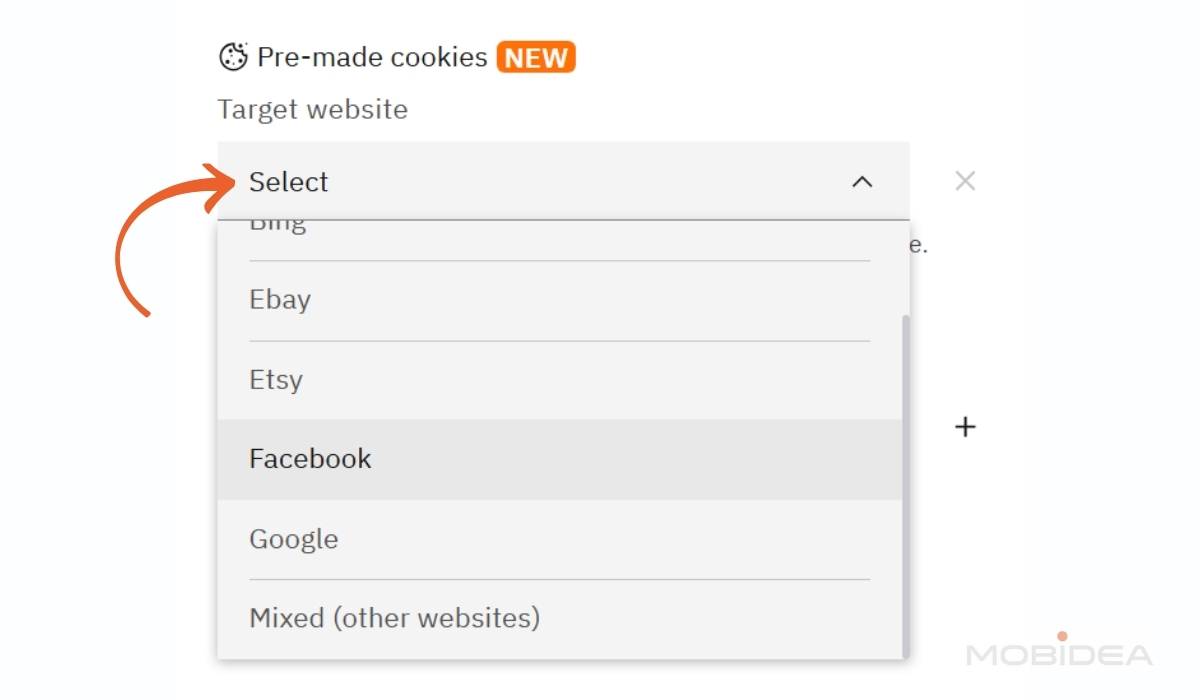
If you’re planning to use this profile primarily for Amazon seller activities, select Amazon from the list.
The system will then load cookies that make sense for someone who might be an Amazon user—shopping history, account preferences, that sort of thing.
For Facebook advertising profiles, choose Facebook. This gives you cookies that suggest you’ve been active on Facebook and related platforms.
But here’s what I do in most cases: I select “Mixed cookies.” This option gives you cookies from over 500 popular websites including Google, Facebook, eBay, Amazon, and many others.
It creates a browsing pattern that looks like a typical internet user who visits lots of different sites—which is actually more realistic for most people.
The system handles everything automatically—you don’t need to configure anything else. The number of cookies you receive varies, but Multilogin provides enough to make your profile look realistic.
You don’t need to worry about collecting additional cookies manually, though you certainly can if you want to build up even more browsing history over time.
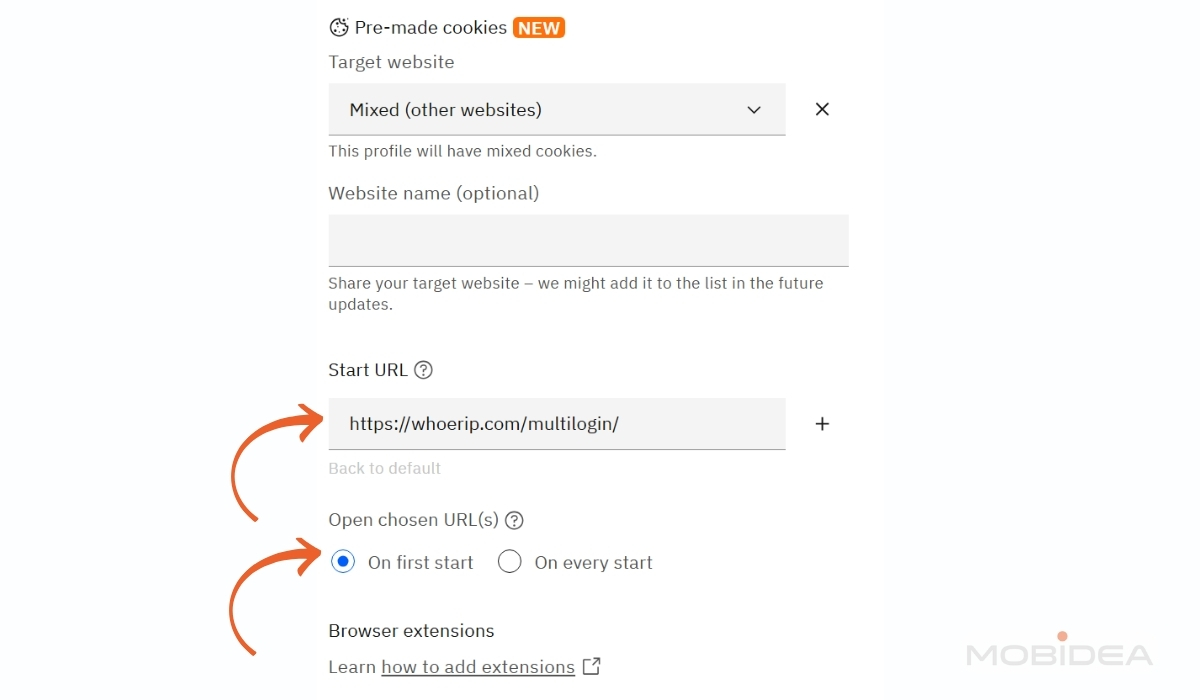
Complete your pre-made cookies setup by adding a Start URL and whether you want it to open on the first start or on every start.
These URLs will automatically open when you launch this profile. I usually add the main page of whatever platform I’m targeting, like facebook.com for advertising profiles.
 Fingerprint
The fingerprint settings lets you blend in better. This section is where you can customize them.
You can edit the following:
- WebRTC
- Geolocation access
- Geolocation data
- Browser languages
- Screen resolution
- Font data
- Media Devices
- Navigator
- WebGL + WebGPU metadata
- WebGL graphics
- Canvas graphics
- AudioContext
- Port scan protection
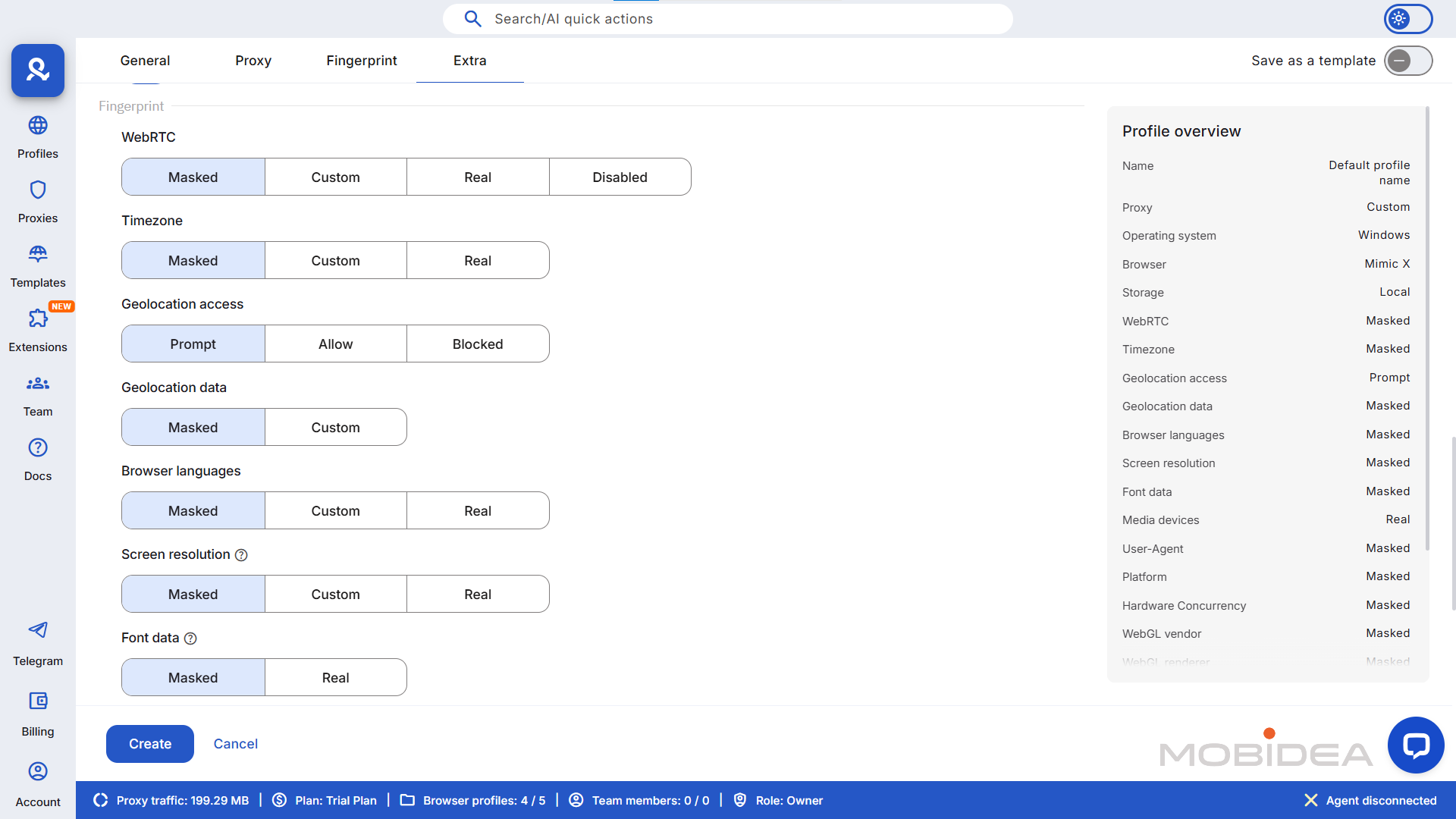
Here’s my advice: Unless you really know what you’re doing, leave these alone. The default settings for unique fingerprints are based on extensive research and testing.
I’ve seen too many people create fingerprints that actually make them more detectable because they tried to customize everything.
That said, there are a few advanced settings that are generally safe to adjust:
The timezone should match your proxy’s location. If you’re using a New York proxy, make sure the timezone is set to Eastern Time.
Multilogin usually handles this automatically, but it’s worth double-checking.
Language settings should also match your target audience. If you’re targeting English-speaking users, make sure English is set as the primary language.
Custom screen resolution can also be done.
If you’re trying to appear as a mobile user, choose a mobile-appropriate resolution. For desktop users, stick with common resolutions like 1920×1080.
Check Profile Overview on the right pane. Once you are satisfied with everything, click on Create Profile to complete the creation.
Quick Profile Creation
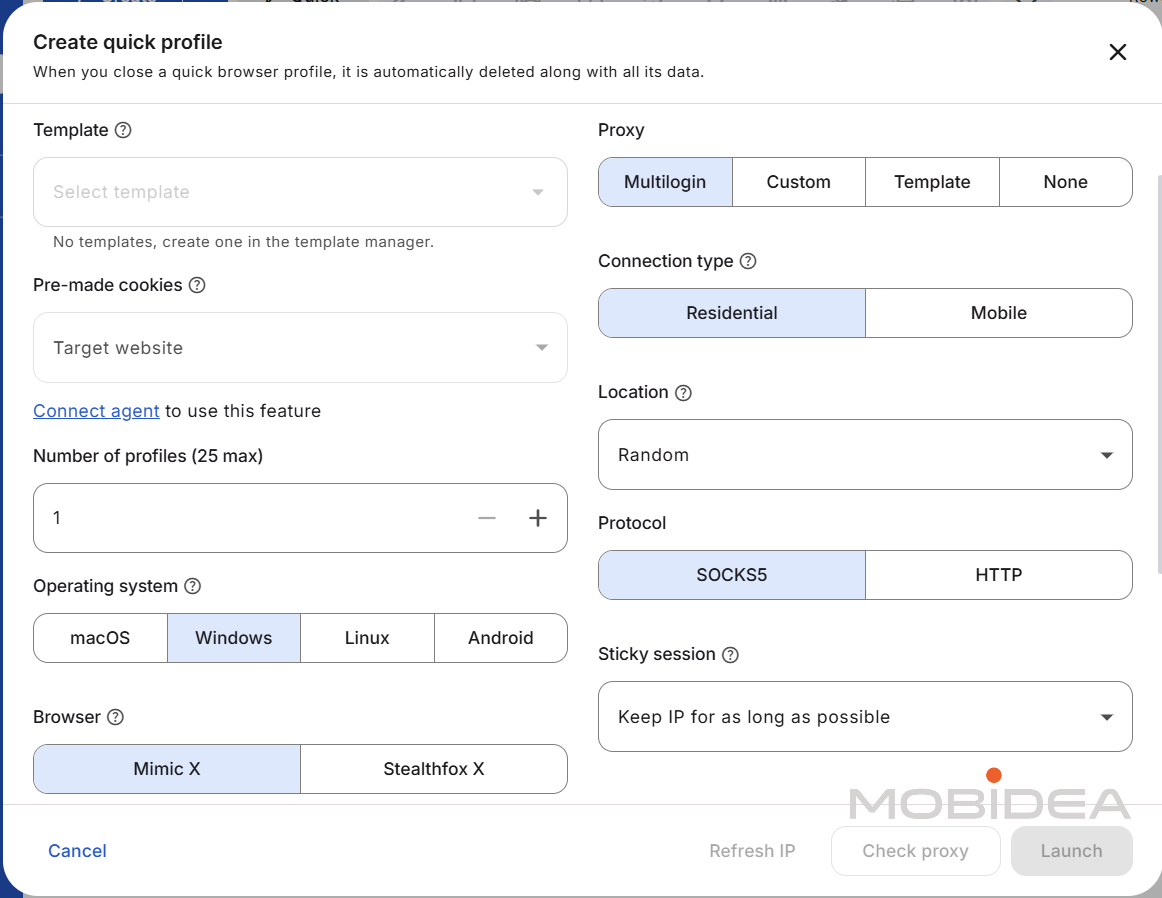
If you don’t want to go through that entire process, there’s a “Quick” button at the top that will generate a completely unique set of parameters.
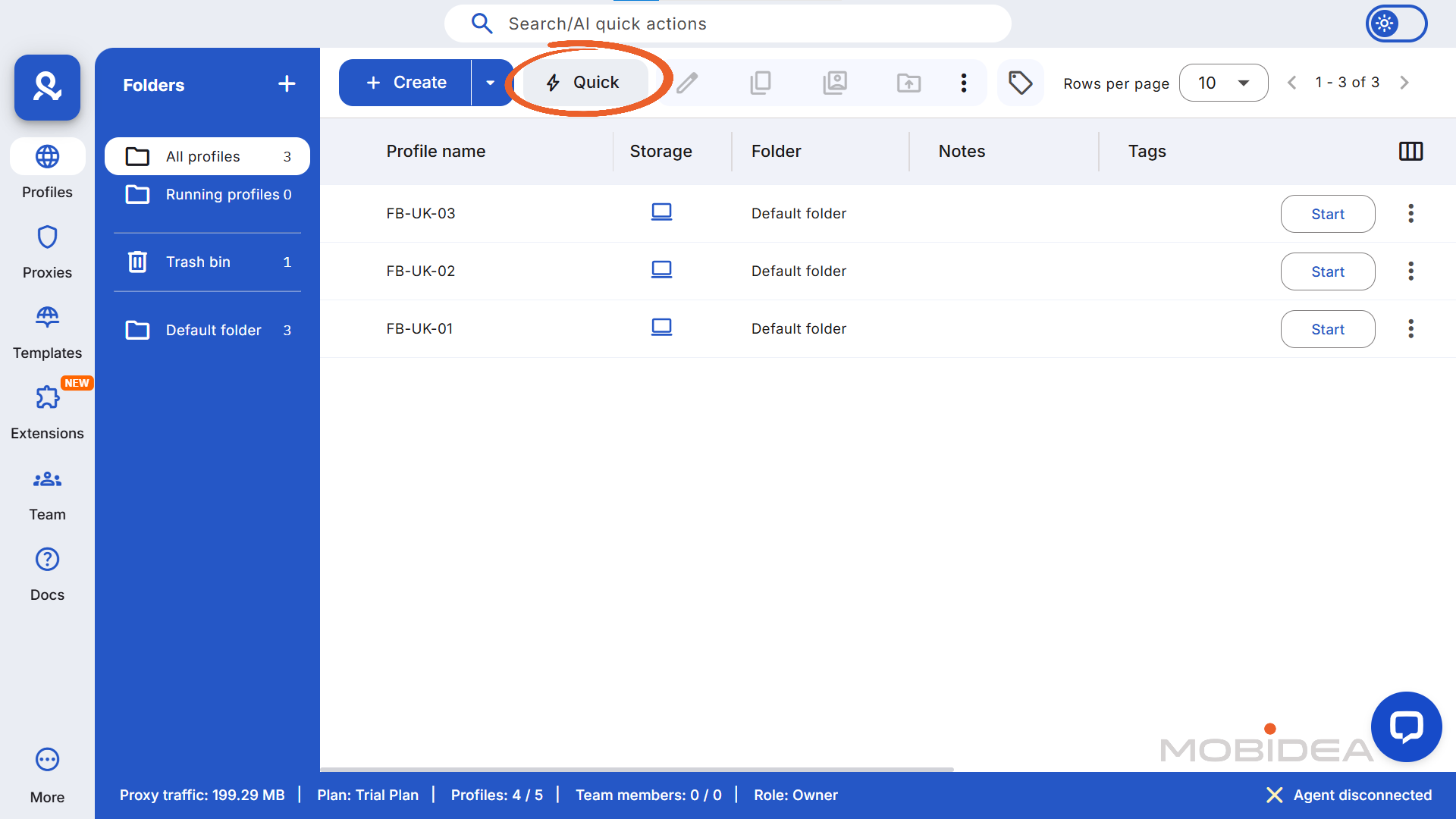
For many users, the automatically generated fingerprint is perfect. Multilogin has spent years researching what makes fingerprints look natural and realistic.
You can still edit some of the details, but it’s not as comprehensive as creating a profile from scratch.
Testing Your Profile
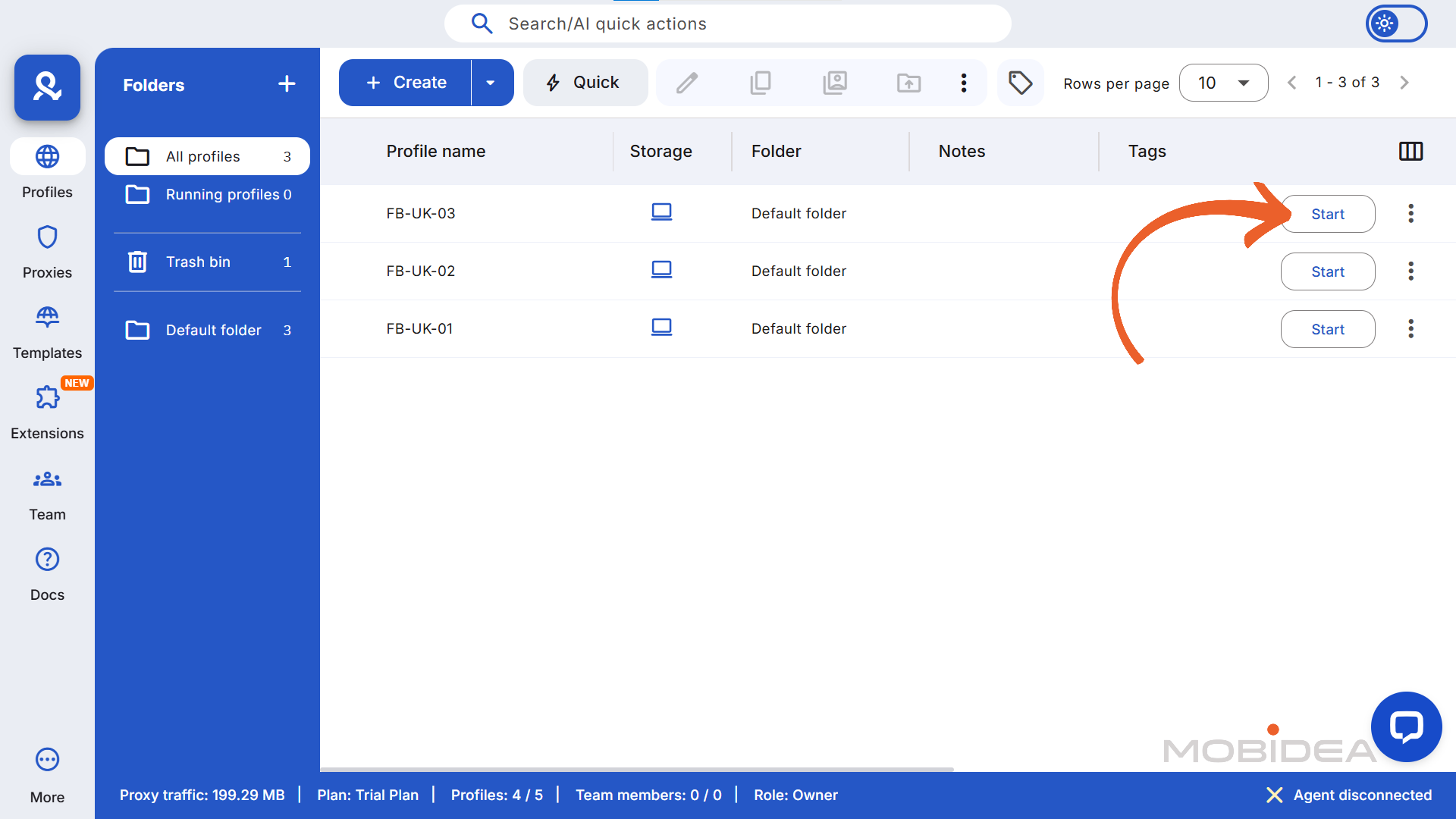
Before you start using this profile for anything important, test it thoroughly. You can find your new profile in the list and click “Start.”
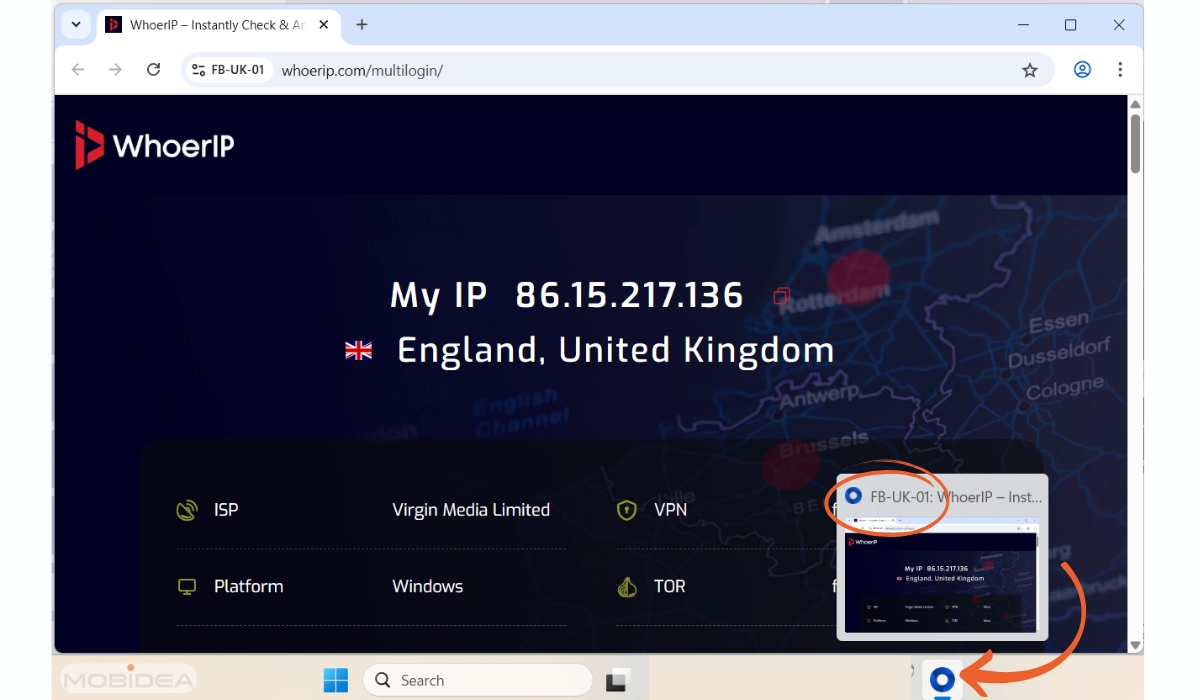
A new browser window will open—this is your Multilogin profile running.
You’ll notice the profile name appears in the browser, usually near the address bar or in the window title.
This helps you keep track of which profile you’re using when you have multiple ones open.
The first thing I always do is visit a site like whoerip.com, whatismyipaddress.com, or browserleaks.com to verify everything is working correctly.
Check that your IP address matches your proxy location and that the browser fingerprint looks consistent.
Navigate to a few websites you plan to use regularly. Make sure everything loads properly and that you’re not getting any unusual security warnings or CAPTCHAs.
If you are, it might indicate an issue with your proxy or fingerprint configuration.
Creating Multiple Profiles
Once you’ve got the hang of creating profiles, you’ll probably want to create several
The first method is through AI Quick Actions.
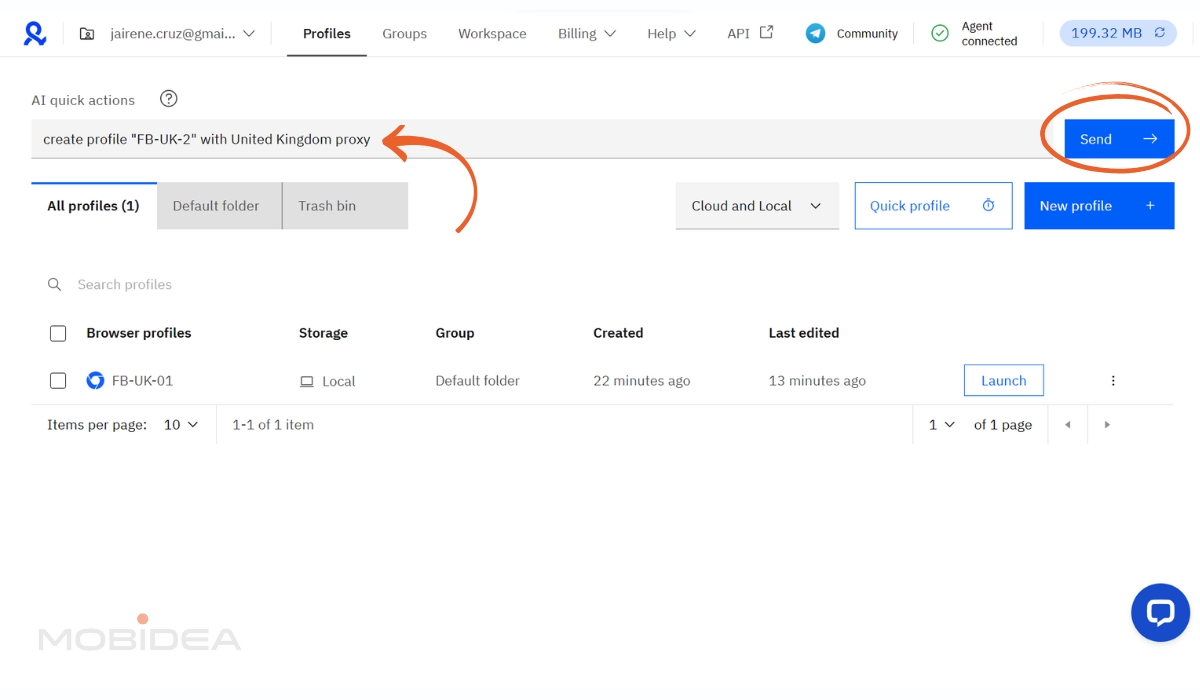
You’ll get a notification once done, and you’ll find your new profile in the list.
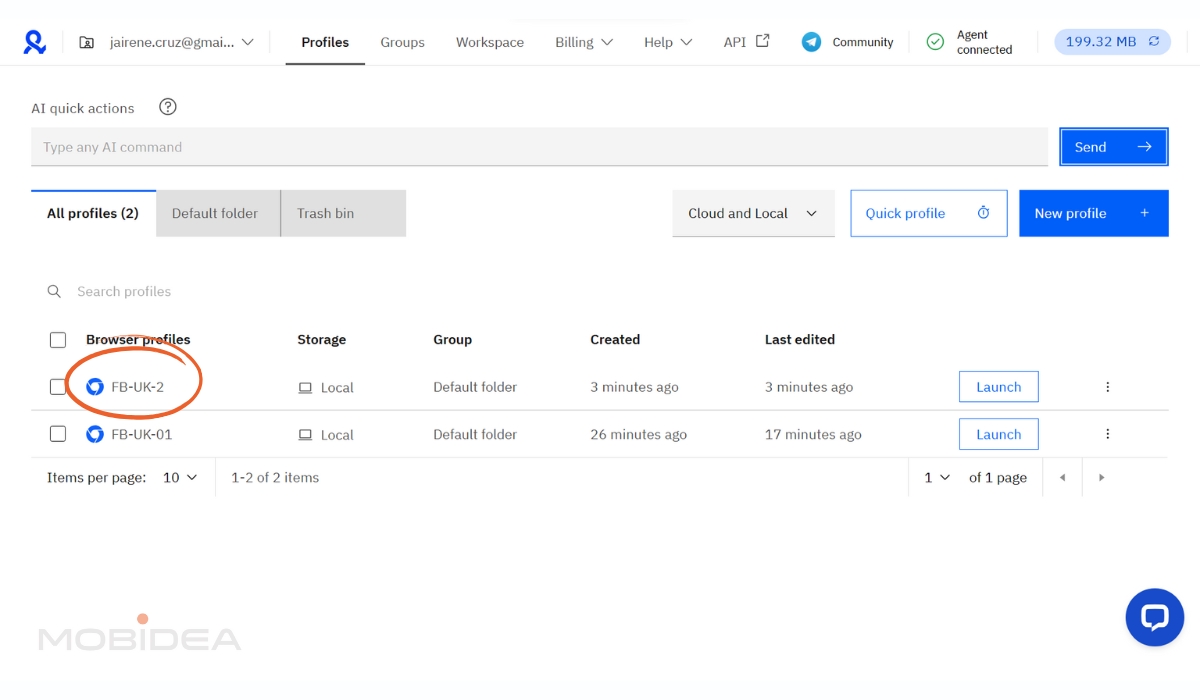
The second method is profile duplication. If you have a profile that’s configured exactly how you like it, you can copy it.
Click the three dots next to any profile in your list and select “Clone.”
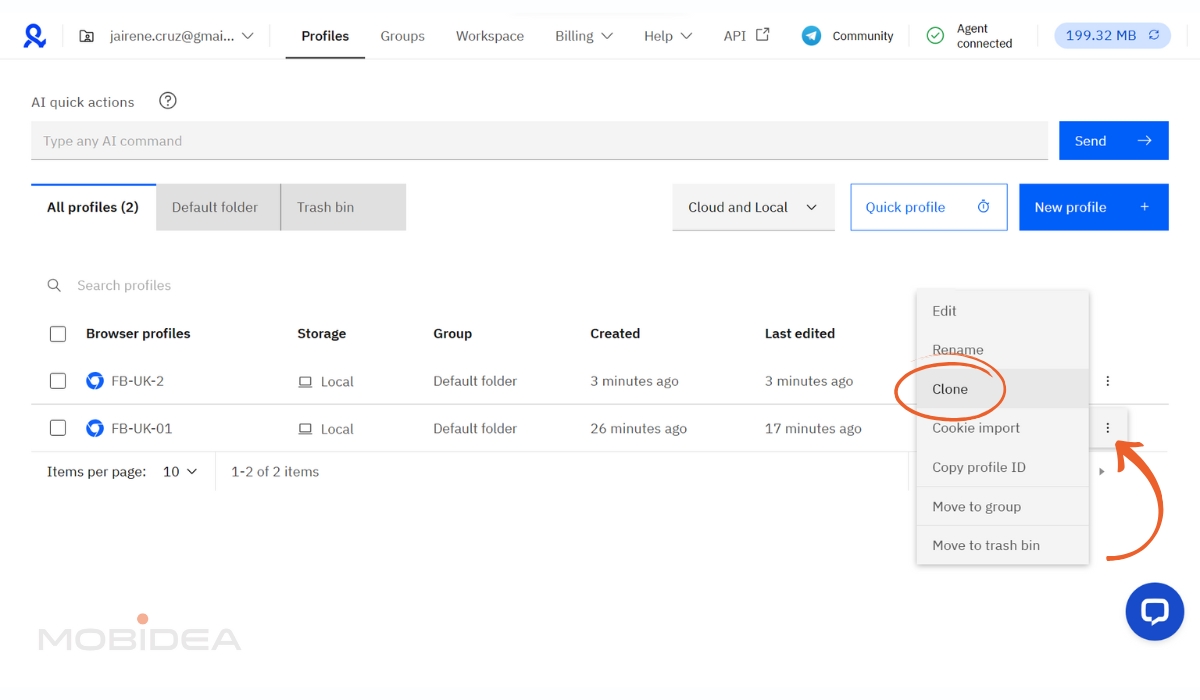
You can create up to 10 copies at once, and the system will automatically randomize the fingerprints for each copy.
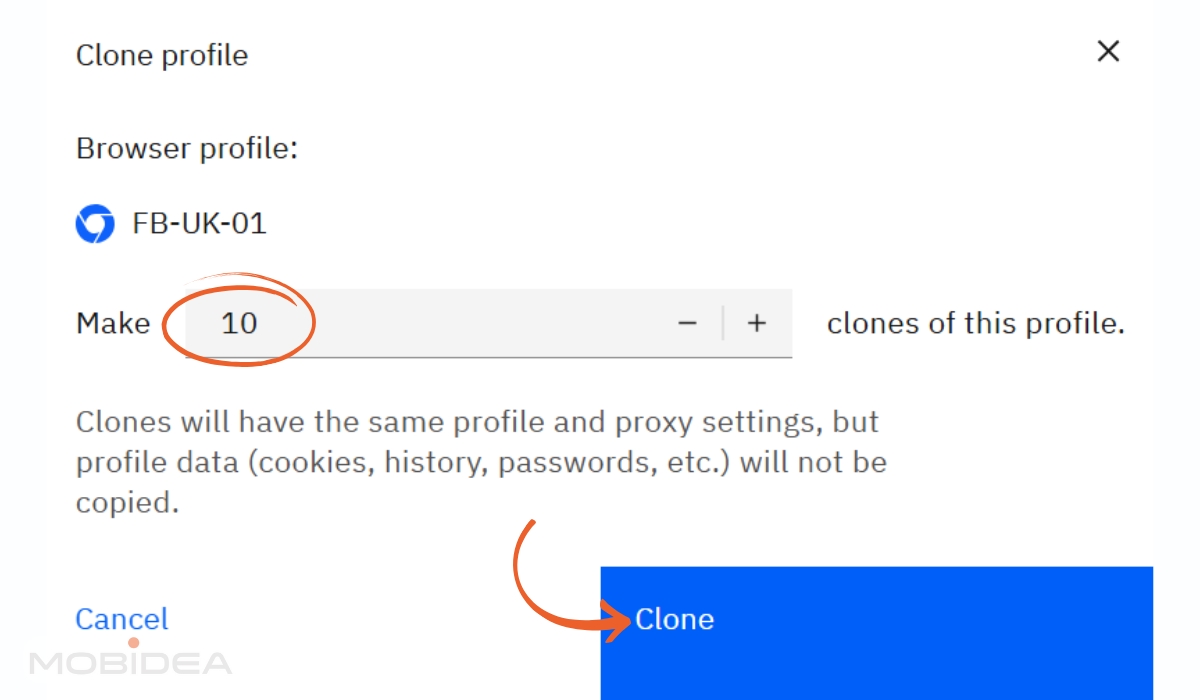
This duplication method is particularly useful when you have a “golden” profile configuration that works well for a specific use case.
Team Collaboration Setup
If you’re working with a team, Multilogin’s collaboration features are pretty robust. You can add team members and control exactly what they can access.
In your account settings, look for the team management section. You can invite team members by email address, and you’ll assign them one of four roles:
- Owner: Full access (you)
- Manager: Can create/edit profiles, manage team members
- Operator: Can use assigned profiles, cannot modify settings
- Starter: Can only launch profiles, cannot edit
When sharing profiles with team members, you can set permissions at the profile level.
Some team members might only need to launch certain profiles, while others might need full editing access.
You can also transfer profiles completely to other team members, though be careful with this—transferred profiles are removed from your access.
The team features work well, although it doesn’t have audit logging, unlike competitors.
If you need comprehensive logs of every action, you might want to implement your own tracking system.
Automation and API Integration
For those ready to take things to the next level, Multilogin offers a comprehensive API that lets you automate profile creation, launching, and management.
To get started with automation, you’ll need to generate an API token in your account settings. This token gives full access to your account, so store it securely.
The API documentation is quite comprehensive, and you can integrate with popular tools like Selenium, Puppeteer, and Playwright.
If you’re not comfortable with coding, Multilogin X also includes AI Quick Actions that can convert simple text instructions into automated processes.
Yes, cloning is not all AI Quick Actions can do.
Here are other tasks AI Quick Actions can handle for you:
- Instant Profile Launching: Skip the clicking around—just tell it which profiles you want to start and they’ll fire up immediately.
Perfect when you need to manage multiple accounts running quickly and simultaneously without navigating through menus.
- One-Click Proxy Management: Need to switch a profile’s proxy or remove one entirely?
Just describe what you want and it handles the assignment instantly. No more digging through proxy settings for each individual profile.
- Multi-Task Automation: Chain up to 10 different actions together in a single command.
You could launch profiles, assign proxies, and organize them into groups all with one instruction—like having a digital assistant that actually understands what you’re trying to accomplish.
- Effortless Profile Organization: Moving profiles between groups becomes as simple as asking.
Instead of manually dragging and dropping or going through multiple menus, just tell it where profiles should go and it sorts everything out for you.
This feature is still developing, so test it on non-critical profiles first.
I tried it several times. Sometimes it works with nested commands, other times, it only works with one command at a time. However, it is definitely a great feature that makes tasks easier.
Tips for Performance Optimization and Scaling
As you scale up your operations, you’ll need to pay attention to system performance.
- Plan Your System
Each active profile uses approximately 200-500MB of RAM, depending on what you’re doing with it. If you’re planning to run 20+ profiles simultaneously, make sure you have adequate system resources.
- Organize Your Profiles
I’ve found that organizing profiles efficiently makes a huge difference in day-to-day operations.
Use folders to group related profiles, apply consistent tags for easy searching, and regularly clean up profiles you’re no longer using.
- Manage Your Proxies
Monitor your proxy traffic usage, especially if you’re on a plan with limited included traffic. High-resolution profiles and media-heavy websites can consume bandwidth quickly.
Remember that choosing the right proxy provider is just as important.
- Start Small And Scale Gradually
It’s tempting to create dozens of profiles right away, but you’ll be more successful if you master the basics first.
Get comfortable with creating and managing a few profiles before expanding to larger operations.
With its revamped interface, the learning curve for using Multilogin is no longer that high.
Once you get the hang of it, it becomes an incredibly powerful tool for managing multiple identities securely and efficiently.
Take your time with the setup, test thoroughly, and don’t hesitate to reach out to support when you need help—their English-language support is available 24/7 and quite responsive.
Troubleshooting Common Issues
Even with careful setup, you’ll occasionally run into issues. Here are the most common problems I’ve encountered and how to solve them:
If profiles won’t launch, first check that the agent is running in the background. You can restart the agent from your system tray or menu bar.
Sometimes Windows or macOS updates can interfere with the agent.
If websites are detecting your profiles as suspicious, review your proxy quality and fingerprint consistency.
Cheap proxies are often the culprit—they’re frequently flagged by major platforms.
Performance issues usually come down to system resources.
If browsers are running slowly or crashing, try reducing the number of concurrent profiles or upgrading your hardware.
For team collaboration issues, double-check role permissions and profile sharing settings.
Sometimes, team members can’t access profiles because of permission restrictions rather than technical problems.
Multilogin Pros and Cons
Let’s get real about what works and what doesn’t with Multilogin.
After diving deep into this platform and checking its overall usability, here’s the honest breakdown that’ll help you decide if it’s worth your hard-earned cash.
Pros
- Industry-Leading Fingerprint Sophistication. Multilogin goes full secret agent mode—manipulating everything from canvas signatures to WebGL rendering and even how your browser reports CPU cores.
This isn’t just “good enough” protection; it’s the kind of sophisticated spoofing that keeps you invisible even when major platforms are actively hunting for multi-account users.
- Enterprise-Grade Session Isolation. Each browser profile operates like it’s living in its own little bubble universe. Multilogin’s architecture ensures zero overlap between your different identities.
- Robust Cloud Infrastructure and Synchronization. Your profiles live in the cloud with enterprise-grade encryption, which means you can access everything from any device without missing a beat. You won’t lose access if your computer decides to have a meltdown.
- Comprehensive API and Automation Framework. For those who love automation, Multilogin’s OPEN API is absolutely brilliant.
You can programmatically control pretty much everything. Integration with tools like Selenium, Puppeteer and Playwright is also seamless.
- Advanced Proxy Integration and Management. Multilogin validates geographic consistency, handles DNS customization, and even manages rotation schedules.
- Professional Team Collaboration Features. You can share specific profiles without exposing login credentials, set permission levels for different team members, and track who did what through audit logs.
- Scalable for All Operation Sizes. It’s a great choice for beginners and small teams, but it also works well for those running an enterprise operation with 10,000+ profiles.
You can start small and scale up as your operation grows with its subscription based pricing model.
- Android Mobile Emulation Support. Multilogin includes Android mobile browser emulation, a feature that’s relatively uncommon in the anti-detect browser market.
- Multilogin has a Desktop App. You can now work with everything right on your device. No extensions needed—just open the app and get started locally.
Cons
- Limited Trial Access and Evaluation Options. Unlike many software platforms that let you kick the tires before buying, Multilogin offers limited trial access.
This makes it challenging to properly evaluate whether the platform fits your specific needs before committing to the subscription cost.
- AI Quick Actions Can’t Perform Complex Tasks. Multilogin states that you make their AI perform up to 10 tasks at once (or in one prompt), though testing shows that it fails sometimes.
A couple of tasks in one prompt perform well, though. For complex tasks, you better use Multilogin CLI or integrate tools like Playwright, Selenium, Puppeteer, or Postman.
- Higher System Resource Requirements. Running multiple browser profiles simultaneously can be demanding on your computer’s RAM and CPU, especially if you’re managing numerous profiles at once.
Users with older machines or limited hardware may need to upgrade their systems to run Multilogin smoothly at scale.
Multilogin Final Verdict
So, is Multilogin worth relying on for your digital business? The honest answer is: it definitely is!
Multilogin is hands-down one of the most advanced anti-detect browsers on the market.
If you’re serious about multi-account management and can’t afford to mess around with account bans, this platform delivers the goods.
The fingerprint management is top-notch, session isolation is bulletproof, and the automation capabilities can seriously streamline large-scale operations.
From beginners managing their first few profiles to professionals running operations at scale, Multilogin makes multi-account management accessible.
The platform balances powerful capabilities with user-friendly operation and minimalist user interface, so you can get up and running quickly without sacrificing the protection your accounts need.
Test it out for yourself! Use our coupon code MOBIDEA20 and get a 20% discount on Multilogin plans. You won’t regret it!


Our comprehensive NextGen Payment review reveals why high-risk merchants trust this specialized processor for stable global payments and fraud protection.

Can this ad network help affiliate marketers scale campaigns profitably? We'll discuss features, testing insights, and more in this EpicAds review.

Thinking of jumping into the world of fintech? Kingfin might just be the best place to start! Learn more in this in-depth Kingfin review.