Yeesshh Review: Uncovering a Hidden Pop Traffic Network
Last updated on September 15, 2026 26 min read
Yeesshh At A Glance for Advertisers
Yeesshh Ad Types & Top Converting Verticals
Ad types: Pop-up, Pop-under, New Tab, Redirect
Verticals: e-Commerce, Dating, Gambling, Sweepstakes, Downloads, mVAS, VPN, and security downloads for mobile.
Yeesshh Advertiser Payment & Investment
Cost Model: CPM
Minimum Deposit: $100
Payment Methods: PayPal, 3DS Credit Cards, Bitcoin, Wire Transfer, Paxum, Capitalist, SEPA Direct Debit
Note: Payment processing fees of 5% apply.
Yeesshh: Support
Personal Account Manager: Available after $2,500 total spend
Knowledgebase: Yes — a comprehensive Help Center is available through an integrated AI chat.
Support Response Speed: Human support is available during business hours (09:00–17:00 CET).
Support Rating:
Contact Methods: Telegram, email, online ticketing
Email Contact: support@yeesshh.com
Telegram: @yeesshhsupport
Pop traffic and redirect ads remain some of the most effective formats for affiliate marketers and performance advertisers.
They’re direct, they convert, and when targeted properly, they deliver results.
But here’s the challenge: finding traffic sources that offer both volume and quality without breaking the bank.
You’ve probably heard of the big names in pop traffic, but what about the networks that stay under the radar?
Networks that have been running for years, building their publisher base quietly, yet remain relatively unknown in the broader affiliate marketing community?
Enter Yeesshh, a pop and redirect traffic network that’s been running since 2016.
Despite nearly a decade in the industry, Yeesshh doesn’t have the same name recognition as its competitors.
There are few reviews online, limited discussions in affiliate communities, and very little buzz on social media.
For a network that claims to deliver billions of impressions daily and was even recognized by the Financial Times as one of Europe’s fastest-growing companies, this lack of visibility raises an important question:
Is Yeesshh a hidden gem worth trying, or is there a reason it remains in the shadows?
This review aims to shine a light on Yeesshh.
We’ll look at what’s behind this ad network (aside from its quirky name), what it offers to both advertisers and publishers, check out its features and targeting options, and walk through the campaign setup process.
Whether Yeesshh becomes a valuable addition to your traffic source rotation or not, by the end of this review, you’ll have all the information needed to make an informed decision.
Key Takeaways
👉Specialized Pop Traffic Network: Yeesshh focuses exclusively on pop and redirect formats (pop-up, pop-under, new tab, redirect) across both mobile and desktop devices.
👉Low Entry Barrier: Minimum deposit of just $100 makes testing accessible.
👉Free Market Intelligence: Publicly accessible volume and bids pages for mobile and desktop provide real-time traffic availability and pricing data before spending any budget.
👉Automated Optimization Tools: Auto-blacklister removes non-converting sources every 60 minutes, while auto-bidder adjusts bids based on performance.
👉Comprehensive Targeting: Geo targeting down to zip code level, carrier targeting for mobile, OS/browser selection, and keyword targeting with negative keywords.
👉Multiple Payment Options: Accepts PayPal, credit cards, Bitcoin, wire transfer, Paxum, and Capitalist, though 5% processing fees apply and some users report receiving less than deposited amounts.
👉Limited Online Presence: Despite operating since 2016, minimal visibility in affiliate marketing communities makes it difficult to research experiences.
👉Automated Advertiser Support: Dedicated account managers assigned after $2,500 total spend, new advertisers can count on the chat agent giving personalized support during critical testing phase.
👉Testing Recommended: The platform’s features and transparency make it worth testing for experienced media buyers who use proper tracking tools, treating initial campaigns as paid research to check traffic performance.
What is Yeesshh?
Yeesshh launched in 2016 as a response to the growing programmatic advertising landscape.
Its founders saw an emerging opportunity: the need for specialists handling redirect formats and “unconventional ad units” that traditional RTB-supported formats couldn’t handle.
The platform is owned by Foamball Holdings, with offices in Barcelona and a legal address in Dublin.
Yeesshh positions itself as a performance-focused ad network built by media buyers for media buyers.
Rather than trying to be everything to everyone, the network specializes only in formats like pop-ups, pop-unders, new tabs, interstitials, on-click ads, and redirects.
Yeesshh made headlines in 2021 when the Financial Times ranked them in the first third of their “Europe’s fastest-growing companies” list.
They also got recognition from Martech Outlook as a top 10 European solution provider.
These awards suggest real business growth, despite the network’s relatively low profile in affiliate marketing circles.
Yeesshh Best Features for Advertisers
When looking at any traffic source, features matter. The right tools can mean the difference between burning through budget on poor traffic and finding profitable campaigns.
Yeesshh offers several features designed specifically for performance advertisers working with pop and redirect formats.
Traffic Volume and Reach
Yeesshh reaches 800 million users daily with over 5 billion impressions available across its network.
Traffic comes from the platform’s own publisher network covering both mobile and desktop devices, plus partnerships with specialized exchanges.
Geographic coverage is global, with particularly strong presence in Europe, United States, United Kingdom, and other English-speaking markets.
The platform provides free access to real-time volume and bid data through two dedicated pages:
- Mobile volumes and bids: com/volumes-and-bids-mobile/
- Desktop volumes and bids: com/volumes-and-bids-desktop/
These tools let advertisers check available traffic volumes and current bid prices for specific countries and devices before launching campaigns.
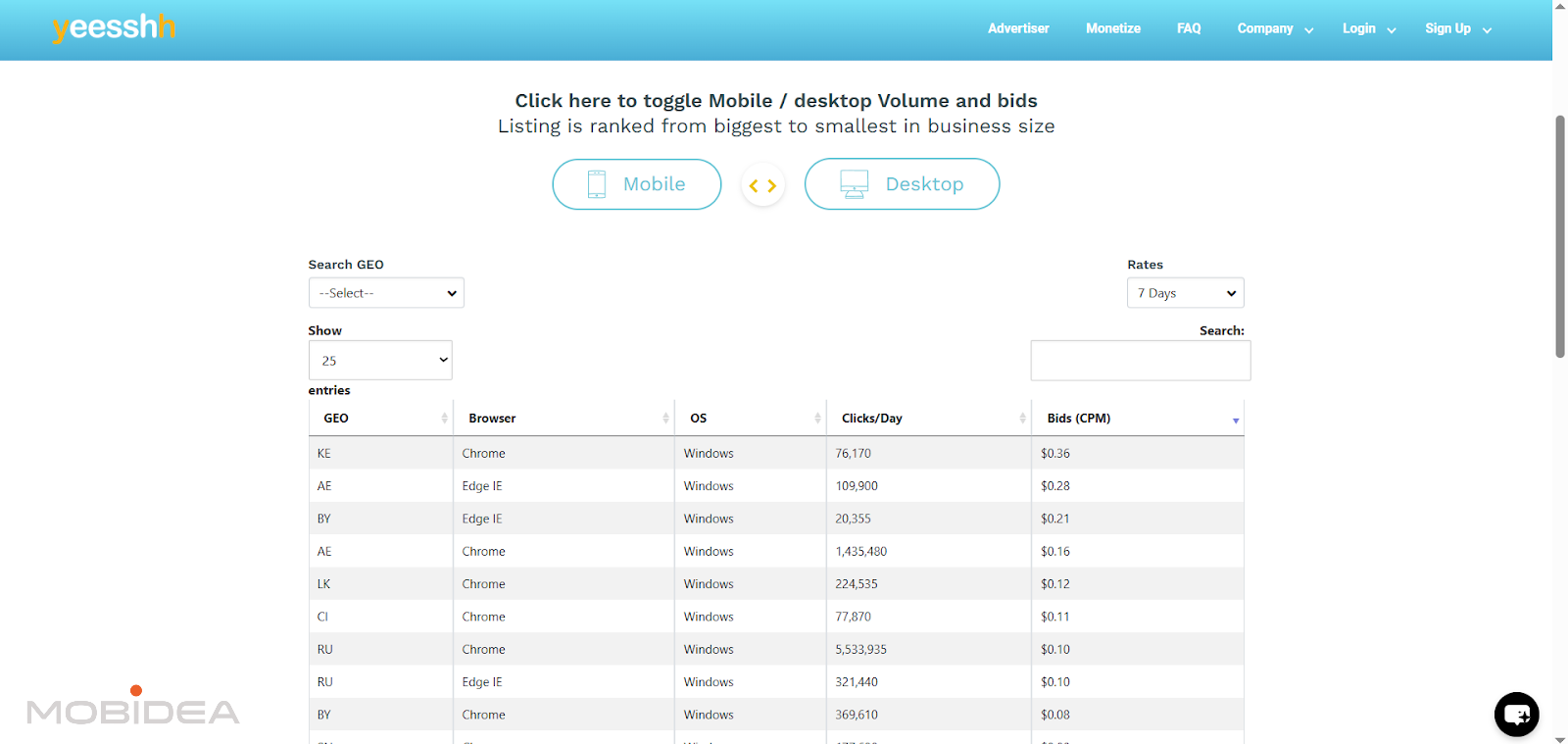
Bid amounts vary by geography and device type.
The platform provides recommended default bids through their volume and bids pages, but these change based on market conditions and competition.
Starting with recommended bids helps ensure campaigns receive enough traffic, though adjustments will likely be needed based on performance data.
We will dive into these later.
Ad Formats
Yeesshh focuses exclusively on pop and redirect formats:
- Pop-under: The classic format where ads open in a new browser window behind the active window.
- Redirect: Users are redirected to the advertiser’s destination when they click on publisher content. This direct approach eliminates additional windows or tabs, creating a seamless transition to the advertiser’s offer.
All formats work across both mobile and desktop traffic.
The platform operates on CPM (Cost Per Mille) model, meaning advertisers pay for impressions rather than clicks.
Advanced Targeting Options
Targeting capabilities determine how precisely campaigns can reach intended audiences.
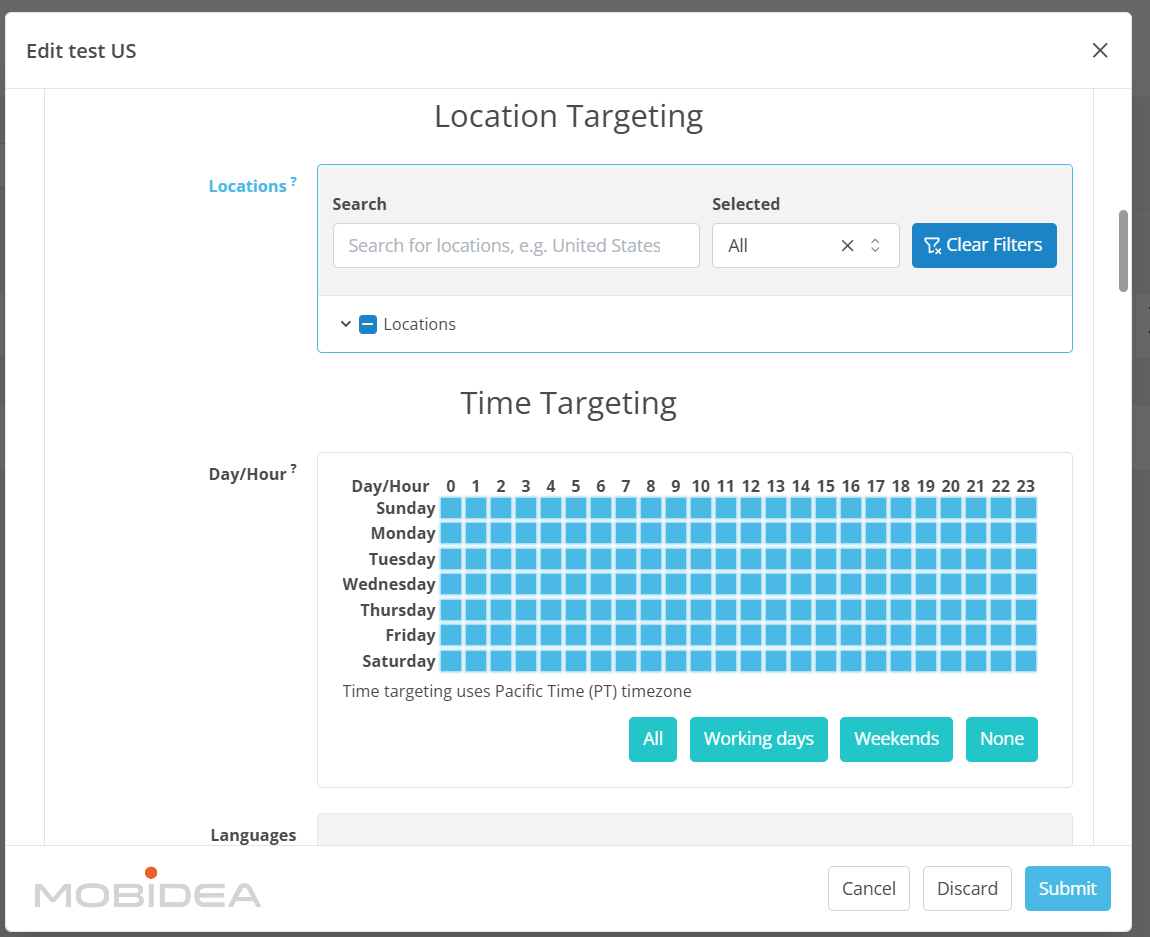
Yeesshh provides several targeting parameters:
- Geographic Targeting: Country-level targeting with the ability to drill down to specific zip codes. This granular location targeting proves particularly valuable for local offers or when testing specific regional markets.
- Time Frame Targeting: Schedule when campaigns run, either by specific hours of the day or days of the week. This feature helps optimize budget spend during peak conversion times.
- Device Targeting: Separate campaigns for mobile and desktop, or combine both. You can also select specific brands of device such as Apple, Samsung, etc.
- Operating System: Target specific operating systems including Windows, MacOS, Linux, Android, iOS, and others. This helps when promoting OS-specific software or when historical data shows certain operating systems convert better for particular offers.
- Browser Targeting: Select which browsers see campaigns, useful for browser-specific extensions or when data indicates certain browsers deliver better performance.
- Connection Type Targeting: Choose between Wifi/Cable and Cellular, or both.
- Carrier Targeting: For mobile campaigns, target specific mobile carriers. According to Yeesshh, carrier-targeted mobile campaigns are among their best performers, particularly for VPN and security download offers.
- Keyword Targeting: Target campaigns based on keywords, with support for negative keywords to exclude unwanted traffic. This allows campaigns to appear on contextually relevant publisher pages.
- Language Targeting: Reach users based on their browser language settings, ensuring ads appear to audiences who can understand the offer.
- Keyword Targeting: This allows you to only show your ads on pages that contain the keyword that you place.
The combination of these targeting options allows for detailed campaign segmentation, though it’s worth noting that more restrictive targeting typically reduces available traffic volume and may increase costs.
Auto-Blacklister and Campaign Optimization
One of Yeesshh’s most valuable features for performance advertisers is the auto-blacklister.
This automated optimization tool removes non-converting traffic sources without manual work.
How it works: Once server-to-server (S2S) conversion tracking is set up, the auto-blacklister monitors each SubID’s performance.
When a Feeds SubID receives the set number of clicks (that you set) without generating a conversion, it automatically gets blocked from the campaign.
The system updates every 60 minutes and runs 24/7.
This automated approach saves a lot of time compared to manual blacklist management while ensuring budget gets spent only on traffic sources showing conversion potential.
However, the auto-blacklister requires proper S2S tracking setup to function—without conversion data flowing back to Yeesshh, the feature cannot work.
Fraud Protection and Chargeback Policy
Beyond the automated bot filtering mentioned earlier, Yeesshh uses several anti-fraud measures.
The platform runs JavaScript tests on each impression before sending traffic to campaigns.
These tests detect bot behavior and find problems that suggest non-human traffic.
Known bot networks, spam IP ranges, and proxy IPs from databases like SpamHaus, SORBS, and Barracuda are blocked before traffic reaches campaigns.
Integration with Botman, announced in 2020, adds another verification layer.
This SaaS platform specializes in AdTech fraud verification and helps identify advanced fraud attempts that might bypass standard filters.
Importantly, Yeesshh offers a chargeback policy for fraudulent traffic.
If advertisers identify suspicious traffic and can document it with required data, they can request a chargeback by emailing admin@yeesshh.com with the subject “Chargeback Request.”
The platform states they take full responsibility for fraud that slips through their filters.
However, it’s important to note that this chargeback policy appears to apply specifically to fraudulent traffic, not to traffic that simply doesn’t convert.
The platform’s terms clearly state that traffic purchased at fixed CPM rates is non-refundable regardless of performance.
This difference matters: poor performance doesn’t qualify for refunds, but documented fraud does.
Integration with Some Tracking Platforms
Yeesshh integrates with a few tracking platforms used by performance advertisers, including Voluum, LandingTrack, and PeerClick.
For advertisers using these tracking platforms, the integration makes campaign management easier and provides complete reporting across all traffic sources in one dashboard.
If your tracking platform is not included here, you can still establish S2S integration, but you’d have to check the proper macros for it to work.
The platform also supports Google Tag Manager (GTM) for those tracking conversions through Google Analytics, and provides conversion tracking scripts for advertisers who own all properties in their funnel.
Minimum Budgets and Recommended Settings
Yeesshh requires a minimum deposit of $100 to start advertising.
However, the platform recommends much higher budgets for effective testing:
- Minimum test budget: $120 over 3 days
- Recommended daily budget: $50/day (about 40,000 impressions/day)
These recommendations reflect the volume needed to gather enough data for optimization decisions.
Running campaigns below these thresholds may not generate enough traffic to properly check source performance or figure out which SubIDs should be blacklisted.
How to Start Advertising with Yeesshh
Getting started with any new traffic source involves several steps: registration, funding the account, understanding the dashboard, and creating the first campaign.
This section walks through the complete process for launching campaigns on Yeesshh.
Account Registration
Visit yeesshh.com and click on the “Get Traffic Now” or advertiser registration option. The registration process is straightforward and doesn’t require extensive verification upfront.
Fill out the registration form with basic information including name, email address, and password.
Unlike some networks that require business documentation during registration, Yeesshh allows immediate access to the platform after email confirmation.
After submitting the registration form, check the email inbox for a confirmation message. Click the verification link to activate the account and gain access to the advertiser dashboard.
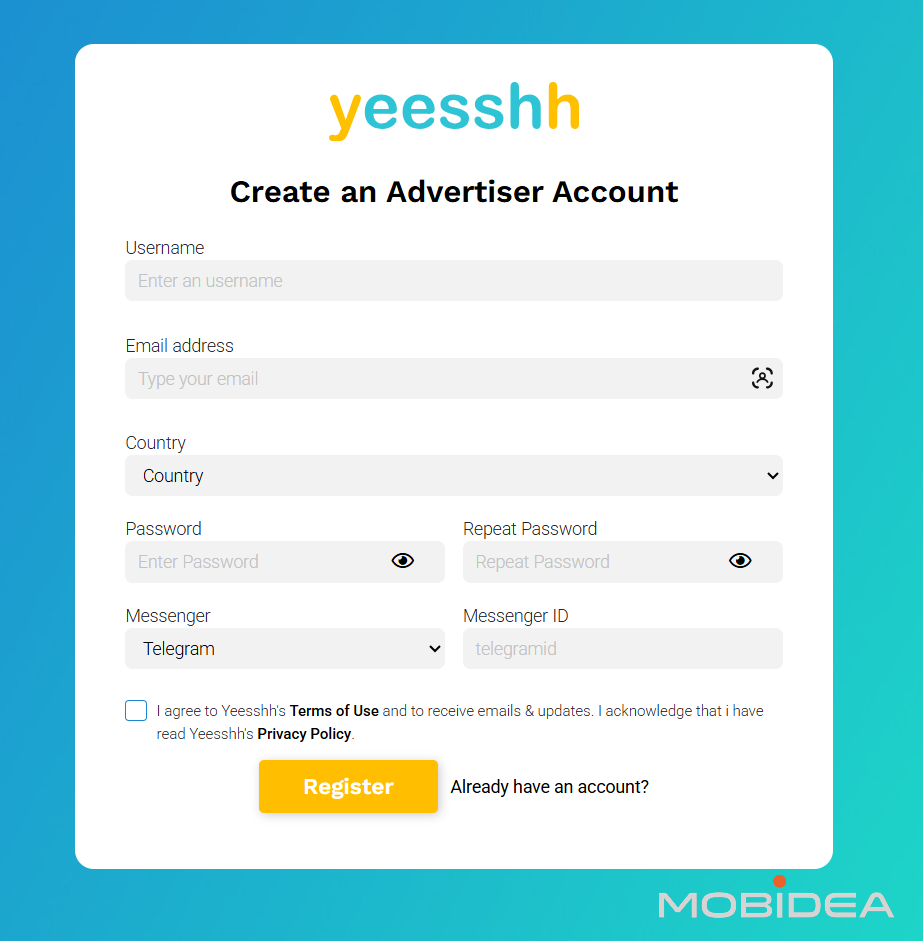
Upon first login, Yeesshh automatically asks you to create a campaign, even without any funds added yet.
Not to worry as you can simply set a test campaign and leave it paused so that it won’t run or be sent to moderation.
Funding Your Account
Before running any campaigns, the account must be funded.
Click the “Funds” button in the top-right corner to view available payment methods. You’ll arrive at the very simplistic payment page.
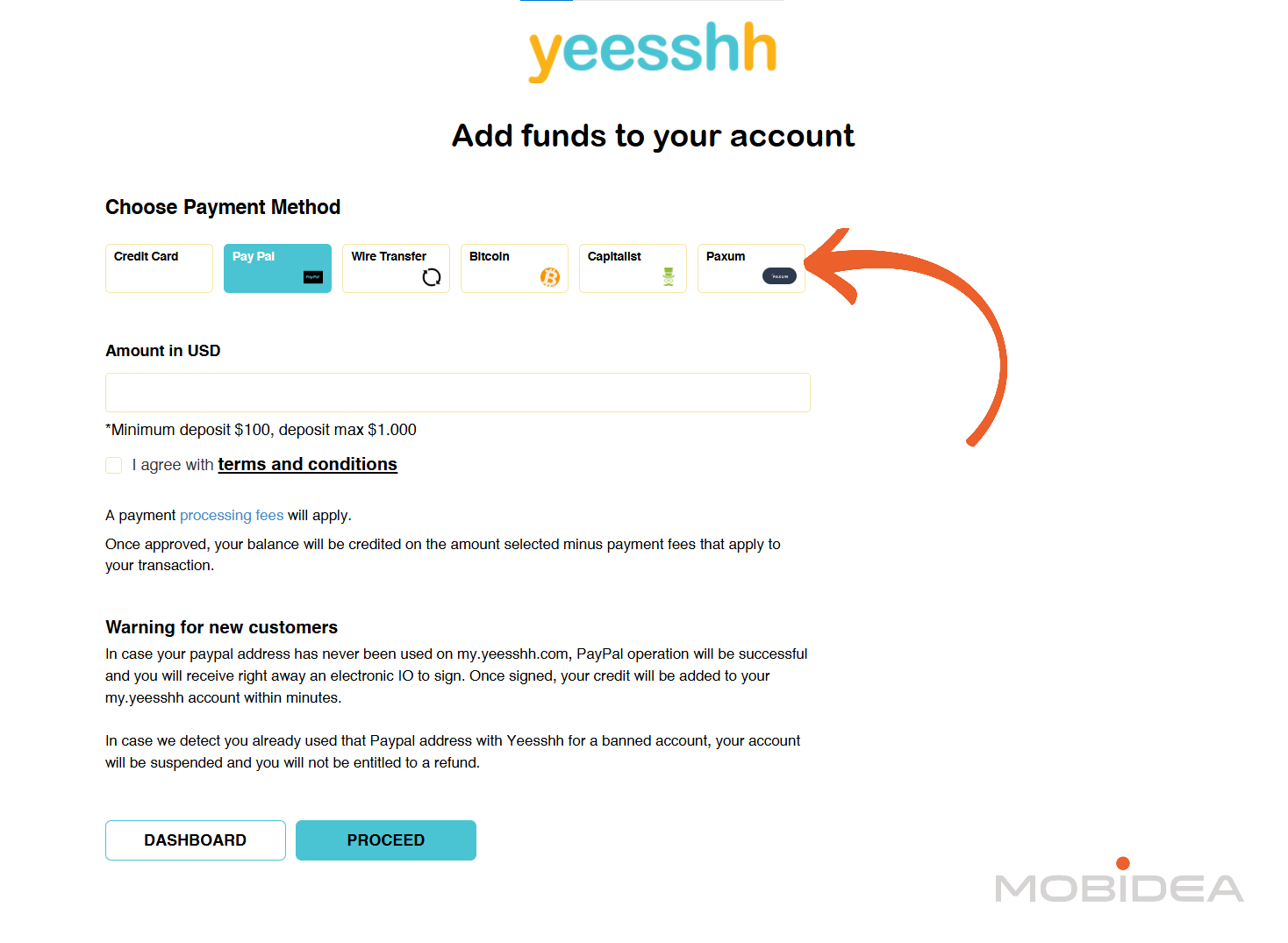
Side Note: What we’ve noticed is that when clicking some of the menu options, such as Funds and New Campaign, the whole dashboard disappears: no more menu options or even footer. Just as shown in the image above.
If you’d like to go back to the main platform, click on the Dashboard button.
Yeesshh accepts several payment options:
- 3DS Credit Cards: Credit card payments with 3D Secure authentication. Processing takes about 5 minutes for DSP accounts.
- PayPal: Quick processing (about 5 minutes for DSP accounts), but limited to deposits up to $1,000 per transaction. If the PayPal email differs from the account registration email, funds may be temporarily held until a new insertion order (IO) is signed.
- Bitcoin: Cryptocurrency payments for those preferring to fund accounts with digital currency. Processing times vary based on blockchain confirmation speeds.
- Wire Transfer: Minimum deposit of $1,000. Requires requesting an invoice through admin@yeesshh.com, then completing the bank transfer. Processing takes longer than electronic payment methods.
- Paxum and Capitalist: Alternative electronic payment processors supported by the platform.
The minimum deposit to start advertising is $100.
Important note: Payment processing fees apply depending on the chosen method.
Remember to visit the links to the corresponding payment method of your choice to determine the processing fee.
Visit this link to view accurate fee information.
Once payment is submitted, processing times vary by method. PayPal and credit card deposits typically process within minutes, while wire transfers may take several business days.
Use the promotional code MOBI25 when making your first deposit of $100 or more to receive a $15 bonus.
Once done topping up with at least $100, send an email to support@yeesshh.com and indicate your account ID to get this bonus.
Understanding Traffic Volume and Pricing
Before creating campaigns, exploring the volume and bid pages provides valuable insight into available traffic and current market rates.
Using the Volume and Bids Tools
Navigate to yeesshh.com/volumes-and-bids-mobile/ for mobile traffic data or yeesshh.com/volumes-and-bids-desktop/ for desktop traffic data.
These tools are accessible without registration, allowing research before committing any budget.
Each page presents a comprehensive table showing:
- Country: Listed alphabetically for easy navigation
- Available Daily Volume: Estimated number of clicks or impressions available per day for that country
- Current Average Bids: Market rates showing what advertisers are currently bidding for traffic in each geography
The data covers only “known browser” traffic, meaning traffic from recognized, legitimate browsers.
Any traffic segments delivering fewer than 1,000 clicks per day are filtered out of the statistics to ensure data relevance.
How to Use These Tools Strategically
Budget Planning
Before launching campaigns, check available volume for target countries. If planning to spend $100 per day at $2 CPM, you’ll need approximately 50,000 impressions available.
The volume data confirms whether sufficient traffic exists to support your budget.
Bid Strategy Development
The average bid prices serve as a starting point for campaign bids.
Bidding below the average may result in limited delivery, while bidding significantly above average could indicate overpaying.
Starting near the suggested average, then adjusting based on actual delivery and performance, typically works well.
Market Opportunity Identification
Countries showing high volume with low average bids might represent testing opportunities.
Conversely, high-demand countries with elevated bids signal competitive markets where profit margins might be tighter.
Geographic Diversification
When one geography shows limited volume, the tools help identify alternative countries with similar characteristics but better volume availability.
For instance, if UK traffic is limited, examining other English-speaking countries might reveal opportunities.
Seasonal Trend Monitoring
Returning to these pages regularly reveals changes in traffic availability and pricing.
Volume increases or bid decreases might indicate growing inventory, while volume drops or bid increases suggest increased competition or reduced publisher availability.
Mobile vs Desktop Comparison
Comparing the mobile and desktop pages for the same country shows which device type offers better volume or pricing for specific markets.
Some countries heavily favor mobile usage, while others show stronger desktop traffic.
Statistics are based on the last 2 days average and update regularly, meaning the data reflects current market conditions rather than historical averages.
Bids shown are specifically for known browser traffic.
This real-time approach provides more actionable intelligence than static rate cards, though it also means conditions can change between research and campaign launch.
Pro Tip: Before creating any campaign, spend 10-15 minutes on these pages analyzing target countries.
Document current volumes and average bids. When creating campaigns, set initial bids slightly above the averages shown.
After 24 hours, compare actual delivery against the volume estimates to gauge whether bids need adjustment.
Setting Up Conversion Tracking
Before creating campaigns, it’s highly recommended to set up conversion tracking.
Yeesshh provides a dedicated “How To Set Up Tracking” section in the left sidebar of the dashboard that explains the process.
Yeesshh provides integration guides for several tracking platforms including:
- Adnovation
- LandingTrack
- Google Tag Manager
- PeerClick
- Voluum

Note: The platform displays logos for these trackers with instructions to “Click on your tracking platform below to see full instructions.”
Tracking Parameters
Aside from conversion tracking, there are many other parameters you can add to your campaign URL for more detailed tracking.
Available tracking tokens include:
- {pubfeed} – Publisher Feed ID
- {original_subid} or {subid} – Source SubID
- {bid} – The cost of the visit
- {conversion} or {click_id} – Unique ID for conversion tracking
- {campaign} – Campaign ID
- {keyword} – Keyword matched on campaign
- {banner} – Ad ID
- {ip} – User IP address
- {country_code} – User country code
- {cost_type} – Cost model type
- {cost_amount} – Cost amount
- {cost_currency} – Cost currency
- {referrer_domain} – Publisher referring domain
Configure these tokens in your tracking platform’s traffic source settings to pass the data correctly.
Note that this is not the full list. You’ll actually find the complete set of tokens when setting up a campaign.
Creating Your First Campaign
With the account funded, research completed, and tracking set-up, it’s time to create a campaign.
Click on “New Campaign.”
Keep in mind that initial campaign setup is very basic. If you don’t find the targeting settings you are looking for, don’t panic.
They’ll be available once your campaign has been created.
Step 1: Campaign Settings

The first screen asks for basic campaign information:
- Campaign Name: Enter a descriptive name using a clear format. For example: “US_Mobile_Mainstream” or “UK_Desktop_VPN”.
- Campaign Status After Approval: Choose whether the campaign should be “Active” (starts immediately after approval) or “Paused” (requires manual activation after approval). I recommend choose Paused so you can further adjust the target settings before allowing it to go live.
- Device Selection: Choose between “Mobile” or “Desktop”. Creating separate campaigns for each device type typically performs better as it allows device-specific optimization and bid management.
Step 2: Traffic Type
Choose your traffic quality level:
- Standard Pops: Regular pop traffic at standard rates, suitable for most campaigns and testing.
- Premium Pops: Higher-quality traffic at premium rates, offering better engagement but at increased cost.
- Rotator: Traffic rotation option for distributing impressions across multiple campaigns or offers.
Step 3: Country & Bid
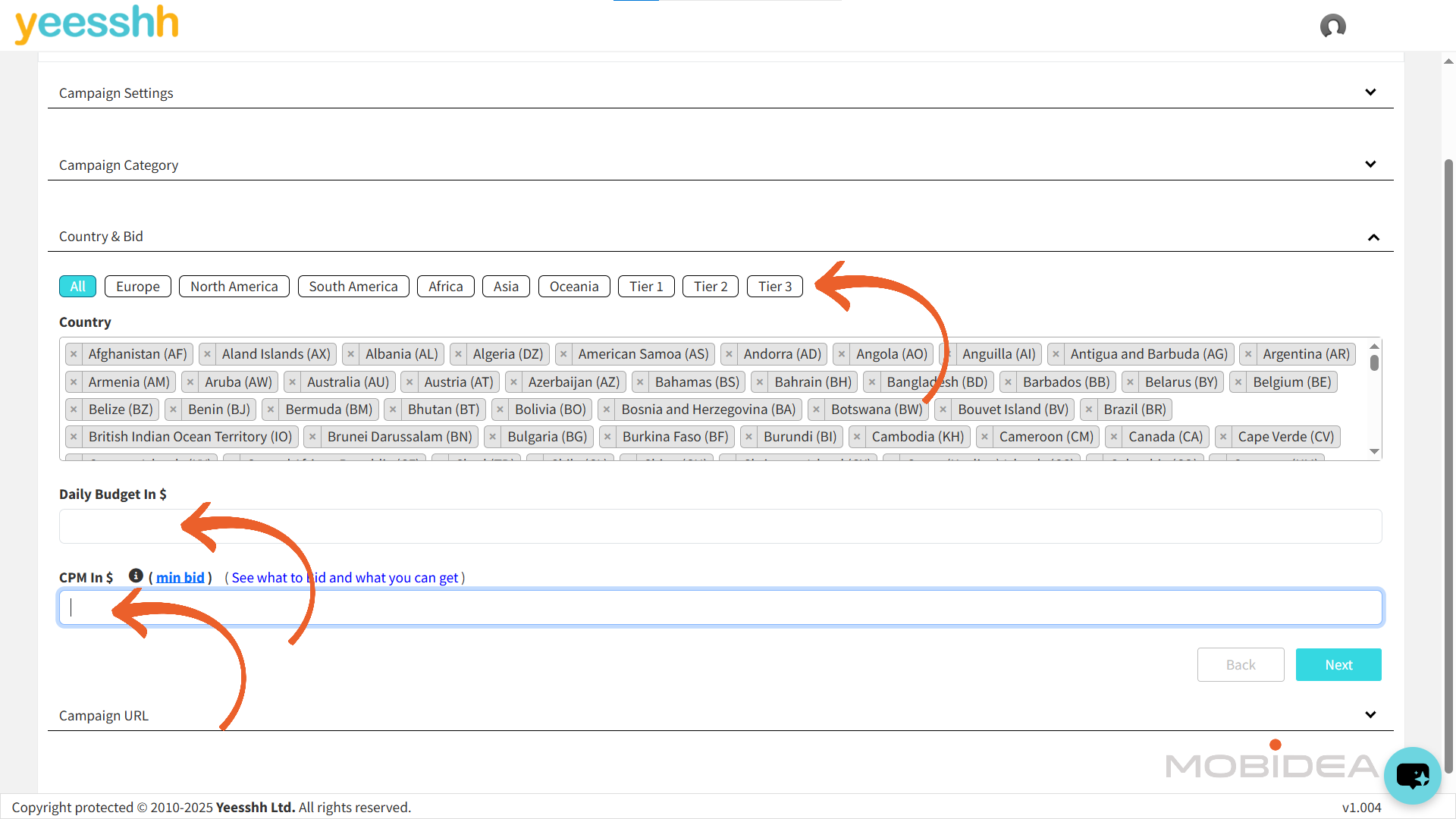
- Country Selection: The platform provides quick filters for “All,” “Europe,” “North America,” “South America,” “Africa,” “Asia,” “Oceania,” and tier-based selections (Tier 1, Tier 2, Tier 3).
Select your target countries from the comprehensive list. You can choose multiple countries for a single campaign.
- Daily Budget in $: Set your daily spending limit. While optional, setting a daily budget helps control costs.
The platform recommends at least $50/day (about 40,000 impressions/day) for meaningful testing.
- CPM in $: Enter your bid amount in CPM. Use the information you gathered from your earlier traffic volume and bid research when placing a bid.
Step 4: Campaign URL and Tracking

- Campaign URL: Provide the campaign’s URL. According to the platform, “It should lead to the offer page.”
This is where you’ll paste your tracking link (if using a tracker) with all the parameters configured in the tracking setup section.
If not using a tracker, place your direct landing page or offer URL here.
- Parameters: The platform displays a comprehensive list of available tracking parameters you can use.
These include parameters like request_id, traffic_source, campaign_id, country, ad_id, browser, device_type, and many others.
Select the parameters you need and apply them to your tracking platform for more accurate stats and data.
- Conversion Postback URL: This field shows the postback URL format: https://xml.yeesshh.com/conversion?c={your_clickid}.
This changes if you select a different tracking platform from the buttons below.
- Tracking System: Select your tracking platform from the available options: Voluum, PeerClick, AdNovation, Landing Track, or “Other” for custom tracking setups.
This helps generate the correct conversion postback URL format.
- Click ID Parameter Name: Enter the parameter name your tracking platform uses for click IDs. For example, if using Voluum, you might enter “clickid”.
This tells Yeesshh which parameter contains the unique click identifier for conversion tracking.
- Conversion Value: Specify the value of your conversion. This helps Yeesshh optimize bids based on your target payout.
If you’re not passing dynamic conversion values, you can leave this as a static number.
Step 5: Review and Submit
Click “Submit” to send your campaign for approval. Yeesshh moderates all campaigns before they go live for new clients. For established clients, or new clients that used Paypal as payment system, the campaign receives traffic immediately.
The approval process typically completes within one business day, though exact timeframes vary.
Campaigns must comply with the platform’s acceptable advertising policies. Once you’ve spent more than $2,000 in the platform, you can apply for auto-approval.
Step 6: Edit the Campaign
Now, to edit your campaign to reflect the targeting settings you want, you’ll need to click on the pencil icon next to the campaign you want to edit.
Or you can also click on the campaign name.
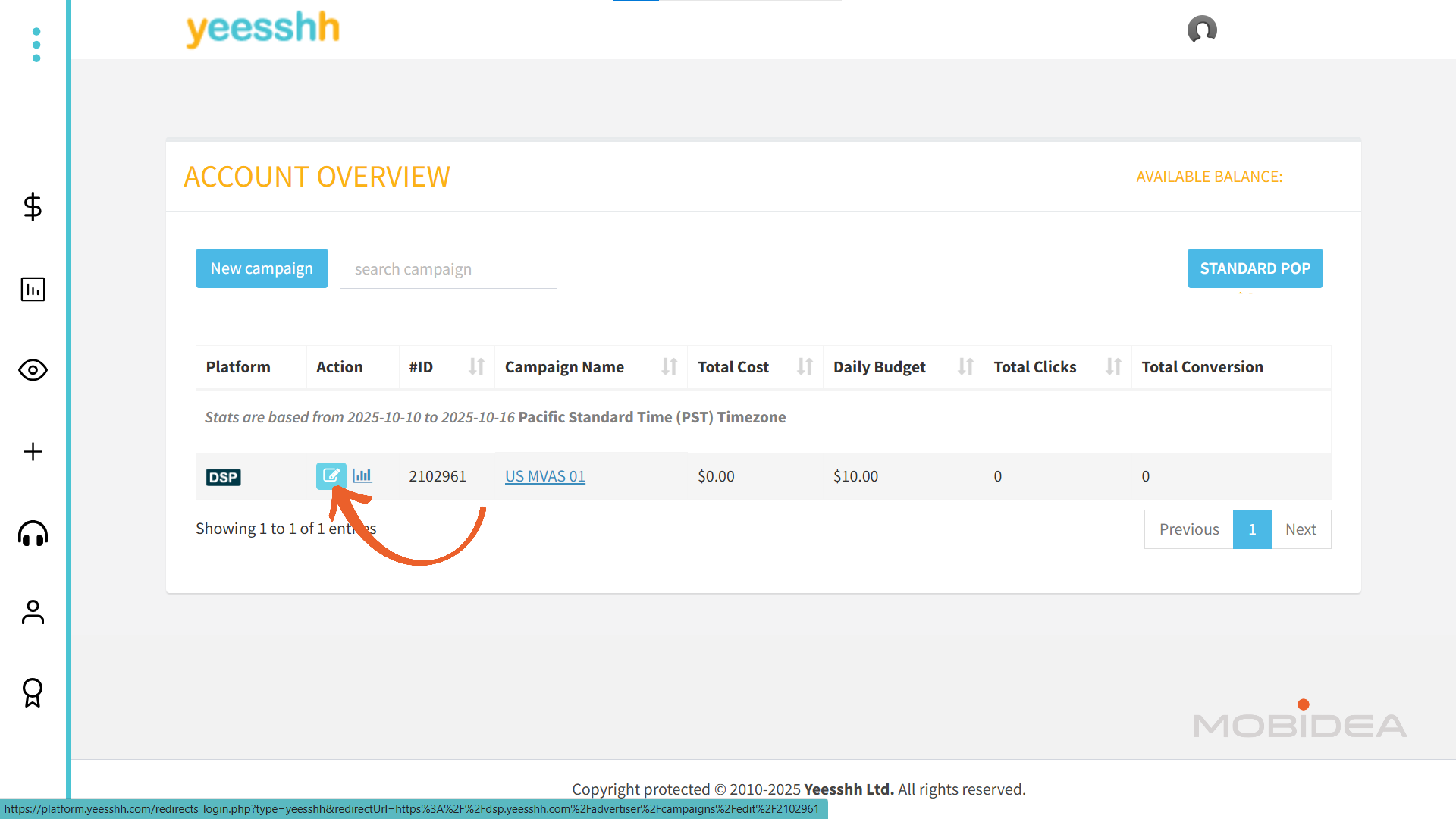
After clicking, a pop-up window will appear, but you’ll be sent to a totally different dashboard as you’ve seen so far.
This is your real DSP dashboard. You’ll find the campaigns you’ve created so far. New menu options will also appear, but we’ll discuss those later.
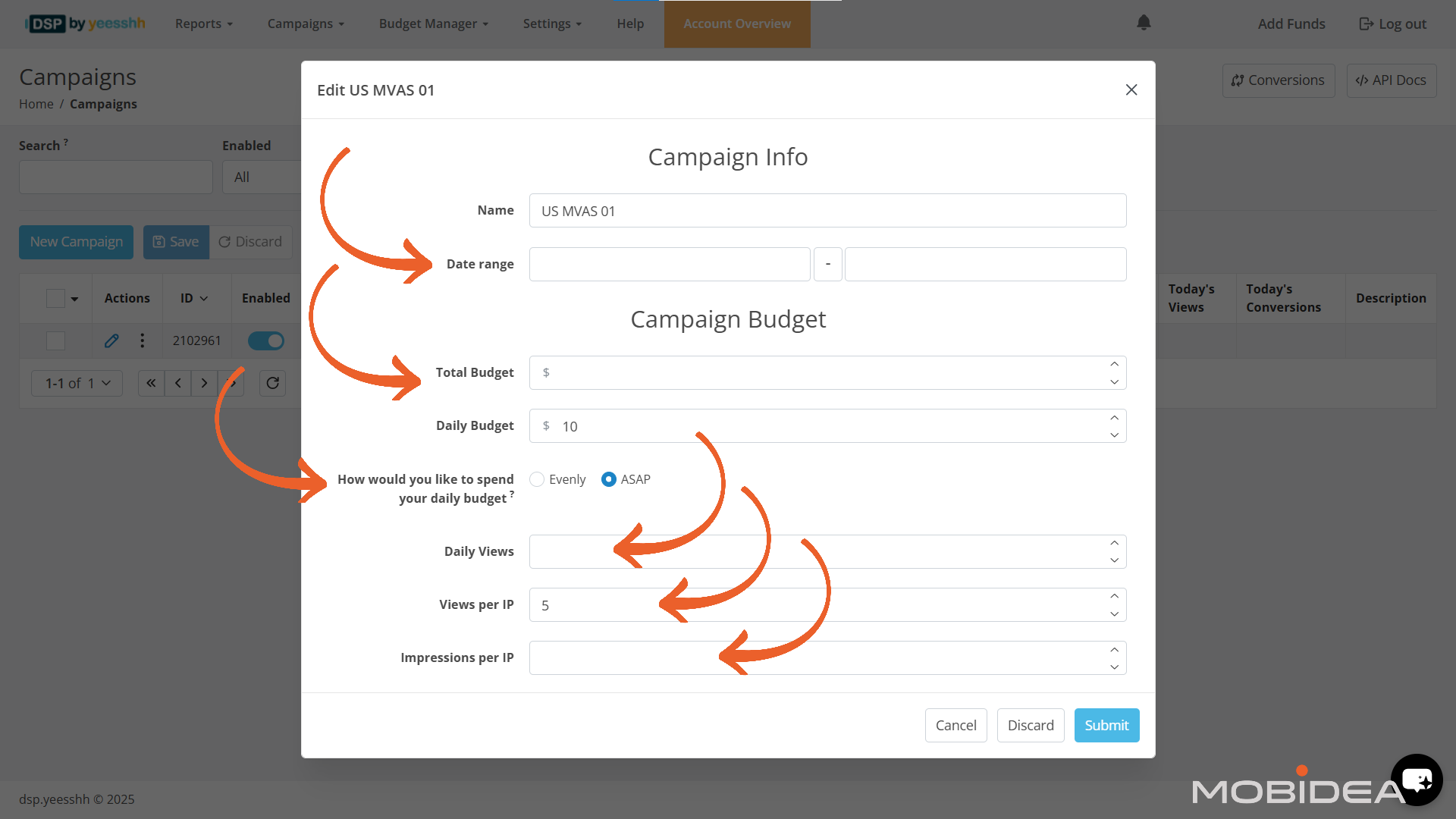
The campaign edit window is now shown, and as you can already see, the options are more comprehensive. You can start editing.
Set the campaign date range if running time-bound promotions. Otherwise, leave this field blank for ongoing campaigns.
Configure budget settings:
- Total Budget: Can be left blank or set to a high amount. For testing, the minimum recommendation is $120 over 3 days.
- Daily Budget: Minimum of $50/day recommended (approximately 40,000 impressions/day). This ensures sufficient traffic volume for meaningful optimization data.
Choose the start delivery option. Selecting “Start Immediately” (ASAP) begins traffic delivery as soon as the campaign is approved and funded.
Set frequency capping through the “Views/Clicks per IP” field. The recommended setting is 5 views per IP address, balancing exposure with avoiding user fatigue.
Once done, click on save.
Now, that’s not enough, right?
In your new dashboard, click on the pencil (edit) icon again.
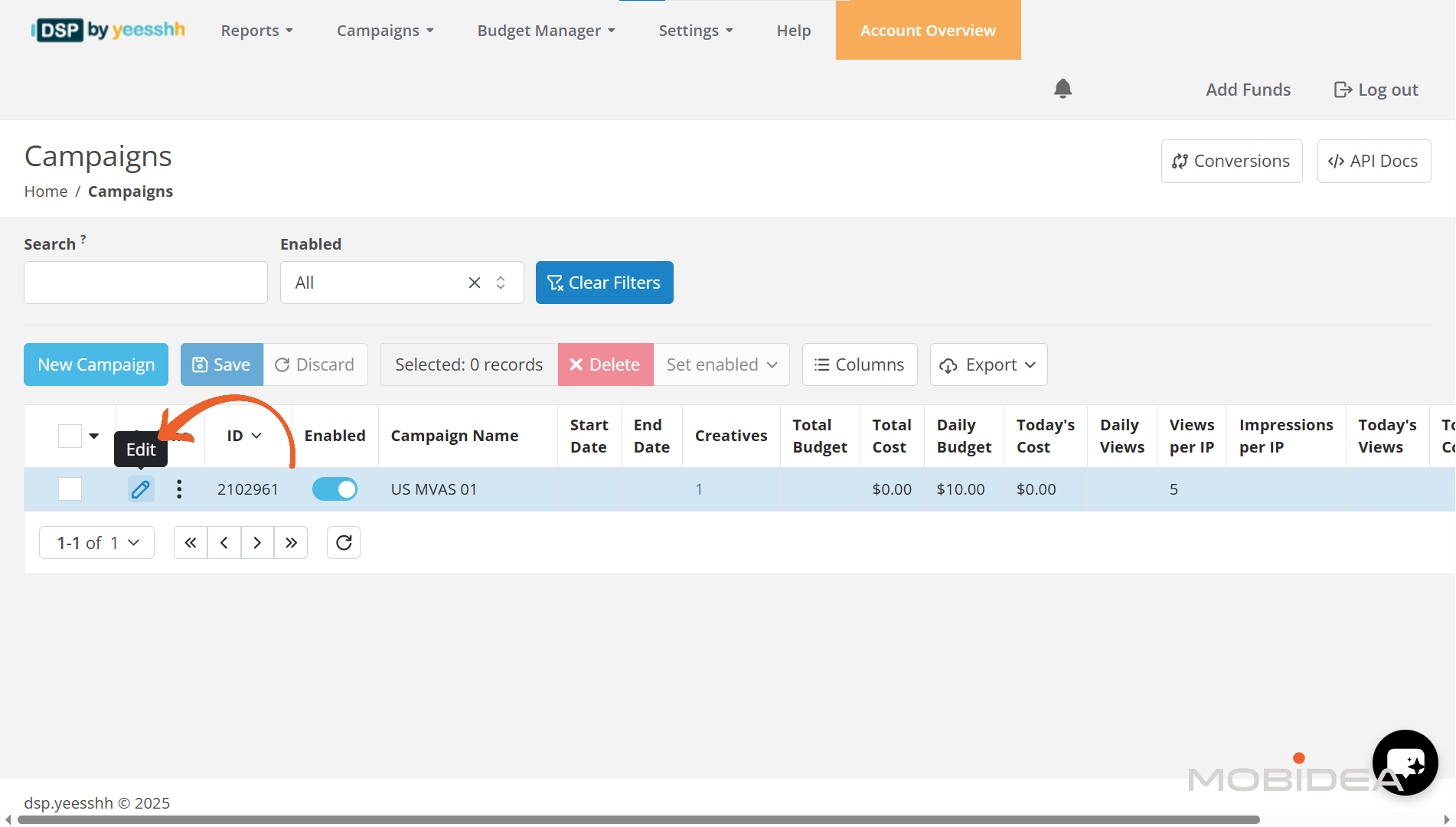
Surprise, surprise! Upon scrolling down the Campaign edit window, you’ll find new options. These are Ad Group Targeting, Keywords, and TQ & Analytics.
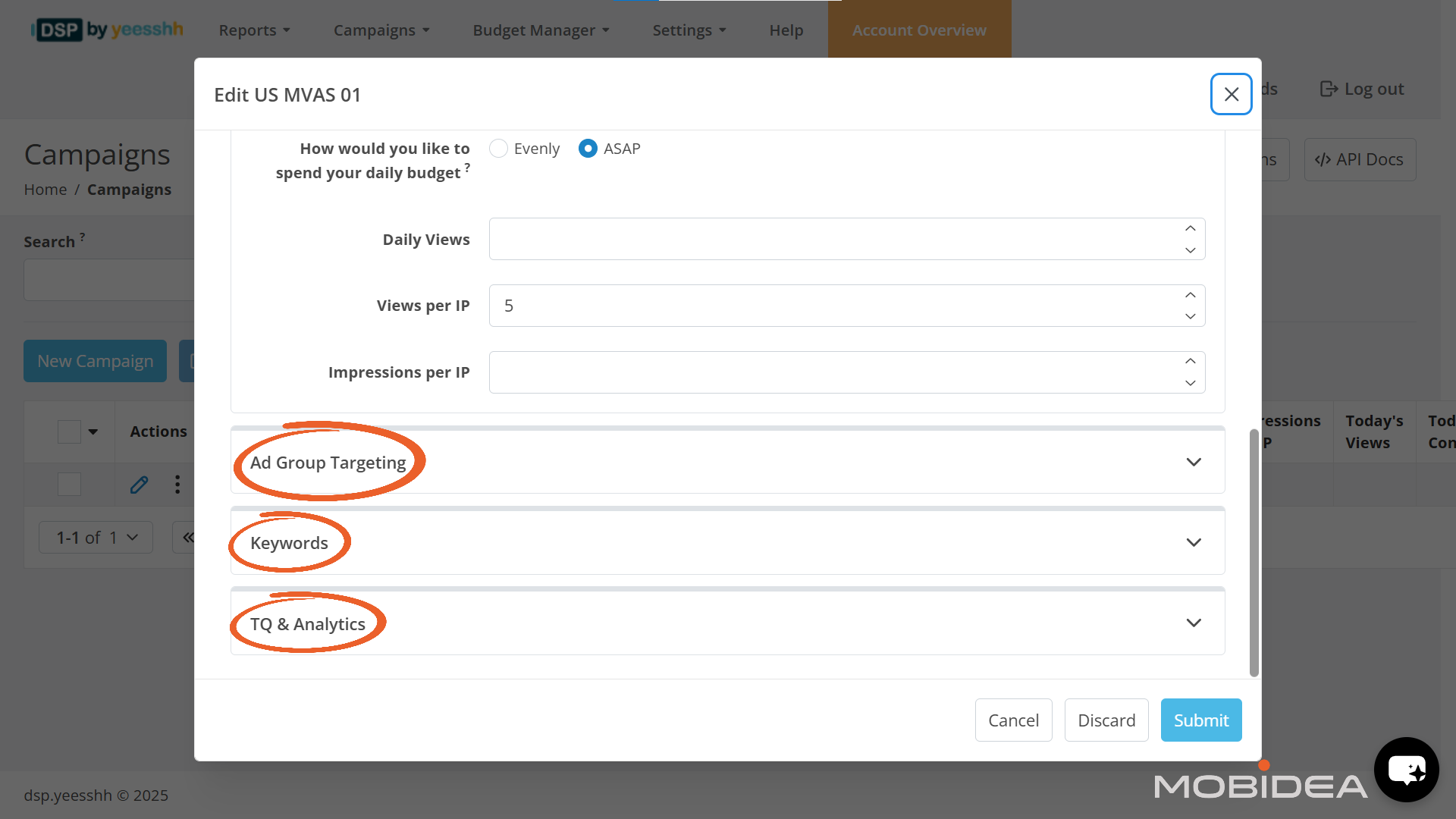
Targeting Configuration
This includes:
- Geography (country, state/region, city, zip code)
- Dayparting (time targeting, schedule based on days of the weeks and times of the day)
- Languages
- OS
- Device type (desktop, mobile, tablet, console, etc.)
- Device brand
- Browser
- Connection type
- Carriers
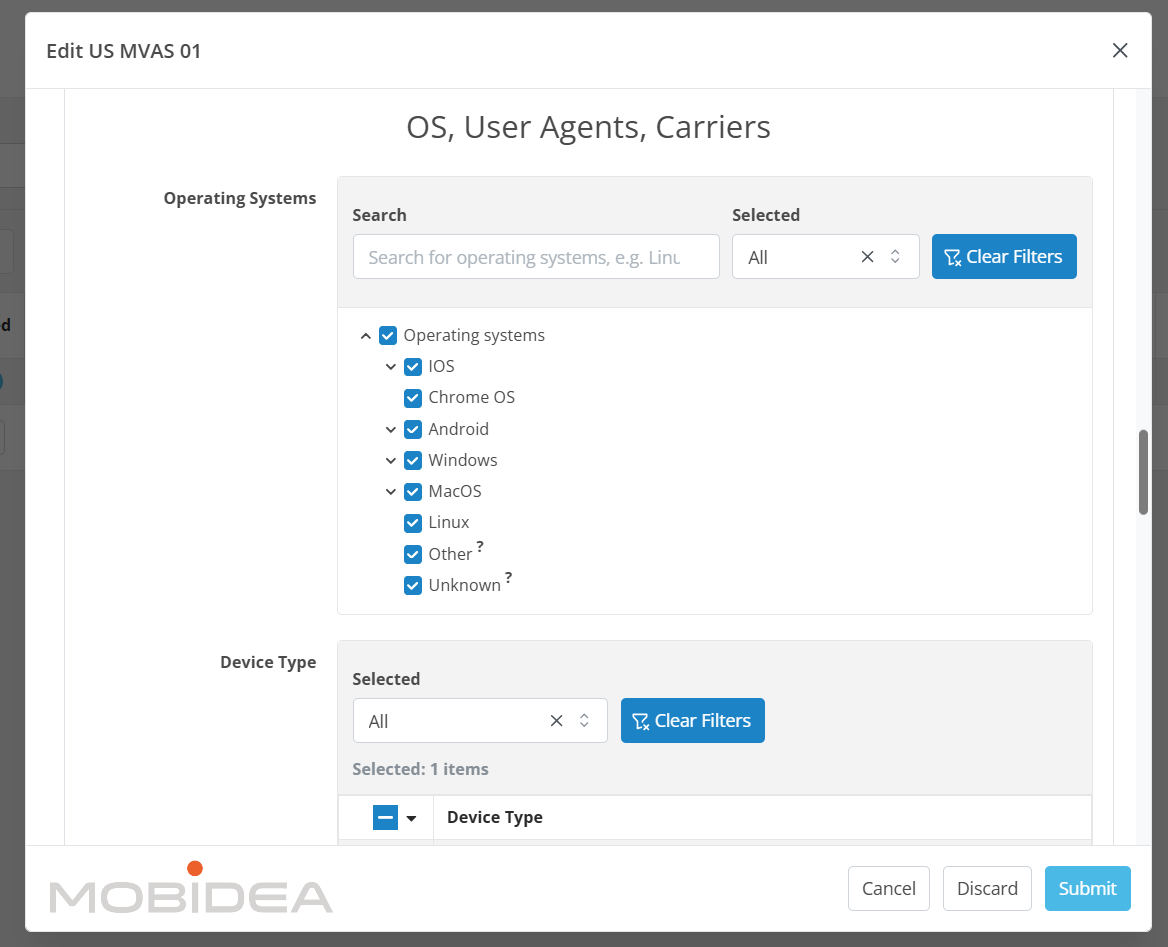
Keyword Targeting (Optional)
Yeesshh offers keyword targeting to show your ads on contextually relevant publisher pages. This section is optional but can improve campaign relevance.
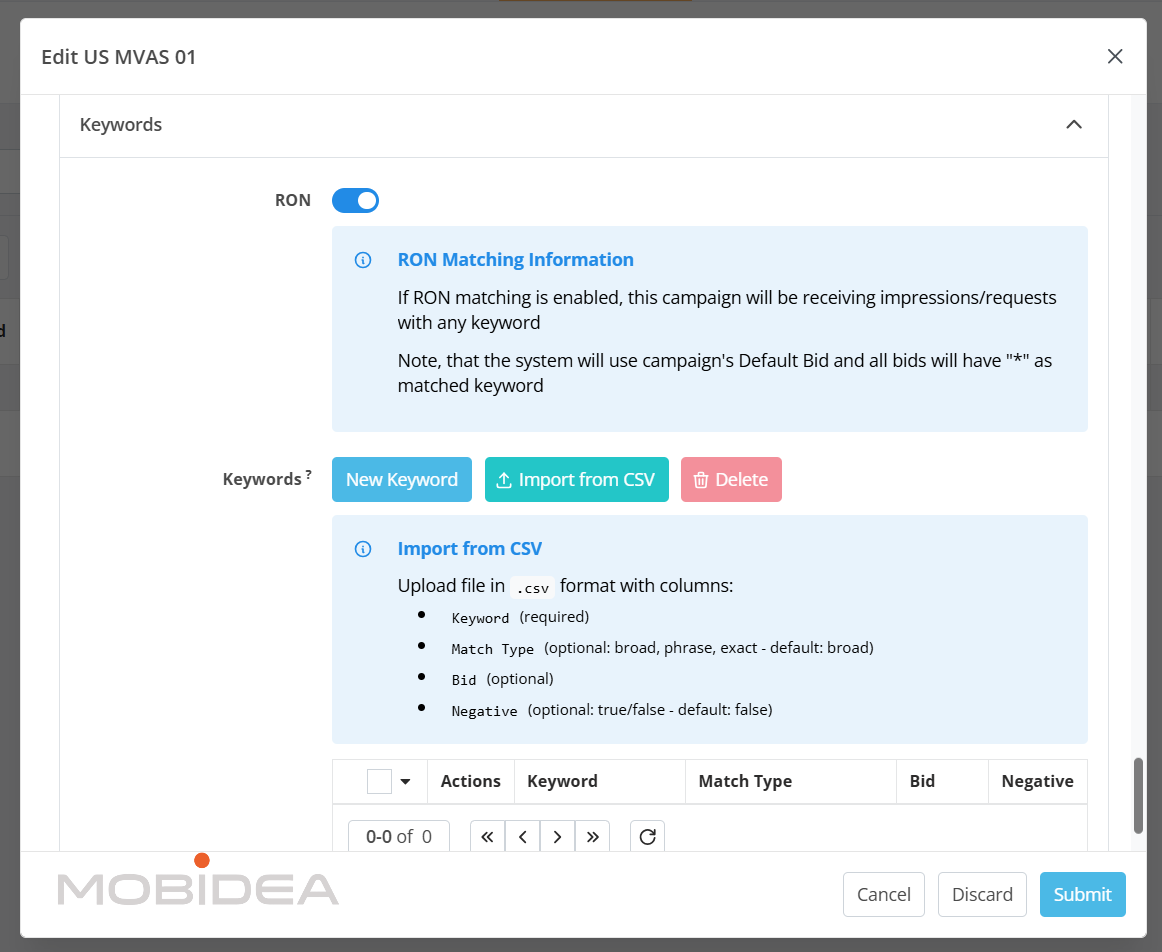
RON (Run of Network): Toggle this switch to enable or disable RON matching.
When enabled, your campaign will receive impressions/requests with any keyword. This is useful for maximizing volume without keyword restrictions.
Adding Keywords: Click “New Keyword” to add individual keywords, or use “Import from CSV” to upload multiple keywords at once.
When importing from CSV, the file should include these columns:
- Keyword (required): The keyword you want to target
- Match Type (optional): Choose from “broad,” “phrase,” or “exact” – default is broad
- Bid (optional): Set a specific bid for this keyword
- Negative (optional): Set to true/false to create negative keywords (excludes your ads from showing on pages with these keywords) – default is false
Keyword Management: After adding keywords, you can view them in a table showing Actions, Keyword, Match Type, Bid, and Negative status.
Use the “Delete” button to remove keywords you no longer want to target.
TQ & Analytics
This is where you can optimize your campaigns by adjusting bids per subID or whitelist/blacklist feeds, or set goals for auto optimization, and more.
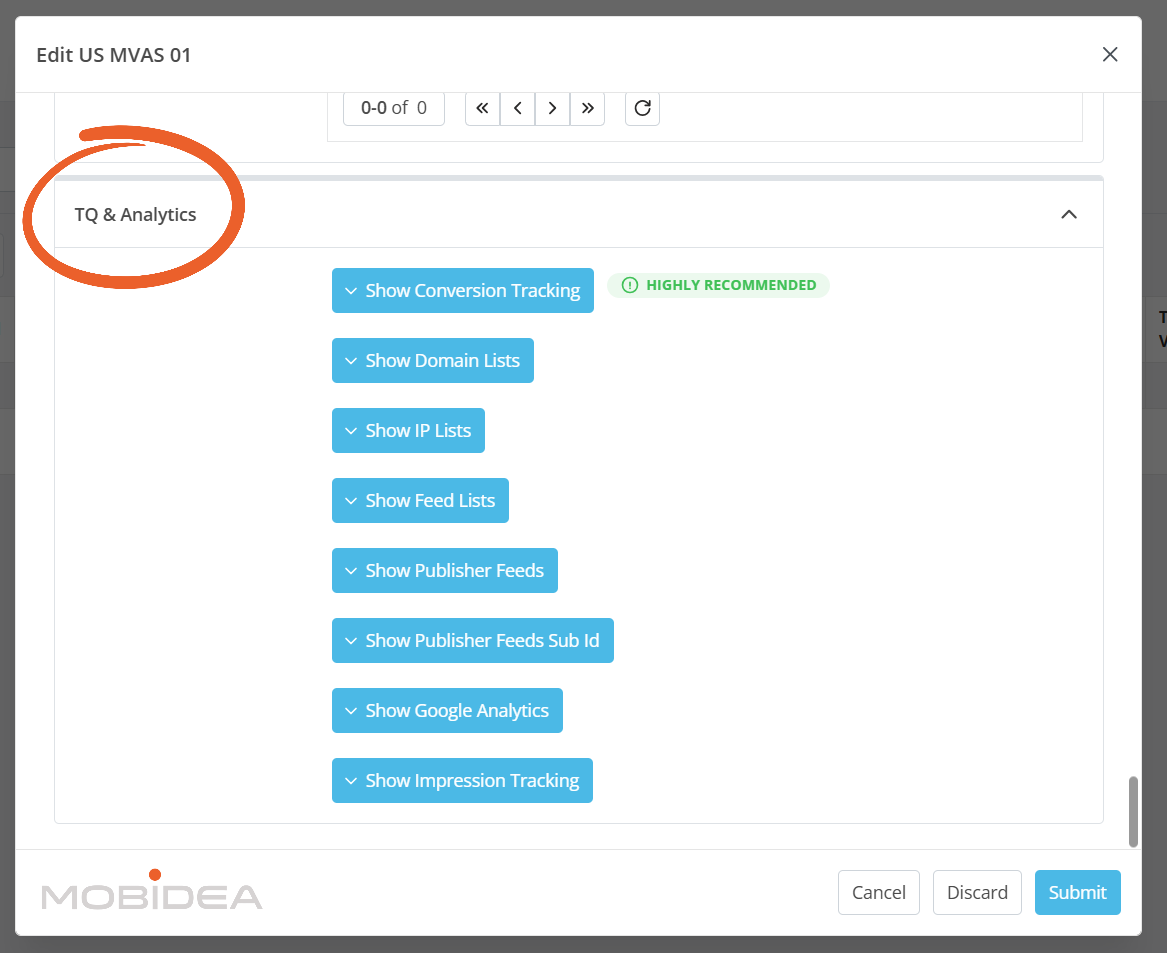
For setting a goal, click on Show Conversion Tracking.
Enter a goal name (can be any descriptive name) and set the conversion value. This tells Yeesshh what to optimize toward when using auto-blacklister or auto-bidder features.
Without proper conversion tracking, the automated optimization features cannot function, significantly limiting campaign performance potential.
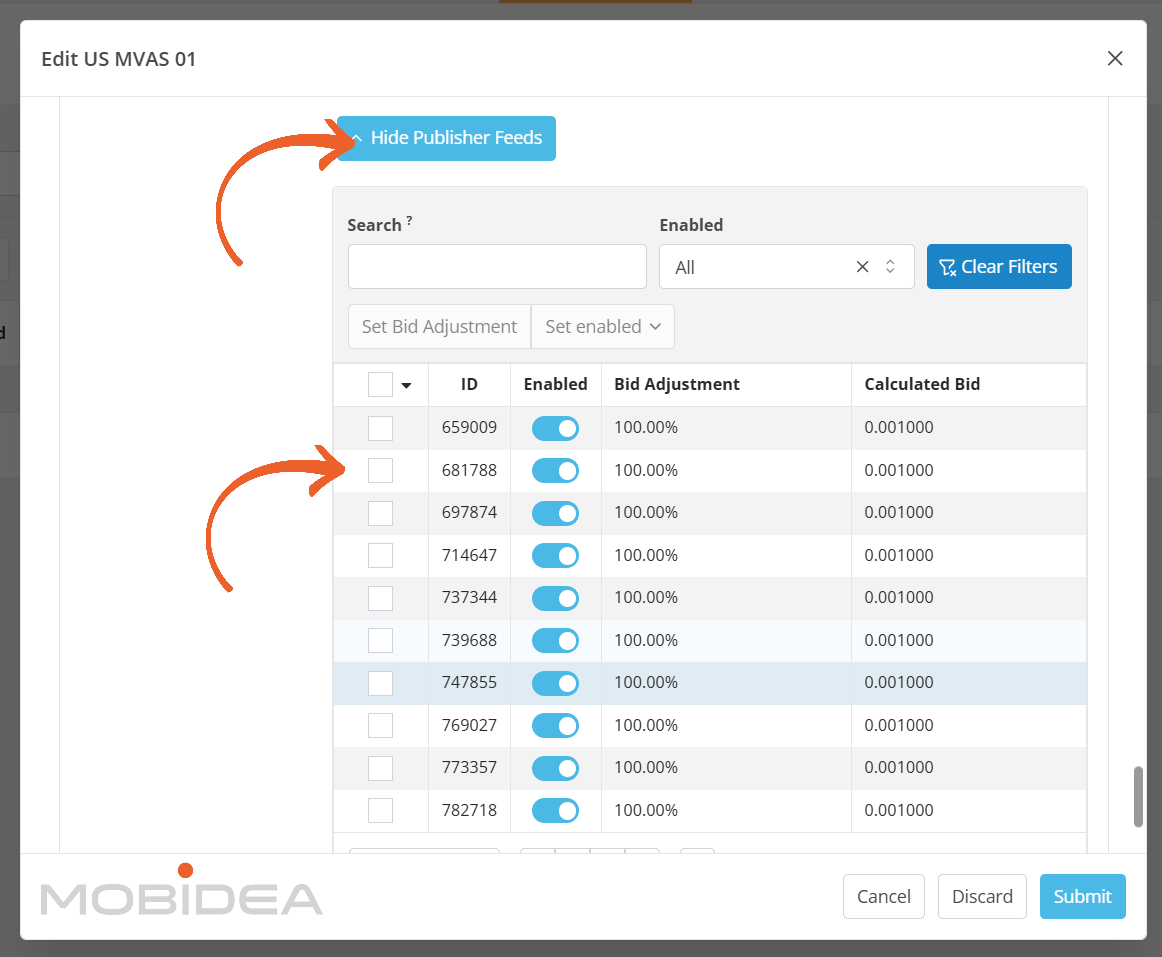
Other options are for whitelisting, or blacklisting, or for adjusting bids.
- Whitelist Only: Restrict traffic to specified SubIDs and publisher feeds. This approach works well after identifying top-performing sources through testing. Enter whitelisted sources in the format [pubfeed].[subid], one per line.
- Blacklist Specific Sources: Exclude particular SubIDs or publisher feeds while receiving all other traffic. Enter blacklisted sources in the format [pubfeed].[subid], one per line.
During initial testing, running all traffic makes sense to identify which sources perform well.
After gathering performance data, transitioning to whitelists or blacklists optimizes budget allocation.
Monitoring Campaign Performance
After campaigns launch, monitoring performance becomes important. Navigate to the Reports section of your DSP dashboard to access detailed performance data.
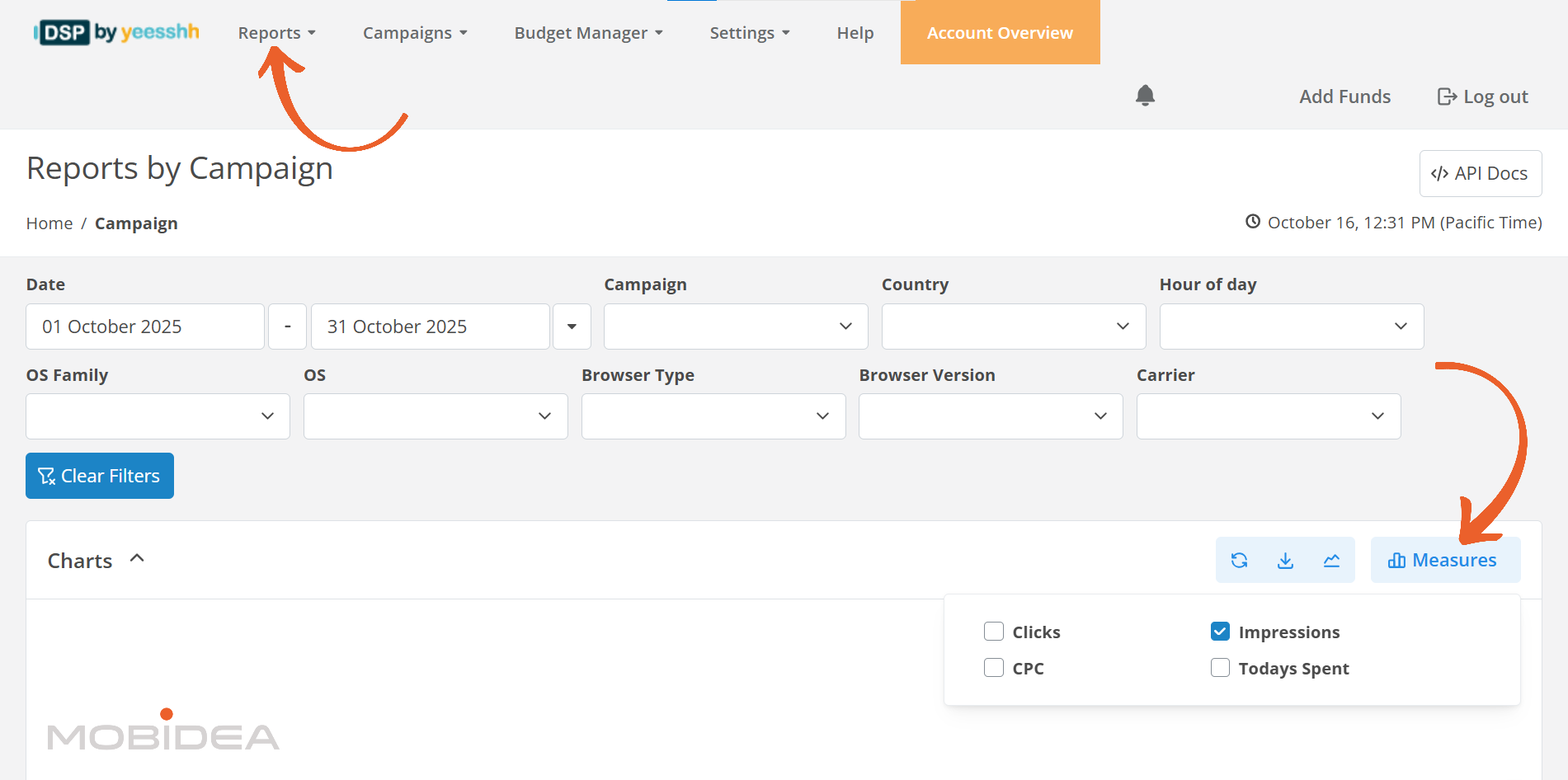
Reports can be broken down by:
- Campaign
- Country
- Hour of day
- Operating system
- OS Family
- Browser Type
- Browser Version
- Carrier
Charts can be shown based on Clicks, CPC, Impressions, and Todays Spent.
You can always adjust the columns in the reports.
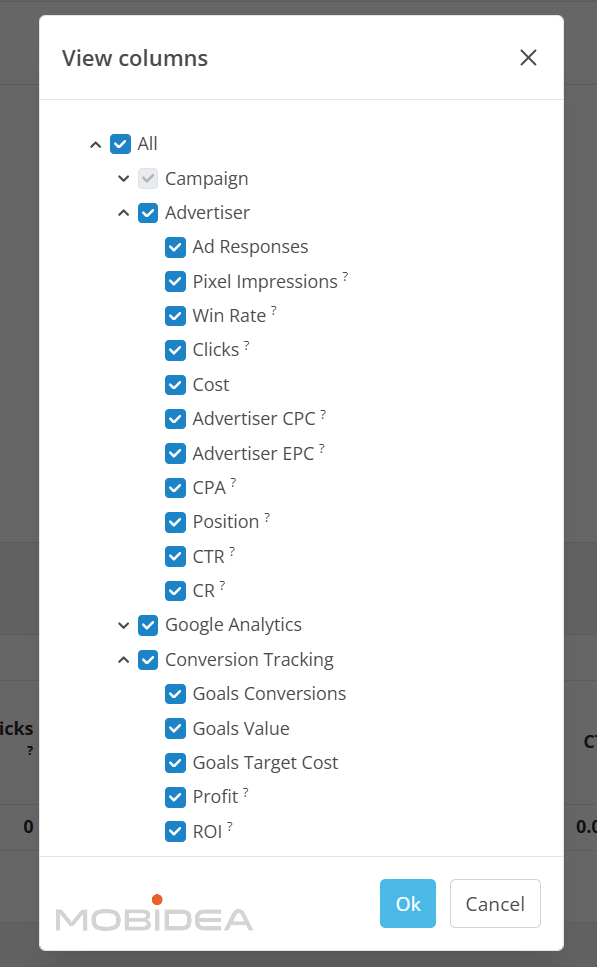
Properly set up tracking platforms provide more complete data including conversion rates, ROI, profit by source, and other advanced metrics.
Yeesshh Pros and Cons for Advertisers
Every traffic source has strengths and weaknesses.
Understanding both sides helps set realistic expectations and make informed decisions about whether Yeesshh fits your traffic strategy.
Pros
- High Traffic Volume: Claims over 5 billion daily impressions reaching 800 million users across mobile and desktop, providing substantial scale for testing and scaling campaigns.
- Automated Optimization Features: Auto-blacklister removes non-converting sources every 60 minutes, while auto-bidder adjusts bids based on performance, reducing manual optimization workload.
- Comprehensive Targeting Options: Geo targeting down to zip code level, carrier targeting for mobile, OS/browser selection, keyword targeting with negative keywords, device brand targeting, connection type, and dayparting support detailed campaign segmentation.
- Multiple Payment Options: Accepts PayPal, credit cards, Bitcoin, wire transfer, Paxum, and Capitalist, providing flexibility for advertisers worldwide.
- Business Credibility: Recognition by Financial Times as one of Europe’s fastest-growing companies suggests legitimate operations despite limited community visibility and long standing operations (since 2016) suggest legitimate operations, despite limited visibility amongst non pop specialists or CPA only buyers.
- Real-Time Bidding Updates: Bid adjustments every 100 seconds with thousands of CPC modifications provide active optimization at a granular level.
- Chargeback Policy Available: Offers chargeback policy for documented fraudulent traffic, providing recourse when fraud issues occur.
Cons
- Roundabout Targeting Setup: Initial campaign creation is very basic, requiring users to edit campaigns after creation to access comprehensive targeting options. This can be confusing for advertisers who need refined targeting and don’t want to fast-track campaign creation.
- Limited Online Presence: Despite running since 2016, minimal visibility in affiliate communities makes it difficult to research experiences or find support.
- Dedicated Account Manager Threshold: Personal account management only becomes available after spending $2,500 total. New advertisers get AI chat agent support.
Best Features of Yeesshh for Publishers
While this review mainly focuses on the advertiser side, Yeesshh also works as a monetization platform for publishers.
Understanding the publisher features provides a complete picture of how the network operates and what drives its traffic quality.
Revenue Share Model
Yeesshh operates on a straightforward 80/20 revenue split. Publishers receive 80% of what advertisers pay for traffic, while the platform retains 20% as its service fee.
If an advertiser pays $10 CPM for traffic from a publisher’s site, that publisher earns $8 CPM on that traffic.
Low Minimum Payout
The $5 minimum withdrawal threshold ranks among the lowest in the pop ad industry.
Most competing networks require minimums ranging from $20 to $100, making Yeesshh particularly attractive for smaller publishers or those just starting with pop monetization.
This low barrier means publishers can test the network and receive their first payment quickly, reducing the financial risk of joining.
It also improves cash flow for publishers operating multiple smaller sites rather than one large property.
Content Flexibility
However, websites must still meet quality standards.
Free hosting or free domain websites are not accepted.
This requirement ensures a baseline quality level across the publisher network, which theoretically benefits both advertisers (through better traffic quality) and publishers (through higher advertiser demand and rates).
Net 30 Payment Terms
Publishers receive payments on Net 30 terms, meaning earnings are paid monthly, 30 days after the end of each month.
For example, earnings from January would be paid by the end of February.
While this payment schedule isn’t the fastest in the industry (some networks offer weekly or bi-weekly payments), it’s standard for many ad networks and provides predictable payment timing.
Publishers can plan cash flow knowing exactly when to expect payments.
XML Feed Support
For publishers with technical capabilities, Yeesshh offers XML feed integration.
This allows for programmatic ad delivery without manually placing ad codes on each page.
Publishers can generate XML feeds during the approval process and integrate them into their sites.
XML feeds prove particularly valuable for publishers running multiple sites or those with dynamic content management systems.
The feed automatically delivers ads across pages without individual code placement, making implementation and maintenance easier.
Real-Time Statistics
The publisher dashboard provides access to real-time performance data, allowing publishers to monitor earnings as they happen rather than waiting for delayed reports.
Available metrics include:
- Impressions served
- Clicks generated
- Revenue earned
- eCPM rates
- Traffic sources
- Geographic breakdowns
Real-time reporting enables quick identification of traffic trends, performance changes, or technical issues requiring attention.
Publishers can see immediately if ad delivery drops or if certain traffic sources suddenly perform differently.
Registration Process
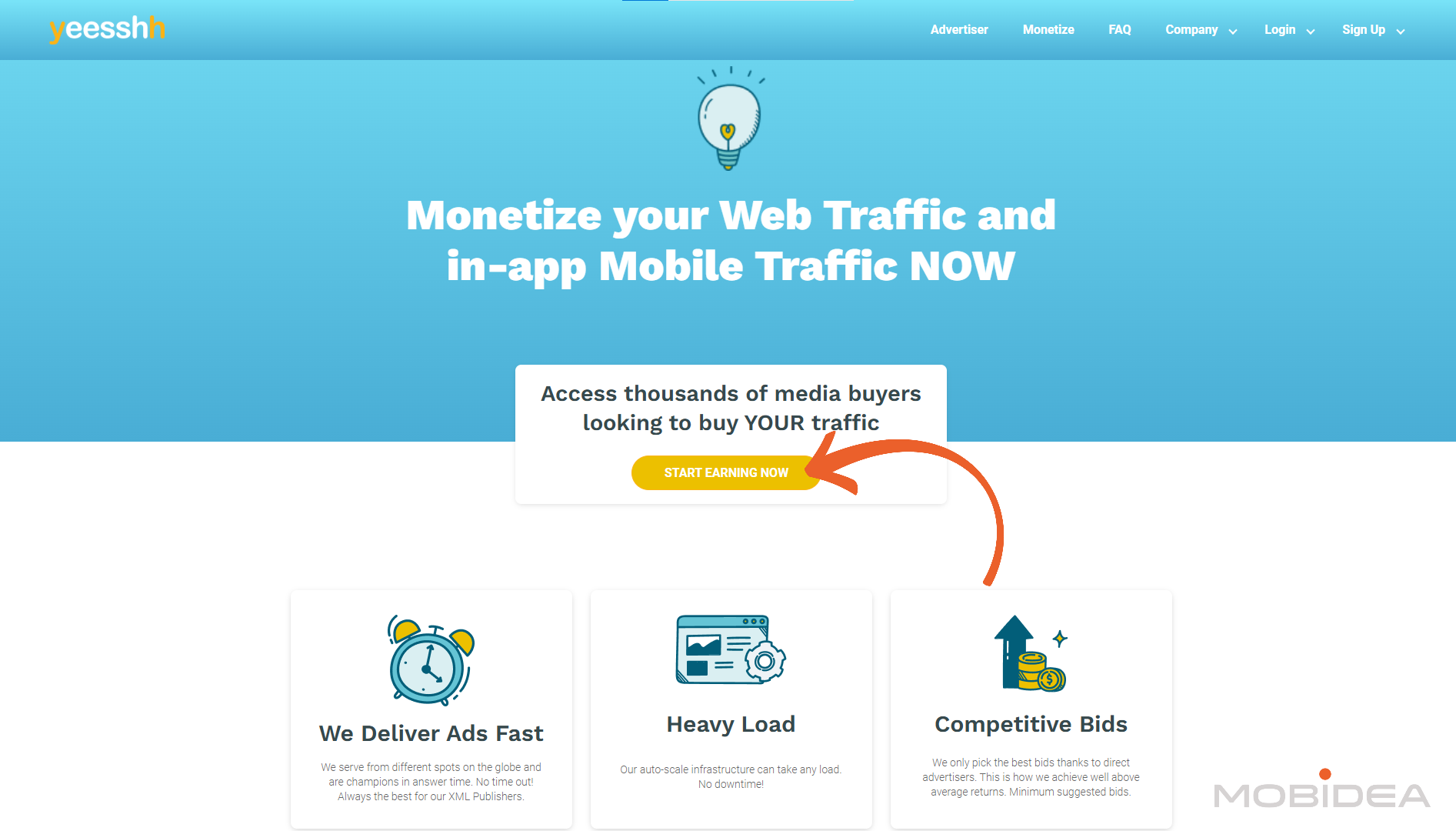
Go to Yeesshh’s website and navigate to the publisher signup or “Start Earning Now” section. The registration process is relatively straightforward:
Fill out the registration form with required information including name, email address, website URL, and basic contact details.
There are two options for earning as a publisher, and that is through:
- Yeesshh XML: Get ad spots filled 24/7.
- Reemora: Use a Smartlink to promote advertiser offers.
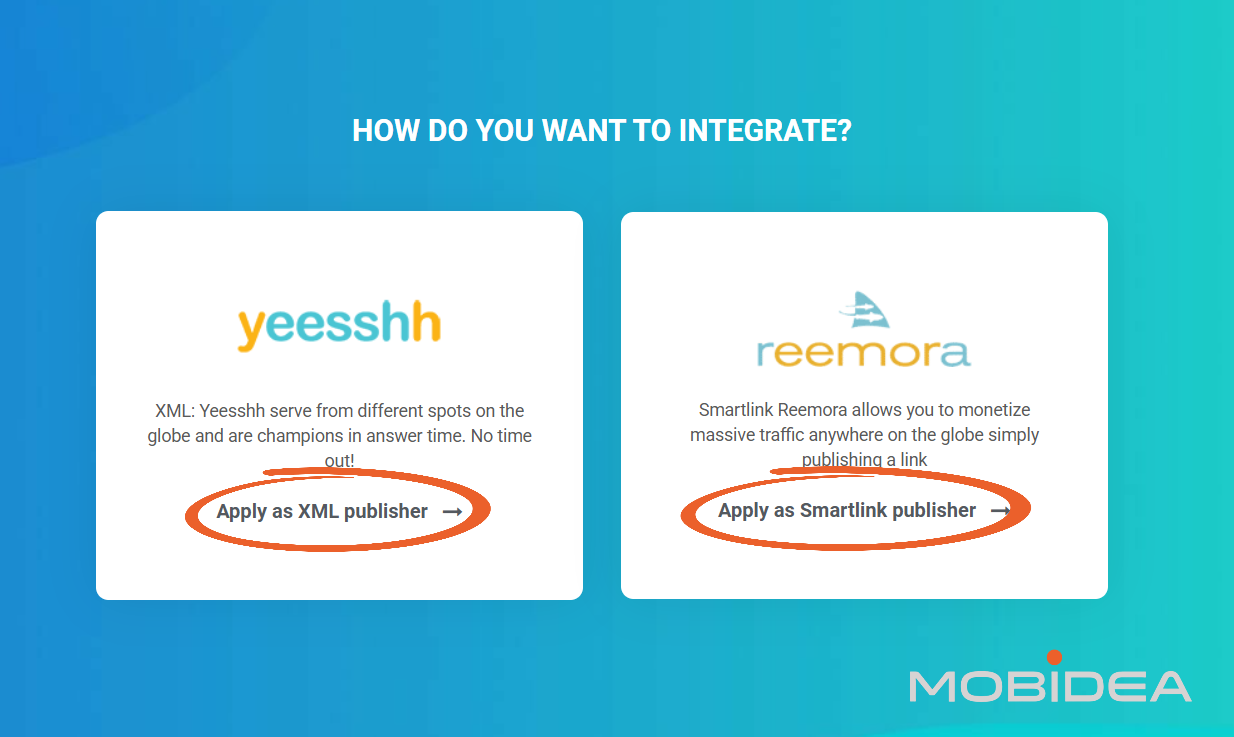
Let’s choose Yeesshh.
Unlike advertiser registration, publisher applications require providing website information upfront since approval depends on site review.
Describe your website’s content, traffic sources, and approximate monthly pageviews or unique visitors.
While Yeesshh doesn’t specify minimum traffic requirements publicly, having established traffic increases approval likelihood.
Submit the application and wait for review.
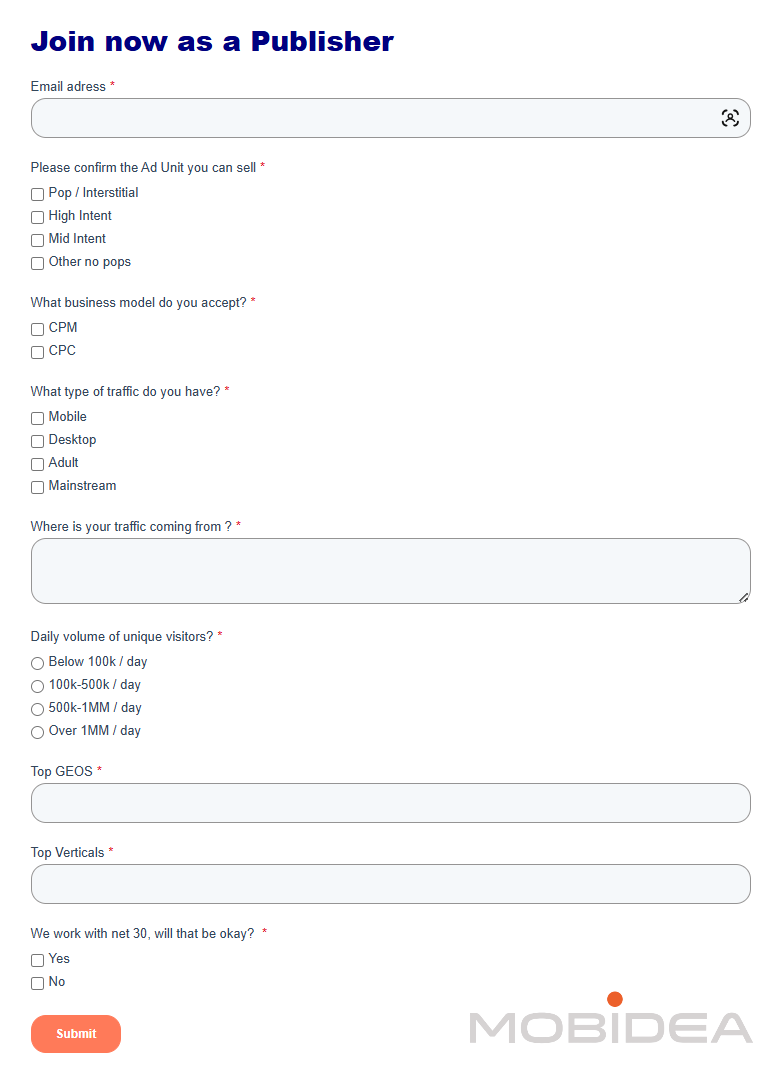
The approval process timeline isn’t publicly specified, though some sources suggest relatively quick approval for qualifying websites.
Check email for communication from Yeesshh regarding application status.
Dashboard Overview
After approval, log into the publisher dashboard. The interface provides access to key functions:
- Overview Section: Displays current earnings, impressions, clicks, eCPM, and other key metrics. This dashboard gives a quick snapshot of monetization performance.
- Ad Units: Where you create and manage individual ad placements for your websites. Each ad unit generates unique code to place on your site.
- Statistics: Detailed reporting showing performance broken down by date, ad unit, country, and other dimensions. Use these reports to identify which ad placements and traffic sources generate the highest revenue.
- Account Settings: Manage payment information, withdrawal preferences, and notification settings.
- Payments: Track pending earnings, completed payments, and payment history.
Monitoring Performance
Regular performance monitoring helps optimize monetization. Here’s what we recommend:
Daily Checks:
Review dashboard metrics daily to catch sudden changes in traffic, eCPM rates, or technical issues.
Rapid drops in impressions might indicate code implementation problems or site issues.
Traffic Analysis:
Examine which traffic sources and geographic regions generate the highest eCPMs. Understanding these patterns helps inform content strategy and traffic acquisition efforts.
Ad Unit Comparison:
If running multiple ad units across different sites or placements, compare their performance. Focus optimization efforts on placements showing the most revenue potential.
Seasonal Patterns:
Note seasonal fluctuations in eCPM rates. Advertiser demand typically varies by season, with certain times of year commanding higher rates due to increased competition.
Reports can typically be exported for deeper analysis in spreadsheet applications.
Use this data to calculate overall revenue per visitor or per pageview to understand true monetization efficiency.
Requesting Payments
Once earnings reach the $5 minimum threshold, request a withdrawal:
Navigate to the payments or withdrawal section of the dashboard. Click the withdrawal or payout request button.
Confirm your payment method and verify the withdrawal amount.
Yeesshh Pros and Cons for Publishers
Publishers considering Yeesshh for monetization should weigh both the advantages and potential drawbacks of the platform.
Pros
- Low Minimum Payout: The $5 withdrawal threshold is among the lowest in the pop ad industry, allowing faster access to earnings and easier testing.
- Transparent Revenue Share: The fixed 80/20 split provides clarity on earnings potential, with publishers receiving 80% of what advertisers pay for their traffic.
- Multiple Payment Options: Supports PayPal, Wire Transfer, Direct Deposit (US), and Bitcoin, accommodating different publisher preferences and geographic locations.
- Real-Time Statistics: Access to real-time performance data allows immediate monitoring of impressions, clicks, revenue, and eCPM rates.
- XML Feed Support: Technical publishers can use XML feeds for programmatic integration across multiple sites or dynamic content systems.
Cons
- Net 30 Payment Terms: Monthly payments 30 days after month end create significant cash flow delays compared to networks offering weekly or bi-weekly payouts.
- Limited Publisher Reviews: Scarce online reviews make it difficult to verify payment reliability, actual eCPM rates, or support quality from real publisher experiences.
- Limited Support Hours: Live chat availability only 09:00 to 17:00 CET creates challenges for publishers in other time zones needing assistance.
Yeesshh Verdict: The Bottom Line
Is Yeesshh worth testing? Yes—with significant caveats.
In affiliate marketing and media buying, testing new traffic sources is essential for finding opportunities competitors miss.
If you are not interested in pops and redirect, forget about Yeesshh. And if you want massive pop traffic, you must be ready to pay CPM as it is the only model accepted by Yeesshh.
Yeesshh’s relative lack of visibility could work in your favor if traffic quality proves acceptable for your offers.
The platform’s transparency and optimization tools provide more control than many alternatives.
We’ve learned of concerns about traffic quality, although these concerns are pretty common in pop and redirect type of ads. You need to set-up your own safeguards for such traffic.
When using Yeesshh, think of your first campaigns as paid research: spending money to gather data about whether this source works for your specific situation.
Some advertisers may find profitable campaigns despite the concerns.
The only way to know which camp you’ll fall into is controlled testing with proper tracking, conservative budgets, and readiness to cut losses quickly if it’s not performing up to your expectations.
Ready to test? Create an advertiser account in Yeesshh and use the code MOBI25 for a $15 bonus on your first deposit of $100 or more.
Set up complete tracking, start with minimal budgets, and let us know how their traffic works for you. Sound off in the comments below!


Advertisement Table of Contents Toggle A-Ads Review At A GlanceA-Ads: Offers & VerticalsA-Ads: Payment & InvestmentA-Ads: SupportKey TakeawaysWhat is A-Ads…

Can this ad network help affiliate marketers scale campaigns profitably? We'll discuss features, testing insights, and more in this EpicAds review.

Can FatAds' pre-vetted traffic sources finally solve your low-conversion campaign problems? Read this FatAds review to find out!